Mini Wi-Fi routers can share a wired connection, extend travel connectivity, or give your devices a familiar private network away from home. I’d start with the GL.iNet GL-MT3600BE Beryl 7 as the best overall pick for its Wi-Fi 7 positioning and travel-router design. The GL.iNet GL-MT3000 Beryl AX is a strong Wi-Fi 6 alternative, while the GL.iNet GL-BE3600 Slate 7 stands out for buyers who want a touchscreen. The main tradeoffs are newer wireless standards versus size and simplicity, along with general-purpose travel features versus specialized compatibility such as Starlink support. Read on for the full breakdown and advice on which compromises fit your trip.

Get privacy and security gear delivered free with Prime
- Fast, free delivery on millions of items
- Prime Video, Amazon Music and more included
- Member-only deals all year
Key Takeaways
- The Beryl 7 leads on newer wireless capability: the GL-MT3600BE is my best overall choice, while Wi-Fi 6 alternatives may make more sense if you do not need Wi-Fi 7.
- The Slate 7 is the interface-focused pick: its touchscreen sets it apart from the other listed travel routers, but buyers who prefer a simpler device may not need that feature.
- Wi-Fi 6 covers several different needs: the GL-MT3000 Beryl AX, Slate AX, and TP-Link Roam 6 models offer a range of portable options rather than one uniform tier.
- Older standards still have a place: the TP-Link TL-WR902AC, GL.iNet Opal, Mango, and AR300M16 suit basic or compact-use priorities, with less headroom than the newer models.
- Specialized compatibility can beat general versatility: the mini mesh router listed for Starlink systems targets a narrower use case, and the two Roam 6 AX1500 listings appear to represent overlapping choices.
| GL.iNet GL-MT3600BE Beryl 7 Dual-Band Wi-Fi 7 Travel Router |  | Best Premium Wi-Fi 7 Travel Router | Wi-Fi standard: Wi-Fi 7 | Bands: Dual-band, 2.4GHz and 5GHz | Wireless speed: 688 Mbps (2.4GHz) + 2882 Mbps (5GHz) | VIEW ON AMAZON | See Our Full Breakdown |
| GL.iNet GL-AXT1800 Slate AX Pocket-Sized Wi-Fi 6 Travel Router |  | Best Pocket-Sized Customizable Option | Wi-Fi standard: Wi-Fi 6 (802.11ax) | Wireless speed: Up to 1800 Mbps: 600 Mbps (2.4GHz) + 1200 Mbps (5GHz) | Firmware: OpenWrt 21.02 | VIEW ON AMAZON | See Our Full Breakdown |
| Compact Dual-Band WiFi 6 Router (1200 Mbps) with Mesh Support |  | Best for Starlink Mini Setups | Wi-Fi standard: Wi-Fi 6 (802.11ax) | Bands: Dual-band, 2.4GHz and 5GHz | Data rate: 1200 Mbps | VIEW ON AMAZON | See Our Full Breakdown |
| TP-Link TL-WR902AC WiFi Travel Router (WiFi 5, AC750) |  | Best Simple Multi-Mode Router | Wi-Fi standard: Wi-Fi 5 (802.11ac) | Wireless speed: AC750, up to 733 Mbps | Bands: 2.4GHz and 5GHz | VIEW ON AMAZON | See Our Full Breakdown |
| TP-Link Roam 6 AX3000 Dual-Band Wi-Fi 6 Travel Router (TL-WR3002X) |  | Best App-Managed High-Speed Pick | Wi-Fi standard: Wi-Fi 6 (802.11ax) | Wireless speed: AX3000: 2402 Mbps (5GHz) + 574 Mbps (2.4GHz) | Processor: MTK dual-core 1.3GHz CPU | VIEW ON AMAZON | See Our Full Breakdown |
| GL.iNet GL-MT300N-V2 (Mango) Portable Mini Travel WiFi Router |  | Best Ultra-Lightweight Pick | Wireless standard: 802.11b/g/n (Wi-Fi 4) | Frequency band: 2.4 GHz | Maximum data transfer rate: 300 Mbps | VIEW ON AMAZON | See Our Full Breakdown |
| TP-Link Roam 6 AX1500 Portable Wi-Fi 6 Travel Router (TL-WR1502X) |  | Best for Flexible Travel Modes | Model: TL-WR1502X | Wireless standard: Wi-Fi 6 | Wireless speeds: Up to 1201 Mbps on 5 GHz and 300 Mbps on 2.4 GHz | VIEW ON AMAZON | See Our Full Breakdown |
| TP-Link Roam 6 AX1500 Portable Wi-Fi 6 Travel Router |  | Best for App-Guided VPN Setup | Wireless standard: Wi-Fi 6 (AX1500) | Wireless speeds: 1201 Mbps on 5 GHz and 300 Mbps on 2.4 GHz | Ethernet ports: 1× 1 Gbps WAN/LAN; 1× 1 Gbps LAN | VIEW ON AMAZON | See Our Full Breakdown |
| GL.iNet GL-BE3600 Slate 7 Wi-Fi 7 Travel Router with Touchscreen |  | Best Premium Mini Router | Wireless standard: Wi-Fi 7 (802.11be) | Wireless speeds: 688 Mbps on 2.4 GHz and 2882 Mbps on 5 GHz | Ethernet ports: 2× 2.5G (1 WAN, 1 LAN) | VIEW ON AMAZON | See Our Full Breakdown |
| GL.iNet GL-MT3000 Beryl AX Wi-Fi 6 Travel Router |  | Best OpenWrt Value Pick | Wireless standard: Wi-Fi 6 | Wireless speeds: 574 Mbps on 2.4 GHz and 2402 Mbps on 5 GHz | WAN port: 2.5 Gbps | VIEW ON AMAZON | See Our Full Breakdown |
| Mini Mesh Wi-Fi Router Compatible with Starlink Gen 2, Gen 3, Gen 4 & Mini Systems |  | Best for Starlink Mesh Expansion | Wi-Fi: Wi-Fi 6, dual-band | Compatibility: Starlink Gen 2, Gen 3, Gen 4, and Mini; not Gen 1 | Maximum devices: 128+ | VIEW ON AMAZON | See Our Full Breakdown |
| GL.iNet GL-SFT1200 Opal AC1200 Dual-Band Travel Router |  | Best for VPN-Friendly Travel | Wi-Fi standard: AC1200 dual-band | 2.4 GHz speed: Up to 300 Mbps | 5 GHz speed: Up to 867 Mbps | VIEW ON AMAZON | See Our Full Breakdown |
| TP-Link Roam 7 BE3600 Wi-Fi 7 Portable Travel Router |  | Best for High-Speed Travel | Wi-Fi standard: Wi-Fi 7 (BE3600) | Bands: Dual-band, 2.4 GHz and 5 GHz | Maximum listed speed: 2882 Mbps on 5 GHz and 688 Mbps on 2.4 GHz | VIEW ON AMAZON | See Our Full Breakdown |
| GL.iNet GL-AR300M16 Mini Travel Wi-Fi Router | 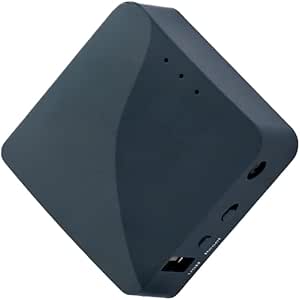 | Best Ultra-Compact OpenWrt Pick | Weight: 39 g (1.41 oz) | Ethernet ports: 2 | USB: USB 2.0 | VIEW ON AMAZON | See Our Full Breakdown |
| mini wi fi router | Wi-Fi standard |
|---|---|
| GL.iNet GL-MT3600BE Beryl 7 Du | Wi-Fi 7 |
| GL.iNet GL-AXT1800 Slate AX Po | Wi-Fi 6 (802.11ax) |
| Compact Dual-Band WiFi 6 Route | Wi-Fi 6 (802.11ax) |
| TP-Link TL-WR902AC WiFi Travel | Wi-Fi 5 (802.11ac) |
| TP-Link Roam 6 AX3000 Dual-Ban | Wi-Fi 6 (802.11ax) |
| GL.iNet GL-MT300N-V2 | — |
| TP-Link Roam 6 AX1500 Portable | — |
| TP-Link Roam 6 AX1500 Portable | — |
| GL.iNet GL-BE3600 Slate 7 Wi-F | — |
| GL.iNet GL-MT3000 Beryl AX Wi- | — |
| Mini Mesh Wi-Fi Router Compati | — |
| GL.iNet GL-SFT1200 Opal AC1200 | AC1200 dual-band |
| TP-Link Roam 7 BE3600 Wi-Fi 7 | Wi-Fi 7 (BE3600) |
| GL.iNet GL-AR300M16 Mini Trave | — |
More Details on Our Top Picks
GL.iNet GL-MT3600BE Beryl 7 Dual-Band Wi-Fi 7 Travel Router
I rank the Beryl 7 as the performance-focused pick for travelers who want a mini router with unusually capable wired connections and extensive network controls. Its Wi-Fi 7 support, two 2.5G Ethernet ports, and pre-installed WireGuard and OpenVPN give it more headroom than the Wi-Fi 6 Slate AX, especially for users connecting fast wired internet or routing traffic through a VPN. OpenWrt also offers more room to customize than the app-centered TP-Link Roam 6. That flexibility brings a steeper setup burden: the physical switch needs configuration in the admin panel, and many VPN services require a separate subscription. VPN speeds can also vary with the network and configuration. I’d pick it for capability, not simplicity.
Pros:- Wi-Fi 7 with up to 2882 Mbps on 5GHz and 688 Mbps on 2.4GHz
- Two 2.5G Ethernet ports support faster wired connections than the other listed routers
- Pre-installed WireGuard and OpenVPN with stated high VPN throughput
- OpenWrt firmware supports extensive customization
Cons:- Many VPN providers require a separate subscription
- The physical toggle switch needs manual setup in the admin panel
- Actual VPN speeds depend on network and configuration
Best for: Frequent travelers and technically confident remote workers who want Wi-Fi 7, fast wired connections, and configurable VPN tools in a compact router.
Not ideal for: Travelers who want a simple, app-led setup or do not plan to use its advanced VPN and OpenWrt features.
- Wi-Fi standard:Wi-Fi 7
- Bands:Dual-band, 2.4GHz and 5GHz
- Wireless speed:688 Mbps (2.4GHz) + 2882 Mbps (5GHz)
- Ethernet:2 x 2.5G ports: 1 WAN, 1 LAN
- USB:1 x USB 3.0
- Maximum devices:120
- VPN throughput:Up to 1100 Mbps WireGuard; up to 1000 Mbps OpenVPN-DCO
- Firmware:OpenWrt 21.02, Kernel 5.4.281
Our verdict“Choose the Beryl 7 if you want the most capable wired and customizable mini router here and are comfortable configuring it.”
GL.iNet GL-AXT1800 Slate AX Pocket-Sized Wi-Fi 6 Travel Router
I’d choose the Slate AX for a traveler who wants a compact Wi-Fi 6 router with meaningful control over the network, but doesn’t need the Beryl 7’s Wi-Fi 7 or dual 2.5G ports. Its OpenWrt firmware and built-in WireGuard and OpenVPN make it useful for turning hotel or public Wi-Fi into a private connection, while three ports give it more wired flexibility than the two-port Starlink-focused compact router in this list. The stated combined speed is 1800 Mbps, below the Roam 6’s AX3000 rating, so it’s not the speed leader. Setup also asks more of the owner than TP-Link’s Tether-app approach, and public networks with time limits may require a manual reconnect. Its switch also needs admin-panel configuration.
Pros:- Wi-Fi 6 with combined wireless speeds up to 1800 Mbps
- Built-in OpenVPN and WireGuard support
- OpenWrt allows customization and app installation
- Three ports and support for up to 120 devices
Cons:- Slower stated wireless speed than the TP-Link Roam 6 AX3000
- Public Wi-Fi time limits may require manual reconnection
- Physical toggle switch requires setup in the admin panel
Best for: Travelers who want a pocket-sized Wi-Fi 6 router with VPN support and OpenWrt controls for hotel and public networks.
Not ideal for: Buyers seeking the highest listed wireless speed or a hands-off app-based setup; the Roam 6 is a better fit for app-led configuration.
- Wi-Fi standard:Wi-Fi 6 (802.11ax)
- Wireless speed:Up to 1800 Mbps: 600 Mbps (2.4GHz) + 1200 Mbps (5GHz)
- Firmware:OpenWrt 21.02
- Security:WPA3
- Ports:3
- LAN bandwidth:1000 Mbps
- Antennas:2 fixed antennas
Our verdict“Pick the Slate AX if compact size, VPN support, and OpenWrt customization matter more to you than peak speed or app-first simplicity.”
Compact Dual-Band WiFi 6 Router (1200 Mbps) with Mesh Support
I see this as the most purpose-built choice for a small Starlink setup, rather than a general-purpose travel router with extensive networking controls. Compatibility with Starlink V4, Gen3, and Mini systems, plus mesh expansion, gives it a clear role that the Slate AX and TP-Link Roam 6 do not claim. Its 1200 Mbps Wi-Fi 6 rating and 110 m² coverage suit a small home, cabin, or compact work area; the Roam 6 offers a higher stated wireless speed and more port options for travelers with varied gear. Here, simplicity comes with limits: there are only two ports, and the coverage figure makes it a poor choice for larger spaces. I’d keep it on the shortlist when Starlink fit matters most.
Pros:- Compatible with Starlink V4, Gen3, and Mini systems
- Mesh support can extend coverage with compatible equipment
- Wi-Fi 6 dual-band operation with a stated 1200 Mbps data rate
- Compact design and low-power operation
Cons:- Stated coverage is limited to approximately 110 m²
- Only two ports are available
- Less suited to broad travel use than the multi-mode Slate AX or Roam 6
Best for: Starlink V4, Gen3, or Mini owners who want a compact Wi-Fi 6 router for a small space and may add mesh coverage.
Not ideal for: People needing a router for a large home, several wired devices, or faster stated wireless performance; the Roam 6 has a higher speed rating and more ports.
- Wi-Fi standard:Wi-Fi 6 (802.11ax)
- Bands:Dual-band, 2.4GHz and 5GHz
- Data rate:1200 Mbps
- Coverage:Approximately 110 m²
- Ports:2
- Security:WPA3
- RAM:256 MB
- Power:12V
Our verdict“Choose this router for a compact Starlink setup in a modest-sized space, not as a high-speed, multi-port travel hub.”
TP-Link TL-WR902AC WiFi Travel Router (WiFi 5, AC750)
I’d pick the TL-WR902AC when portability and flexible operating modes matter more than newer Wi-Fi or fast wired networking. Its five modes cover common travel tasks, from creating a router connection to using it as an access point, extender, client, or hotspot. That makes it more adaptable than the Starlink-focused compact router, while its one-switch design asks less of the owner than the OpenWrt-based Slate AX. The tradeoff is an older Wi-Fi 5 AC750 class and a 10/100Mbps WAN/LAN port, which can bottleneck a fast wired connection compared with the Roam 6’s 2.5G port. I’d also skip it if IPv6 support is needed: this model supports IPv4 only. Its USB port adds file sharing and device charging, but does not offset those limits.
Pros:- Five operating modes cover a range of travel and access-point uses
- Compact, pocket-sized design
- Dual-band Wi-Fi 5 supports 2.4GHz and 5GHz
- USB 2.0 supports file sharing and mobile-device charging
Cons:- 10/100Mbps WAN/LAN port can limit wired throughput
- Supports IPv4 only
- Wi-Fi 5 AC750 has a lower speed rating than the Wi-Fi 6 options listed
Best for: Travelers who want a small, straightforward router for switching among hotspot, extender, client, and access-point duties.
Not ideal for: Remote workers with fast wired internet or networks requiring IPv6; its 10/100Mbps WAN/LAN port and IPv4-only support are limiting.
- Wi-Fi standard:Wi-Fi 5 (802.11ac)
- Wireless speed:AC750, up to 733 Mbps
- Bands:2.4GHz and 5GHz
- Operating modes:Router, Hotspot, Range Extender, Client, Access Point
- WAN/LAN port:1 x 10/100Mbps
- USB:1 x USB 2.0
- Power:Micro USB, 5V/2A
Our verdict“Choose the TL-WR902AC for a portable, multi-mode travel router when newer Wi-Fi and gigabit-class wired speeds are not priorities.”
TP-Link Roam 6 AX3000 Dual-Band Wi-Fi 6 Travel Router (TL-WR3002X)
I’d steer travelers toward the Roam 6 when they want high stated Wi-Fi 6 speeds without taking on OpenWrt configuration. Its AX3000 rating, 2.5G WAN/LAN port, separate 1G LAN port, and USB-C power make it more versatile for a hotel room or remote-work kit than the simpler TL-WR902AC. The Tether app and Router, Hotspot, and AP/Repeater modes also make it a more approachable choice than the Beryl 7 for someone who does not need Wi-Fi 7 or extensive firmware customization. The Beryl 7 is the stronger fit for OpenWrt users and offers two 2.5G ports; the Roam 6 lacks OpenWrt, and its real-world Wi-Fi performance can vary with distance and surroundings.
Pros:- Wi-Fi 6 AX3000 rating with up to 2402 Mbps on 5GHz
- 2.5G WAN/LAN port plus a separate 1G LAN port
- USB-C power supports flexible travel setups
- Tether app and Router, Hotspot, and AP/Repeater modes
Cons:- Does not support OpenWrt firmware
- Actual Wi-Fi speeds vary with distance and surroundings
- Has one 2.5G port, while the Beryl 7 provides two
Best for: Remote workers and frequent travelers who want fast Wi-Fi 6, flexible modes, USB-C power, and app-based setup.
Not ideal for: OpenWrt enthusiasts or buyers who need two 2.5G Ethernet ports; the Beryl 7 offers that extra wired flexibility and customization.
- Wi-Fi standard:Wi-Fi 6 (802.11ax)
- Wireless speed:AX3000: 2402 Mbps (5GHz) + 574 Mbps (2.4GHz)
- Processor:MTK dual-core 1.3GHz CPU
- Ethernet:1 x 2.5G WAN/LAN; 1 x 1G LAN
- USB:1 x USB 3.0
- Power:USB-C, 5V PD compatible
- Modes:Router, Hotspot, AP/Repeater
- Dimensions:4.1 x 3.5 x 1.1 inches
Our verdict“Choose the Roam 6 if you want a fast, app-managed travel router with flexible ports and USB-C power, rather than OpenWrt customization.”
GL.iNet GL-MT300N-V2 (Mango) Portable Mini Travel WiFi Router
I rank the GL.iNet Mango for travelers who value a tiny, USB-powered router over newer Wi-Fi speeds. At just 39 g, it is the easiest pick here to slip into a pocket, and its two Ethernet ports let it work with wired hotel connections as well as wireless ones. Pre-installed OpenWrt with OpenVPN and WireGuard support gives it more privacy options than the simpler setup on the TP-Link Roam 6 AX1500. The tradeoff is its single-band Wi-Fi 4: it lacks 5 GHz and is a weaker fit for busy networks or multiple bandwidth-heavy devices. Its 16 MB of flash also leaves less room for added software than the GL.iNet Beryl AX. I see it as a compact travel tool, not a fast home router.
Pros:- Very light at 39 g and small enough for pocket carry.
- OpenWrt with OpenVPN and WireGuard support.
- Two Ethernet ports accommodate wired network setups.
- Runs from USB power sources such as a laptop or power bank.
Cons:- Single-band 2.4 GHz Wi-Fi 4 is less suited to congested networks.
- 16 MB of flash limits room for extra software.
- A separate power adapter is needed if USB power is not available.
Best for: Solo travelers and light packers who want USB-powered private Wi-Fi and VPN options for hotel or public networks.
Not ideal for: Households or remote workers with several demanding devices, since it has only 2.4 GHz Wi-Fi 4 and limited flash storage.
- Wireless standard:802.11b/g/n (Wi-Fi 4)
- Frequency band:2.4 GHz
- Maximum data transfer rate:300 Mbps
- Weight:39 g (1.41 oz)
- Memory:128 MB RAM; 16 MB flash ROM
- Ports:2× Ethernet; USB 2.0
- Operating system:OpenWrt
- Power:5 V USB
Our verdict“Choose the Mango for lightweight travel and basic VPN-enabled networking, but skip it if you need dual-band speed or room for extensive customization.”
TP-Link Roam 6 AX1500 Portable Wi-Fi 6 Travel Router (TL-WR1502X)
I give the TP-Link Roam 6 AX1500 (TL-WR1502X) the nod for travelers who want one compact device to handle several network situations. Its router, hotspot, access point, range-extender, and client modes make it more adaptable than the single-band GL.iNet Mango, while dual-band Wi-Fi 6 is better suited to modern devices. USB tethering and USB-C power add options when hotel Wi-Fi or a wall outlet is inconvenient. The tradeoff is a less open platform: unlike the GL.iNet Beryl AX, this model does not support OpenWrt, so it is not the pick for firmware tinkering. It also is not a cellular hotspot, despite the word “hotspot” among its modes. I’d choose it for mode flexibility, not as a replacement for a mobile-data device.
Pros:- Wi-Fi 6 with 2.4 GHz and 5 GHz bands.
- Five network modes cover varied travel and home setups.
- Supports Ethernet and USB tethering.
- USB-C power works with compatible power banks.
Cons:- No OpenWrt support for advanced firmware customization.
- It is not a cellular mobile hotspot.
- Requires a compatible 5 V/3 A USB-C power source.
Best for: Frequent travelers who switch between hotel Wi-Fi, wired access, access-point setups, and USB tethering.
Not ideal for: OpenWrt enthusiasts or buyers who need a standalone cellular hotspot, since it supports neither OpenWrt nor mobile data on its own.
- Model:TL-WR1502X
- Wireless standard:Wi-Fi 6
- Wireless speeds:Up to 1201 Mbps on 5 GHz and 300 Mbps on 2.4 GHz
- Modes:Router, hotspot, access point, range extender, client
- Tethering:Ethernet and USB
- Power input:USB-C, 5 V/3 A
- Dimensions:4.09 × 3.54 × 1.10 in
- OpenWrt support:Not supported
Our verdict“Pick this TP-Link for flexible connection modes and Wi-Fi 6 in a travel-sized router, not for cellular service or custom firmware.”
TP-Link Roam 6 AX1500 Portable Wi-Fi 6 Travel Router
I’d steer app-first travelers toward this TP-Link Roam 6 AX1500 listing, which highlights Tether App management, captive-portal automation, and OpenVPN and WireGuard support. Those features can make hotel sign-ins and private-network setup less fiddly than on the GL.iNet Mango, though the Mango offers the more open OpenWrt platform. Dual-band Wi-Fi 6 and two gigabit Ethernet ports give this pocket-sized router a practical mix for connecting newer devices and wired hotel service. Its limits are worth weighing: TP-Link does not support OpenWrt, and its advertised wireless speeds depend on the surrounding network and available bandwidth. This is a fit for travelers who prefer guided setup over firmware control, rather than buyers chasing advanced customization or guaranteed real-world throughput.
Pros:- Supports OpenVPN and WireGuard.
- Tether App and web interface offer two management options.
- Two 1 Gbps Ethernet ports support wired connections.
- USB-C power and captive-portal automation suit travel use.
Cons:- Does not support OpenWrt.
- Actual Wi-Fi speeds depend on network conditions and available bandwidth.
- Requires a compatible 5 V/3 A USB-C power source.
Best for: Remote workers and frequent hotel guests who want app-based management, VPN protocol support, and wired gigabit connections.
Not ideal for: Firmware tinkerers or users who need predictable maximum speeds, since OpenWrt is unsupported and real-world performance varies.
- Wireless standard:Wi-Fi 6 (AX1500)
- Wireless speeds:1201 Mbps on 5 GHz and 300 Mbps on 2.4 GHz
- Ethernet ports:1× 1 Gbps WAN/LAN; 1× 1 Gbps LAN
- Power input:USB-C, 5 V/3 A
- VPN protocols:OpenVPN and WireGuard
- Management:Tether App and web interface
- Brand:TP-Link
Our verdict“Choose this Roam 6 for guided app management and VPN support on the road, but look elsewhere for OpenWrt customization.”
GL.iNet GL-BE3600 Slate 7 Wi-Fi 7 Travel Router with Touchscreen
I place the GL.iNet Slate 7 at the premium end for travelers who want fast local networking and hands-on control in a compact router. Wi-Fi 7, dual 2.5G Ethernet, and 2 GB of RAM give it more headroom than the Wi-Fi 6 GL.iNet Beryl AX, while its touchscreen makes network and VPN controls easier to reach without relying only on an app. OpenWrt 23.05, WPA3, and DNS-over-HTTPS and DNS-over-TLS support also suit buyers who like a more configurable setup. That capability brings added complexity: the physical buttons need configuration, and VPN performance varies with the network and setup. Its stated VPN speeds also trail its headline wireless rates. I’d pick it for control and fast connections, not for the simplest plug-and-go experience.
Pros:- Wi-Fi 7 with up to 2882 Mbps on 5 GHz.
- Two 2.5G Ethernet ports support multi-gigabit wired links.
- OpenWrt 23.05, 2 GB RAM, and 512 MB storage enable customization.
- Touchscreen provides direct access to network and VPN controls.
Cons:- Button defaults require manual configuration.
- VPN throughput is lower than the headline wireless rates and varies by setup.
- Encrypted VPN traffic requires a compatible VPN service or configuration.
Best for: Technically confident travelers who want Wi-Fi 7, multi-gigabit wired connections, touchscreen controls, and OpenWrt customization.
Not ideal for: Buyers seeking a basic low-setup travel router, since its configurable controls and advanced features may be more than they need.
- Wireless standard:Wi-Fi 7 (802.11be)
- Wireless speeds:688 Mbps on 2.4 GHz and 2882 Mbps on 5 GHz
- Ethernet ports:2× 2.5G (1 WAN, 1 LAN)
- USB port:USB 3.0
- Memory and storage:2 GB RAM; 512 MB storage
- Operating system:OpenWrt 23.05
- VPN support:OpenVPN and WireGuard client/server
- Security:WPA3, DNS over HTTPS, DNS over TLS
- VPN speeds:Up to 100 Mbps with OpenVPN; 540 Mbps with WireGuard
Our verdict“Choose the Slate 7 if you want a feature-rich Wi-Fi 7 travel router with direct touchscreen control, and skip it for a simpler setup.”
GL.iNet GL-MT3000 Beryl AX Wi-Fi 6 Travel Router
I see the GL.iNet Beryl AX as the balanced choice for travelers who want OpenWrt flexibility without stepping up to the Slate 7’s Wi-Fi 7 hardware and touchscreen. Its Wi-Fi 6 dual-band connection, 2.5G WAN port, and 1G LAN port make it more capable than the Mango for newer devices and faster wired internet. OpenVPN and WireGuard support, WPA3, and DNS privacy features suit buyers who want control over their network; international plugs also help on trips abroad. Compared with the TP-Link Roam 6 AX1500, the Beryl AX is better for firmware customization, but its physical toggle needs manual setup and it may take more configuration. VPN throughput also falls below the maximum wireless rates. I’d choose it for adaptable travel networking, not for the simplest app-led setup.
Pros:- OpenWrt firmware supports extensive network customization.
- 2.5 Gbps WAN port pairs well with fast wired internet.
- OpenVPN and WireGuard support with WPA3 and DNS privacy features.
- Includes US, UK, and EU plugs for international travel.
Cons:- Physical toggle switch must be configured in the admin panel.
- VPN speeds are below the maximum wireless rates and vary by setup.
- Wi-Fi 6 lacks the newer standard and touchscreen of the Slate 7.
Best for: Travelers who want OpenWrt, VPN support, a multi-gigabit WAN port, and international power plugs in one compact router.
Not ideal for: Buyers who want a fully hands-off setup or Wi-Fi 7, since the toggle requires configuration and the router uses Wi-Fi 6.
- Wireless standard:Wi-Fi 6
- Wireless speeds:574 Mbps on 2.4 GHz and 2402 Mbps on 5 GHz
- WAN port:2.5 Gbps
- LAN port:1 Gbps
- USB port:USB 3.0
- Firmware:OpenWrt 21.02
- VPN speeds:Up to 150 Mbps with OpenVPN; 300 Mbps with WireGuard
- Security protocols:WPA3, DNS over HTTPS, DNS over TLS, IPv6
- Included plugs:US, UK, EU
Our verdict“Pick the Beryl AX for a customizable Wi-Fi 6 travel router with VPN tools and multi-gigabit WAN, rather than the Slate 7’s newer Wi-Fi 7 platform.”
Mini Mesh Wi-Fi Router Compatible with Starlink Gen 2, Gen 3, Gen 4 & Mini Systems
I rank this as the Starlink-specific choice rather than a general travel router: it works with Starlink Gen 2, Gen 3, Gen 4, and Mini systems, but not Gen 1 or third-party mesh networks. Its up-to-1,250-square-foot coverage and support for 128 or more devices suit a busy home or cabin that needs another mesh point. Wall or table mounting gives it more placement flexibility than a pocket router like the GL.iNet GL-AR300M16, which is built for travel rather than home coverage. The tradeoff is that its usefulness depends on owning compatible Starlink equipment, and concrete or metal obstacles can weaken performance. I’d also factor in the listed 70 Mbps upstream limit before choosing it for demanding upload-heavy use.
Pros:- Compatible with Starlink Gen 2, Gen 3, Gen 4, and Mini systems
- Supports more than 128 devices
- Coverage listed up to 1,250 square feet
- Includes wall or table mounting options
Cons:- Does not work with Starlink Gen 1 or third-party mesh systems
- Concrete walls and metal appliances can reduce performance
- Upstream data transfer is limited to 70 Mbps
Best for: Starlink Gen 2, Gen 3, Gen 4, or Mini owners who want to extend home or cabin coverage for many connected devices.
Not ideal for: Starlink Gen 1 owners, users of other mesh systems, or households that need strong performance through concrete walls or metal obstructions.
- Wi-Fi:Wi-Fi 6, dual-band
- Compatibility:Starlink Gen 2, Gen 3, Gen 4, and Mini; not Gen 1
- Maximum devices:128+
- Coverage:Up to 1,250 sq ft
- LAN port bandwidth:1000 Mbps
- Data transfer rate:150 Mbps
- Ports:2
- Security:WPA2
Our verdict“Choose this Starlink-focused mesh router if you need broader coverage for a compatible system, not a general-purpose travel router.”
GL.iNet GL-SFT1200 Opal AC1200 Dual-Band Travel Router
I’d pick the Opal for travelers who want a small router with VPN software already available, without stepping up to the newer Wi-Fi 7 hardware in the TP-Link Roam 7 BE3600. Its dual-band AC1200 connection separates lighter browsing from devices that benefit from the 5 GHz band, while three gigabit Ethernet ports give it more wired flexibility than many compact travel options. At 145 g with retractable antennas, it is made to pack away easily and set up around hotel or public Wi-Fi. The compromise is older Wi-Fi 5 performance rather than the newer standards found in several roundup alternatives. I’d also check the configuration steps before travel: the VPN toggle needs setup in the admin panel, and easytethering is not supported.
Pros:- Compact 145 g design with retractable antennas
- Dual-band Wi-Fi with speeds up to 300 Mbps on 2.4 GHz and 867 Mbps on 5 GHz
- Three gigabit Ethernet ports, including a WAN port
- OpenVPN and WireGuard are preinstalled
Cons:- Uses Wi-Fi 5 rather than Wi-Fi 6 or Wi-Fi 7
- VPN toggle switch requires setup in the admin panel
- Does not support easytethering
Best for: Travelers who want a lightweight dual-band router with OpenVPN and WireGuard available, plus multiple gigabit Ethernet connections.
Not ideal for: Buyers seeking Wi-Fi 6 or Wi-Fi 7 speeds, or travelers who need easytethering or a VPN switch that works without prior configuration.
- Wi-Fi standard:AC1200 dual-band
- 2.4 GHz speed:Up to 300 Mbps
- 5 GHz speed:Up to 867 Mbps
- Ethernet ports:2 Gigabit LAN and 1 Gigabit WAN
- Weight:145 g
- VPN support:OpenVPN and WireGuard preinstalled
- IPv6:Supported
- Antennas:Retractable
Our verdict“Choose the Opal for portable VPN-ready networking and wired flexibility; skip it if newer Wi-Fi standards or easytethering matter more.”
TP-Link Roam 7 BE3600 Wi-Fi 7 Portable Travel Router
I rank the Roam 7 as the speed-focused pick among these mini routers. Its Wi-Fi 7 connection lists up to 2,882 Mbps on 5 GHz, and the 2.5 Gbps WAN port gives it room to handle a fast wired connection. Router, Hotspot, Access Point, Client, and Range Extender modes make it more adaptable than the simpler GL.iNet GL-SFT1200 Opal, which is a better fit for travelers who want a lighter-duty VPN-ready setup. USB-C power is convenient on the road, while USB 3.0 adds another connection option. This model has clear limits: it is dual-band, with no 6 GHz support, and it does not support OpenWrt. Its speed claims also depend on compatible devices and network conditions.
Pros:- Wi-Fi 7 with listed 5 GHz speeds up to 2882 Mbps
- 2.5 Gbps WAN port for fast wired connections
- Multiple modes, including Hotspot, Access Point, Client, and Range Extender
- USB-C power and USB 3.0 support
Cons:- Does not support the 6 GHz band
- Does not support OpenWrt firmware
- Maximum listed wireless speeds depend on compatible equipment and network conditions
Best for: Remote workers, travelers, and mobile gamers who want a compact router with fast Wi-Fi 7, flexible operating modes, and a multi-gig WAN port.
Not ideal for: Buyers who need 6 GHz Wi-Fi, OpenWrt firmware, or a router for use with devices and connections that cannot take advantage of its higher speeds.
- Wi-Fi standard:Wi-Fi 7 (BE3600)
- Bands:Dual-band, 2.4 GHz and 5 GHz
- Maximum listed speed:2882 Mbps on 5 GHz and 688 Mbps on 2.4 GHz
- Maximum devices:90
- Ports:1x 2.5 Gbps WAN, 1x 1 Gbps LAN, 1x USB 3.0
- Power input:USB-C, 5V PD compatible
- Security protocols:OpenVPN, WireGuard, PPTP, and L2TP
- Operating modes:Router, Hotspot, Access Point, Range Extender, and Client
Our verdict“Choose the Roam 7 if you want the fastest and most flexible travel router here, provided dual-band Wi-Fi and closed firmware suit your needs.”
GL.iNet GL-AR300M16 Mini Travel Wi-Fi Router
At just 39 g, the GL-AR300M16 is the easiest of these four to stash in a pocket or small travel kit. I’d choose it for travelers who value flexible network sharing and OpenWrt support over fast wireless performance. It can turn a hotel’s wired or wireless connection into a private Wi-Fi network, and its VPN client and server support gives it more configuration scope than the plug-and-play focus of the TP-Link Roam 7 BE3600. USB modem tethering adds another way to get online. The size comes with real limits: its 128 MB of RAM and 16 MB of flash leave less onboard resource capacity, and the USB 2.0 connection is modest. A power adapter is not included, so plan to use a suitable source such as a laptop or power bank.
Pros:- Very light 39 g body for pocket-sized packing
- Shares wired and wireless network connections
- OpenWrt with OpenVPN and WireGuard client and server support
- Supports USB modem tethering
Cons:- Power adapter is sold separately
- 16 MB of flash storage limits onboard capacity
- USB 2.0 and compact hardware are less suited to demanding high-speed use
Best for: Minimalist travelers and OpenWrt users who want a very light router for sharing hotel wired or wireless internet, with VPN and USB modem options.
Not ideal for: Users who need high wireless throughput, generous onboard storage, or a ready-to-use wall adapter in the box.
- Weight:39 g (1.41 oz)
- Ethernet ports:2
- USB:USB 2.0
- RAM:128 MB
- Flash storage:16 MB NOR
- Power input:5V/2A
- VPN support:OpenVPN and WireGuard client and server
- Operating system:OpenWrt
Our verdict“Pick the GL-AR300M16 for an exceptionally light, configurable travel router, not for high-speed Wi-Fi or generous hardware resources.”

How We Picked
I compared these options as mini travel routers, not as replacements for full-size home networking gear. The main criteria were wireless generation and stated class, portability implied by each model’s design, the usefulness of its intended role, and how clearly it fits a buyer’s needs. I also separated general-purpose travel models from products aimed at specific setups, such as the Starlink-compatible mini mesh router.
The ranking logic favors a useful balance of modern wireless capability and travel-focused design, which puts the GL-MT3600BE Beryl 7 first. Wi-Fi 6 models follow as capable alternatives, while the touchscreen-equipped Slate 7 earns a distinct premium-style role rather than an automatic first place. Older Wi-Fi 5 and compact lower-tier models rank behind them for buyers who prioritize basic use or minimal size over newer wireless headroom. I treat repeated or closely overlapping listings cautiously rather than presenting them as meaningfully different choices.
| mini wi fi router | Wi-Fi standard |
|---|---|
| GL.iNet GL-MT3600BE Beryl 7 Du | Wi-Fi 7 |
| GL.iNet GL-AXT1800 Slate AX Po | Wi-Fi 6 (802.11ax) |
| Compact Dual-Band WiFi 6 Route | Wi-Fi 6 (802.11ax) |
| TP-Link TL-WR902AC WiFi Travel | Wi-Fi 5 (802.11ac) |
| TP-Link Roam 6 AX3000 Dual-Ban | Wi-Fi 6 (802.11ax) |
| GL.iNet GL-MT300N-V2 | — |
| TP-Link Roam 6 AX1500 Portable | — |
| TP-Link Roam 6 AX1500 Portable | — |
| GL.iNet GL-BE3600 Slate 7 Wi-F | — |
| GL.iNet GL-MT3000 Beryl AX Wi- | — |
| Mini Mesh Wi-Fi Router Compati | — |
| GL.iNet GL-SFT1200 Opal AC1200 | AC1200 dual-band |
| TP-Link Roam 7 BE3600 Wi-Fi 7 | Wi-Fi 7 (BE3600) |
| GL.iNet GL-AR300M16 Mini Trave | — |
Factors to Consider When Choosing Mini Wi Fi Routers
Choosing a mini router is less about finding the biggest number on a box and more about matching the device to the connection you will actually use. I’d sort the decision by your internet source, the number and type of devices you connect, and how much setup control you want.
Match the router to your internet source
Start by checking how the router will receive internet: a hotel Ethernet port, an existing Wi-Fi network, a wired modem, or a satellite setup can call for different capabilities. A travel router can create a private network from a shared connection, but the source connection still limits the result. If you are buying for Starlink, check the exact hardware generation and connection method rather than relying on a broad compatibility claim. The Starlink-focused mini mesh option in this lineup has a more specific purpose than the general-purpose GL.iNet and TP-Link travel models. Choosing around the source first helps prevent paying for wireless features your connection cannot use.
Choose a wireless generation for your devices
Wi-Fi 7 is the newest standard represented here, with the Beryl 7, Slate 7, and TP-Link Roam 7 among the options. It makes most sense when your devices can use newer Wi-Fi features or when you want a newer platform for future devices. Wi-Fi 6 models such as the Beryl AX, Slate AX, and Roam 6 series remain sensible for many current phones and laptops. Older Wi-Fi 5 or compact models may be enough for light tasks, but they offer less wireless headroom. Avoid choosing by the router’s advertised class alone; client support and the speed of the upstream connection also shape real-world results.
Prioritize portability without ignoring placement
A pocket-sized router is easier to pack, but a small body does not automatically make it the best choice for every room or group. Think about where you can place it near a power source and, when relevant, a wired connection. A router kept inside a bag or behind other equipment may not serve nearby devices as well as one placed in the open. The Mango and AR300M16 emphasize compact travel, while models such as the Slate 7 bring additional interface features that may affect what you carry. For frequent trips, weigh packed size against the ports and controls you will actually use.
Decide how much setup control you want
Some buyers want a straightforward way to share a connection; others want more control over network settings and travel use. More features can help when you regularly change networks, but they can also add setup steps and choices. Before buying, check the manufacturer’s current setup instructions and confirm that the connection modes you need are supported. A basic travel router may be easier to live with for occasional trips, while a more capable model can suit a traveler who configures networks often. Do not assume that a small router is automatically plug-and-play just because it is portable.
Look beyond the router’s wireless headline
The wireless standard is only one part of the connection: port type, power requirements, and the upstream network can limit what the router delivers. Check the product’s exact port and power details before deciding that it will work with a particular hotel, modem, or travel battery. A router with newer Wi-Fi cannot improve a slow or unstable source connection. If you plan to connect several devices, think about whether they will be used at the same time and for bandwidth-heavy tasks. These practical checks can matter more than moving from one advertised Wi-Fi tier to another.
Frequently Asked Questions
Should I choose a Wi-Fi 7 mini router if my phone and laptop use Wi-Fi 6?
It can still make sense if you want a newer router for future devices, but Wi-Fi 7 benefits depend on compatible clients and the internet source. A Wi-Fi 6 model such as the GL-MT3000 Beryl AX may be a better match if your current devices are the priority. Think about how long you plan to keep the router and whether you will use it with newer equipment. For occasional travel on modest hotel connections, paying for a newer wireless generation may not change much. I’d choose Wi-Fi 7 for the longer-term fit, not on the assumption that every connection will become faster.
Can a mini travel router make hotel Wi-Fi private for all my devices?
Many travel routers are designed to create a separate network for your devices using an available hotel connection, but the exact connection methods vary by model. Check whether the router supports the way that hotel provides access, including any sign-in step or captive portal. A private network can simplify connecting multiple devices, but it does not make the hotel’s internet faster or remove every network restriction. You may need to complete the hotel’s access process during setup. Confirm the relevant mode in the manufacturer’s instructions before your trip.
Is the Starlink-compatible mini mesh router a better choice than a general travel router?
It is a better fit only if its stated compatibility matches your Starlink system and the way you want to extend or share the connection. The listing names Starlink Gen 2, Gen 3, Gen 4, and Mini systems, making it more targeted than the general-purpose travel routers here. A GL.iNet or TP-Link travel model may suit a wider mix of hotel, wired, or other travel connections. Check the exact connection and setup requirements for your Starlink hardware before choosing either type. If you switch between several internet sources, a specialized unit may be less versatile for your needs.
Do I need a touchscreen on a mini Wi-Fi router?
A touchscreen can make on-device controls more accessible, which is the distinctive appeal of the GL.iNet GL-BE3600 Slate 7. It is not a requirement for every traveler, especially if you prefer configuring a router through its usual setup process and rarely change settings. Extra controls can add convenience, but they should not outweigh compatibility, size, or the connection modes you need. If you are choosing between the Slate 7 and a simpler model, decide whether you will use the screen during regular trips. Otherwise, the touchscreen may add little value to your routine.
Are the two TP-Link Roam 6 AX1500 listings different routers?
The supplied product names describe one listing as the TL-WR1502X and the other simply as a TP-Link Roam 6 AX1500. That wording does not establish that they are separate hardware models, so I would compare the exact model number and included specifications before treating them as distinct choices. Check details such as ports, supported modes, and package contents on the listing you plan to buy. If those match, choosing between the two may come down to the specific listing details rather than router performance. This roundup does not assign them different roles based on the names alone.
Conclusion
For most travelers who want a modern mini router, I’d choose the GL.iNet GL-MT3600BE Beryl 7 as best overall. My best value pick is the GL.iNet GL-SFT1200 Opal for buyers who want a dual-band travel option without making Wi-Fi 7 the priority; for a simpler, older-standard choice, look at the TP-Link TL-WR902AC as a beginner-friendly starting point. The GL.iNet GL-BE3600 Slate 7 is my premium-style pick for those drawn to its touchscreen and Wi-Fi 7 positioning. For Wi-Fi 6, compare the Beryl AX, Slate AX, and Roam 6 models by their exact model details; for Starlink-specific use, start with the listed mini mesh router and verify system compatibility. Choose by connection source and setup needs first, then use wireless generation and size to break a tie.