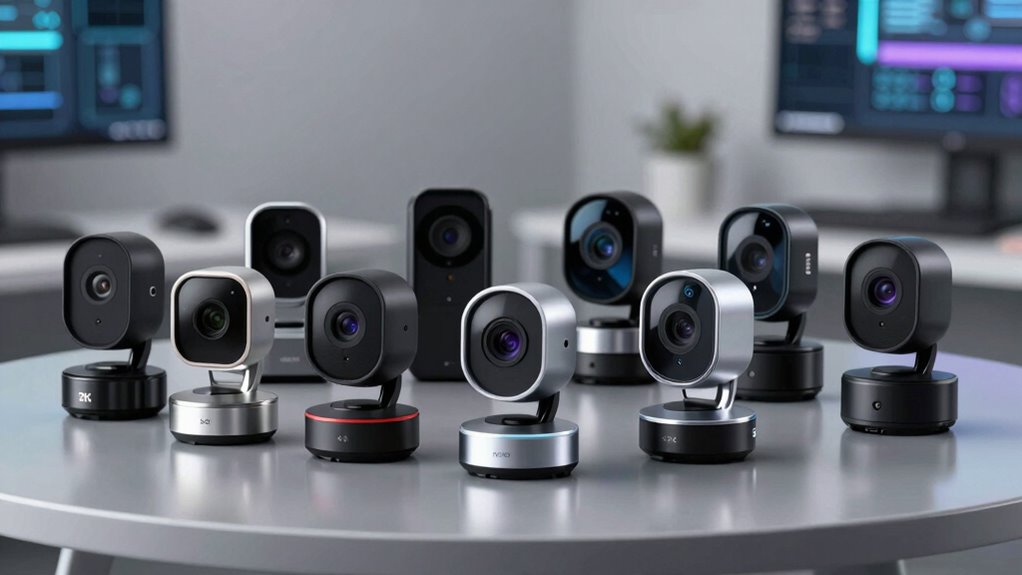

A premium 4K webcam can add detail to calls and streams, but sensor size, autofocus, sound, and setup matter as much as resolution. I rank the Logitech MX Brio as the best overall pick for buyers who want a polished, versatile camera, while the Acer 4K Webcam with a Sony 1/2-Inch Sensor stands out for its larger sensor and privacy cover. The EMEET S600 is a compelling choice for streaming-focused setups with its Sony sensor and PDAF autofocus. The main tradeoffs are image control versus simplicity, built-in audio versus a separate microphone, and extra features versus desk space. Read on for the full comparison and guidance on which webcam fits your needs.

Get privacy and security gear delivered free with Prime
- Fast, free delivery on millions of items
- Prime Video, Amazon Music and more included
- Member-only deals all year
Complete the kit



Key Takeaways
- Sensor size helps separate the premium options: Acer’s 1/2-inch sensor and EMEET’s 1/2.55-inch sensor give those models a distinct imaging focus beyond the shared 4K label.
- The MX Brio is the most balanced pick: It leads this ranking for buyers who want a versatile Logitech option, while the other models specialize more clearly in sensor features, streaming, or straightforward meetings.
- Autofocus is a practical differentiator: PDAF appears on several Acer and EMEET options, which can help keep a moving speaker in focus without manual adjustment.
- Built-in microphones are a convenience, not a full audio solution: The Acer A640 and several EMEET models include dual or noise-reduction microphones, but buyers prioritizing polished sound may still want a dedicated mic.
- Privacy and simplicity can outweigh extra controls: Acer’s magnetic privacy cover is a tangible security feature, while basic meeting setups may be better served by a webcam that is easy to position and leave in place.
| Acer A640 4K Webcam with AI Noise-Canceling Microphone |  | Best for Flexible Frame Rates | Maximum resolution: 4K at 30 fps | Other supported resolutions: 2K or 1080p at 60 fps | Image sensor: Sony 1/2.8-inch | VIEW ON AMAZON | See Our Full Breakdown |
| Acer 4K Webcam with Sony 1/2-Inch Sensor, PDAF, Dual Noise-Reduction Microphones, and Magnetic Privacy Cover |  | Best Compact Build | Resolution: 4K UHD | Image sensor: Sony 1/2-inch CMOS | Autofocus: Phase-detection autofocus (PDAF) | VIEW ON AMAZON | See Our Full Breakdown |
| Logitech 4K Webcam | 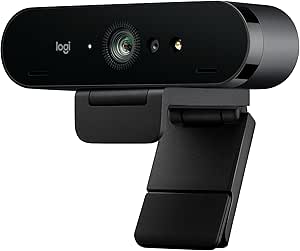 | Best for Adjustable Framing | Resolution: 4K Ultra HD | Frame rate: Up to 90 fps | Zoom: 5x HD | VIEW ON AMAZON | See Our Full Breakdown |
| Logitech MX Brio Ultra HD 4K Webcam |  | Best Premium for Desk Demonstrations | Resolution and frame rate: 4K at 30 fps or 1080p at 60 fps | Connectivity: USB-C | Microphones: Dual noise-reducing microphones | VIEW ON AMAZON | See Our Full Breakdown |
| EMEET S600 4K Streaming Webcam with Sony 1/2.55-Inch Sensor and PDAF Autofocus |  | Best for Streaming Control | Sensor: Sony 1/2.55-inch | Maximum resolution and frame rate: 4K at 30 fps | Other resolution and frame rate: 1080p at 60 fps | VIEW ON AMAZON | See Our Full Breakdown |
| Logitech Brio Ultra HD 4K Webcam for Streaming and Meetings |  | Best for Flexible Framing | Resolution: Up to 4K | Maximum frame rate: 30 fps | Digital zoom: 5x | VIEW ON AMAZON | See Our Full Breakdown |
| EMEET Nova 4K Webcam with PDAF Autofocus and Dual Microphones |  | Best for Flexible Mounting | Maximum resolution: 4K | Frame rate: 30 fps | Autofocus: PDAF; fixed focus range of 7.9–118 inches | VIEW ON AMAZON | See Our Full Breakdown |
| EMEET C960 4K Webcam with PDAF Autofocus and Dual Microphones |  | Best for Straightforward Setup | Video resolution: 4K; defaults to 1080p | Focus: PDAF autofocus | Field of view: 73° | VIEW ON AMAZON | See Our Full Breakdown |
| 4k webcam premium | Microphones | Autofocus | Compatibility | Connectivity |
|---|---|---|---|---|
| Acer A640 4K Webcam with AI No | — | Phase-detection autofocus (PDAF) | — | USB; USB-A to USB-C adapter included |
| Acer 4K Webcam with Sony 1/2-I | Dual digital microphones with noise reduction | Phase-detection autofocus (PDAF) | — | — |
| Logitech 4K Webcam | Dual omni-directional, noise-canceling | — | Windows, Mac, and ChromeOS | USB |
| Logitech MX Brio Ultra HD 4K W | Dual noise-reducing microphones | Autofocus | Windows, macOS, Chrome OS, Linux | USB-C |
| EMEET S600 4K Streaming Webcam | Noise-canceling | PDAF | — | — |
| Logitech Brio Ultra HD 4K Webc | Dual omnidirectional with noise-canceling technology | — | Windows, Mac, and ChromeOS | — |
| EMEET Nova 4K Webcam with PDAF | 2 built-in microphones; capture range up to 8 feet | PDAF; fixed focus range of 7.9–118 inches | Windows 10/11, macOS 10.14+, Android TV 7.0+; Zoom, Teams, and Google Meet | USB 2.0 Type-A |
| EMEET C960 4K Webcam with PDAF | Dual omnidirectional | — | Windows 7/10/11, macOS 10.14 and above, Android TV 7.0 and above, Linux | — |
More Details on Our Top Picks
Acer A640 4K Webcam with AI Noise-Canceling Microphone
The Acer A640 suits buyers who want 4K for detailed calls and a smoother 60 fps option when they switch to 1080p. Its phase-detection autofocus and automatic low-light correction handle two common sources of distracting video without requiring constant adjustments. Compared with the Acer 4K Webcam with Sony 1/2-Inch Sensor, the A640 spells out its frame-rate choices and adds low-light correction, while the other Acer lists a larger sensor and a light aluminum body. The A640’s AI noise-canceling microphone and physical shutter make it a practical work camera, though the microphone may need to be selected and permitted in each app. It has no speakers, so it cannot replace a headset or desktop audio setup.
Pros:- Supports 4K at 30 fps and 1080p at 60 fps
- PDAF autofocus and automatic low-light correction
- AI noise-canceling microphone
- Physical sliding privacy shutter and plug-and-play USB setup
Cons:- No built-in speakers
- Microphone may require selecting it as the default input and enabling app permissions
Best for: Remote workers who alternate between detailed 4K meetings and smoother 1080p calls, and want a physical shutter.
Not ideal for: Buyers who expect built-in speakers or want audio to work without checking device and app input settings.
- Maximum resolution:4K at 30 fps
- Other supported resolutions:2K or 1080p at 60 fps
- Image sensor:Sony 1/2.8-inch
- Autofocus:Phase-detection autofocus (PDAF)
- Microphone:AI noise cancellation
- Privacy:Physical sliding shutter
- Connectivity:USB; USB-A to USB-C adapter included
- Built-in speakers:No
Our verdict“Choose the A640 if switching between 4K detail and 1080p motion matters more than having onboard speakers.”
Acer 4K Webcam with Sony 1/2-Inch Sensor, PDAF, Dual Noise-Reduction Microphones, and Magnetic Privacy Cover
The 57 g aluminum body makes this Acer the compact pick for a tidy desk or a travel setup, while its Sony 1/2-inch sensor and PDAF autofocus give it a strong imaging foundation. Its dual noise-reduction microphones are specified for pickup up to 2.5 meters, a useful fit for someone who sits back from the screen. Compared with the Acer A640, this model emphasizes its larger stated sensor and light metal construction; the A640 offers more explicit resolution and frame-rate options, plus automatic low-light correction. The magnetic privacy cover is easy to remove and replace, but the USB cable connection limits placement to within reach of a port. Compatibility is broad across Windows, Mac, and ChromeOS, though version requirements are not detailed.
Pros:- Sony 1/2-inch CMOS sensor with 4K capture
- PDAF autofocus
- Dual noise-reduction microphones with stated pickup up to 2.5 meters
- Lightweight aluminum body and magnetic privacy cover
Cons:- Requires a wired USB connection
- Operating-system version requirements are not specified
Best for: Laptop users who move between workspaces and want a lightweight 4K camera with a removable magnetic cover.
Not ideal for: Buyers who need wireless placement, detailed OS version guidance, or clearly specified frame-rate choices.
- Resolution:4K UHD
- Image sensor:Sony 1/2-inch CMOS
- Autofocus:Phase-detection autofocus (PDAF)
- Microphones:Dual digital microphones with noise reduction
- Microphone pickup range:Up to 2.5 meters
- Material:Aerospace-grade aluminum
- Connection:USB-C to USB-A; adapter included
- Weight:57 g
Our verdict“Pick this Acer for a light, well-built 4K webcam that travels easily, provided a wired connection fits your setup.”
Logitech 4K Webcam
The Logitech 4K Webcam stands apart for framing flexibility: its 90°, 78°, and 65° field-of-view presets let a presenter widen the shot for a room or tighten it around a single person, and 5x HD zoom offers further control. The stated frame rate reaches 90 fps, which is unusually high among these picks, while RightLight 3 HDR aims to keep faces visible in backlit or uneven conditions. Compared with the Logitech MX Brio, this model offers more listed framing choices and a higher maximum frame rate; the MX Brio adds manual image controls and Show Mode for desk demonstrations. The older Logitech is listed as discontinued and unsupported, a significant drawback for buyers who want ongoing product support. Its USB-only connection also calls for a nearby port.
Pros:- 4K Ultra HD video with a stated maximum of 90 fps
- Three field-of-view presets and 5x HD zoom
- RightLight 3 HDR for challenging lighting
- Dual noise-canceling microphones and flip-up privacy shade
Cons:- Listed as discontinued and unsupported
- USB connection required
Best for: Streamers and presenters who want adjustable field of view, zoom, and a high listed frame rate.
Not ideal for: Buyers who need a currently supported Logitech model or prefer USB-C connectivity.
- Resolution:4K Ultra HD
- Frame rate:Up to 90 fps
- Zoom:5x HD
- Field-of-view presets:90°, 78°, or 65° dFOV
- Microphones:Dual omni-directional, noise-canceling
- Connectivity:USB
- Compatibility:Windows, Mac, and ChromeOS
- Weight:0.16 kg
Our verdict“Choose this Logitech for its unusually flexible framing and high listed frame rate only if its discontinued status fits your support needs.”
Logitech MX Brio Ultra HD 4K Webcam
The Logitech MX Brio is the most presentation-focused option here: its Show Mode lets users share what is on the desk, while manual image controls provide more say over the look than the Acer A640’s automatic low-light correction. It records 4K at 30 fps or 1080p at 60 fps, making it a close match to the A640 on those core formats, with dual noise-reducing microphones and automatic exposure and white balance for hands-off calls. This combination suits people who move between face-to-camera meetings and product or document demonstrations. Its USB-C connection may require an adapter for older USB-A setups, and the supplied data gives no sensor size or field-of-view details, so buyers seeking those specific imaging comparisons have less to go on.
Pros:- 4K at 30 fps or 1080p at 60 fps
- Manual image controls alongside AI-enhanced adjustments
- Show Mode supports desk sharing
- Dual noise-reducing microphones and a privacy cover
Cons:- USB-C connection may require an adapter for USB-A devices
- Sensor size and field of view are not specified in the supplied product data
Best for: Hybrid workers and instructors who want to switch between face-to-camera calls and sharing objects on their desk.
Not ideal for: Buyers who need a stated sensor size, field of view, or direct USB-A connection without an adapter.
- Resolution and frame rate:4K at 30 fps or 1080p at 60 fps
- Connectivity:USB-C
- Microphones:Dual noise-reducing microphones
- Compatibility:Windows, macOS, Chrome OS, Linux
- Autofocus:Autofocus
- Exposure:Auto-exposure
- White balance:Auto white balance
- Additional features:Privacy cover and Show Mode
Our verdict“Choose the MX Brio if desk demonstrations and manual image adjustments matter as much as sharp video calls.”
EMEET S600 4K Streaming Webcam with Sony 1/2.55-Inch Sensor and PDAF Autofocus
The EMEET S600 gives streamers a useful framing choice at 1080p: its field of view can narrow from 73° to 40°, helping keep a busy room or extra desk space out of the shot. At 4K, however, the view is fixed at 73°, so the tighter framing advantage disappears at the highest resolution. Like the Logitech MX Brio, it offers 4K at 30 fps and 1080p at 60 fps, but the S600 adds stated PDAF autofocus, a Sony 1/2.55-inch sensor, and optional EMEETLINK customization. Its noise-canceling microphones are enabled by default and require software to turn off, which may frustrate users who prefer another audio setup. A built-in privacy cover and plug-and-play USB connection keep everyday setup simple.
Pros:- 4K at 30 fps and 1080p at 60 fps
- PDAF autofocus and automatic light adjustment
- Adjustable 40°–73° field of view at 1080p
- Built-in privacy cover and optional EMEETLINK customization
Cons:- Field of view is fixed at 73° in 4K
- Noise cancellation is on by default and requires software to disable
Best for: Streamers who want adjustable 1080p framing and optional software controls for a USB-connected camera.
Not ideal for: Buyers who need a narrow field of view while recording in 4K or want to disable microphone noise cancellation without software.
- Sensor:Sony 1/2.55-inch
- Maximum resolution and frame rate:4K at 30 fps
- Other resolution and frame rate:1080p at 60 fps
- Autofocus:PDAF
- Field of view:40°–73° at 1080p; fixed at 73° at 4K
- Microphones:Noise-canceling
- Privacy cover:Built-in
- Connection:USB 2.0 and 3.0
Our verdict“Pick the S600 for adjustable 1080p streaming shots, as long as its fixed 4K framing and software-dependent audio setting suit your workflow.”
Logitech Brio Ultra HD 4K Webcam for Streaming and Meetings
The Logitech Brio earns its place for buyers who want more control over the picture than a fixed-view webcam allows. Its three 65°, 78°, and 90° field-of-view settings let you tighten a solo-call frame or include more of a room, while autofocus and 5x digital zoom help adjust the view without moving the camera. Compared with the EMEET Nova 4K Webcam, the Brio offers more framing choices and Windows Hello support; the Nova instead has a physical privacy cover and a rotating mount. The Brio also adds automatic lighting adjustment and dual noise-canceling microphones, though its 4K mode tops out at 30 fps. Its shutter attaches to the camera rather than being built in, which makes privacy less convenient than on the EMEET options.
Pros:- Three field-of-view presets offer more framing flexibility than the fixed-view EMEET Nova and C960
- Autofocus and 5x digital zoom allow framing adjustments without repositioning the webcam
- Dual noise-canceling microphones and automatic lighting adjustment support calls in varied rooms
- Supports Windows Hello
Cons:- 4K recording is limited to 30 fps
- Privacy shutter is attachable rather than built in
Best for: Hybrid workers and streamers who switch between tight solo framing and wider room views, or who want Windows Hello support
Not ideal for: Buyers who need 4K above 30 fps or prefer a built-in privacy cover
- Resolution:Up to 4K
- Maximum frame rate:30 fps
- Digital zoom:5x
- Field of view:65°, 78°, or 90° diagonal
- Microphones:Dual omnidirectional with noise-canceling technology
- Microphone pickup range:Up to 1.2 meters
- Compatibility:Windows, Mac, and ChromeOS
- Warranty:1-year limited hardware warranty
Our verdict“Choose the Brio if adjustable framing and Windows Hello matter more to you than a built-in privacy cover or higher 4K frame rates.”
EMEET Nova 4K Webcam with PDAF Autofocus and Dual Microphones
The EMEET Nova suits a desk setup that needs a webcam to move between monitor, tripod, or changing angles. Its 360° horizontal rotation, vertical adjustment, and standard tripod thread give it mounting flexibility the Logitech Brio does not emphasize, while PDAF autofocus and automatic light adjustment handle routine image changes. The tradeoff is a fixed 73° field of view: unlike the Brio, it cannot switch between tighter and wider framing presets. The Nova also starts at 1080p, so buyers must select 4K through compatible software or an app. Its dual microphones can cover nearby voices, but the supplied details caution that they perform best in quiet rooms with the webcam unobstructed. A physical privacy cover is a practical advantage over the Brio’s attachable shutter.
Pros:- 360° horizontal rotation and vertical adjustment make it adaptable to different desk arrangements
- Standard 1/4-inch tripod thread supports non-monitor mounting
- PDAF autofocus and automatic light adjustment help maintain a usable image as conditions change
- Physical privacy cover offers direct lens coverage
Cons:- Defaults to 1080p; 4K must be enabled through software or a compatible app
- Fixed 73° field of view offers less framing choice than the Logitech Brio
- Microphones work best in quiet settings with the webcam unobstructed
Best for: Remote workers who reposition a webcam across monitor and tripod setups and are comfortable enabling 4K in software
Not ideal for: People who frequently change framing, need 4K to be the default, or rely on webcam microphones in noisy rooms
- Maximum resolution:4K
- Frame rate:30 fps
- Autofocus:PDAF; fixed focus range of 7.9–118 inches
- Field of view:73°
- Microphones:2 built-in microphones; capture range up to 8 feet
- Connectivity:USB 2.0 Type-A
- Mount adjustment:360° horizontal rotation; 15° vertical adjustment; 180° adjustable stand
- Tripod mount:Standard 1/4-inch nut
- Compatibility:Windows 10/11, macOS 10.14+, Android TV 7.0+; Zoom, Teams, and Google Meet
Our verdict“Pick the Nova if flexible mounting and a physical privacy cover matter more than adjustable framing or automatic 4K selection.”
EMEET C960 4K Webcam with PDAF Autofocus and Dual Microphones
The EMEET C960 is the simple USB-A choice in this group: it pairs a true 4K sensor with PDAF autofocus, automatic light correction, and a privacy cover, then mounts to a monitor or tripod. Like the Nova, it defaults to 1080p and needs supported software to switch to 4K; the provided specs do not list a frame rate, so I would not assume a particular 4K motion performance. The C960’s stated compatibility includes Linux, giving it a broader listed operating-system range than the Nova. Its 73° view is fixed, however, while the Logitech Brio can switch among three angles. This makes the C960 a better fit for a stable desk setup than for users who often change composition or want detailed software and microphone specifications before choosing.
Pros:- True 4K sensor with PDAF autofocus and automatic light correction
- USB-A plug-and-play connection
- Privacy cover provides physical lens coverage
- Mount adjusts horizontally and vertically and includes a 1/4-inch tripod thread
Cons:- Defaults to 1080p and requires supported software to switch to 4K
- Fixed 73° field of view is less adaptable than the Logitech Brio’s presets
- Supplied product data does not state a maximum frame rate
Best for: USB-A users on Windows, Mac, or Linux who want autofocus, a privacy cover, and a standard tripod option
Not ideal for: Buyers who want adjustable field of view, 4K enabled by default, or a stated frame-rate specification
- Video resolution:4K; defaults to 1080p
- Focus:PDAF autofocus
- Field of view:73°
- Microphones:Dual omnidirectional
- Connection:USB-A
- Privacy:Privacy cover
- Mounting:360° horizontal adjustment, 15° vertical adjustment, 1/4-inch tripod thread
- Compatibility:Windows 7/10/11, macOS 10.14 and above, Android TV 7.0 and above, Linux
Our verdict“Choose the C960 for a straightforward USB-A webcam with Linux compatibility, provided you are comfortable switching from its 1080p default to 4K in software.”

How We Picked
I compared these webcams by how their stated features address real 4K webcam needs: image capture, focus, microphone capability, privacy, and likely fit for meetings or streaming. A 4K label alone did not set the order; sensor details and autofocus earned attention because they can affect the image in changing light or when the speaker moves. I also weighed practical features such as a privacy cover and built-in microphones against the limits of relying on webcam audio.
The ranking favors versatility first, then gives distinct placements to options with a clear strength or simpler use case. The Logitech MX Brio takes the overall spot for its premium, broadly useful positioning; the Acer Sony-sensor model and EMEET S600 follow for buyers with more specific imaging and streaming priorities. The other Logitech and EMEET options remain relevant for buyers who value a familiar meeting setup or a more direct feature set, though their listed features offer fewer reasons to outrank the lead picks.
| 4k webcam premium | Autofocus | Connectivity | Compatibility |
|---|---|---|---|
| Acer A640 4K Webcam with AI No | Phase-detection autofocus (PDAF) | USB; USB-A to USB-C adapter included | — |
| Acer 4K Webcam with Sony 1/2-I | Phase-detection autofocus (PDAF) | — | — |
| Logitech 4K Webcam | — | USB | Windows, Mac, and ChromeOS |
| Logitech MX Brio Ultra HD 4K W | Autofocus | USB-C | Windows, macOS, Chrome OS, Linux |
| EMEET S600 4K Streaming Webcam | PDAF | — | — |
| Logitech Brio Ultra HD 4K Webc | — | — | Windows, Mac, and ChromeOS |
| EMEET Nova 4K Webcam with PDAF | PDAF; fixed focus range of 7.9–118 inches | USB 2.0 Type-A | Windows 10/11, macOS 10.14+, Android TV 7.0+; Zoom, Teams, and Google Meet |
| EMEET C960 4K Webcam with PDAF | — | — | Windows 7/10/11, macOS 10.14 and above, Android TV 7.0 and above, Linux |
Factors to Consider When Choosing 4k Webcam Premium
Choosing a premium 4K webcam is less about collecting the longest spec list and more about matching the camera to your room, workflow, and tolerance for setup. I would start with the conditions you actually face during calls, then decide which features can solve a real problem.
Match the Sensor to Your Room
A larger sensor can be useful when your room is dim or has uneven lighting, but it does not replace good placement or a light source. Webcam image quality also depends on exposure, processing, lens design, and the application receiving the video. Avoid assuming that every 4K camera will look sharper in every call; some video services compress feeds or cap resolution. If you sit near a bright window, prioritize handling contrast and position the camera so the window is not behind you. Buyers with steady, well-lit desks may get more value from reliable framing and simple controls than from a sensor upgrade.
Check Your Video Call Resolution Path
Before paying for 4K, check whether your computer, video app, connection, and meeting account can send or receive 4K video. Many everyday calls display a lower resolution, so a 4K webcam may serve more as a source for cropping, recording, or future flexibility than as a visible upgrade for every participant. Streaming and local recording workflows can make the extra detail more useful. Also check that your computer has the ports and processing headroom the camera needs. A good 4K feed is only useful when the rest of the setup can carry it.
Decide Whether Webcam Audio Is Enough
Built-in microphones reduce desk clutter and can work well for casual calls in a quiet room. They are less reliable when the room echoes, a fan is running, or the speaker sits far from the camera. Noise-reduction features can help with steady background sounds, but they cannot make a distant voice sound close and natural in every environment. If clients or viewers judge your work by audio quality, plan for a headset or dedicated microphone. That choice can matter more to the people on the call than a move from a good HD image to 4K.
Choose Autofocus for Your Movement
Autofocus is helpful if you lean toward a whiteboard, hold objects up to the camera, or shift around while presenting. PDAF can support faster focus adjustments, though performance still depends on lighting and how the camera handles motion. For a fixed desk position, autofocus may provide little benefit after the camera is set up. Think about whether you want the camera to adapt automatically or prefer stable framing with fewer changes during a call. A camera that repeatedly refocuses can distract viewers, so the best choice depends on how you present.
Plan for Privacy and Placement
A physical privacy cover gives a clear way to block the lens when the camera is idle. Check how the webcam attaches to your monitor or tripod and whether the cover or mount suits that position. A compact laptop setup has different needs from a permanent streaming desk, where a tripod mount and repeatable framing may matter more. Also account for the cable route and the camera’s height; a premium image cannot fix an unflattering angle. Make these fit checks before buying, especially if the webcam will move between workspaces.
Pay for Features You Will Use
Premium webcams can add sensor improvements, autofocus, privacy hardware, microphones, or software controls, but extra features only earn their place when they fit your routine. Frequent presenters may benefit from dependable focus and flexible positioning, while occasional meeting users may prefer a simple camera with a clear image. A separate microphone can be a better upgrade than paying for more built-in audio processing. Consider how often you record, stream, or change rooms before prioritizing advanced controls. The best premium choice is the one that improves your actual calls without adding setup friction.
Frequently Asked Questions
Will a 4K webcam make every video call look sharper?
No. The webcam can capture a 4K image, but the call app, account settings, network, and the other participant’s display can limit the resolution they see. A 4K source may still help if you record locally or crop the image, but it may not change a routine meeting. Check the video options in your main calling app before choosing based on resolution alone. If it does not support 4K output, prioritize focus, lighting performance, and framing.
Should I choose a larger sensor or PDAF autofocus?
Choose based on the problem you encounter most. A larger sensor is a stronger priority when your room is dim or lighting varies, while PDAF autofocus can be more useful if you move around or bring objects into frame. Neither spec guarantees a better image on its own, since lens quality, image processing, and lighting still matter. A fixed-position speaker in a bright room may not need advanced autofocus. Someone presenting dynamically may notice it more often.
Can I rely on a webcam’s built-in microphones for professional calls?
For a quiet home office and short meetings, built-in microphones can be convenient and keep the desk uncluttered. They are more likely to pick up room echo, keyboard noise, and distance than a headset or a microphone placed near you. Noise reduction can limit some background sound, but it may also affect how natural a voice sounds. If calls are central to your work, test audio from your normal seating position before relying on it. For client presentations or streaming, a dedicated mic is often the safer audio choice.
Is a premium 4K webcam worth it if I mostly use a laptop?
It can be worthwhile if you use an external monitor, record content, or want a camera that stays at eye level on a desk. For occasional calls on the go, a built-in laptop camera avoids carrying and positioning another device. Think about where you take calls and whether you can mount the webcam securely on each screen. Also check that your laptop supports the camera connection and can handle its video output. If you rarely use a fixed workspace, portability may matter more than premium imaging features.
Which features should I prioritize for streaming rather than meetings?
For streaming, prioritize consistent focus, a stable mount, dependable image quality under your room lighting, and a workflow that supports your streaming resolution. The EMEET S600 is the lineup’s clearest streaming-oriented option, while the Acer model with the larger Sony sensor is worth weighing if low-light capture is a concern. Meetings often place more weight on ease of setup, privacy, and clear voice pickup. In either case, audio and lighting can shape the result as much as the webcam. Check your streaming software’s camera controls before paying for features it cannot use.
Conclusion
For most buyers seeking a premium 4K webcam, I recommend the Logitech MX Brio as the best overall choice for a versatile desk setup. The best value among these options is the EMEET Nova for buyers who want 4K, PDAF autofocus, and dual microphones in a straightforward package. For a more specialized premium setup, the Acer 4K Webcam with Sony 1/2-Inch Sensor stands out for its sensor and magnetic privacy cover. Beginners who want a direct meeting camera can start with the Logitech Brio Ultra HD 4K, while streamers should give the EMEET S600 a close look. Choose the Acer A640 if built-in AI noise-canceling audio is a priority, and the EMEET C960 if its dual microphones and PDAF meet your needs without extra complexity.
Halloween Picks

Gemmy Bluey Family Halloween Inflatable Scene, 5.5 ft Lighted Yard Decoration

Pumpkin Halloween Fog Machine with 12-Color LED Lights, Bluetooth Speaker, and Remote

Haunted Hill Farm 4.6-Ft. Spinning Beatrix Halloween Animatronic
As an affiliate, we earn on qualifying purchases.