For a rugged portable SSD that balances speed, capacity, and everyday protection, I’d start with the SanDisk Extreme Portable SSD 2TB, rated for transfers up to 1,050MB/s. The Samsung T9 2TB and SanDisk Extreme 2TB rated up to 2,000MB/s stand out for buyers with compatible USB 3.2 Gen 2×2 ports who want faster transfers. The main tradeoffs are speed versus device compatibility, capacity versus portability, and how much protection you need for your working conditions. Smaller SSK drives can suit light storage needs, but offer less room than the 1TB and 2TB options. Read on for the full comparison and guidance on choosing a drive that fits your devices and workload.

Get privacy and security gear delivered free with Prime
- Fast, free delivery on millions of items
- Prime Video, Amazon Music and more included
- Member-only deals all year
Key Takeaways
- The 2TB SanDisk Extreme rated up to 1,050MB/s is the balanced pick: it pairs useful capacity and a clear speed target without requiring the 2,000MB/s models’ higher-speed interface.
- Advertised speeds of up to 2,000MB/s come with a compatibility condition: the Samsung T9, PNY RP60, and faster SanDisk options use USB 3.2 Gen 2×2, so a host device must support that interface to benefit.
- Capacity changes the buying decision more than small model differences: the lineup spans 250GB to 4TB, making it possible to match a drive to working files rather than defaulting to one size.
- The two SSK options are the compact-capacity choices: their 250GB and 500GB configurations may suit transfer tasks, but are less suited to keeping large project libraries on one drive.
- Shared product names do not mean identical specifications: check the capacity and stated speed of each SanDisk Extreme listing; the 1,050MB/s and 2,000MB/s versions target different performance needs.
| SanDisk Extreme Portable SSD 2TB, USB-C, Up to 1050MB/s |  | Best Balanced Rugged Pick | Storage capacity: 2 TB | Read speed: Up to 1050 MB/s | Write speed: Up to 1000 MB/s | VIEW ON AMAZON | See Our Full Breakdown |
| SanDisk Extreme Portable SSD, 2TB, Up to 2000MB/s |  | Best for Speed-Conscious Travelers | Storage capacity: 2 TB | Read speed: Up to 2000 MB/s | Interface: USB 3.0 | VIEW ON AMAZON | See Our Full Breakdown |
| PNY RP60 2TB USB 3.2 Gen 2×2 Type-C Portable SSD |  | Best Rugged Performance Pick | Storage capacity: 2 TB | Interface: USB 3.2 Gen 2×2, USB Type-C | Read speed: Up to 2000 MB/s | VIEW ON AMAZON | See Our Full Breakdown |
| SSK Portable External SSD, 500GB, USB-C, up to 1050MB/s |  | Best Compact Aluminum Pick | Storage capacity: 500 GB | Read speed: Up to 1050 MB/s | Write speed: Up to 1000 MB/s | VIEW ON AMAZON | See Our Full Breakdown |
| SSK 250GB Portable External SSD with USB-C |  | Best for Small Transfers | Storage capacity: 250 GB | Read speed: Up to 1050 MB/s | Write speed: Up to 1000 MB/s | VIEW ON AMAZON | See Our Full Breakdown |
| SanDisk 1TB Extreme Portable SSD |  | Best for Balanced Rugged Protection | Storage capacity: 1 TB | Read speed: Up to 1050 MB/s | Write speed: Up to 1000 MB/s | VIEW ON AMAZON | See Our Full Breakdown |
| Samsung T9 Portable SSD, 2TB, USB 3.2 Gen 2×2, Up to 2,000 MB/s | 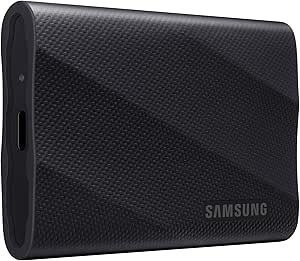 | Best for High-Speed, High-Capacity Workflows | Storage capacity: 2 TB | Interface: USB 3.2 Gen 2×2 | Maximum read speed: Up to 2000 MB/s | VIEW ON AMAZON | See Our Full Breakdown |
| SanDisk Extreme Portable SSD, 1TB, Up to 2000MB/s | | Best Compact Rugged Pick | Storage capacity: 1 TB | Interface: USB 3.0 | Connector: USB Type-C | VIEW ON AMAZON | See Our Full Breakdown |
| SanDisk Extreme Portable SSD, 4TB, Up to 2000MB/s | | Best for Maximum Portable Capacity | Storage capacity: 4 TB | Interface: USB-C | Read speed: Up to 2000 MB/s | VIEW ON AMAZON | See Our Full Breakdown |
| portable ssd rugged | Storage capacity | Read speed | Interface | Write speed |
|---|---|---|---|---|
| SanDisk Extreme Portable SSD 2 | 2 TB | Up to 1050 MB/s | — | Up to 1000 MB/s |
| SanDisk Extreme Portable SSD | 2 TB | Up to 2000 MB/s | USB 3.0 | — |
| PNY RP60 2TB USB 3.2 Gen 2×2 T | 2 TB | Up to 2000 MB/s | USB 3.2 Gen 2×2, USB Type-C | Up to 1800 MB/s |
| SSK Portable External SSD | 500 GB | Up to 1050 MB/s | — | Up to 1000 MB/s |
| SSK 250GB Portable External SS | 250 GB | Up to 1050 MB/s | — | Up to 1000 MB/s |
| SanDisk 1TB Extreme Portable S | 1 TB | Up to 1050 MB/s | USB 3.0 | Up to 1000 MB/s |
| Samsung T9 Portable SSD | 2 TB | — | USB 3.2 Gen 2×2 | — |
| SanDisk Extreme Portable SSD | 1 TB | — | USB 3.0 | — |
| SanDisk Extreme Portable SSD | 4 TB | Up to 2000 MB/s | USB-C | — |
More Details on Our Top Picks
SanDisk Extreme Portable SSD 2TB, USB-C, Up to 1050MB/s
The SanDisk Extreme Portable SSD 2TB pairs a useful everyday capacity with IP65 protection, drop protection up to 3 meters, and a carabiner loop for attaching it to a bag. Its listed speeds of up to 1050 MB/s read and 1000 MB/s write suit backups and large file transfers, though the newer SanDisk Extreme model claims up to 2000 MB/s read. That faster option is a better fit for buyers with a compatible setup who prioritize transfer speed; this one keeps the speed claim more modest while retaining hardware encryption and rugged features. One caveat: the product information gives conflicting IP ratings, listing IP65 in updated specifications and IP55 in older details. I would verify the rating for the exact unit before relying on a particular level of water and dust resistance.
Pros:- 2TB capacity suits backups and sizable photo or video libraries
- Drop protection up to 3 meters and a carabiner loop support portable use
- 256-bit AES hardware encryption adds a privacy option
- Up to 1050 MB/s read and 1000 MB/s write speeds
Cons:- Product details conflict between IP65 and IP55 ratings
- Maximum speeds depend on the host device and usage conditions
Best for: Traveling photographers and laptop owners who want 2TB of storage, drop protection, and a carabiner loop for carrying the drive outdoors.
Not ideal for: Buyers who need the highest stated transfer speeds or a clearly consistent water-and-dust rating; the faster 2000 MB/s SanDisk model is a better speed comparison.
- Storage capacity:2 TB
- Read speed:Up to 1050 MB/s
- Write speed:Up to 1000 MB/s
- Connectivity:USB-C, USB 3.2 Gen 2
- Drop protection:Up to 3 meters
- Water and dust resistance:IP65 in updated specifications; older details state IP55
- Encryption:256-bit AES hardware encryption
- Non-operating temperature range:-20°C to 85°C
Our verdict“Choose this SanDisk for a 2TB balance of speed, carrying features, and rugged protection, but confirm the IP rating if water resistance is a deciding factor.”
SanDisk Extreme Portable SSD, 2TB, Up to 2000MB/s
This 2TB SanDisk Extreme combines an IP65 dust- and water-resistance rating with drops up to 3 meters, while claiming read speeds up to 2000 MB/s. That makes it a stronger speed-focused choice than the other SanDisk 2TB model in this list, which lists up to 1050 MB/s read. The benefit depends on the connected device and workload: a high read-speed claim alone does not establish matching write performance, and the supplied product details do not specify a write figure. It also includes 256-bit AES password protection, but setup requires a software download and support is limited to Windows 10 or later and macOS 12 or later. I would favor this model over the PNY RP60 only when the SanDisk’s listed speed and software-based protection better match the buyer’s needs.
Pros:- Up to 2000 MB/s stated read speed
- IP65 dust and water resistance with drop protection up to 3 meters
- 2TB capacity for portable backups and large working files
- 256-bit AES password protection
Cons:- Write speed is not specified in the supplied product details
- Encryption requires a software download and supports only listed Windows and macOS versions
Best for: Traveling creators who move large files to a compatible computer and want a 2TB drive with a stated IP65 rating and password protection.
Not ideal for: Buyers who need a stated write-speed figure, want encryption without installing software, or use an operating system outside the listed support.
- Storage capacity:2 TB
- Read speed:Up to 2000 MB/s
- Interface:USB 3.0
- Connector:USB Type-C
- Protection:IP65 dust and water resistance; drop protection up to 3 meters
- Encryption:256-bit AES password protection
- Supported operating systems for encryption:Windows 10 or later; macOS 12 or later
- Compatible devices:Desktop, laptop, smartphone, tablet
Our verdict“Pick this SanDisk if its 2000 MB/s read claim and IP65 protection suit your setup, but choose the PNY RP60 if you need a stated write-speed figure too.”
PNY RP60 2TB USB 3.2 Gen 2×2 Type-C Portable SSD
The PNY RP60 stands out here for pairing an IP65-rated rubberized shell and 3-meter drop testing with clearly stated read and write speeds: up to 2000 MB/s and 1800 MB/s. That makes its performance case more complete than the faster-read SanDisk Extreme 2TB listing, which does not specify write speed. The main catch is the interface: reaching the RP60’s maximum figures requires a USB 3.2 Gen 2×2 host, so a compatible Type-C connector alone does not guarantee those speeds. At 54.8 g, it remains easy to carry, and its clip loop adds a practical attachment point. Acronis True Image software and a three-year limited warranty round out the package, though buyers who do not need this speed may prefer the more measured SanDisk 1050 MB/s model.
Pros:- Up to 2000 MB/s read and 1800 MB/s write with a compatible host
- IP65-rated shell and drop testing up to 3 meters
- Rubberized body and clip loop suit portable handling
- Includes Acronis True Image data protection software and a three-year limited warranty
Cons:- Maximum speeds require a USB 3.2 Gen 2×2 host
- The supplied details do not specify hardware encryption
Best for: Field photographers and video creators with a USB 3.2 Gen 2×2 computer who want explicit read and write speed claims alongside dust, water, and drop protection.
Not ideal for: People connecting mainly to hosts without USB 3.2 Gen 2×2, since they may not reach the advertised maximum speeds and may not benefit from paying for this performance tier.
- Storage capacity:2 TB
- Interface:USB 3.2 Gen 2×2, USB Type-C
- Read speed:Up to 2000 MB/s
- Write speed:Up to 1800 MB/s
- Water and dust resistance:IP65-rated
- Drop resistance:Up to 3 m (9.8 ft)
- Weight:54.8 g
- Warranty:3-year limited warranty
Our verdict“Choose the RP60 when your host supports USB 3.2 Gen 2×2 and you want stated high write speeds in a rugged, clip-friendly drive.”
SSK Portable External SSD, 500GB, USB-C, up to 1050MB/s
The SSK 500GB Portable External SSD is the lightest-weight style of choice in this group: its aluminum enclosure weighs 36.6 g, and the package includes both USB-C and USB-A cables for connecting to a wider range of devices. Listed speeds reach 1050 MB/s read and 1000 MB/s write, similar to the 2TB SanDisk Extreme, but the SSK’s 500GB capacity gives less room for a large photo archive or repeated video shoots. It also lists S.M.A.R.T. diagnostics and TRIM support, plus use for 4K60 ProRes HDR recording on iPhone. Its main limitation for a rugged-drive roundup is clear: the supplied specifications do not give an IP rating or drop-protection figure. I would choose the PNY RP60 instead for wet, dusty, or rougher field conditions.
Pros:- 36.6 g aluminum enclosure in a compact form
- Includes USB-C and USB-A cables
- Up to 1050 MB/s read and 1000 MB/s write
- Supports S.M.A.R.T. diagnostics, TRIM, and listed iPhone ProRes recording use
Cons:- No water, dust, or drop-protection rating is provided
- 500GB capacity is more limiting than the 2TB SanDisk and PNY options
- High-speed SLC cache uses 25% of available capacity
Best for: Mobile video creators and commuters who want a light, compact SSD with USB-C and USB-A cables for moving files between phones and computers.
Not ideal for: Outdoor users who need documented water, dust, or drop protection, or creators who need more than 500GB for active projects.
- Storage capacity:500 GB
- Read speed:Up to 1050 MB/s
- Write speed:Up to 1000 MB/s
- Connectivity:USB 3.2 Gen 2, USB-C and USB-A
- Enclosure material:Aluminum alloy
- Weight:36.6 g
- Dimensions:2.6 × 1.5 × 0.5 inches
- Features:LED activity light, S.M.A.R.T. diagnostics, TRIM support, SLC caching
Our verdict“Pick this SSK for light mobile workflows and flexible connections, but choose an IP-rated model such as the PNY RP60 for documented rugged protection.”
SSK 250GB Portable External SSD with USB-C
This SSK 250GB SSD is the capacity-minimal choice in the lineup, not a substitute for a rugged field drive. It shares the 500GB SSK’s 36.6 g aluminum enclosure, USB-C and USB-A cables, and listed speeds up to 1050 MB/s read and 1000 MB/s write. The smaller capacity suits short-term transfers, phone footage, or a compact set of working files; compared with the SSK 500GB, it leaves less room for larger projects and ongoing backups. More importantly for this roundup, the supplied specifications list no IP rating or drop-protection figure, unlike the IP65-rated PNY RP60 and SanDisk options. S.M.A.R.T. diagnostics and TRIM are useful management features, but they do not make the drive weatherproof or impact-rated. I would reserve it for controlled everyday handling.
Pros:- Light 36.6 g aluminum enclosure
- Includes USB-C and USB-A cables
- Up to 1050 MB/s read and 1000 MB/s write
- Supports S.M.A.R.T. diagnostics and TRIM
Cons:- 250GB capacity is restrictive for large backups and video libraries
- No water, dust, or drop-protection rating is provided
- SLC cache is limited to 25% of available capacity
Best for: Phone users and commuters who need a small-capacity drive for transferring a limited set of files and value both USB-C and USB-A connections.
Not ideal for: Outdoor photographers, videographers, and anyone storing a large library or needing documented water, dust, or impact protection.
- Storage capacity:250 GB
- Read speed:Up to 1050 MB/s
- Write speed:Up to 1000 MB/s
- Connectivity:USB 3.2 Gen 2, USB-C and USB-A
- Enclosure material:Aluminum alloy
- Weight:36.6 g
- Dimensions:2.6 × 1.5 × 0.5 inches
- Features:LED activity light, S.M.A.R.T. diagnostics, TRIM support, SLC caching
Our verdict“Choose this SSK for small, controlled file transfers, but step up to the 500GB SSK for more room or an IP-rated drive for rugged use.”
SanDisk 1TB Extreme Portable SSD
The SanDisk 1TB Extreme Portable SSD is a sensible middle ground for buyers who want a protective drive without prioritizing headline speed or high capacity. Its stated read and write speeds—up to 1050 MB/s and 1000 MB/s—are balanced for moving project files and regular backups. Water and dust resistance, drop protection, and a carabiner loop make it easier to carry on location than a basic portable SSD. It also includes 256-bit AES hardware encryption, unlike the newer 1TB SanDisk Extreme model listed here, whose supplied details describe password protection but do not specify hardware encryption. The tradeoff is that its speed ceiling is below the newer model’s stated 2000 MB/s read speed, and its 1TB capacity may feel limiting for large video libraries. Actual transfer performance depends on the host device and conditions.
Pros:- Balanced stated read and write speeds for routine file transfers
- Water and dust resistance plus stated drop protection
- Carabiner loop supports convenient attachment while traveling
- 256-bit AES hardware encryption adds a security layer
Cons:- Slower stated read speed than the newer 1TB SanDisk Extreme model in this roundup
- Actual speed varies with the connected device and usage conditions
- Usable capacity is less than the listed 1TB
Best for: Photographers and mobile workers who want a 1TB everyday backup drive with stated drop protection, water and dust resistance, and hardware encryption.
Not ideal for: Video editors moving very large files who need the highest stated transfer speeds or more than 1TB of working space.
- Storage capacity:1 TB
- Read speed:Up to 1050 MB/s
- Write speed:Up to 1000 MB/s
- Interface:USB 3.0
- Connector:USB Type-C
- Protection:Water-resistant and dust-resistant; drop protection stated as up to 3 m in features and 2 m in the product description
- Encryption:256-bit AES hardware encryption
- Weight:1.76 oz
- Warranty:5-year limited warranty
Our verdict“Choose this SanDisk if balanced transfer speeds, hardware encryption, and carry-friendly protection matter more than maximum speed or storage capacity.”
Samsung T9 Portable SSD, 2TB, USB 3.2 Gen 2×2, Up to 2,000 MB/s
The Samsung T9 2TB is the performance-focused pick here: it pairs twice the capacity of the 1TB SanDisk Extreme options with stated read and write speeds of up to 2000 MB/s. That can shorten transfers of large projects, but only if the computer and cable support USB 3.2 Gen 2×2; on a slower host, buyers may not see the advertised ceiling. Thermal management and hardware encryption suit demanding work sessions, while broad compatibility includes computers, tablets, consoles, and iPhone 15/16. Compared with the 4TB SanDisk Extreme, the T9 offers a stated write speed as well as read speed, but has half the storage capacity. The ruggedness case is less fully specified in the supplied details than the SanDisk models, which list IP65 protection and drop resistance. Choose it for speed and workflow capacity, not on the assumption of a stated rugged rating.
Pros:- Stated read and write speeds reach up to 2000 MB/s
- 2TB capacity suits larger active projects than the 1TB drives
- Thermal management is designed for heavy use
- Hardware encryption and compatibility across computers, tablets, consoles, and specified iPhones
Cons:- Maximum speeds require a compatible USB 3.2 Gen 2×2 host and cable
- Supplied product details do not state an IP or drop-protection rating
- Host-device compatibility and achieved performance can vary
Best for: Video creators and power users with a USB 3.2 Gen 2×2 host who want 2TB capacity, high stated transfer speeds, and thermal management.
Not ideal for: Travelers who need a clearly stated water, dust, and drop-protection rating, or users whose devices cannot take advantage of USB 3.2 Gen 2×2.
- Storage capacity:2 TB
- Interface:USB 3.2 Gen 2×2
- Maximum read speed:Up to 2000 MB/s
- Maximum write speed:Up to 2000 MB/s
- Features:Hardware encryption and thermal management
- Compatible devices:Gaming consoles, Mac, PC, tablet, iPhone 15/16
- Color:Black
- Form factor:Portable
Our verdict“Pick the Samsung T9 for fast transfers and 2TB of working space when your devices support its interface and rugged ratings are not your main requirement.”
SanDisk Extreme Portable SSD, 1TB, Up to 2000MB/s
This 1TB SanDisk Extreme combines pocket-friendly dimensions with a notably high stated read ceiling of up to 2000 MB/s, making it a better fit for mobile workflows than the older 1TB SanDisk Extreme, which lists up to 1050 MB/s read speed. Its IP65 rating and stated protection against drops up to 3 m give buyers clear environmental and impact details for carrying it between locations. At 1.6 oz, it is also the lightest drive in this batch with a supplied weight. The compromise is that the description does not provide a write-speed figure, so buyers should not assume transfers will match the read maximum. Password protection uses 256-bit AES encryption, but requires a software download and supported operating systems. It suits compact, rugged file access better than buyers who need 2TB or more.
Pros:- Stated read speed of up to 2000 MB/s
- IP65-rated water and dust resistance with drop protection up to 3 m
- Compact dimensions and 1.6 oz weight suit portable kits
- 256-bit AES password protection
Cons:- Write speed is not specified in the supplied product data
- Encryption requires a software download and is limited to Windows 10+ and macOS 12+
- 1TB capacity is smaller than the Samsung T9 2TB and SanDisk Extreme 4TB
Best for: Traveling photographers and field workers who want a lightweight 1TB drive with a stated IP65 rating and clear drop protection.
Not ideal for: People managing large media archives or those who need a published write-speed figure and hardware-based encryption details.
- Storage capacity:1 TB
- Interface:USB 3.0
- Connector:USB Type-C
- Maximum read speed:Up to 2000 MB/s
- Protection:IP65 water and dust resistance; drop protection up to 3 m
- Encryption:256-bit AES password protection
- Weight:1.6 oz
- Dimensions:3.35 × 2 × 0.39 in
- Encryption software compatibility:Windows 10+ and macOS 12+
Our verdict“Choose this model for a light, clearly rated rugged drive with fast stated reads, but skip it if you need more capacity or a stated write-speed target.”
SanDisk Extreme Portable SSD, 4TB, Up to 2000MB/s
When capacity is the main constraint, the 4TB SanDisk Extreme offers four times the storage of the 1TB SanDisk Extreme models while keeping the same stated up to 2000 MB/s read speed. That extra room can reduce the need to rotate drives when storing photo collections, video footage, or multiple project backups. Its pocket-sized design, IP65 dust and water resistance, and drop protection up to 3 m make it a more explicitly rugged choice than the Samsung T9, whose supplied details do not give an ingress or drop rating. The tradeoff is that the product data lists only a read-speed figure; write speeds are lower than the stated read maximum, with no specific write figure supplied. Password protection also depends on software and supported operating systems, rather than being a friction-free hardware-encryption feature.
Pros:- 4TB capacity provides substantially more room than the 1TB SanDisk models
- Stated read speed of up to 2000 MB/s
- IP65 dust and water resistance with drop protection up to 3 m
- Pocket-sized format for carrying a large project library
Cons:- Write speeds are lower than the stated read speed, with no specific write figure provided
- Password protection requires software and supported operating systems
- The supplied data does not list a weight or dimensions
Best for: Videographers, photographers, and mobile professionals who need several terabytes of portable storage with stated water, dust, and drop protection.
Not ideal for: Buyers who mainly transfer small files, want a stated write-speed figure, or need password protection without installing supported software.
- Storage capacity:4 TB
- Interface:USB-C
- Read speed:Up to 2000 MB/s
- Protection:IP65 dust and water resistance
- Drop protection:Up to 3 m
- Encryption:256-bit AES password protection
- Form factor:2.5-inch
- Compatible devices:Desktop, laptop, smartphone, tablet
- Compatible platforms:Mac, PC
Our verdict“Choose this SanDisk when 4TB of portable, explicitly protected storage matters more than a published write-speed figure or hardware-based encryption.”

How We Picked
I ranked these nine drives around the needs behind a rugged portable SSD search: dependable everyday portability, useful capacity, transfer performance, and compatibility. Advertised maximum speed matters, but only when a computer or other host device supports the drive’s interface. I also weighed how clearly each model fits a distinct buyer, from someone carrying a small transfer drive to a creator storing larger projects.
The ranking favors options with a practical balance of capacity, speed, and usability over headline performance alone. The 2TB SanDisk Extreme rated up to 1,050MB/s leads as a broadly sensible starting point; faster 2,000MB/s-class models rank well for compatible systems, while the smaller SSK drives make more sense for lighter workloads than as primary project storage. The supplied product details do not specify matching protection ratings for every model, so I avoid treating “rugged” as proof of equal resistance to drops, dust, or water. Buyers should check each manufacturer’s protection claims and warranty before relying on a drive in harsh conditions.
| portable ssd rugged | Read speed | Write speed | Interface |
|---|---|---|---|
| SanDisk Extreme Portable SSD 2 | Up to 1050 MB/s | Up to 1000 MB/s | — |
| SanDisk Extreme Portable SSD | Up to 2000 MB/s | — | USB 3.0 |
| PNY RP60 2TB USB 3.2 Gen 2×2 T | Up to 2000 MB/s | Up to 1800 MB/s | USB 3.2 Gen 2×2, USB Type-C |
| SSK Portable External SSD | Up to 1050 MB/s | Up to 1000 MB/s | — |
| SSK 250GB Portable External SS | Up to 1050 MB/s | Up to 1000 MB/s | — |
| SanDisk 1TB Extreme Portable S | Up to 1050 MB/s | Up to 1000 MB/s | USB 3.0 |
| Samsung T9 Portable SSD | — | — | USB 3.2 Gen 2×2 |
| SanDisk Extreme Portable SSD | — | — | USB 3.0 |
| SanDisk Extreme Portable SSD | Up to 2000 MB/s | — | USB-C |
Factors to Consider When Choosing Portable Ssd Rugged
Choosing a rugged SSD takes more than comparing the biggest speed number. I’d match the drive to the host device, the amount of data kept locally, and the conditions it will face, then leave room for backups and future growth.
Match the SSD’s interface to your actual devices
A drive’s maximum transfer rate is only useful when the host connection can support it. The 2,000MB/s-class models in this lineup specify USB 3.2 Gen 2×2; a USB-C connector by itself does not confirm that a laptop or tablet supports that faster standard. Check the computer’s technical specifications, not just the shape of its port, before choosing a speed-focused model. If you often move files between several devices, the slowest connection in that chain sets the practical pace. Paying for a higher speed tier may still make sense for future hardware, but it may not shorten today’s transfers. For mixed or older equipment, a broadly compatible drive can be a more useful choice than a faster model your devices cannot fully use.
Choose capacity around your working set
Think about what needs to travel with you, not just the size of your current folder. A 250GB or 500GB drive can handle documents, selected media, or short-term transfers, but video libraries and large project files can fill smaller capacities quickly. A 1TB or 2TB model offers more room for active work, while 4TB can reduce the need to rotate several drives. Leave free space for new files and working copies rather than planning to fill every gigabyte. Also account for file-system formatting, which means usable space will be lower than the label suggests. If one drive will hold your only copy of important data, capacity is not a substitute for a separate backup.
Verify what rugged protection actually covers
“Rugged” is not a single protection standard, and a tough-looking shell does not tell you how a drive handles water, dust, or drops. Check the exact model’s published ratings and the conditions behind them; a rating may apply only when covers are closed or the drive is configured as specified. Think through your real exposure: a commute in a padded bag differs from a dusty jobsite or wet outdoor shoot. Even a drive with an environmental rating can be damaged by a hard impact or a cable pulled loose while it is active. For field use, protect the drive and connector from strain, and keep a second copy of critical files elsewhere. Do not rely on a broad “rugged” label in place of model-specific protection details.
Treat advertised speed as a workload clue, not a guarantee
Maximum sequential speeds describe favorable conditions and do not predict every task. Large video files may benefit more from a fast interface than thousands of small documents, while sustained transfers can differ from short benchmark bursts. Your computer, cable, file system, and source drive all affect real-world throughput. For regular backups, compatibility and capacity may matter more than chasing the highest number on the box. For editing directly from an external drive, test the full setup with the software and media formats you use. Choose a speed tier based on repeated work you actually do, rather than assuming a larger advertised figure will improve every workflow.
Plan for cables, backups, and everyday handling
Portable storage is only convenient if the cable and connection work with the devices you carry. Check what cables or adapters are included and whether your phone, tablet, or computer can read the drive’s file system; USB-C alone does not guarantee direct support from every device. For frequent travel, a short, secure cable and a protected place in your bag can help prevent connector damage. Keep a second copy of important files on another drive or in a separate backup location, since portability also makes a drive easy to lose. If several people will use the SSD, decide how files will be organized and backed up before it becomes a shared archive. These habits often matter more to data safety than a modest jump in advertised transfer speed.
Frequently Asked Questions
Will a 2,000MB/s rugged SSD run at that speed on any USB-C port?
No. USB-C describes the connector, not the data speed, and the 2,000MB/s-class options here specify USB 3.2 Gen 2×2. A device with a different USB standard may still connect but deliver lower transfer speeds. Check the host computer’s specifications and use a suitable cable before choosing a faster model. If your current devices lack Gen 2×2 support, the lower-rated SanDisk option may be a more practical match. You can still choose a faster drive for a future computer, but do not expect its headline rate on incompatible hardware.
Is 500GB enough for a portable SSD used for photography or video?
It depends on the size of your files and whether the drive is for short-term transfers or an active project library. The 500GB SSK can suit a modest collection or a temporary handoff, but high-resolution video and large photo shoots can consume that space quickly. Remember that formatted capacity is below the figure on the label, and leave free room for new work and working files. If you want several projects available at once, a 1TB or 2TB option offers more breathing room. For irreplaceable footage, plan a second copy regardless of the capacity you choose.
Can I use a rugged SSD as my only backup while traveling?
I would not treat any single portable SSD as the only copy of important files. A rugged design may help with specific physical hazards, but it cannot prevent loss, theft, electronic failure, or accidental deletion. Keep a second copy on another device or in a separate backup location, especially after a shoot or while traveling. If internet access is limited, a second drive stored apart from the first can reduce the risk of one incident affecting both copies. The SSD is useful for portable access, but backup safety comes from having independent copies.
Should I pick the fastest SSD or the largest one for video work?
Start with the demands of your workflow and the limits of your computer. If you regularly edit large files directly from an external drive and your system supports USB 3.2 Gen 2×2, a faster model may help with transfers and editing tasks. If you mainly archive footage or keep multiple projects with you, capacity may be the more useful upgrade. The interface, cable, source media, and editing software all shape real performance, so a speed label alone cannot settle the choice. For many video users, sufficient capacity and a separate backup matter at least as much as maximum throughput.
What should I check before using an SSD directly with a phone or tablet?
Confirm that the device supports external storage and can supply enough power to the SSD. Check the drive’s file system against the phone or tablet’s supported formats, since an incompatible format can prevent access or require reformatting. You may also need a suitable USB-C cable or adapter; connector fit does not guarantee data support. Test a small file transfer before relying on the setup during a trip or shoot. Keep a separate copy of anything important, and avoid reformatting until you have confirmed that the drive contains no files you need.
Conclusion
For most buyers, I’d choose the SanDisk Extreme Portable SSD 2TB rated up to 1,050MB/s as the best overall balance of capacity and stated speed. For a value-focused choice, the SSK 500GB fits lighter transfer needs, while the 250GB SSK is best reserved for small file sets rather than a large working library. The Samsung T9 2TB is my premium performance pick for a system that supports USB 3.2 Gen 2×2; without that support, its speed advantage may go unused. For beginners, the standard-speed SanDisk 1TB Extreme offers a straightforward capacity and performance starting point. For large project libraries, consider the SanDisk Extreme 4TB; for a compact high-speed setup, compare the 1TB and 2TB SanDisk 2,000MB/s versions against your available space and host compatibility. Before taking any model into rough conditions, confirm its specific protection ratings and keep a second copy of important files.