Choosing the right smart door sensors can feel overwhelming given the sheer number of connectivity standards like Zigbee, Z-Wave, and Wi-Fi. My top pick is the Ring Alarm Contact Sensor (2nd Gen) because it offers seamless integration with the widest ecosystem of smart home devices and reliable cloud connectivity. For those prioritizing local control and lower ongoing costs, the Aqara Zigbee Door and Window Sensor stands out for its compact design and robust compatibility with Home Assistant and Apple HomeKit. The main tradeoff you will face is between ease of setup and local data privacy; cloud-based systems are simpler but rely on internet stability, while local protocols are faster but require more technical know-how. Keep reading to see how these options stack up against budget-friendly multi-packs and premium security bundles.

Get privacy and security gear delivered free with Prime
- Fast, free delivery on millions of items
- Prime Video, Amazon Music and more included
- Member-only deals all year
Key Takeaways
- Protocol matters more than brand: Zigbee sensors often offer better battery life and mesh network stability compared to standalone Wi-Fi models, which drain batteries faster.
- Hub dependency varies widely: Some sensors like the Aqara and ThirdReality require a compatible hub, while others like the Ring or SimpliSafe connect directly to proprietary base stations.
- Physical size impacts installation: Compact sensors like the Aqara are easier to hide on narrow door frames, whereas bulkier units may interfere with door swing or trim.
- Battery life is the hidden cost: Wi-Fi sensors typically need replacement every 3-6 months, while Zigbee and Z-Wave options can last a year or more due to lower power consumption.
- Bundle value depends on ecosystem lock-in: Multi-packs offer lower per-unit costs, but only if you already own or plan to buy the specific hub required for that brand.
| Ring Alarm Contact Sensor (2nd Gen) |  | Best for Ring Alarm Households | Model: 2nd Gen | Power source: 2 x 3V CR2032 coin cell batteries | Battery life: Approximately 3 years | VIEW ON AMAZON | See Our Full Breakdown |
| YoLink Door and Window Sensor Kit with Hub, 4-Pack |  | Best for Long-Range, Multi-Entry Monitoring | Included: 1 YoLink Hub and 4 door sensors | Wireless technology: LoRa | Advertised range: Up to 2,034 ft open air | VIEW ON AMAZON | See Our Full Breakdown |
| Gaoducash WiFi Door and Window Contact Sensors, 4-Pack |  | Best Hub-Free Wi-Fi Pick | Pack count: 4 sensors | Connectivity: Wi-Fi | App compatibility: Tuya Smart, Smart Life | VIEW ON AMAZON | See Our Full Breakdown |
| THIRDREALITY Zigbee Contact Sensor, 4-Pack |  | Best for Alexa Zigbee Setups | Pack size: 4 sensors | Connectivity: Zigbee | Power: 2 AAA 1.5V alkaline batteries per sensor | VIEW ON AMAZON | See Our Full Breakdown |
| GRSICO Zigbee Door and Window Contact Sensors, 4 Pack |  | Best for Flexible Zigbee Installation | Model: DP-ZS-01 | Quantity: 4 sensors | Connectivity: Wireless Zigbee | VIEW ON AMAZON | See Our Full Breakdown |
| SimpliSafe 11-Piece Wireless Home Security System Gen 3 with Indoor HD Camera |  | Best Comprehensive Security Ecosystem | System Type: Wireless Home Security | Piece Count: 11 | Camera Type: Wireless Indoor HD | VIEW ON AMAZON | See Our Full Breakdown |
| Aqara Zigbee Door and Window Sensor, 3-Pack |  | Best for Apple HomeKit Users | Connectivity: Zigbee | Hub Requirement: Compatible Aqara Hub required | Compatible Platforms: Apple HomeKit, Alexa, IFTTT | VIEW ON AMAZON | See Our Full Breakdown |
| Gaoducash Smart WiFi Door and Window Sensor | 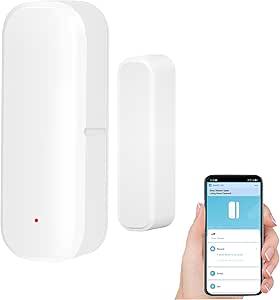 | Best Hub-Free Wi-Fi Entry Point | Connectivity: 2.4 GHz WiFi | Power Source: 2 AAA batteries (included) | Stated Battery Life: Over six months | VIEW ON AMAZON | See Our Full Breakdown |
| Tolviviov 8-Piece Wi-Fi Home Security Alarm System |  | Best DIY Alarm Kit with Loud Siren | Kit Contents: 1 siren station, 5 sensors, 2 remotes | Connectivity: 2.4 GHz Wi-Fi | Maximum Expansion: 20 sensors and 5 remotes | VIEW ON AMAZON | See Our Full Breakdown |
| PHYSEN Smart WiFi Door and Window Sensor Chime |  | Best for Indoor Awareness and Alerts | Connectivity: WiFi | Maximum Range: 500 feet | Volume Levels: 5 | VIEW ON AMAZON | See Our Full Breakdown |
| Tapo T31 Smart Door and Window Sensor Starter Kit |  | Best All-in-One Starter Kit | Included Components: 3 Tapo T110 sensors and 1 Tapo H100 hub with chime | Connectivity: Low-power wireless protocol; 2.4 GHz Wi-Fi required | Smart Home Compatibility: Alexa, Google Home, Apple HomeKit, SmartThings, Matter | VIEW ON AMAZON | See Our Full Breakdown |
| SONOFF SenseGuard DW Gen2 Zigbee Door and Window Contact Sensors, 4-Pack |  | Best Value for Zigbee Users | Brand: SONOFF | Model: SNZB-04PR2 | Quantity: 4 sensors | VIEW ON AMAZON | See Our Full Breakdown |
| Tapo T110 Mini Door Contact Sensor |  | Best Compact Expansion Sensor | Model: T110 | Compatibility: Requires Tapo Hub H100 | Connection: Sub-1G Low-Power Wireless | VIEW ON AMAZON | See Our Full Breakdown |
| smart door sensor | Connectivity | Dimensions |
|---|---|---|
| Ring Alarm Contact Sensor | Z-Wave | 1.56 x 2.09 x 0.55 in |
| YoLink Door and Window Sensor | — | — |
| Gaoducash WiFi Door and Window | Wi-Fi | 2.73 x 0.63 x 2.74 in |
| THIRDREALITY Zigbee Contact Se | Zigbee | — |
| GRSICO Zigbee Door and Window | Wireless Zigbee | 1 x 0.5 x 3 in |
| SimpliSafe 11-Piece Wireless H | — | — |
| Aqara Zigbee Door and Window S | Zigbee | — |
| Gaoducash Smart WiFi Door and | 2.4 GHz WiFi | 2.83 x 0.98 x 0.78 inches |
| Tolviviov 8-Piece Wi-Fi Home S | 2.4 GHz Wi-Fi | 9.06 × 6.69 × 1.97 inches |
| PHYSEN Smart WiFi Door and Win | WiFi | 3.54 x 3.03 x 3.74 inches |
| Tapo T31 Smart Door and Window | Low-power wireless protocol; 2.4 GHz Wi-Fi required | — |
| SONOFF SenseGuard DW Gen2 Zigb | Zigbee; requires a compatible hub | 3.54 x 1.02 x 0.53 in |
| Tapo T110 Mini Door Contact Se | — | 0.48 x 1.48 x 2.42 inches |
More Details on Our Top Picks
Ring Alarm Contact Sensor (2nd Gen)
I’d choose this sensor when the home already runs on a Ring Alarm Base Station. Tool-free installation and a slim profile make it easy to place on doors or windows, while the stated approximately three-year battery life keeps routine battery changes infrequent. It sends mobile alerts when an entry point opens, which suits basic monitoring within the Ring system. Compared with the YoLink Door and Window Sensor Kit, Ring is a more natural fit for an existing Ring setup, while YoLink includes a hub and four sensors for a separate monitoring system. The tradeoff is firm: this sensor cannot operate without the Ring base station, and some advanced features require a separate subscription. I’d skip it if you want a hub-free Wi-Fi sensor or are building around another platform.
Pros:- Tool-free installation simplifies placement on doors and windows.
- Slim design suits locations where a larger sensor would be conspicuous.
- Approximately three-year battery life reduces frequent battery changes.
Cons:- Requires a Ring Alarm Base Station to function.
- Advanced features require a separate Ring Home subscription.
Best for: Households that already have a Ring Alarm Base Station and want a slim, easy-to-install sensor for doors or windows.
Not ideal for: Buyers without a Ring Alarm Base Station, or those seeking hub-free operation or advanced features without a separate subscription.
- Model:2nd Gen
- Power source:2 x 3V CR2032 coin cell batteries
- Battery life:Approximately 3 years
- Dimensions:1.56 x 2.09 x 0.55 in
- Connectivity:Z-Wave
- Range to base station:250 ft
- Operating temperature:32°F to 120°F (0°C to 49°C)
- Requirement:Ring Alarm Base Station
- Warranty:1-year limited warranty
Our verdict“Choose this sensor for straightforward entry monitoring if you already own a Ring Alarm Base Station; otherwise, the YoLink kit offers a more self-contained starting point.”
YoLink Door and Window Sensor Kit with Hub, 4-Pack
For buyers monitoring several entry points across a large home or outbuilding, this kit’s combination of four sensors and an included hub is its clearest advantage. Its LoRa connection has an advertised open-air range of up to 2,034 feet, and the sensors can report open, closed, and left-open conditions. That long-range design sets it apart from the Ring Alarm Contact Sensor, which is tied to the Ring base station and has a listed 250-foot range to that station. YoLink also supports app alerts and self-monitoring without a monthly fee. The tradeoff is that the range figure is for open air, not a guarantee through walls, and the hub needs a smartphone plus internet connection for setup. I’d pick it for broad coverage, not for a system-free installation.
Pros:- Includes one hub and four sensors for monitoring multiple entry points.
- Advertised open-air range of up to 2,034 feet suits widely spaced devices.
- Supports open, closed, and left-open monitoring with app alerts.
- Battery life is rated for up to five years.
Cons:- Hub is required for full functionality.
- Hub setup requires a smartphone and an internet connection.
- Advertised open-air range may not reflect performance through buildings.
Best for: Households with multiple doors or windows spread across a large property that want app alerts and long-range sensor communication.
Not ideal for: Buyers who want a sensor that connects directly to Wi-Fi without a hub, or who cannot provide the hub with internet access during setup.
- Included:1 YoLink Hub and 4 door sensors
- Wireless technology:LoRa
- Advertised range:Up to 2,034 ft open air
- Battery life:Up to 5 years
- Control method:App
- Installation:Mounting tape
- Hub requirement:Required for full functionality
- Hub network:2.4 GHz Wi-Fi or wired Ethernet
- Phone compatibility:Android or Apple smartphone
Our verdict“Choose YoLink for multi-entry coverage across a wide area, but pick a hub-free option like Gaoducash if direct Wi-Fi app monitoring matters more.”
Gaoducash WiFi Door and Window Contact Sensors, 4-Pack
This four-pack makes sense for buyers who want app alerts without buying a separate hub. The sensors connect over Wi-Fi and work through Tuya Smart or Smart Life, with Alexa and Google Assistant support for voice control and routines. The app can show sensor status, alert history, and battery level, giving this pack more day-to-day visibility than a basic alert-only setup. Compared with the THIRDREALITY Zigbee Contact Sensor, Gaoducash avoids the need for a compatible Zigbee hub, but it depends on Wi-Fi and its companion app instead. Adhesive mounting keeps installation simple, and included AAA batteries get the set started. I’d skip it if your home Wi-Fi is unreliable or you prefer a hub-based Zigbee network; the supplied details also don’t state a battery-life estimate.
Pros:- Connects over Wi-Fi without requiring a separate hub.
- Works with Tuya Smart and Smart Life apps.
- Supports Alexa, Google Assistant, and app-based automation.
- App provides sensor status, alert history, and battery-level information.
Cons:- Requires Wi-Fi and a compatible smartphone app.
- The product data does not specify battery life.
Best for: Smart-home beginners who want four app-connected door or window sensors with Alexa or Google Assistant support and no separate hub.
Not ideal for: Buyers with unreliable Wi-Fi, those avoiding Tuya Smart or Smart Life, or shoppers who need a stated battery-life estimate.
- Pack count:4 sensors
- Connectivity:Wi-Fi
- App compatibility:Tuya Smart, Smart Life
- Smart assistant compatibility:Amazon Alexa, Google Assistant
- Power source:2 AAA batteries per sensor
- Batteries:Included
- Control method:App, voice
- Mounting:Door or window mount with adhesive tape
- Dimensions:2.73 x 0.63 x 2.74 in
Our verdict“Pick Gaoducash for hub-free Wi-Fi monitoring and voice routines; choose THIRDREALITY instead if you already have a compatible Zigbee hub.”
THIRDREALITY Zigbee Contact Sensor, 4-Pack
If your home already has a compatible Zigbee hub—or an Echo with a built-in Zigbee hub—this four-pack offers a straightforward way to add several monitored entry points. Its strongest case is hub-based Alexa integration: a door or window opening can trigger Alexa routines, while battery monitoring and event history are available with compatible Third Reality devices. The sensors are rated for up to two years of battery life, shorter than YoLink’s stated five years but still suited to buyers who prefer a Zigbee network over Wi-Fi sensors such as Gaoducash. Compatibility is broad, though some listed platform support depends on the Smart Bridge MZ1, sold separately. I’d avoid these for metal doors or windows, where the product is not recommended, and they’re intended for indoor use only.
Pros:- Works with compatible Zigbee hubs and Echo devices with a built-in Zigbee hub.
- Can trigger Alexa routines when an entry point opens.
- Battery life is rated for up to two years.
- Supports OTA firmware updates.
Cons:- Requires a compatible Zigbee hub.
- For indoor use only.
- Not recommended for metal doors or windows.
Best for: Alexa households with an Echo that has a built-in Zigbee hub, or owners of a compatible Zigbee hub who want four sensors for routines.
Not ideal for: Buyers without a compatible Zigbee hub, people monitoring outdoor entry points, or households with metal doors or windows.
- Pack size:4 sensors
- Connectivity:Zigbee
- Power:2 AAA 1.5V alkaline batteries per sensor
- Battery life:Up to 2 years
- Use:Indoor only
- Compatibility:Compatible Zigbee hubs and Echo devices with built-in Zigbee hub
- Additional platform support:Apple HomeKit, Google Home, Amazon Alexa, and SmartThings with Smart Bridge MZ1, sold separately
- Firmware updates:OTA supported
Our verdict“Choose THIRDREALITY for Alexa routines in an existing Zigbee setup; Gaoducash is a better fit if you want Wi-Fi sensors without a hub.”
GRSICO Zigbee Door and Window Contact Sensors, 4 Pack
GRSICO’s distinguishing feature is not a long range claim or a detailed battery-life estimate; it is the option to use adhesive backing or screw mounting. That gives renters a no-drill route and homeowners a more permanent fitting, while the compact four-pack can cover doors, windows, or cabinets. Its stated compatibility includes SmartThings, Home Assistant, Hubitat, Aeotec, Homey, and Alexa devices with a built-in Zigbee hub, making it a flexible choice for people already invested in one of those systems. Compared with the THIRDREALITY Zigbee Contact Sensor, the GRSICO listing emphasizes broader hub-platform choices and mounting flexibility, while THIRDREALITY provides a stated battery-life estimate and explicit Alexa routine support. GRSICO still requires a compatible Zigbee hub, and the supplied data does not specify battery life or sensor history features.
Pros:- Works with several named Zigbee platforms, including SmartThings and Home Assistant.
- Includes four sensors for monitoring multiple entry points.
- Offers adhesive or screw mounting for different installation needs.
- Compact form supports discreet placement.
Cons:- Requires a compatible Zigbee hub.
- The product data does not specify battery life.
- The supplied information does not detail event history or battery monitoring.
Best for: SmartThings, Home Assistant, Hubitat, Aeotec, or Homey users who want four Zigbee sensors and the choice of adhesive or screw mounting.
Not ideal for: Buyers without a compatible Zigbee hub, or shoppers who need a stated battery-life estimate and clearly specified alert-history features.
- Model:DP-ZS-01
- Quantity:4 sensors
- Connectivity:Wireless Zigbee
- Power source:Battery powered
- Battery cell type:Alkaline
- Compatible devices:SmartThings, Alexa devices with built-in Zigbee hub, Home Assistant, Hubitat, Aeotec, Homey
- Control method:App, voice
- Dimensions:1 x 0.5 x 3 in
- Installation:Self-adhesive or screw-mounted; compatible Zigbee hub required
Our verdict“Choose GRSICO if your existing Zigbee platform is supported and mounting choice matters; THIRDREALITY is the clearer pick if you want a stated battery-life estimate.”
SimpliSafe 11-Piece Wireless Home Security System Gen 3 with Indoor HD Camera
This system stands out because it isn’t just a sensor; it is a complete security hub that includes an indoor HD camera and professional monitoring options. Unlike standalone sensors like the Aqara Zigbee Door and Window Sensor, which rely on your existing smart home infrastructure, SimpliSafe provides its own cellular and Wi-Fi backbone. This makes it ideal for users who want turnkey protection without configuring hubs or bridges. However, the tradeoff is cost and complexity; you are buying into a proprietary ecosystem rather than a flexible component library.
The inclusion of two-way audio allows for active deterrence, a feature absent in passive contact sensors. While the pet-friendly motion detection reduces false alarms, it requires careful placement compared to the simpler door-gap logic of other options. This is for those prioritizing verified emergency response over DIY automation flexibility.
Pros:- Includes professional monitoring options and cellular backup for power outages.
- Integrated HD camera with two-way audio allows for active deterrence.
- Pet-friendly motion sensors reduce false alarms for animals under 60 lbs.
- Seamless integration with Alexa and Google Assistant for voice control.
Cons:- Professional monitoring requires a recurring subscription fee.
- Wireless sensors rely on batteries, requiring periodic maintenance.
- Proprietary ecosystem limits integration with non-SimpliSafe devices.
Best for: Homeowners seeking a standalone, professionally monitored security system with integrated video verification.
Not ideal for: Smart home enthusiasts who prefer open protocols like Zigbee or Matter and want to avoid monthly subscription fees.
- System Type:Wireless Home Security
- Piece Count:11
- Camera Type:Wireless Indoor HD
- Motion Sensor Range:35 feet
- Pet Friendly:Yes (under 60 lbs)
- Compatibility:Alexa, Google Assistant
- Monitoring:Optional 24/7 Professional
Our verdict“Choose this if you want a complete, monitored security suite rather than just a smart sensor.”
Aqara Zigbee Door and Window Sensor, 3-Pack
The Aqara Zigbee Door and Window Sensor is the definitive choice for Apple HomeKit households. Compared to the Gaoducash Smart WiFi Door and Window Sensor, which relies on cloud connectivity, Aqara’s Zigbee protocol offers local execution via a hub, meaning automations continue even if your internet drops. This reliability is critical for security. The compact form factor fits discreetly on windows, unlike bulkier Wi-Fi models.
However, this performance comes with a strict ecosystem lock-in. You must purchase an Aqara Hub separately, adding to the initial cost. If you already use SmartThings or third-party Zigbee hubs, this device will not pair with them, unlike the more open SONOFF SenseGuard. It is a premium component for a specific, closed-loop automation strategy.
Pros:- Zigbee connectivity enables fast, local automations via compatible hubs.
- Official support for Apple HomeKit and Amazon Alexa.
- Compact design fits discreetly on doors, windows, and cabinets.
- High sensitivity with a maximum gap of 0.86 inches.
Cons:- Requires a specific Aqara Hub, which is sold separately.
- Incompatible with SmartThings and most third-party Zigbee hubs.
- Higher upfront cost due to the mandatory hub purchase.
Best for: Apple HomeKit users who prioritize local automation reliability and low-latency responses.
Not ideal for: Users without an Aqara Hub or those using SmartThings, as it lacks third-party hub compatibility.
- Connectivity:Zigbee
- Hub Requirement:Compatible Aqara Hub required
- Compatible Platforms:Apple HomeKit, Alexa, IFTTT
- Pack Quantity:3
- Maximum Sensor Gap:0.86 inches
- Main Sensor Dimensions:1.61 × 0.87 × 0.43 inches
- Item Weight:46.5 g
Our verdict“The best pick for HomeKit users willing to invest in a hub for superior local automation performance.”
Gaoducash Smart WiFi Door and Window Sensor
This sensor removes the barrier to entry for smart security by eliminating the need for a hub. Unlike the Aqara Zigbee Door and Window Sensor, which demands a proprietary bridge, the Gaoducash Smart WiFi Door and Window Sensor connects directly to your 2.4 GHz Wi-Fi network. This makes it significantly cheaper to start and easier to deploy in homes with poor Zigbee coverage. The Tuya Smart app interface is robust, allowing for easy scene creation with other devices.
The tradeoff is potential network congestion and latency. Wi-Fi sensors can be slower to report than Zigbee alternatives like the Tapo T110 Mini, and they consume more battery power. If your router is far from the sensor, connection stability may suffer. This is best for renters or those with simple setups who want immediate functionality without technical complexity.
Pros:- No hub required; connects directly to 2.4 GHz Wi-Fi.
- Works with Alexa and Google Assistant for voice control.
- Includes batteries and adhesive for immediate installation.
- Integrates with the wide Tuya Smart device ecosystem.
Cons:- Requires a stable 2.4 GHz Wi-Fi signal at the installation site.
- Battery life may vary significantly based on network activity.
- Cloud-dependent reporting can introduce latency during internet outages.
Best for: Renters and beginners who want a simple, hub-free setup with direct Wi-Fi connectivity.
Not ideal for: Users with congested Wi-Fi networks or those requiring low-latency, local-only automations.
- Connectivity:2.4 GHz WiFi
- Power Source:2 AAA batteries (included)
- Stated Battery Life:Over six months
- Compatible Apps:Tuya Smart, Smart Life
- Voice Assistants:Amazon Alexa, Google Assistant
- Dimensions:2.83 x 0.98 x 0.78 inches
- Warranty:24 months
Our verdict“A practical, budget-friendly option for users who want to skip hub setup entirely.”
Tolviviov 8-Piece Wi-Fi Home Security Alarm System
This kit addresses a common weakness in smart sensors: the lack of a loud, physical deterrent. While the PHYSEN Smart WiFi Door and Window Sensor Chime offers gentle notifications, the Tolviviov 8-Piece Wi-Fi Home Security Alarm System includes a 110dB siren station that actively scares intruders. It combines the convenience of app control with the traditional security of remote fobs, appealing to users who distrust phone-only interfaces.
The downside is its bulk and power requirements. The siren station must stay plugged into AC power, unlike battery-powered sensors like the Ring Alarm Contact Sensor. It also uses a proprietary 2.4 GHz Wi-Fi connection that does not integrate with broader smart home platforms like HomeKit. This is a dedicated security tool, not a general-purpose automation component.
Pros:- Includes a loud 110dB siren for active intruder deterrence.
- Comes with remote controls for quick arming and disarming.
- Expandable to support up to 20 sensors and 5 remotes.
- No monthly subscription fees required for local alerts.
Cons:- Siren station requires constant AC power and has limited battery backup.
- Limited smart home integration beyond basic Alexa/Google commands.
- Bulky siren unit is less discreet than standalone sensors.
Best for: Homeowners who want a loud local alarm deterrent combined with remote smartphone alerts.
Not ideal for: Users seeking deep integration with smart home ecosystems like HomeKit or Matter.
- Kit Contents:1 siren station, 5 sensors, 2 remotes
- Connectivity:2.4 GHz Wi-Fi
- Maximum Expansion:20 sensors and 5 remotes
- Backup Battery Life:8 hours
- Power:AC adapter with battery backup
- Maximum Range:100 meters
- Dimensions:9.06 × 6.69 × 1.97 inches
Our verdict“Ideal for those prioritizing a loud, physical alarm over subtle smart home integration.”
PHYSEN Smart WiFi Door and Window Sensor Chime
This product redefines the sensor’s role from security to indoor awareness. Unlike the Gaoducash Smart WiFi Door and Window Sensor, which focuses solely on security alerts, the PHYSEN Smart WiFi Door and Window Sensor Chime includes a plug-in receiver that plays audible chimes locally. This is perfect for knowing when someone enters a room without checking your phone. The receiver supports up to 20 sensors, allowing for a comprehensive internal monitoring system.
However, it is less robust for perimeter security. The chime volume, while adjustable, is not a deterrent like the siren in the Tolviviov system. Additionally, while app notifications are free, SMS alerts may incur costs. This device is best suited for monitoring foot traffic, elderly care, or retail entry, rather than preventing break-ins.
Pros:- Includes a plug-in chime receiver with adjustable volume and ringtones.
- Supports up to 20 sensors for large area coverage.
- Provides free push notifications via the companion app.
- Easy plug-and-play setup with no hub required.
Cons:- SMS and phone call alerts may require additional payment.
- Chime is not a security deterrent, only an awareness tool.
- Relies on Wi-Fi for remote alerts and app functionality.
Best for: Retail owners, caregivers, or families needing audible notifications for high-traffic entry points.
Not ideal for: Users looking for a primary anti-theft security system with loud deterrent sirens.
- Connectivity:WiFi
- Maximum Range:500 feet
- Volume Levels:5
- Ringtones:32
- Expandable Sensors:Up to 20
- Dimensions:3.54 x 3.03 x 3.74 inches
- App Notifications:Free push notifications
Our verdict“The best choice for monitoring traffic flow and entry alerts rather than security threats.”
Tapo T31 Smart Door and Window Sensor Starter Kit
This kit stands out for beginners who want a complete system without extra purchases. Unlike the standalone Tapo T110, which forces you to hunt down a separate hub, this bundle includes the Tapo H100 hub with a built-in 90 dB chime and three sensors. The real advantage is immediate utility: you get audible alerts for local notifications and app push notifications for remote monitoring right out of the box. While the SONOFF SenseGuard offers more sensors for a lower per-unit cost, it lacks the integrated chime and requires a different hub ecosystem. The Tapo kit strikes a balance between ease of setup and smart home integration, supporting Matter, Alexa, and Google Home. The tradeoff is the dependency on the specific Tapo hub; if you move, you must take the hub with the sensors, unlike Wi-Fi-only alternatives.
Pros:- Includes hub, chime, and three sensors for immediate use
- Supports Matter, Alexa, Google Home, and Apple HomeKit
- Tool-free magnetic or adhesive mounting options
- Long battery life of up to two years per sensor
Cons:- Sensors are useless without the included hub
- Requires a 2.4 GHz Wi-Fi network for hub connectivity
- Limited to three sensors unless you buy more separately
Best for: Homeowners setting up their first smart security system who want an audible chime and app alerts in one box.
Not ideal for: Users who already own a Zigbee hub or prefer Wi-Fi-only devices that do not require a central bridge.
- Included Components:3 Tapo T110 sensors and 1 Tapo H100 hub with chime
- Connectivity:Low-power wireless protocol; 2.4 GHz Wi-Fi required
- Smart Home Compatibility:Alexa, Google Home, Apple HomeKit, SmartThings, Matter
- Alarm Volume:90 dB
- Sensor Battery Life:Up to 2 years
- Mounting Type:Magnetic or adhesive
- Sensor Dimensions:2.42 x 1.48 x 0.48 inches
- Hub Dimensions:2.8 x 2.5 x 2 inches
- Color:White
Our verdict“The most convenient entry point for smart security if you want audible alerts and app notifications without buying a separate hub.”
SONOFF SenseGuard DW Gen2 Zigbee Door and Window Contact Sensors, 4-Pack
If you already run a Zigbee network, this 4-pack delivers exceptional value per sensor. Compared to the Tapo T31 Kit, which bundles a hub, the SONOFF pack assumes you have the infrastructure, letting you scale security cheaply. The tamper alerts are a significant upgrade over basic open/close detection, notifying you if someone tries to rip the sensor off the doorframe. However, the dependency on a Zigbee hub is a hurdle for novices who might prefer the simplicity of the Tapo ecosystem. The inclusion of AAA batteries is a practical touch, though some users prefer the slimmer profile of CR2032-powered options like the Tapo T110. This model is ideal for expanding an existing setup rather than starting from scratch.
Pros:- Low cost per sensor when buying in bulk
- Includes tamper detection for added security
- Flexible installation with horizontal or vertical magnet options
- Works with Alexa, Home Assistant, and SmartThings
Cons:- Requires a separate compatible Zigbee hub
- Uses bulkier AAA batteries compared to coin-cell alternatives
- No built-in chime or local audio alerts
Best for: Tech-savvy users with an existing Zigbee hub who need to add multiple sensors cheaply.
Not ideal for: Beginners without a smart home hub, as these sensors cannot function independently.
- Brand:SONOFF
- Model:SNZB-04PR2
- Quantity:4 sensors
- Power Source:2 AAA batteries per sensor, included
- Connectivity:Zigbee; requires a compatible hub
- Compatible Devices:Alexa, Home Assistant, SmartThings
- Detection Distance:Up to 30 mm
- Dimensions:3.54 x 1.02 x 0.53 in
- Sensor Technology:Contact sensor with tamper alert
Our verdict“The most cost-effective way to expand security coverage if you already own a compatible Zigbee hub.”
Tapo T110 Mini Door Contact Sensor
Designed for discreet monitoring, this sensor is significantly smaller than the SONOFF SenseGuard, making it less visible on cabinets or windows. It relies on Sub-1G Low-Power Wireless technology, which helps achieve the two-year battery life on a single CR2032 coin cell. While this efficiency is impressive, the strict requirement for the Tapo Hub H100 limits its flexibility compared to Wi-Fi-only sensors. It is the perfect add-on if you already own the Tapo starter kit but need to cover specific spots like a pantry door. The 15mm max gap is tighter than some competitors, requiring precise alignment during installation. For those with existing Tapo infrastructure, this is the least intrusive way to expand coverage.
Pros:- Extremely compact and discreet profile
- Up to 2 years of battery life on a single CR2032
- Easy adhesive mounting with no tools required
- Supports Smart Actions for home automation
Cons:- Requires Tapo Hub H100 to operate
- Strict 15mm gap limitation requires precise alignment
- Limited to 2.4 GHz Wi-Fi network for the hub
Best for: Existing Tapo users who need to add coverage to small or inconspicuous areas like cabinets.
Not ideal for: New users without a Tapo Hub, as the sensor will not function without one.
- Model:T110
- Compatibility:Requires Tapo Hub H100
- Connection:Sub-1G Low-Power Wireless
- Battery Life:Up to 2 years (CR2032 included)
- Dimensions:0.48 x 1.48 x 2.42 inches
- Weight:0.03 kg
- Material:Plastic
- Mounting Type:Surface Mount (3M adhesive included)
- Max Gap:15mm
Our verdict“The ideal expansion sensor for Tapo ecosystem users who prioritize battery life and a low-profile design.”
How We Picked
To rank these smart door sensors, I evaluated each product based on four primary criteria: connectivity reliability, installation flexibility, ecosystem compatibility, and long-term maintenance. Connectivity reliability was judged by the sensor’s ability to maintain a stable connection without frequent dropouts, with a preference for protocols that support mesh networking if applicable. I also assessed how easy the units were to mount on standard door frames, noting any issues with size or alignment that could hinder proper operation.
Ecosystem compatibility played a major role in the final ordering, as a sensor that works with your existing smart home platform is far more valuable than one that requires a new hub. Finally, I considered the total cost of ownership, factoring in battery replacement frequency and any required subscription fees for cloud storage or monitoring. Products that offered local processing without monthly fees were ranked higher than those locked behind paywalls, unless the proprietary ecosystem provided unmatched convenience.
Factors to Consider When Choosing Smart Door Sensors
Selecting the right sensor requires looking past the price tag and understanding how the device fits into your broader home automation strategy. Here are the critical factors to weigh before making a purchase.Understanding Connectivity Protocols
The most significant differentiator among smart door sensors is the communication protocol they use. Zigbee and Z-Wave sensors create a mesh network, meaning each device acts as a repeater for others, which improves overall signal strength in larger homes. In contrast, Wi-Fi sensors connect directly to your router, which is simpler to set up but often results in shorter battery life and potential network congestion if you have many IoT devices. If you already have a smart home hub, choosing a Zigbee or Z-Wave sensor can integrate seamlessly with existing automations. However, if you want a standalone solution without extra hubs, Wi-Fi or Bluetooth-based options are more straightforward, provided you accept the tradeoff of more frequent battery changes.
Hub Requirements and Ecosystem Lock-In
Many sensors do not work in isolation; they require a specific hub or base station to function. Brands like Ring and SimpliSafe require their proprietary base stations, which often come with optional monitoring subscriptions. Conversely, open-protocol sensors like the Aqara or ThirdReality can work with generic Zigbee hubs or platforms like Home Assistant, offering greater flexibility. Before buying, check if you already own a compatible hub. If not, calculate the total cost of the sensor pack plus the hub. Sometimes a single-brand starter kit is cheaper than buying individual sensors and a separate hub, but it limits your future expansion to that brand’s ecosystem.
Physical Design and Mounting Constraints
The physical dimensions of the sensor and its magnet matter when installing on modern doors with tight clearances. A bulky sensor might not fit on a narrow door jamb or could prevent the door from closing fully if the magnet is misaligned. Compact designs are preferable for sliding doors or windows where space is limited. Additionally, consider the mounting method: most use adhesive strips for quick installation, but screws offer better durability and tamper resistance. If you are renting, look for sensors with high-quality adhesive that removes cleanly. For homeowners, screw-mounting ensures the sensor stays in place during harsh weather or accidental impacts, which is critical for maintaining security integrity.
Power Source and Battery Maintenance
Battery life varies dramatically between protocols and usage patterns. Wi-Fi sensors typically consume more power because they must maintain a constant connection to the router, often requiring battery replacements every few months. Zigbee and Z-Wave sensors are designed to sleep until triggered, extending battery life to a year or more. Some models offer rechargeable batteries via USB-C, which eliminates replacement costs but adds the inconvenience of plugging in a tiny device. Consider how many doors you plan to monitor; if you have ten or more, the maintenance burden of Wi-Fi sensors becomes significant. Prioritize low-power protocols if you want a ‘set it and forget it’ system with minimal upkeep.
Integration with Smart Home Automations
A door sensor is most powerful when it triggers other actions, such as turning on lights, adjusting thermostats, or locking other doors. Evaluate how well the sensor integrates with your current smart home platform. Amazon Alexa and Google Home have broad compatibility, but native integration into Apple HomeKit is often limited to specific brands like Aqara or Eve. If you use advanced automation platforms like Home Assistant, open-protocol Zigbee sensors provide the most flexibility. Check if the sensor supports ‘open/close’ state changes in your app, or if it only sends a simple alert. The depth of integration determines how useful the sensor is beyond basic security alerts.
Frequently Asked Questions
Do smart door sensors work if my internet goes down?
It depends entirely on the connectivity protocol and system architecture. Wi-Fi-based sensors generally stop sending alerts to your phone if the internet connection drops, though some may still trigger local alarms or sirens. Zigbee and Z-Wave sensors connected to a local hub can often continue to perform local automations, such as turning on lights or sounding a siren, even without internet. However, remote notifications will still be delayed or lost until connectivity is restored. If offline reliability is a priority, choose a system with local processing capabilities and a cellular backup option for the hub.
Can I use smart door sensors on sliding doors or gates?
Yes, but you must choose sensors with a sufficient trigger distance between the magnet and the switch. Standard contact sensors typically work with gaps up to 0.5 inches, which is fine for most hinged doors. Sliding doors and gates often have larger gaps or misalignment issues due to weather or settling. Look for models specifically rated for wider gaps or use extended alignment accessories if available. Ensure the mounting surface is flat and stable; sliding mechanisms can introduce vibration that might cause false alarms if the sensor is not securely fastened.
Are subscription fees required for all smart door sensors?
No, many smart door sensors function without any monthly fees, but features vary. Basic sensors from brands like Aqara, Ring (without monitoring), and ThirdReality allow you to receive instant push notifications and control automations for free. However, cloud storage for video verification or professional monitoring services usually require a subscription. Some Wi-Fi-only sensors may offer free basic alerts but lock advanced features or history logs behind a paywall. Always check the fine print to see if the core security function requires ongoing payment or if the subscription is optional for premium features.
How do I prevent false alarms from pets or weather?
False alarms are often caused by loose mounting or environmental interference rather than the sensor itself. Ensure the magnet and sensor are aligned precisely and mounted on a rigid surface that does not flex in the wind. For pets, the risk is low unless they can physically dislodge the sensor or open a lightweight door. Temperature fluctuations can sometimes affect battery contacts or adhesive strength, so use high-quality mounting tape or screws. Regularly check the battery level, as low power can cause erratic behavior or delayed reporting, which might be mistaken for a false alarm.
What is the difference between a contact sensor and a motion sensor?
A contact sensor detects the physical opening or closing of a door or window by measuring the gap between two components. It is ideal for perimeter security because it only triggers when an entry point is breached. A motion sensor detects movement within a room using infrared or other technologies. Motion sensors are better for interior monitoring but can trigger false alarms from pets or curtains. Using both provides layered security: contact sensors guard the perimeter, while motion sensors detect activity inside the home after a breach or during armed hours.
Conclusion
Choosing the right smart door sensors comes down to balancing your existing smart home setup with your maintenance preferences. For most users, the Ring Alarm Contact Sensor remains the best overall choice due to its ease of installation and reliable app integration, making it perfect for beginners who want a hassle-free security upgrade. If you are building a custom home automation system and want to avoid subscription fees, the Aqara Zigbee Door and Window Sensor offers the best value and flexibility, especially for those with Apple HomeKit or Home Assistant. For budget-conscious buyers needing multiple sensors, the YoLink Kit provides a solid entry point with its hub included, though you should verify its long-term support. Ultimately, prioritize the protocol that matches your hub and the form factor that fits your door frames to avoid frustration during installation.
Halloween Picks
halloween
As an affiliate, we earn on qualifying purchases.