

Smart hubs can connect devices that otherwise use different wireless standards or give you one place to manage a smart home. My best overall pick is the Hubitat Elevation C-8 Pro for buyers who want flexible automation, while the Amazon Echo Hub 8-Inch is a more approachable choice for touch-based control and the Lutron Caséta Smart Hub focuses on dependable lighting control. The main tradeoffs are compatibility, setup effort, reliance on cloud services, and whether you need a screen or a dedicated bridge. Some products here are specialized hubs, while others are smart displays or even a computer accessory, so the right fit depends on what you want connected. Read on for the full breakdown and a guide to choosing the right kind of hub.

Get privacy and security gear delivered free with Prime
- Fast, free delivery on millions of items
- Prime Video, Amazon Music and more included
- Member-only deals all year
Key Takeaways
- Hubitat Elevation C-8 Pro is the strongest fit for automation-focused buyers who are prepared to spend more time configuring rules.
- Amazon Echo Hub 8-Inch offers a dedicated touch panel, while the Echo Show models combine smart-home controls with screens built for broader household use.
- Lutron Caséta Smart Hub is a focused choice for lighting systems; it does not replace a hub intended to coordinate a wide mix of devices.
- Tapo H100, H110, and H200 serve different Tapo use cases, so buyers should match the hub to their devices rather than assume the models are interchangeable.
- Several entries are purpose-built bridges or non-home products, including the Linkind outdoor lights hub, Hapadif shade bridge, and Anker USB-C hub; their narrower scope makes compatibility checks especially important.
| Amazon Echo Hub 8-Inch Smart Home Control Panel |  | Best Dedicated Control Panel | Display: 8 inches | Voice assistant: Alexa | Connectivity: Wi-Fi, Bluetooth, Zigbee, Matter, Sidewalk, Thread | VIEW ON AMAZON | See Our Full Breakdown |
| Lutron Caséta Smart Hub |  | Best for Lutron Lighting | Connectivity: Connects to a Wi-Fi router | Smart-home compatibility: Amazon Alexa, Apple HomeKit, Google Assistant, Ring, Serena shades, Sonos | Technology: Clear Connect | VIEW ON AMAZON | See Our Full Breakdown |
| Amazon Echo Show 5 Smart Display, Cloud Blue |  | Best Compact Alexa Display | Display: 5.5 inches | Camera: 2 MP | Color: Cloud Blue | VIEW ON AMAZON | See Our Full Breakdown |
| Tapo H110 Matter-Certified Smart IR and IoT Hub with Chime |  | Best for Legacy Infrared Appliances | Model: H110 | Connectivity: 2.4 GHz Wi-Fi, infrared | Compatibility: Over 8,000 brands and 18 appliance types | VIEW ON AMAZON | See Our Full Breakdown |
| Anker Nano 10-in-1 USB-C Hub with Smart Display |  | Best for Laptop Desk Setups | Ports: HDMI 2.1, DisplayPort 1.4, 100W max PD-IN, 10 Gbps USB-C, 10 Gbps USB-A, two 5 Gbps USB-A, Gigabit Ethernet, SD and microSD 3.0 | Host charging: Up to 80W | Single-monitor video: Up to 4K at 144 Hz or 2K at 240 Hz | VIEW ON AMAZON | See Our Full Breakdown |
| Linkind Outdoor Lights Smart Hub |  | Best for Outdoor Lighting | Connectivity: Bluetooth mesh; 2.4 GHz Wi-Fi | Maximum connected devices: 32 Linkind smart lights | Control range: Up to 40 m | VIEW ON AMAZON | See Our Full Breakdown |
| Hubitat Elevation C-8 Pro Smart Home Hub |  | Best for Advanced Local Automation | Connectivity: Matter 1.5, Z-Wave 800 Series Long Range, Zigbee 3.0, Bluetooth | Voice assistants: Amazon Alexa, Google Home, Apple HomeKit | Device compatibility: 1,000+ devices across 100+ brands | VIEW ON AMAZON | See Our Full Breakdown |
| Amazon Echo Show 15, 15.6-Inch Full HD Smart Display with Fire TV |  | Best Smart Hub Display for Family Spaces | Display: 15.6-inch Full HD (1080p) | Entertainment: Built-in Fire TV; Fire TV remote included | Video calling: Centered auto-framing camera, 3.3x zoom, wide field of view, and noise reduction | VIEW ON AMAZON | See Our Full Breakdown |
| Tapo H100 Smart Hub with Built-In Chime | 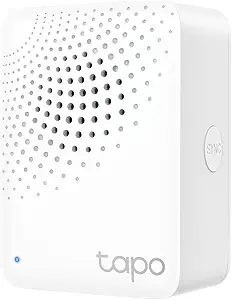 | Best for Tapo Sensors and Alerts | Model: H100 | Wireless protocol: Low-power wireless | Wi-Fi requirement: 2.4 GHz | VIEW ON AMAZON | See Our Full Breakdown |
| Aeotec Smart Home Hub with SmartThings, Z-Wave, Zigbee, and Matter |  | Best for SmartThings and Wired Setup | Connectivity: Wi-Fi, Ethernet | Protocols and platforms: Matter, SmartThings, Zigbee, Z-Wave Plus (V3 model only) | Voice assistants: Google Home, Alexa | VIEW ON AMAZON | See Our Full Breakdown |
| TP-Link Tapo H200 Smart Hub with Built-In Chime |  | Best for Large Tapo Setups | Device capacity: Up to 64 switches, sensors, or buttons plus 4 cameras or doorbells | Compatible devices: Tapo C420, Tapo C400, Tapo D230, and other Tapo devices | Storage: microSD card up to 512 GB, sold separately | VIEW ON AMAZON | See Our Full Breakdown |
| Amazon Echo Hub Smart Home Control Panel |  | Best for Alexa-First Control | Display size: 8 inches | Smart home protocols: Wi-Fi, Bluetooth, Zigbee, Matter, Sidewalk, Thread | Installation: Wall mounted; compatible with separately sold tabletop stands | VIEW ON AMAZON | See Our Full Breakdown |
| Aeotec Smart Home Hub2 V4 with Matter and Zigbee |  | Best for Local SmartThings Automations | Model: Hub2 V4 | Ecosystem: SmartThings | Protocols: Matter, Zigbee | VIEW ON AMAZON | See Our Full Breakdown |
| Hapadif Smart Bridge Hub for Motorized Shades |  | Best for Motorized Shades | Manufacturer: Hapadif | Model number: Hpd-sbh-001 | Product dimensions: 4 x 3.5 x 1.5 inches | VIEW ON AMAZON | See Our Full Breakdown |
| smart hub | Connectivity |
|---|---|
| Amazon Echo Hub 8-Inch Smart H | Wi-Fi, Bluetooth, Zigbee, Matter, Sidewalk, Thread |
| Lutron Caséta Smart Hub | Connects to a Wi-Fi router |
| Amazon Echo Show 5 Smart Displ | — |
| Tapo H110 Matter-Certified Sma | 2.4 GHz Wi-Fi, infrared |
| Anker Nano 10-in-1 USB-C Hub w | — |
| Linkind Outdoor Lights Smart H | Bluetooth mesh; 2.4 GHz Wi-Fi |
| Hubitat Elevation C-8 Pro Smar | Matter 1.5, Z-Wave 800 Series Long Range, Zigbee 3.0, Bluetooth |
| Amazon Echo Show 15 | — |
| Tapo H100 Smart Hub with Built | — |
| Aeotec Smart Home Hub with Sma | Wi-Fi, Ethernet |
| TP-Link Tapo H200 Smart Hub wi | — |
| Amazon Echo Hub Smart Home Con | — |
| Aeotec Smart Home Hub2 V4 with | Wi-Fi, Ethernet |
| Hapadif Smart Bridge Hub for M | — |
More Details on Our Top Picks
Amazon Echo Hub 8-Inch Smart Home Control Panel
The Echo Hub is the clearest fit for a household that wants a fixed place to manage Alexa-compatible devices. Its 8-inch screen puts controls, routines, and compatible camera feeds together, while built-in Zigbee, Matter, and Thread support gives it broader smart-home reach than the Echo Show 5, which is more focused on media and calls. The tradeoff is that this is a control panel rather than a general-purpose display: it has no listed camera or entertainment focus, and installation may take extra planning. It can be wall mounted, but wall power and cable-hiding accessories may need separate purchases; the table-top stand is also sold separately. Certified refurbished status may suit buyers comfortable with that condition, and the listing says it includes the same limited warranty as a new device.
Pros:- 8-inch screen brings compatible device controls and routines into one place
- Built-in support for Zigbee, Matter, and Thread alongside Wi-Fi and Bluetooth
- Can show compatible camera feeds and manage security systems
- Can be wall mounted or used with a separately sold table-top stand
Cons:- Wall power and cable-hiding accessories may require separate purchases
- Table-top stand is sold separately
- Certified refurbished condition may not suit buyers seeking a new device
Best for: Alexa households that want a wall-mounted dashboard for routines, compatible devices, and camera feeds
Not ideal for: Buyers who want a ready-to-use tabletop screen or a display primarily for video calls and entertainment
- Display:8 inches
- Voice assistant:Alexa
- Connectivity:Wi-Fi, Bluetooth, Zigbee, Matter, Sidewalk, Thread
- Installation:Wall mount; table-top stand sold separately
- Device condition:Certified refurbished
- Recycled materials:27%
Our verdict“Choose the Echo Hub if you want a dedicated Alexa control panel with broad device-standard support and have a plan for its power and mounting.”
Lutron Caséta Smart Hub
This hub earns its place through a focused job: connecting Caséta lighting and accessories to major smart-home platforms. Its Clear Connect technology avoids competing with Wi-Fi-connected devices, a useful distinction from the Tapo H110, which uses 2.4 GHz Wi-Fi and infrared to control a wider mix of legacy appliances. The Caséta hub supports up to 75 Caséta devices and works with Alexa, Apple HomeKit, Google Assistant, Ring, Serena shades, and Sonos. That breadth makes it a strong foundation for a Lutron-centered home, but it is not a broad radio hub for mixing unrelated device types. Compatible dimmers, switches, and accessories are sold separately, so the hub alone does not provide lighting control. Setup is straightforward: plug it into an outlet and connect it to a router.
Pros:- Works with Alexa, Apple HomeKit, Google Assistant, Ring, Serena shades, and Sonos
- Clear Connect technology avoids competing with Wi-Fi-connected devices
- Simple outlet and router setup
- Supports expansion to up to 75 Caséta devices
Cons:- Compatible dimmers, switches, and other accessories are sold separately
- Its focus on Caséta devices limits its usefulness as a hub for mixed-brand smart-home hardware
Best for: Homeowners building a Caséta lighting system who want it connected to several major smart-home platforms
Not ideal for: Buyers seeking one hub for mixed-brand sensors, appliances, and devices outside the Caséta ecosystem
- Connectivity:Connects to a Wi-Fi router
- Smart-home compatibility:Amazon Alexa, Apple HomeKit, Google Assistant, Ring, Serena shades, Sonos
- Technology:Clear Connect
- Device capacity:Up to 75 Caséta devices
- Included:One Lutron Caséta Smart Hub
Our verdict“Pick the Caséta Smart Hub when Lutron lighting is the center of your setup and you want platform connections with room to expand.”
Amazon Echo Show 5 Smart Display, Cloud Blue
The Echo Show 5 is the compact, everyday-screen pick for buyers who want Alexa controls alongside media and video calls. Its 5.5-inch display can handle news, weather, and compatible smart-home controls, while the 2 MP camera supports calls and home check-ins. Compared with the Echo Hub 8-Inch Smart Home Control Panel, it takes up less space and adds a camera, but its smaller screen and lack of listed Zigbee, Matter, and Thread hub support make it less suited to a dedicated, broad-device dashboard. Privacy controls include a camera shutter and microphone and camera off button, which help when the device sits in a bedroom or shared space. The main compromise is screen area, and some camera or smart-home functions depend on compatible devices or services.
Pros:- Compact 5.5-inch display for news, weather, and media
- 2 MP camera supports video calls and home check-ins
- Camera shutter and microphone and camera off button provide physical privacy controls
- Fabric uses post-consumer recycled polyester yarn and aluminum is recycled
Cons:- The 5.5-inch display offers less room for controls than the Echo Hub’s 8-inch panel
- Some camera and smart-home features require compatible devices or services
Best for: Alexa users with limited counter space who want a small screen for calls, media, and basic compatible device control
Not ideal for: Buyers who need a large smart-home control panel or built-in support for multiple device connectivity standards
- Display:5.5 inches
- Camera:2 MP
- Color:Cloud Blue
- Smart assistant:Alexa
- Recycled materials:Fabric made from 100% post-consumer recycled polyester yarn; aluminum made from 100% recycled aluminum
- Packaging:100% recyclable
Our verdict“Choose the Echo Show 5 if you want a compact Alexa screen with calling and media features more than a dedicated multi-standard smart-home hub.”
Tapo H110 Matter-Certified Smart IR and IoT Hub with Chime
The Tapo H110 is a practical bridge between smart-home platforms and appliances that still rely on infrared remotes. It can control compatible TVs, air conditioners, and fans from over 8,000 brands, giving it a different role from the Lutron Caséta Smart Hub, which is built around Caséta lighting and accessories. Matter certification and support for Alexa, Google Assistant, and Siri help connect its controls to common smart-home routines; app access, scheduling, and location-based control add ways to automate appliances. The built-in 93 dB alarm also gives the hub an audible alert function. Infrared depends on line of sight and range, so it cannot control an appliance hidden behind a cabinet or too far away. It also requires 2.4 GHz Wi-Fi, a constraint for homes configured only for other bands.
Pros:- Controls compatible infrared appliances across over 8,000 brands and 18 appliance types
- Matter-certified and compatible with Alexa, Google Assistant, and Siri
- Supports remote access, scheduled automations, and location-based control
- Built-in 93 dB alarm can provide audible alerts
Cons:- Infrared control requires appliances to be within range
- Requires 2.4 GHz Wi-Fi
Best for: People who want app and voice control for infrared TVs, air conditioners, fans, and other legacy appliances
Not ideal for: Buyers whose appliances are out of infrared range or whose Wi-Fi setup does not provide 2.4 GHz connectivity
- Model:H110
- Connectivity:2.4 GHz Wi-Fi, infrared
- Compatibility:Over 8,000 brands and 18 appliance types
- Smart-home standard:Matter-certified
- Voice assistants:Alexa, Google Assistant, Siri
- Built-in alarm:93 dB
- App compatibility:iOS and Android
Our verdict“Choose the H110 if infrared appliances are the main gap in your smart home and they are positioned within the hub’s control range.”
Anker Nano 10-in-1 USB-C Hub with Smart Display
This Anker Nano is a laptop docking hub, not a smart-home hub, so it belongs in a roundup about desk connectivity only if “hub” is used in that broader sense. Its 10 connection options include HDMI 2.1, DisplayPort 1.4, USB ports, Ethernet, and memory-card readers, while the built-in display shows port and device information. For a compatible host, it supports up to 4K at 144 Hz on one monitor or dual 2K at 240 Hz. That makes it a better match for a laptop desk than the Amazon Echo Hub, which manages compatible home devices rather than computer peripherals. Host compatibility matters: the laptop must support the listed USB-C features, and the charger is not included. Mac users should also note that the two external displays mirror content, and Linux is unsupported.
Pros:- Ten connection options include HDMI 2.1, DisplayPort 1.4, Gigabit Ethernet, and SD and microSD readers
- Built-in display shows port and device information
- Supports high-refresh single-monitor output and compatible dual-monitor configurations
- Rear-facing ports and a 27.6-inch host cable can help reduce desk clutter
Cons:- Charger is not included
- macOS mirrors content across both external monitors
- Not compatible with Linux
Best for: Windows or macOS laptop users who need a compact dock with high-refresh display outputs, Ethernet, and card readers
Not ideal for: Anyone seeking a smart-home controller, Linux support, or independent extended displays on a Mac
- Ports:HDMI 2.1, DisplayPort 1.4, 100W max PD-IN, 10 Gbps USB-C, 10 Gbps USB-A, two 5 Gbps USB-A, Gigabit Ethernet, SD and microSD 3.0
- Host charging:Up to 80W
- Single-monitor video:Up to 4K at 144 Hz or 2K at 240 Hz
- Dual-monitor video:Up to dual 2K at 240 Hz with a compatible host
- Built-in cable length:27.6 inches
- Compatibility:Windows 10/11 and macOS; USB-C with Power Delivery, DisplayPort 1.2/1.4/2.1, and USB4 or Thunderbolt 3/4/5
- Included:Hub, magnetic base, safety sheet with QR code for user manual
Our verdict“Choose this Anker dock for a compatible laptop desk setup, but skip it if you need a smart-home hub or use Linux.”
Linkind Outdoor Lights Smart Hub
The Linkind Outdoor Lights Smart Hub is a focused choice for managing a yard full of compatible Linkind lights. Its Bluetooth mesh connection can coordinate up to 32 lights, while the Aidot app adds group control, schedules, music modes, and 43 preset scenes. That makes it more useful for shaping an outdoor lighting setup than a general-purpose hub such as the Aeotec Smart Home Hub, which is built to connect devices across several protocols and categories.
The tradeoff is that this hub has a narrow job: it requires compatible Linkind lights, 2.4 GHz Wi-Fi, and a separate power adapter. Its stated control range is up to 40 m, so placement still matters. Choose it for coordinated outdoor effects and voice control; skip it if you want one hub for a mixed-brand smart home.
Pros:- Groups and controls up to 32 compatible Linkind lights
- Offers schedules, music modes, and 43 preset scenes
- Supports app and Alexa or Google Assistant voice control
Cons:- Works only with compatible Linkind smart outdoor lights
- Requires 2.4 GHz Wi-Fi and a separate power adapter
Best for: Linkind light owners who want scheduled, grouped outdoor lighting and app or voice control
Not ideal for: Buyers building a mixed-brand smart home or anyone without compatible Linkind lights
- Connectivity:Bluetooth mesh; 2.4 GHz Wi-Fi
- Maximum connected devices:32 Linkind smart lights
- Control range:Up to 40 m
- Preset scenes:43 dynamic scenes
- Voice assistants:Amazon Alexa and Google Assistant
- Power input:5V-1A or 5V-2A adapter
- Phone compatibility:Android 6.0 or later; iOS 12.0 or later
Our verdict“Choose this hub to coordinate a compatible Linkind outdoor lighting setup, but pick a broader smart home hub for mixed devices.”
Hubitat Elevation C-8 Pro Smart Home Hub
For buyers who want automation to keep running through an internet outage, the Hubitat Elevation C-8 Pro is the most capable control center in this group. Local processing, support for Matter, Z-Wave, Zigbee, and Bluetooth, and compatibility with more than 1,000 devices across 100+ brands give it broader reach than the Linkind Outdoor Lights Smart Hub, which serves a single lighting ecosystem. The two external antennas are dedicated to Z-Wave and Zigbee.
That flexibility asks more of its owner. Rule Machine and the AI-assisted routine builder offer room for detailed automations, but the learning curve may frustrate someone who only wants a simple dashboard. Platform updates do not require a recurring subscription. Camera compatibility beyond the mentioned Ring integration is not specified, so buyers with camera-centered plans should check that fit before choosing it.
Pros:- Local processing lets automations continue during internet outages
- Supports Matter, Z-Wave 800 Series Long Range, Zigbee 3.0, and Bluetooth
- Works with Alexa, Google Home, and Apple HomeKit
- Includes advanced automation tools without a required recurring subscription
Cons:- Advanced automation tools can take time to learn
- Camera compatibility beyond the mentioned Ring integration is not specified
Best for: Smart home enthusiasts who want local automations across several protocols and brands
Not ideal for: Beginners seeking a simple, low-setup hub or buyers who need clearly specified broad camera support
- Connectivity:Matter 1.5, Z-Wave 800 Series Long Range, Zigbee 3.0, Bluetooth
- Voice assistants:Amazon Alexa, Google Home, Apple HomeKit
- Device compatibility:1,000+ devices across 100+ brands
- Antennas:Two dedicated external antennas for Z-Wave and Zigbee
- Dimensions:3.23 x 2.95 x 0.67 in
- Weight:0.16 lb
- Subscription:No recurring subscription required
Our verdict“Pick the C-8 Pro if you want deep, locally processed automations across a varied device collection and are willing to learn its tools.”
Amazon Echo Show 15, 15.6-Inch Full HD Smart Display with Fire TV
The Echo Show 15 makes the most sense when a smart hub needs to double as a shared household screen. Its 15.6-inch Full HD display can keep calendars and to-do lists visible, while Fire TV adds entertainment and voice or dashboard controls reach compatible smart home devices. Compared with the Amazon Echo Hub 8-Inch Smart Home Control Panel, this is the more screen-focused option for a kitchen or family area where video and household information matter alongside device control.
That emphasis also means a larger footprint and less of a dedicated control-panel feel. Video calling adds an auto-framing camera with 3.3x zoom and noise reduction, while a physical shutter and mic/camera-off button give households direct privacy controls. Some streaming content may require a subscription, and smart home control depends on compatible devices. Choose it for a visible family hub; skip it if device control is your only priority.
Pros:- Large Full HD screen supports visible calendars and to-do lists
- Built-in Fire TV and included remote add entertainment options
- Auto-framing camera supports video calls
- Includes a camera shutter and mic/camera-off button
Cons:- Some streaming content may require a subscription
- Smart home control depends on compatible devices
- Its large screen takes more wall or counter space than a compact hub
Best for: Families who want a shared calendar and task screen with entertainment and smart home controls
Not ideal for: Buyers who want a compact, dedicated device-control panel or do not need a large display
- Display:15.6-inch Full HD (1080p)
- Entertainment:Built-in Fire TV; Fire TV remote included
- Video calling:Centered auto-framing camera, 3.3x zoom, wide field of view, and noise reduction
- Smart home control:Voice and dashboard control of compatible devices
- Privacy:Mic/camera-off button and built-in camera shutter
- Family organization:Widgets for calendars and to-do lists
Our verdict“Choose the Echo Show 15 when your household wants a shared information and entertainment screen that also controls compatible devices.”
Tapo H100 Smart Hub with Built-In Chime
The Tapo H100 is a practical small-system hub for connecting compatible Tapo sensors, switches, and buttons. It supports up to 64 devices over a low-power wireless protocol, so battery-powered sensors can form the basis for actions such as triggering a smart routine or sounding the built-in siren, which reaches up to 90 dB. Compared with the Tapo H110 Matter-Certified Smart IR and IoT Hub with Chime, the H100’s supplied details center on sensor and button connections rather than IR control.
Its limits matter when planning a larger Tapo setup: it cannot directly connect to Tapo smart plugs or lighting, and it still needs 2.4 GHz Wi-Fi. That makes it a better fit for entry alerts and sensor-led actions than as the sole hub for every device in a room. Pick it when Tapo sensors are the priority; choose a different hub if lighting and plugs need direct connections.
Pros:- Supports up to 64 compatible Tapo devices
- Low-power wireless connection can help extend compatible device battery life
- Sensor detection and button presses can trigger smart actions
- Compatible setups can activate a siren up to 90 dB
Cons:- Requires 2.4 GHz Wi-Fi
- Cannot directly connect to Tapo smart plugs or smart lighting
Best for: Tapo users who want to connect compatible sensors and buttons for alerts and triggered actions
Not ideal for: Buyers who need a hub to connect Tapo smart plugs or lighting directly
- Model:H100
- Wireless protocol:Low-power wireless
- Wi-Fi requirement:2.4 GHz
- Maximum range:Up to 30 m
- Maximum connected devices:64
- Siren volume:Up to 90 dB
Our verdict“Choose the H100 for Tapo sensor and button automations with an audible alert, but look elsewhere for direct plug and lighting support.”
Aeotec Smart Home Hub with SmartThings, Z-Wave, Zigbee, and Matter
The Aeotec Smart Home Hub suits buyers who want SmartThings automations with a choice of Wi-Fi or Ethernet setup. Its listed support spans Matter, Zigbee, and Z-Wave Plus on the V3 model, with Alexa and Google Home compatibility. That makes it a more general home-device hub than the Tapo H100, whose listed connections focus on compatible Tapo sensors, switches, and buttons.
Many automations can run locally, which can reduce reliance on internet access for routine device actions, though the supplied details do not say every automation runs this way. Check the model version before buying if Z-Wave matters: Z-Wave Plus is limited to the V3 model. It is designed for North America, which narrows its fit for buyers elsewhere. Choose it for a SmartThings-centered setup in its supported region; skip it if you need confirmed Z-Wave support on another version or use it outside North America.
Pros:- Supports Matter, Zigbee, and Z-Wave Plus on the V3 model
- Offers both Wi-Fi and Ethernet connectivity
- SmartThings app supports automations, many of which run locally
- Works with Alexa and Google Home
Cons:- Designed for use in North America
- Z-Wave Plus support is limited to the V3 model
Best for: North American SmartThings users who want a multi-protocol hub with an Ethernet setup option
Not ideal for: Buyers outside North America or those who require Z-Wave Plus without confirming they have the V3 model
- Connectivity:Wi-Fi, Ethernet
- Protocols and platforms:Matter, SmartThings, Zigbee, Z-Wave Plus (V3 model only)
- Voice assistants:Google Home, Alexa
- Setup and control:SmartThings app for Android, iOS, and iPadOS
- Region:Designed for North America
- Automation:Automations for lighting, sensors, switches, comfort, and energy use; many can run locally
Our verdict“Choose this Aeotec hub for SmartThings control over Wi-Fi or Ethernet in North America, after checking the model version if you need Z-Wave Plus.”
TP-Link Tapo H200 Smart Hub with Built-In Chime
The Tapo H200 suits homes building out a sizable Tapo setup: it supports up to 64 switches, sensors, or buttons, plus four cameras or doorbells. Its built-in chime and alarm give those devices a way to announce events, while optional microSD storage lets compatible recordings stay local. Compared with the Tapo H100, the H200 is the better fit when camera and doorbell support matters alongside sensors. It also works with Alexa and Google Home for voice control. The tradeoffs are ecosystem reach and setup details: it is designed around compatible Tapo devices, the microSD card is extra, and the hub and accessories need to share the right regional Sub-1G band. Buyers with mixed-brand devices should look at a broader protocol hub instead.
Pros:- Supports up to 64 switches, sensors, or buttons and four cameras or doorbells
- Built-in chime and alarm provide audible alerts
- Optional local recording with a microSD card up to 512 GB
- Works with Amazon Alexa and Google Home
Cons:- microSD card must be purchased separately
- Compatibility depends on matching regional Sub-1G bands
- Centered on compatible Tapo devices rather than broad protocol support
Best for: Tapo households adding multiple sensors and compatible cameras or video doorbells
Not ideal for: Buyers building a mixed-brand smart home or anyone whose Tapo devices use a different regional Sub-1G band
- Device capacity:Up to 64 switches, sensors, or buttons plus 4 cameras or doorbells
- Compatible devices:Tapo C420, Tapo C400, Tapo D230, and other Tapo devices
- Storage:microSD card up to 512 GB, sold separately
- Maximum chime volume:90 dB
- Wireless protocol:Sub-1G
- Voice assistants:Amazon Alexa and Google Home
- Wi-Fi requirement:2.4 GHz
Our verdict“Choose the Tapo H200 if you want one hub for a growing Tapo sensor and camera setup with audible alerts and optional local storage.”
Amazon Echo Hub Smart Home Control Panel
The Echo Hub is the lineup’s clearest choice for Alexa households that want a visible, customizable place to manage devices, routines, cameras, and media. Its 8-inch display makes controls easier to scan than relying on a voice assistant alone, while support for Wi-Fi, Bluetooth, Zigbee, Matter, Sidewalk, and Thread gives it wider protocol coverage than the Tapo H200, which focuses on Tapo devices. It can be wall mounted or paired with a separately sold tabletop stand, so placement is flexible but not fully self-contained. The screen and broad compatibility make it a stronger control surface than a simple bridge; buyers who only need shade control or a small device network may find it more panel than they need. Some mounting and power accessories cost extra, and Ring camera summaries have additional service requirements.
Pros:- Customizable on-screen dashboard for smart home controls
- Built-in support for Wi-Fi, Bluetooth, Zigbee, Matter, Sidewalk, and Thread
- Can manage compatible security systems and show cameras
- Includes on-screen media controls and privacy controls
Cons:- Mounting and some power options are sold separately
- Ring camera summaries require Alexa+ and a compatible Ring subscription
- An 8-inch control panel may be unnecessary for buyers who only need a basic hub
Best for: Alexa-focused households that want a shared screen for device controls, routines, cameras, and media
Not ideal for: Buyers who need only a compact bridge for one device family or want a tabletop panel with all mounting and power accessories included
- Display size:8 inches
- Smart home protocols:Wi-Fi, Bluetooth, Zigbee, Matter, Sidewalk, Thread
- Installation:Wall mounted; compatible with separately sold tabletop stands
- Privacy features:Microphone off button and multiple privacy controls
- Recycled materials:27%
- Camera and security control:Compatible security systems and camera viewing
- Media controls:On-screen media controls
Our verdict“Pick the Echo Hub if Alexa is your main smart home platform and you want a dedicated screen for everyday control.”
Aeotec Smart Home Hub2 V4 with Matter and Zigbee
For a SmartThings household, the Aeotec Smart Home Hub2 V4 puts the emphasis on device coordination and automations rather than a display. It supports Matter and Zigbee, connects over Wi-Fi or Ethernet, and can process local automations that may keep running through a temporary internet outage. That gives it a different role from the screen-led Amazon Echo Hub: the Aeotec is a behind-the-scenes coordinator for people who manage their home in the SmartThings app. Alexa and Google Assistant compatibility adds voice control, but its protocol list has a clear gap: Z-Wave is not supported. Buyers with existing Z-Wave devices should compare it with the other Aeotec Smart Home Hub listed in this roundup, which includes Z-Wave, before choosing. This version makes the most sense for a Matter and Zigbee setup that values local processing.
Pros:- Supports Matter and Zigbee devices through SmartThings
- Offers both Wi-Fi and Ethernet connectivity
- Local automations can continue during temporary internet outages
- Compatible with Alexa and Google Assistant
Cons:- Does not support Z-Wave
- SmartThings is the central ecosystem for setup and automation
- Does not provide a built-in screen for direct controls
Best for: SmartThings users with Matter and Zigbee devices who want local automations and a choice of Wi-Fi or Ethernet
Not ideal for: Households with Z-Wave devices they want to connect directly to the hub
- Model:Hub2 V4
- Ecosystem:SmartThings
- Protocols:Matter, Zigbee
- Connectivity:Wi-Fi, Ethernet
- Voice assistant compatibility:Alexa, Google Assistant
- Local automation:Supported
- Z-Wave:Not supported
Our verdict“Choose this Aeotec hub if your SmartThings setup uses Matter and Zigbee and local automation matters more than Z-Wave support.”
Hapadif Smart Bridge Hub for Motorized Shades
The Hapadif Smart Bridge Hub has a narrow but practical job: connecting compatible motorized shades to the Tuya app, Alexa, and Google Home. That lets shade owners schedule movement and use voice or remote app control without making this a general-purpose hub. Compared with the TP-Link Tapo H200, which coordinates a much larger set of sensors and cameras, the Hapadif is simpler and more specialized. That focus is useful when the main goal is to automate shades, but it also limits its value if you expect to add unrelated smart home devices. Compatibility with particular shade models may vary, so the buyer’s existing hardware is the deciding factor. The small, light bridge is easy to place, though the provided data does not list its network protocols or shade capacity.
Pros:- Connects compatible shades with Alexa and Google Home
- Enables remote shade control through the Tuya app
- Supports custom schedules and routines
- Compact, lightweight bridge with a user manual included
Cons:- Designed specifically for compatible motorized shades
- Compatibility with particular shade devices may vary
- Product data does not specify supported protocols or the number of shades it can coordinate
Best for: Homeowners with compatible motorized shades who want Tuya app control, voice commands, and scheduled routines
Not ideal for: Buyers seeking a general-purpose smart home hub or those whose shade model has not been confirmed as compatible
- Manufacturer:Hapadif
- Model number:Hpd-sbh-001
- Product dimensions:4 x 3.5 x 1.5 inches
- Item weight:2.08 ounces
- Battery:1 AA battery included
- Color:White
- Included components:Smart Bridge Hub, user manual
- Compatible controls:Alexa, Google Home, Tuya app
Our verdict“Buy the Hapadif bridge when compatible motorized shades are your main automation goal and a broader hub would go unused.”

How We Picked
I ranked these products by how well they serve as a smart-home control point: device compatibility, support for relevant protocols, automation options, setup demands, and how clearly each hub fits a buyer’s needs. A hub that coordinates a broad range of devices earns a higher place than a bridge designed for one brand or appliance type, unless that focused role solves a clear problem particularly well.
I also weighed usability, flexibility, and practical tradeoffs. Screen-based Echo devices can make control more visible and accessible, but their display and assistant features are not the same as broad device integration. Specialized hubs can be simpler when they match a buyer’s existing equipment, while advanced systems can offer more control at the cost of a steeper setup. The Anker USB-C hub is included in the supplied lineup, but it is a computer accessory rather than a smart-home hub, so it ranks last for this article’s purpose.
Factors to Consider When Choosing Smart Hubs
Before choosing a smart hub, start with the devices and routines you already have. The label “hub” covers everything from a multi-protocol home controller to a bridge that operates one product family, and those roles are not interchangeable.
Match protocols to the devices you own
Write down the wireless standards used by your current devices before choosing a hub. Zigbee, Z-Wave, Matter, Wi-Fi, and proprietary connections each affect which devices can pair and what features remain available. A hub listing several protocols can still have device or feature limits, so check compatibility for the exact model and the functions you use. Matter support can simplify some cross-brand connections, but it does not make every older device compatible. Avoid buying by protocol count alone; a focused bridge may suit a home better if it supports the devices you actually need to control.
Decide where automation should run
Some buyers mainly want an easy way to switch devices on and off, while others want routines that respond to sensors, time, or several conditions. More flexible automation can reduce the need for separate apps and create useful routines, but it often brings more setup choices and troubleshooting. Ask whether schedules and rules should keep working if internet access is interrupted, then check the hub’s documented behavior rather than assuming local control. A simple voice assistant routine may be enough for basic tasks. If your household depends on complex rules, prioritize automation depth and local operation over a large screen or extra entertainment features.
Choose a screen only if it improves household control
A display can make shared controls visible to family members and guests who do not want to open an app or learn voice commands. It also takes up wall or counter space and adds screen features that may not improve device compatibility. Think about whether the hub will live in a central room, whether people will interact with it directly, and whether a phone app already meets that need. A dedicated control panel and a smart display can look similar while serving different roles. Choose based on how people in the home will use it, rather than assuming a bigger screen means stronger smart-home control.
Check whether a specialist bridge is enough
Lighting, motorized shades, and sensor ecosystems may use bridges designed for a particular product family. Such a bridge can be the simplest path when your goal is limited to controlling those devices. It may not coordinate unrelated brands or support broader routines, so consider what you might add over the next few years. If you expect to expand, verify that the specialist hub can connect to your chosen wider platform. If your needs are narrow and stable, paying for general-purpose features you will not use can add setup without adding value.
Plan for setup, maintenance, and household ownership
Smart hubs can differ in how much account linking, firmware upkeep, and troubleshooting they require. The person who configures a system may not be the person who uses it day to day, so clear controls and shared access matter. Check whether setup depends on a particular app, account, or voice assistant before buying. Also consider how you will recover routines after a router change or device replacement. A system that is easy for the whole household to understand can be a better long-term choice than one with more settings than anyone wants to maintain.
Separate smart-home hubs from products that only share the name
Product listings sometimes use “hub” for equipment that does not coordinate smart-home devices. A USB-C hub expands a computer’s ports, for example, and does not function as a home automation controller just because it includes a display or smart feature. Read the product’s primary purpose and supported device list before comparing it with smart-home platforms. The same check helps distinguish a home hub from a chime or a bridge for one accessory category. Confirming the role first prevents buying a technically useful product that does not solve your home-control problem.
Frequently Asked Questions
Can one smart hub control devices from different brands?
Sometimes, but brand variety alone does not guarantee compatibility. Check each device’s supported protocols and the hub’s compatible-device information, including whether key functions such as dimming, sensor reporting, or custom controls are supported. Matter can help connect participating products across ecosystems, though older devices may need a compatible bridge. If a device only works through its own app or proprietary hub, plan for that extra layer. Choose based on the specific devices you want to use together.
Do I need a smart hub if I already use Alexa or a smart display?
Not always. Some Wi-Fi and Matter devices can connect directly to an assistant or display, which may cover basic voice control and routines. A separate hub can add support for other protocols, provide a dedicated control interface, or offer automation features your current setup lacks. Check whether your existing device already supports the products you plan to add before buying another controller. If your current setup works for your devices and routines, an extra hub may add little.
Will smart-home automations keep working when the internet goes down?
That depends on where the hub processes its routines and what the individual devices require. Some systems can run certain automations locally, while cloud-linked features, voice assistants, remote access, or account services may stop working without internet. Confirm which functions are local for the exact hub and device combination you plan to use. Also distinguish a home internet outage from a power outage, since a hub and router still need electricity. If offline operation matters, make it a deciding requirement before selecting a platform.
Should I buy a general-purpose hub or a bridge for one device family?
Choose a specialist bridge if your goal is limited to a compatible lighting, shade, or sensor system and you do not need broader coordination. A general-purpose hub makes more sense when you want to combine devices from multiple categories or build more involved routines. Specialist bridges may still connect to a larger platform, but that depends on supported integrations and can involve extra setup. Think about likely additions as well as what you own today. The best choice is the smallest system that meets both your current needs and a realistic expansion plan.
How can I tell whether a product called a hub is actually a smart-home hub?
Look at its primary function and the devices it claims to connect. A smart-home hub coordinates or bridges compatible home devices, while a USB-C hub expands a computer’s connections and may have no home automation role. A chime-equipped bridge or a shade controller can be a genuine smart-home product but still support only a narrow set of devices. Verify the supported ecosystem, protocols, and app before comparing features. This quick check keeps category wording from steering you toward the wrong kind of product.
Conclusion
For the best overall, I recommend the Hubitat Elevation C-8 Pro to buyers who want broad automation control and are comfortable with a more involved setup. The best value for focused lighting is the Lutron Caséta Smart Hub when its ecosystem matches the devices you own; for a more visible, approachable control point, the Amazon Echo Hub 8-Inch is my best pick for beginners. Buyers seeking a screen for a shared space can compare the Echo Show 5 and Echo Show 15, with the larger model better suited to a prominent household display. For specialized needs, choose the Tapo hubs for compatible Tapo devices, Linkind for its outdoor lights, or Hapadif for its motorized shades. The Anker Nano USB-C Hub serves a different purpose and is not a smart-home control choice.
Evergreen bestsellers Picks

TCL 43-Inch 4K UHD Smart LED Roku TV (43S435, 2021 Model)

Hisense 55-Inch E6SR Series Hi-QLED 4K UHD Smart Roku TV (2026 Model)

Hisense 43-Inch E6SR Series Hi-QLED 4K UHD Smart Roku TV (2026 Model)
As an affiliate, we earn on qualifying purchases.