Smart wall outlets add app or voice control to built-in receptacles, while outlet extenders offer a simpler way to add smart control and charging without replacing an outlet. The Tapo P210M is my best overall pick for its Matter support, while the Kasa KP200 suits shoppers who want an established in-wall Wi-Fi option and the GHome extender adds USB ports and multiple controlled outlets. The main tradeoffs are compatibility, installation effort, and whether you need a permanent in-wall upgrade or a plug-in accessory. Check your wiring, hub or platform needs, and available wall space before choosing. Read on for how all nine options compare and which one fits your setup.

Get privacy and security gear delivered free with Prime
- Fast, free delivery on millions of items
- Prime Video, Amazon Music and more included
- Member-only deals all year
Key Takeaways
- Matter support sets the Tapo P210M apart: it is the clearest choice here for buyers who want broader smart-home platform flexibility.
- In-wall models suit permanent control: Amazon Basics, Tapo P210M, Kasa KP200, Geeni, and ELEGRP replace a receptacle, so installation and wiring compatibility matter.
- Extenders trade a wall upgrade for added capacity: GHome and Tapo P306 plug in, with multiple outlets; GHome also adds USB charging.
- USB needs favor Lumary and GHome: their USB-A and USB-C options can reduce charger clutter, but USB ports are not a substitute for individually controlled AC outlets.
- Multipacks fit multi-room projects: Geeni and ELEGRP offer several in-wall outlets per package, while a single outlet or extender makes more sense when you are upgrading one location.
| Amazon Basics Smart In-Wall Outlet, Works with Alexa |  | Best for Alexa Households | Operating voltage: 120 V | Maximum wattage: 1800 W | Connectivity: 2.4 GHz Wi-Fi | VIEW ON AMAZON | See Our Full Breakdown |
| GHome Smart Plug Outlet Extender with 3 Smart Outlets and 3 USB Ports |  | Best for Adding Smart Capacity | Total outlets: 9 | Smart AC outlets: 3, individually controlled | Always-on AC outlets: 3 | VIEW ON AMAZON | See Our Full Breakdown |
| Tapo P210M Matter-Certified Smart In-Wall Outlet |  | Best for Multi-Platform Smart Homes | Model: P210M | Connectivity: 2.4 GHz Wi-Fi and Matter | Wiring: Neutral wire required | VIEW ON AMAZON | See Our Full Breakdown |
| Tapo P306 Smart Plug Outlet Extender with 3 Individually Controlled Outlets | 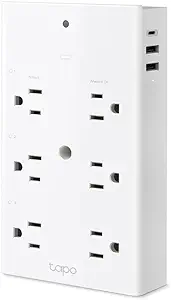 | Best Plug-In Pick for HomeKit | Smart outlets: 3, individually controlled | Always-on outlets: 3 | USB ports: 3 | VIEW ON AMAZON | See Our Full Breakdown |
| Kasa Smart KP200 In-Wall Wi-Fi Smart Outlet |  | Best for Alexa and Google Assistant | Model: KP200 | Connectivity: Wi-Fi, IEEE 802.11b/g/n | Outlets: 2, independently controlled | VIEW ON AMAZON | See Our Full Breakdown |
| Geeni Smart Wi-Fi In-Wall Outlet, 4-Pack |  | Best for Whole-Home Coverage | Pack size: 4 outlets | Controlled sockets: 2 per outlet, independently controlled | Voice assistants: Amazon Alexa, Google Home | VIEW ON AMAZON | See Our Full Breakdown |
| Lumary Smart Wall Outlet with USB-A and USB-C Ports |  | Best for Built-In USB Charging | AC outlets: 1 | USB ports: 1 USB-A and 1 USB-C | USB output: 5 V, 2.1 A per port | VIEW ON AMAZON | See Our Full Breakdown |
| ELEGRP Smart In-Wall Outlet, 6 Pack |  | Best for Multi-Room Outlet Upgrades | Pack size: 6 outlets | Controlled sockets: 2 per outlet, independently controlled | Connectivity: 2.4 GHz Wi-Fi | VIEW ON AMAZON | See Our Full Breakdown |
| Lumary Smart Outlet with 2 AC Outlets and 2 USB Ports |  | Best for AC and USB Control in One Wall Unit | Pack quantity: 4 | AC outlets: 2, independently controlled | USB ports: 2 | VIEW ON AMAZON | See Our Full Breakdown |
| smart wall outlet | Voice assistants |
|---|---|
| Amazon Basics Smart In-Wall Ou | — |
| GHome Smart Plug Outlet Extend | — |
| Tapo P210M Matter-Certified Sm | — |
| Tapo P306 Smart Plug Outlet Ex | — |
| Kasa Smart KP200 In-Wall Wi-Fi | Amazon Alexa and Google Assistant |
| Geeni Smart Wi-Fi In-Wall Outl | Amazon Alexa, Google Home |
| Lumary Smart Wall Outlet with | Amazon Alexa, Google Assistant |
| ELEGRP Smart In-Wall Outlet | Amazon Alexa, Google Assistant |
| Lumary Smart Outlet with 2 AC | Amazon Alexa, Google Home |
More Details on Our Top Picks
Amazon Basics Smart In-Wall Outlet, Works with Alexa
The Amazon Basics Smart In-Wall Outlet is a straightforward fit for homes already organized around Alexa. Its two sockets can be controlled separately or grouped, so a lamp and another device can follow different schedules without adding a plug-in extender. Compared with the Kasa Smart KP200, it offers the same basic two-outlet control idea but ties voice control to Alexa rather than also supporting Google Assistant. It also lacks the Tapo P210M’s Matter compatibility and energy monitoring, keeping this pick focused on remote control and scheduling. The tradeoff comes before setup: installation needs a neutral wire and an outlet box at least two inches deep, plus 2.4 GHz Wi-Fi. Buyers who meet those wiring requirements get a clean, permanent upgrade; renters and homes without a neutral wire should look elsewhere.
Pros:- Controls each socket individually or groups them in the Alexa app
- Adds Alexa voice control and remote operation to a standard wall outlet
- Schedules connected devices without a separate hub
Cons:- Works with Amazon Alexa only
- Requires a neutral wire and an outlet box at least two inches deep
- Requires 2.4 GHz Wi-Fi
Best for: Homeowners with Alexa devices, a neutral wire, and enough outlet-box depth who want two permanently installed sockets on schedules.
Not ideal for: Renters, homes without a neutral wire or deep outlet box, and households that use Google Home or Apple HomeKit.
- Operating voltage:120 V
- Maximum wattage:1800 W
- Connectivity:2.4 GHz Wi-Fi
- Voice assistant:Amazon Alexa
- Installation:Neutral wire and outlet box at least 2 inches deep required
- Mounting:Wall mount
- Hub:Not required
- Color:White
Our verdict“Choose this for a permanent two-socket upgrade in an Alexa home when the existing wiring and outlet box meet its installation requirements.”
GHome Smart Plug Outlet Extender with 3 Smart Outlets and 3 USB Ports
The GHome outlet extender makes sense when one wall receptacle needs to serve several kinds of devices. It combines three individually controlled smart outlets with three always-on AC outlets and three group-controlled USB ports, giving it more charging capacity than the in-wall Tapo P210M or Kasa KP200. That flexibility comes with a clear boundary: only three AC outlets are smart, and the USB ports switch as a group. The P306 also offers three smart and three always-on outlets, while adding Apple HomeKit support and wider spacing; GHome’s listed compatibility is Alexa and Google Home, and its dimensions are compact at 3.95 by 1.18 inches. This is a plug-in extender, not a replacement outlet, so it occupies the receptacle and may be a poor fit where the wall area is crowded. Its 15 A rating and overload and overcurrent protection suit a busy charging spot, provided the network uses 2.4 GHz Wi-Fi.
Pros:- Combines three smart AC outlets, three always-on AC outlets, and three USB ports
- Allows separate control of the three smart outlets
- Supports Alexa, Google Home, app control, timers, and schedules
- Includes overload and overcurrent protection
Cons:- USB ports can only be controlled together
- Only three of the six AC outlets are smart-controlled
- Requires 2.4 GHz Wi-Fi
Best for: Households that need a wall-mounted mix of smart outlets, always-on AC sockets, and USB charging in one location.
Not ideal for: Buyers who need every socket smart-controlled, individually controlled USB ports, or 5 GHz Wi-Fi support.
- Total outlets:9
- Smart AC outlets:3, individually controlled
- Always-on AC outlets:3
- USB ports:3, group controlled
- Maximum current:15 A
- Voltage:120 V
- Wi-Fi:2.4 GHz only
- Certifications:FCC and ETL
Our verdict“Pick GHome when you want several charging options and three individually scheduled smart outlets without changing in-wall wiring.”
Tapo P210M Matter-Certified Smart In-Wall Outlet
The Tapo P210M is the strongest fit here for a household that may use more than one smart home platform. Matter support and compatibility with Alexa, Apple HomeKit, Google Home, and SmartThings give it broader reach than the Alexa-only Amazon Basics outlet or the Alexa-and-Google Kasa KP200. Its two devices can be controlled separately or together, while energy monitoring helps identify how much connected equipment draws and local control keeps supported control available during internet outages. Scheduling and automatic shutoff add practical ways to manage devices. Those capabilities matter most to buyers who will use the extra visibility and platform choice; someone seeking simple Alexa schedules may find the Amazon Basics model more direct. Like that model and the KP200, this is an in-wall installation that requires a neutral wire, and setup requires 2.4 GHz Wi-Fi. It is a capable retrofit only where the wiring is compatible.
Pros:- Matter support works with Alexa, Apple HomeKit, Google Home, and SmartThings
- Controls two connected devices independently or together
- Energy monitoring, scheduling, and automatic shutoff are included
- Supports local control during internet outages
Cons:- Requires a neutral wire for installation
- Requires 2.4 GHz Wi-Fi for setup
- In-wall installation is less suitable for renters or frequent moves
Best for: Homeowners with neutral wiring who want two controlled sockets, energy monitoring, and flexibility across major smart home platforms.
Not ideal for: Renters, homes without a neutral wire, or buyers who want a simple plug-in option and do not need Matter or energy data.
- Model:P210M
- Connectivity:2.4 GHz Wi-Fi and Matter
- Wiring:Neutral wire required
- Maximum load:15 A
- Power supply:125 V, 50/60 Hz
- Smart home compatibility:Amazon Alexa, Apple HomeKit, Google Home, Samsung SmartThings
- Operating temperature:32°F–104°F
- Certifications:FCC, ETL, RoHS
Our verdict“Choose the P210M for a permanent two-socket upgrade when cross-platform compatibility and energy monitoring matter more than plug-in convenience.”
Tapo P306 Smart Plug Outlet Extender with 3 Individually Controlled Outlets
For buyers who want smart control without replacing the wall outlet, the Tapo P306 combines three individually controlled AC outlets, three always-on outlets, and three USB ports in one extender. Its Apple HomeKit support sets it apart from the GHome extender, which lists Alexa and Google Home compatibility; Tapo also works with Alexa and Google Home. The 1.57-inch spacing gives larger plugs more room than a tightly packed outlet strip, while included mounting hardware helps keep the unit secured to the receptacle. This adds useful capacity compared with the in-wall Tapo P210M, but it takes up the existing wall outlet and requires that outlet for mounting. Only half of its six AC sockets are smart-controlled, and the supplied data does not specify USB control behavior or charging wattage. It suits a fixed charging area better than a spot where a compact, flush wall outlet is the priority.
Pros:- Offers three individually controlled smart outlets plus three always-on AC outlets
- Works with Tapo, Apple HomeKit, Alexa, and Google Home
- 1.57-inch outlet spacing accommodates larger plugs
- Includes a mounting screw and stabilizing post
Cons:- Only three of the six AC outlets are smart-controlled
- Uses an existing wall outlet for mounting
- USB charging details and control behavior are not specified in the product data
Best for: Apple HomeKit households that need a secured plug-in extender with three smart outlets, always-on sockets, and USB ports.
Not ideal for: Buyers who need all six AC outlets to be smart, want a flush in-wall replacement, or have limited space around the outlet.
- Smart outlets:3, individually controlled
- Always-on outlets:3
- USB ports:3
- Outlet spacing:1.57 inches
- USB charging:18 W fast charging
- Smart home compatibility:Tapo, Apple HomeKit, Amazon Alexa, Google Home
- Mounting:Mounting screw and stabilizing post included
Our verdict“Choose the P306 when you want a secured, high-capacity plug-in extender with HomeKit support and do not need every AC socket to be smart.”
Kasa Smart KP200 In-Wall Wi-Fi Smart Outlet
The Kasa Smart KP200 suits buyers who want a permanent two-socket outlet and use either Alexa or Google Assistant. It controls the two outlets independently or together, with remote operation, schedules, scenes, grouping, and Away Mode, which turns devices on and off at random. That gives it more routine-setting options than the Amazon Basics outlet, whose voice compatibility is limited to Alexa. Compared with the Tapo P210M, the KP200 lists Google Assistant and Alexa but not Matter, Apple HomeKit, SmartThings, or energy monitoring. Its combined limit of 15 A and 1875 W applies across both outlets, so connected devices share that capacity. In-wall installation means it is less convenient than the GHome or Tapo P306 extenders and requires checking wiring and box fit before purchase; the provided product data does not specify those installation details.
Pros:- Controls two outlets independently or together
- Supports Alexa and Google Assistant voice control
- Offers remote control, schedules, scenes, and device grouping
- Away Mode randomly switches connected devices on and off
Cons:- In-wall installation is less convenient than the GHome and Tapo P306 extenders
- The 15 A and 1875 W maximums are shared across both outlets
- Does not list Matter, Apple HomeKit, or energy monitoring
Best for: Homeowners who want a permanent two-outlet installation with Alexa or Google Assistant control, schedules, scenes, and Away Mode.
Not ideal for: Renters, buyers seeking Apple HomeKit or Matter support, or households that need energy monitoring or a plug-in extender.
- Model:KP200
- Connectivity:Wi-Fi, IEEE 802.11b/g/n
- Outlets:2, independently controlled
- Maximum current:15 A total
- Maximum power:1875 W total
- Operating voltage:125 V
- Voice assistants:Amazon Alexa and Google Assistant
- Operating temperature:32°F–104°F
Our verdict“Pick the KP200 for an in-wall two-socket upgrade when Alexa or Google Assistant routines matter more than Matter, HomeKit, or energy data.”
Geeni Smart Wi-Fi In-Wall Outlet, 4-Pack
The four-outlet pack makes this Geeni a practical way to add smart control across several rooms at once. Each wall unit has two independently controlled, tamper-resistant sockets, so a lamp and another device can follow separate schedules without occupying an extra wall plate. Like the ELEGRP Smart In-Wall Outlet, 6 Pack, it works with Alexa and Google Home without a hub; Geeni also lists overload, short-circuit, overcurrent, and overheating protection. The tradeoff is installation: every location needs a neutral wire, so this is less suitable for older wiring or renters who cannot replace outlets. Its 2.4 GHz-only Wi-Fi requirement also narrows setup compatibility. Choose it for multi-room coverage and independent control; skip it if you need a plug-in option or cannot confirm the wiring.
Pros:- Four wall outlets provide eight independently controlled smart sockets across multiple rooms.
- Works with Alexa and Google Home without a hub.
- Remote control, timers, and schedules support hands-off routines.
- Built-in overload, short-circuit, overcurrent, and overheating protection.
Cons:- Requires a neutral wire for installation.
- Works only with 2.4 GHz Wi-Fi.
Best for: Homeowners upgrading several rooms who want independently scheduled sockets and Alexa or Google Home control.
Not ideal for: Renters or owners with older wiring who cannot confirm a neutral wire at each installation point.
- Pack size:4 outlets
- Controlled sockets:2 per outlet, independently controlled
- Voice assistants:Amazon Alexa, Google Home
- Wi-Fi:2.4 GHz
- Installation:Neutral wire required
- Safety features:Overload, short-circuit, overcurrent, and overheating protection
- Material:ABS
- Color:White
Our verdict“Choose Geeni to equip several rooms with independently controlled outlets, provided your wiring and Wi-Fi meet its requirements.”
Lumary Smart Wall Outlet with USB-A and USB-C Ports
For a bedside or desk outlet that needs to charge a phone while controlling a lamp, Lumary combines one smart AC outlet with USB-A and USB-C ports. App and voice control, scheduling, grouping, and power monitoring give it more visibility into connected devices than the Geeni Smart Wi-Fi In-Wall Outlet, 4-Pack, which focuses on two switched AC sockets per unit. Its tamper-resistant shutters and overheating and short-circuit protection add practical safeguards, while side or back wiring offers some installation flexibility. The compromise is capacity: this model has one AC outlet, so it cannot match the two independently controlled AC sockets on the ELEGRP Smart In-Wall Outlet, 6 Pack. It also requires replacing an existing wall outlet and a 2.4 GHz network. Pick it when built-in USB charging matters more than extra AC sockets.
Pros:- Combines a smart AC outlet with USB-A and USB-C charging ports.
- Offers app and voice control, schedules, timers, and grouping.
- Power monitoring helps track connected devices.
- Includes tamper-resistant shutters and overheating and short-circuit protection.
Cons:- Requires replacing an existing wall outlet.
- Supports only 2.4 GHz Wi-Fi.
- Has one AC outlet, fewer than two-socket models such as the ELEGRP.
Best for: Homeowners replacing a bedside or desk outlet who want USB-A and USB-C charging alongside smart control and power monitoring.
Not ideal for: Buyers who need two separately controlled AC sockets or cannot replace an in-wall outlet.
- AC outlets:1
- USB ports:1 USB-A and 1 USB-C
- USB output:5 V, 2.1 A per port
- Maximum load:15 A
- Voltage:110 V
- Wi-Fi:2.4 GHz only
- Voice assistants:Amazon Alexa, Google Assistant
- Installation:Side or back wiring; replaces an existing outlet
- Warranty:2 years
Our verdict“Choose Lumary when built-in USB-A and USB-C charging and power monitoring matter more than having a second smart AC socket.”
ELEGRP Smart In-Wall Outlet, 6 Pack
With six in-wall units and two independently controlled sockets per unit, ELEGRP is the largest multi-room set in this group. That makes it a strong fit for homeowners who want to automate lamps or other plug-in devices throughout the house in one project. It supports Alexa and Google Assistant directly over Wi-Fi, with no hub required, and its UL and cUL certifications provide a concrete product credential. Compared with the Geeni Smart Wi-Fi In-Wall Outlet, 4-Pack, ELEGRP supplies two more wall units, though the provided details do not list Geeni’s range of built-in electrical protections. The main constraint is the work involved: these replace existing outlets and need compatible in-wall electrical boxes. A 2.4 GHz-only connection may also complicate setup for buyers whose network is configured differently.
Pros:- Six units provide coverage for a larger outlet-upgrade project.
- Each outlet has two independently controlled sockets.
- Works with Alexa and Google Assistant without a hub.
- UL and cUL certified.
Cons:- Requires installation in compatible in-wall electrical boxes.
- Supports only 2.4 GHz Wi-Fi.
Best for: Homeowners planning a broad outlet upgrade who can install six units in compatible electrical boxes.
Not ideal for: Renters, buyers seeking a plug-in alternative, or households without a compatible 2.4 GHz network.
- Pack size:6 outlets
- Controlled sockets:2 per outlet, independently controlled
- Connectivity:2.4 GHz Wi-Fi
- Voice assistants:Amazon Alexa, Google Assistant
- Installation:Compatible in-wall electrical box required
- Certifications:UL, cUL
- Plug type:Type B, 3-pin North American
- Material:Brass, polycarbonate
Our verdict“Choose ELEGRP for a broad, hub-free smart outlet upgrade when you have compatible boxes and 2.4 GHz Wi-Fi.”
Lumary Smart Outlet with 2 AC Outlets and 2 USB Ports
This Lumary pairs two individually controlled AC outlets with two USB ports, making it a flexible choice for a spot where lamps and small electronics share one wall plate. The USB ports each provide 5 V, 2.1 A, while app control, voice commands, grouping, and schedules handle the AC outlets. Compared with the Lumary Smart Wall Outlet with USB-A and USB-C Ports, this version offers a second AC socket, but its listed USB output does not distinguish between USB-A and USB-C. It also comes in a four-unit pack, useful for coordinating several rooms, and includes a two-year warranty. Buyers should weigh that bundled coverage against the need to replace wall outlets and rely on 2.4 GHz Wi-Fi. Its PVC material and listed ETL and FCC certifications round out the product data.
Pros:- Two AC outlets can be controlled independently.
- Includes two USB ports rated at 5 V, 2.1 A each.
- Supports app and voice control, grouping, and schedules without a hub.
- Four-unit pack and two-year warranty.
Cons:- Supports only 2.4 GHz Wi-Fi.
- Requires replacing existing wall outlets.
- USB connector types are not specified in the provided product data.
Best for: Homeowners replacing several outlets who want two separately controlled AC sockets and USB charging at each location.
Not ideal for: Buyers who need USB-C specifically, cannot replace in-wall outlets, or use a network without 2.4 GHz Wi-Fi.
- Pack quantity:4
- AC outlets:2, independently controlled
- USB ports:2
- USB output:5 V, 2.1 A per port
- Maximum current:15 A
- Voltage:110 V
- Wi-Fi:2.4 GHz; no hub required
- Voice assistants:Amazon Alexa, Google Home
- Certifications:ETL, FCC
Our verdict“Choose this Lumary pack for multiple locations needing two smart AC sockets and USB charging, unless USB-C is a must-have.”

How We Picked
I compared these options by how well they serve the main reasons people shop for smart wall outlets: remote and voice control, smart-home compatibility, outlet layout, charging capacity, and fit for a permanent or temporary setup. For in-wall models, installation demands and the value of a multi-unit pack also shaped the ranking; for extenders, I weighed the number of controllable outlets and the usefulness of extra USB ports.
The Tapo P210M ranks first because Matter support gives it a clear compatibility advantage in this group. The Kasa KP200 and Amazon Basics model follow for shoppers focused on in-wall control, while plug-in extenders and USB-equipped Lumary models serve buyers who value added sockets or charging over a built-in replacement. Multipacks rank higher for whole-home projects than for one-off upgrades. Each option has a different fit, and the drawbacks include platform limits, installation work, or a layout that may not suit every wall or device.
| smart wall outlet | Voice assistants |
|---|---|
| Amazon Basics Smart In-Wall Ou | — |
| GHome Smart Plug Outlet Extend | — |
| Tapo P210M Matter-Certified Sm | — |
| Tapo P306 Smart Plug Outlet Ex | — |
| Kasa Smart KP200 In-Wall Wi-Fi | Amazon Alexa and Google Assistant |
| Geeni Smart Wi-Fi In-Wall Outl | Amazon Alexa, Google Home |
| Lumary Smart Wall Outlet with | Amazon Alexa, Google Assistant |
| ELEGRP Smart In-Wall Outlet | Amazon Alexa, Google Assistant |
| Lumary Smart Outlet with 2 AC | Amazon Alexa, Google Home |
Factors to Consider When Choosing Smart Wall Outlets
Before choosing a model, decide what job the outlet needs to do and how much change you want to make to the room. These factors can help you avoid buying a smart control feature that does not match your wiring, devices, or smart-home setup.
Choose In-Wall or Plug-In Based on the Job
An in-wall outlet makes sense when you want a built-in look and plan to control the same receptacle for years. It also brings wiring and installation requirements, so confirm that the product fits your box and household electrical setup before purchase. A plug-in extender is easier to remove or relocate, but it occupies the outlet and may protrude from the wall. Think about nearby furniture, plugs, and whether the extender could block another receptacle. For a rental or a temporary setup, a plug-in model can be the more practical format even if it looks less integrated.
Check Smart-Home Compatibility Before You Buy
Compatibility affects whether an outlet joins the routines, voice controls, and devices you already use. Matter can make cross-platform setup easier, but check whether your controller, app, and network support the features you want. A product labeled for a specific voice assistant may offer a narrower path than a model designed for broader ecosystem support. Also distinguish remote app control from local control: network or service outages can affect how convenient a smart outlet feels. Make a short list of the platforms and routines you rely on, then verify the exact model supports them.
Match Outlet Control to the Devices You Plug In
Count the devices you need to control separately, not only the number of sockets on the product. An extender with several individually controlled AC outlets can manage a group of lamps or small appliances more flexibly than a shared-control design. USB ports are useful for charging phones and accessories, but they do not provide the same scheduling or power control as a smart AC outlet. Consider what happens when one device needs to stay on while another turns off. Avoid assuming every port has its own control just because the product has several ports.
Treat USB Ports as a Charging Convenience
USB-A and USB-C ports can free up AC sockets and reduce the number of charging bricks on a desk or bedside table. Their presence alone does not tell you how quickly a device will charge, so check the product’s stated output and compare it with your phone, tablet, or accessory requirements. If fast charging matters, a dedicated charger may perform better than a built-in port. USB ports also add value only where a charging device will regularly be within reach. For lamps or appliances, prioritize AC outlet control instead.
Plan for Wiring, Space, and Installation
In-wall smart outlets are not simply plug-in devices: installation can depend on the existing wiring, electrical box depth, and the space available behind the receptacle. Read the installation instructions and product requirements before buying, and arrange qualified help if you are not comfortable working with household wiring. A larger body can make a tight box difficult to use, while a protruding extender can interfere with furniture or neighboring plugs. Measure the location and check what is already connected there. These small checks can prevent a technically compatible outlet from being an awkward fit.
Decide Whether a Multipack Is Worthwhile
A multipack can simplify a coordinated upgrade across several rooms, but only if you have a clear plan for each outlet. Buying several units at once can leave you with extras if your wiring, preferred platform, or routines differ from room to room. Start by identifying which lamps or devices benefit from schedules and remote control. A single outlet is easier to evaluate in one location, while a pack fits a consistent project. Compare the included quantity with the number of places you will actually use smart control.
Frequently Asked Questions
Should I choose a Matter outlet if my home already uses one smart-home platform?
Matter can be useful even in a single-platform home because it may make a later platform change or shared household setup easier. Its benefits depend on your controller and the features supported by the exact outlet, so check compatibility before buying. If you have no plans to change ecosystems and a simpler outlet already fits your setup, Matter may not be the deciding factor. Prioritize reliable integration with the routines and voice controls you use today. The Tapo P210M is the standout choice in this roundup when broader compatibility is a priority.
Can I install an in-wall smart outlet without changing my wiring?
An in-wall model replaces an existing receptacle, so it must match the wiring and electrical box at that location. The product instructions should specify its wiring requirements, and not every older installation will meet them. Do not assume a standard-looking outlet means the smart version will fit the box or connect as expected. If you are unsure how to identify the wiring or complete the work safely, hire a qualified electrician. A plug-in extender avoids replacing the receptacle, though it uses the existing outlet and adds bulk.
Is an outlet extender a good substitute for an in-wall smart outlet?
It can be a good substitute when you want to add smart control without replacing a receptacle or when you need extra sockets and USB charging in one spot. Extenders are easier to move, but they sit outside the wall and can block neighboring outlets or clash with furniture. An in-wall option gives a cleaner permanent installation and may suit a frequently used location better. Compare how many AC outlets need independent control, since socket count does not always mean separate control. Your room layout and willingness to install hardware should guide the choice.
Do built-in USB ports replace a dedicated phone charger?
Not automatically. Built-in ports are convenient for routine charging, but charging speed depends on their output and your device’s requirements. Check the stated USB-A or USB-C specifications if fast charging matters to you. A dedicated charger may be a better fit for power-hungry devices or when charging speed is the priority. Treat USB ports as a way to reduce clutter, then choose the outlet based on the AC control you need.
Should I buy a multipack before trying one smart outlet?
A multipack makes sense when you already know that several locations have compatible wiring and will benefit from the same kind of smart control. If this is your first smart outlet, starting with one unit lets you confirm that the app, platform, and physical fit work for your household. This is especially useful when comparing an in-wall installation with a removable extender. Geeni and ELEGRP are the multi-unit options in this roundup, while single units suit a targeted upgrade. Plan the locations first so the package size matches a real project.
Conclusion
For most buyers, I recommend the Tapo P210M as the best overall choice because Matter support gives it the broadest platform flexibility in this lineup. The GHome extender is my best value for people who need multiple smart AC outlets and USB charging without an in-wall replacement; the Lumary USB-equipped models suit charging-focused rooms. For beginners who want to avoid replacing a receptacle, the Tapo P306 offers a straightforward plug-in route. Choose Kasa KP200 or Amazon Basics if you prefer a single in-wall outlet, and look to Geeni or ELEGRP for a multi-room project. The best pick depends on whether you value platform flexibility, easy installation, built-in charging, or several upgraded locations.
Fall Picks

DJI Osmo Action 4 Essential Combo Waterproof 4K Action Camera
As an affiliate, we earn on qualifying purchases.