Thermal imaging cameras help locate temperature differences that may point to insulation gaps, moisture, or electrical issues, but image detail and ease of use vary widely. I rank the TOPDON TC004 as the best overall for its dedicated 3.5-inch display and handheld format, while the Thermal Master P1 stands out for its 320 × 240 resolution in a USB-C attachment. For simpler point checks, the FLIR TG165-X pairs thermal imaging with a Bullseye laser. The main tradeoff is between a standalone camera’s convenience and a phone attachment’s compactness, alongside the cost of higher image detail and added controls. Read on for the full breakdown, buying advice, and picks by use case.

Get privacy and security gear delivered free with Prime
- Fast, free delivery on millions of items
- Prime Video, Amazon Music and more included
- Member-only deals all year
Key Takeaways
- TOPDON TC004 is my best overall pick because its dedicated 3.5-inch display avoids tying inspections to a compatible phone.
- Thermal Master P1 favors image detail and portability with 320 × 240 resolution in a USB-C attachment, though it depends on a phone.
- FLIR TG165-X suits targeted checks where its Bullseye laser helps identify the measurement area, rather than broad survey work.
- The lineup splits between phone accessories and standalone tools; buyers should decide whether pocketability or a ready-to-use screen matters more.
- Model names alone do not settle the choice: the HF96 and HP96, and the two GT14S listings, advertise different controls or imaging features that buyers should match to their workflow.
| H128 Handheld Thermal Camera, 240 × 240 TISR Resolution |  | Best for Long Inspections | Resolution: 240 × 240 TISR | Frame rate: 25 Hz | Temperature range: -4°F to 842°F | VIEW ON AMAZON | See Our Full Breakdown |
| FLIR ONE Pro Thermal Imaging Camera for iPhone 15 and Newer |  | Best Guided Phone-Based Pick | Compatibility: iPhone 15 and newer with USB-C | Native infrared resolution: 160 × 120 | Enhanced resolution: 480 × 360 | VIEW ON AMAZON | See Our Full Breakdown |
| Thermal Master P1 USB-C Thermal Camera, 320 × 240 Resolution |  | Best High-Resolution Phone Attachment | IR resolution: 320 × 240 | Refresh rate: 25 Hz | Temperature range: -20°C to 600°C (-4°F to 1112°F) | VIEW ON AMAZON | See Our Full Breakdown |
| Flagfront YXI96 Thermal Camera with 240 × 240 Resolution |  | Best for High-Temperature Checks | Resolution: 240 × 240 | Refresh rate: 25 Hz | Temperature range: -4°F to 1022°F | VIEW ON AMAZON | See Our Full Breakdown |
| FLIR TG165-X Thermal Imaging Camera with Bullseye Laser |  | Best for Targeted Point Measurements | Model: TG165-X | IR resolution: 4,800 pixels | Temperature range: -25°C to 300°C (-13°F to 572°F) | VIEW ON AMAZON | See Our Full Breakdown |
| HSFTOOLS HF96 Thermal Imaging Camera with AI Scene Detection and Laser Pointer |  | Best for Guided Home Inspections | Thermal resolution: 240 × 240 with live super-resolution | Temperature range: -4°F to 1022°F (-20°C to 550°C) | Temperature accuracy: ±3.6°F | VIEW ON AMAZON | See Our Full Breakdown |
| MILESEEY TR10 Thermal Imaging Camera |  | Best for Adjustable Emissivity | IR resolution: 192 × 192 | Refresh rate: 25 Hz | Thermal sensitivity: NETD <50 mK | VIEW ON AMAZON | See Our Full Breakdown |
| Klein Tools TI250 Rechargeable Thermal Imaging Camera |  | Best for Straightforward Spot Checks | Image resolution: Over 19,200 pixels | Emissivity range: 0.01–0.99 | Temperature alarm range: -4°F to 752°F (-20°C to 400°C) | VIEW ON AMAZON | See Our Full Breakdown |
| TOPDON TC004 Thermal Imaging Camera, 3.5-Inch Display |  | Best for Large-Screen Field Viewing | Display: 3.5 inches | Infrared resolution: 256 × 192 | Enhanced resolution: Up to 512 × 384 with TISR | VIEW ON AMAZON | See Our Full Breakdown |
| FOXWELL HT280 Thermal Imaging Camera |  | Best for Windows-Based Reporting | Display: 2.8-inch, 320 × 240 LCD | Enhanced image resolution: 260 × 260 with TISR | Thermal sensitivity: 50 mK | VIEW ON AMAZON | See Our Full Breakdown |
| HSFTOOLS HP96 Thermal Imaging Camera with 3.5″ Touch Screen and Intelligent Scene Detection | 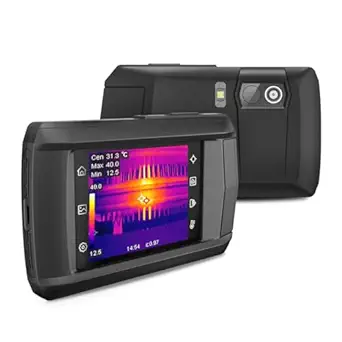 | Best for Guided Home Inspections | Infrared resolution: 96 × 96 | Enhanced resolution: Up to 240 × 240 live super resolution | Visible-light camera: 640 × 480 | VIEW ON AMAZON | See Our Full Breakdown |
| TOPDON TC004 Mini Thermal Imaging Camera, 240 × 240 TISR Resolution |  | Best for Long Inspection Sessions | Thermal resolution: 128 × 128 native; enhanced to 240 × 240 with TISR | Field of view: 40° × 30° | Refresh rate: 25 Hz | VIEW ON AMAZON | See Our Full Breakdown |
| GT14S Thermal Imaging Camera with Thermometer Mode |  | Best for High-Temperature Checks | Temperature range: -4°F to 1022°F | Thermal sensitivity: NETD <50 mK | Minimum detectable temperature difference: 0.05°C | VIEW ON AMAZON | See Our Full Breakdown |
| FOXWELL RT280 Thermal Imaging Camera, 320 × 240 LCD, 240 × 180 TISR |  | Best for Inspection Reports | Display: 2.8-inch, 320 × 240 LCD | Thermal resolution: 120 × 90 native; enhanced to 240 × 180 with TISR | Field of view: 50° × 38° | VIEW ON AMAZON | See Our Full Breakdown |
| GT14S Thermal Imaging Camera with Edge Enhancement and Thermometer Mode |  | Best for Lightweight Quick Checks | Weight: 240 g | Battery capacity: 2500 mAh | Battery life: Up to 14 hours | VIEW ON AMAZON | See Our Full Breakdown |
| thermal imaging camera | Temperature range | Temperature accuracy | Field of view |
|---|---|---|---|
| H128 Handheld Thermal Camera | -4°F to 842°F | ±3% | — |
| FLIR ONE Pro Thermal Imaging C | — | ±3°C or ±5% | — |
| Thermal Master P1 USB-C Therma | -20°C to 600°C (-4°F to 1112°F) | ±3.6°F | — |
| Flagfront YXI96 Thermal Camera | -4°F to 1022°F | Within 2% | 50° |
| FLIR TG165-X Thermal Imaging C | -25°C to 300°C (-13°F to 572°F) | — | — |
| HSFTOOLS HF96 Thermal Imaging | -4°F to 1022°F (-20°C to 550°C) | ±3.6°F | 50° |
| MILESEEY TR10 Thermal Imaging | -4°F to 1022°F | ±2°C | — |
| Klein Tools TI250 Rechargeable | — | — | — |
| TOPDON TC004 Thermal Imaging C | -4°F to 1022°F | — | — |
| FOXWELL HT280 Thermal Imaging | -10°C to 500°C (14°F to 932°F) | ±3.6°F or ±2% | 50° × 50° |
| HSFTOOLS HP96 Thermal Imaging | — | ±2% | 50° |
| TOPDON TC004 Mini Thermal Imag | -4°F to 842°F (-20°C to 450°C) | Within ±3.6°F / 2% | 40° × 30° |
| GT14S Thermal Imaging Camera w | -4°F to 1022°F | — | 50° |
| FOXWELL RT280 Thermal Imaging | –4°F to 1022°F | ±3.6°F / ±2% | 50° × 38° |
| GT14S Thermal Imaging Camera w | — | — | 50° |
More Details on Our Top Picks
H128 Handheld Thermal Camera, 240 × 240 TISR Resolution
The H128 pairs 240 × 240 TISR imaging with a 25 Hz frame rate, giving handheld inspections a clear, responsive view. Its standout advantage over the phone-connected FLIR ONE Pro is a stated battery life of up to 24 hours, so it suits longer rounds without depending on a compatible phone. Temperature alarms and automatic maximum, minimum, and center readings can help locate spots that deserve closer attention. The tradeoff is measurement accuracy: the stated ±3% may be less appealing when precise readings matter. IP65 protection and a 6.56-foot drop rating add resilience, though the 1.06-pound body is less pocketable than a phone attachment. This is a practical choice for extended building or equipment checks, provided its measurement tolerance fits the job.
Pros:- 240 × 240 TISR resolution and 25 Hz imaging
- Up to 24 hours of stated battery life
- Temperature alarms and automatic maximum, minimum, and center readings
- IP65 protection and a 6.56-foot drop rating
Cons:- Temperature accuracy is specified as ±3%
- At 1.06 pounds, it is heavier than phone-connected options such as the FLIR ONE Pro
Best for: Maintenance staff and building inspectors who need a standalone camera for long inspection sessions.
Not ideal for: Buyers who need highly precise temperature measurements or a lightweight camera to carry in a pocket.
- Resolution:240 × 240 TISR
- Frame rate:25 Hz
- Temperature range:-4°F to 842°F
- Temperature accuracy:±3%
- Thermal sensitivity:40 mK
- Battery life:Up to 24 hours
- Ingress protection:IP65
- Weight:1.06 pounds
Our verdict“Choose the H128 for long handheld inspections where battery life and a rugged body matter more than maximum measurement precision.”
FLIR ONE Pro Thermal Imaging Camera for iPhone 15 and Newer
The FLIR ONE Pro makes thermal inspection approachable by connecting to an iPhone 15 or newer with USB-C and pairing its images with guided inspection steps in the app. Its MSX and Super Resolution processing enhance images from a native 160 × 120 sensor to a stated 480 × 360, which can make thermal patterns easier to interpret alongside visible detail. Compared with the standalone H128, this is far smaller and puts inspection guidance and phone workflows in reach, but it depends on a compatible iPhone and does not match the H128’s stated 24-hour battery life. The native sensor resolution is the key tradeoff behind the enhanced output. Stated accuracy also applies only under specified unit and scene conditions, so this is better for guided troubleshooting than unrestricted precision work.
Pros:- MSX and Super Resolution enhance the thermal image presentation
- App includes guided inspection steps for air leaks and moisture
- Compact 1.29-ounce attachment
- Rated to withstand drops from 1.5 meters
Cons:- Compatible only with iPhone 15 and newer models with USB-C
- Native infrared resolution is 160 × 120
- Stated accuracy depends on specified unit and scene temperatures
Best for: iPhone 15 or newer owners who want guided checks for issues such as air leaks and moisture.
Not ideal for: Android users, owners of older or Lightning-port iPhones, and buyers who want a standalone handheld camera.
- Compatibility:iPhone 15 and newer with USB-C
- Native infrared resolution:160 × 120
- Enhanced resolution:480 × 360
- Temperature accuracy:±3°C or ±5%
- Accuracy conditions:Unit: 15°C–35°C; scene: 5°C–120°C
- Dimensions:2.6 × 1.3 × 0.6 inches
- Weight:1.29 ounces
Our verdict“Pick the FLIR ONE Pro if you have a compatible iPhone and value guided inspections and phone-based image work over standalone operation.”
Thermal Master P1 USB-C Thermal Camera, 320 × 240 Resolution
The P1 stands out among phone-connected cameras with 320 × 240 infrared resolution, a 25 Hz refresh rate, and a very light 17 g body. Compared with the FLIR ONE Pro, it offers higher stated native resolution and works with USB-C smartphones and computers, rather than being limited to newer iPhones. Digital zoom, adjustable emissivity, alarms, and isotherm mode give technically minded users more ways to inspect temperature patterns. Its -20°C to 600°C range also reaches hotter targets than the FLIR ONE Pro’s stated operating scene range. The tradeoff is a separate adapter for Lightning iPhones and only 5–8 hours of operation; the H128 is a better fit for longer sessions. Choose the P1 when compactness and detailed smartphone-based analysis matter more than all-day runtime.
Pros:- 320 × 240 infrared resolution at a 25 Hz refresh rate
- Broad stated range from -20°C to 600°C
- Digital zoom, temperature alarms, and adjustable emissivity
- 17 g body includes a case and extension cable
Cons:- Lightning iPhones require a separate adapter
- Operating time is stated as 5–8 hours, shorter than the H128’s up to 24 hours
- Temperature accuracy is specified as ±3.6°F
Best for: USB-C phone or computer users who want a compact camera with higher stated native resolution and adjustable inspection controls.
Not ideal for: Lightning-port iPhone owners who want a ready-to-use connection, or inspectors needing a full-day battery.
- IR resolution:320 × 240
- Refresh rate:25 Hz
- Temperature range:-20°C to 600°C (-4°F to 1112°F)
- Temperature accuracy:±3.6°F
- Minimum detectable temperature difference:0.04°C
- Digital zoom:15×
- Operating time:5–8 hours
- Weight:0.62 oz (17 g)
- Compatibility:USB-C smartphones and computers; Lightning iPhones require a separate adapter
Our verdict“Choose the P1 for detailed, compact USB-C thermal imaging with adjustable controls, if its shorter runtime suits your inspection sessions.”
Flagfront YXI96 Thermal Camera with 240 × 240 Resolution
The YXI96 is the pick in this group for buyers who need to inspect hotter surfaces: its stated range reaches 1022°F, above the H128’s 842°F ceiling and the FLIR TG165-X’s 572°F limit. It combines that range with 240 × 240 super-resolution imaging, a 25 Hz refresh rate, temperature alarms, and a wide 50° field of view. That field of view can take in more of a scene at once, while the alarms help flag readings outside a chosen threshold. The stated accuracy is within 2%, tighter on paper than the H128’s ±3%, though the supplied data does not explain the conditions behind that figure. Its IP54 rating is also below the H128’s IP65 protection. The palette listing names five colors despite claiming six selections, leaving one option unclear.
Pros:- Stated temperature range reaches 1022°F
- 240 × 240 super-resolution imaging with 25 Hz refresh
- 50° field of view and temperature alarms
- Stated accuracy is within 2%
Cons:- IP54 protection is lower than the H128’s IP65 rating
- Product data names only five palettes while claiming six selectable options
- Accuracy conditions are not specified in the provided product details
Best for: Tradespeople and maintenance technicians who need to scan hot equipment or surfaces within the stated 1022°F range.
Not ideal for: Buyers who need IP65-level ingress protection or complete documentation of every image palette.
- Resolution:240 × 240
- Refresh rate:25 Hz
- Temperature range:-4°F to 1022°F
- Temperature accuracy:Within 2%
- Field of view:50°
- Color palettes:Six selectable palettes stated; five names listed
- Ingress protection:IP54
Our verdict“Choose the YXI96 when inspecting hotter targets is the priority and its IP54 protection suits the work environment.”
FLIR TG165-X Thermal Imaging Camera with Bullseye Laser
The TG165-X favors clear targeting over the higher pixel counts offered by the H128 and Thermal Master P1. Its 4,800-pixel IR sensor is paired with MSX image enhancement, and a bullseye laser helps indicate where a measurement is aimed. That pairing suits troubleshooting individual components or locating a specific hot spot, where knowing the target matters as much as scanning a broad scene. The rugged IP54 enclosure is designed to resist dirt, dust, and oil, and the stated detector warranty lasts 10 years. Compared with the YXI96, though, the TG165-X tops out at 300°C (572°F), so it is less suitable for hotter equipment. The product details also list no connectivity or data transfer features, which may limit documentation workflows.
Pros:- Bullseye laser helps target the area being measured
- MSX enhancement adds visible detail to thermal images
- IP54 enclosure is designed to resist dirt, dust, and oil
- 10-year detector warranty
Cons:- Temperature range tops out at 300°C (572°F), below the YXI96’s stated maximum
- Product details do not specify connectivity or data transfer features
- IR resolution is listed as 4,800 pixels, below the pixel counts stated for the H128 and P1
Best for: Technicians who need a rugged handheld camera for locating and measuring specific equipment hot spots.
Not ideal for: Inspectors working with surfaces hotter than 572°F or those who need documented image transfer features.
- Model:TG165-X
- IR resolution:4,800 pixels
- Temperature range:-25°C to 300°C (-13°F to 572°F)
- Image enhancement:Patented MSX technology
- Targeting:Bullseye laser pointer
- Ingress protection:IP54
- Parts and labor warranty:2 years
- Detector warranty:10 years
Our verdict“Choose the TG165-X for rugged, laser-guided spot checks within its temperature range, rather than broader high-resolution scanning.”
HSFTOOLS HF96 Thermal Imaging Camera with AI Scene Detection and Laser Pointer
The HF96 is the most guided pick here for homeowners tracing possible insulation gaps or water leaks. Its AI scene recognition flags those patterns, while the 50° field of view gives a broad look at walls and other surfaces. Compared with the MILESEEY TR10, it adds AI detection and live super-resolution, but its ±3.6°F accuracy is looser than the TR10’s ±2°C specification, and neither camera provides a moisture reading. The 11-hour battery and storage for thousands of files suit long inspection days. There is a setup step: AI features require a firmware download, and the analysis software works on Windows only. Choose it for visual screening and documentation, not moisture diagnosis or precision calibration.
Pros:- AI scene detection can flag possible water leaks and insulation gaps
- Live super-resolution presents thermal images at 240 × 240
- Up to 11 hours of battery life and 4 GB of storage support extended inspections
- IP54 protection and a 6.6-foot drop rating suit job-site use
Cons:- AI scene features require a manufacturer firmware download
- Does not measure moisture
- HSF Studio analysis software is limited to Windows
Best for: Homeowners and building inspectors who want on-screen help spotting possible insulation gaps or leaks during visual surveys
Not ideal for: Buyers who need direct moisture readings, tighter temperature accuracy, or Mac-compatible analysis software
- Thermal resolution:240 × 240 with live super-resolution
- Temperature range:-4°F to 1022°F (-20°C to 550°C)
- Temperature accuracy:±3.6°F
- Thermal sensitivity:<50 mK
- Field of view:50°
- Frame rate:25 Hz
- Battery life:Up to 11 hours
- Storage:4 GB; 30,000+ images or 14 hours of video
- Protection:IP54; certified for 6.6-foot drops
Our verdict“Choose the HF96 for guided visual home inspections and long sessions, provided you do not need moisture readings or Mac software.”
MILESEEY TR10 Thermal Imaging Camera
For inspectors who move between surfaces with different emissivity, the MILESEEY TR10 puts a useful measurement control ahead of automated guidance. Its adjustable emissivity helps tailor readings to the material being checked, and its stated ±2°C accuracy is tighter than the HF96’s ±3.6°F figure. The tradeoff is a 192 × 192 sensor, below the HF96’s 240 × 240 enhanced image and the TOPDON TC004’s 256 × 192 sensor. At 25 Hz, the live view updates smoothly as the camera moves, while 8 GB storage and an eight-hour battery support routine field work. It is a practical measurement-focused choice, though the listed accuracy may not suit calibration work and its resolution gives less image detail than higher-resolution options.
Pros:- Adjustable emissivity supports readings on different materials
- 25 Hz refresh rate provides a smooth live thermal view
- Eight-hour battery life supports a full inspection session
- 8 GB internal storage and 6.6-foot drop protection
Cons:- 192 × 192 resolution is lower than the HF96 and TOPDON TC004
- ±2°C accuracy may not meet precision calibration needs
Best for: Building maintenance technicians who take readings across varied materials and value emissivity adjustment over automated scene detection
Not ideal for: Thermography professionals needing higher image detail or temperature accuracy suited to precision calibration
- IR resolution:192 × 192
- Refresh rate:25 Hz
- Thermal sensitivity:NETD <50 mK
- Temperature range:-4°F to 1022°F
- Temperature accuracy:±2°C
- Battery capacity:3000 mAh
- Battery life:Up to 8 hours
- Storage:8 GB
- Drop protection:6.6 feet
Our verdict“Pick the TR10 for routine inspections across varied surfaces when emissivity adjustment matters more than maximum image detail.”
Klein Tools TI250 Rechargeable Thermal Imaging Camera
The Klein Tools TI250 keeps the job focused on finding hot and cold spots without making the product description hinge on AI or enhanced-resolution claims. Its image captures more than 19,200 pixels, with adjustable emissivity, selectable palettes, and temperature alarms to help users tune the display and notice readings that cross a set threshold. That makes it a simpler alternative to the HF96, whose scene detection adds guidance for possible leaks and insulation gaps. The TI250 also lists a temperature alarm range up to 752°F, while the HF96 measures to 1022°F. One notable compromise is its built-in, non-removable battery: users cannot swap in a charged spare during a long day. With no battery runtime specified here, it is best for planned spot checks rather than extended rounds.
Pros:- More than 19,200 pixels help reveal hot and cold areas
- Adjustable emissivity accommodates different surface materials
- Temperature alarms help flag readings outside a chosen range
- USB-C transfer and included carrying case simplify file handling and transport
Cons:- Built-in battery is non-removable, so it cannot be swapped during work
- Listed temperature alarm range tops out at 752°F, below the HF96’s range
- Battery runtime is not specified in the provided product data
Best for: Electricians and facility staff who need a familiar handheld tool for periodic hot-spot checks and temperature alarms
Not ideal for: Technicians doing long field rounds who need a replaceable battery or a stated operating temperature range above 752°F
- Image resolution:Over 19,200 pixels
- Emissivity range:0.01–0.99
- Temperature alarm range:-4°F to 752°F (-20°C to 400°C)
- Color palettes:Selectable
- Image transfer:USB-C
- Battery:Built-in rechargeable, non-removable
- Included accessories:Charging cable, carrying case, and instructions
Our verdict“Choose the TI250 for occasional spot checks with alarms and simple file transfer, but look elsewhere for swappable power or higher-temperature work.”
TOPDON TC004 Thermal Imaging Camera, 3.5-Inch Display
The TOPDON TC004 makes a strong case for field users who need to read thermal patterns on the camera itself. Its 3.5-inch display is larger than the screen size specified for the FOXWELL HT280, and the 256 × 192 infrared sensor is paired with TISR enhancement up to 512 × 384. That enhanced image may make patterns easier to inspect on-screen, though it does not change the underlying sensor resolution. A laser pointer and integrated LED light add practical help when locating and illuminating inspection areas. The TC004 also leads this group on stated storage with 64 GB built in and includes Wi-Fi, IP54 protection, and two-meter drop resistance. The main planning gap is that battery life is not provided, so users cannot judge runtime against the HF96 or TR10.
Pros:- 3.5-inch display gives a roomy view of thermal patterns
- TISR enhancement raises displayed resolution up to 512 × 384
- 64 GB internal storage accommodates extensive image and video documentation
- Wi-Fi, an LED light, laser pointer, IP54 protection, and two-meter drop resistance
Cons:- Battery life is not specified in the provided product data
- Enhanced resolution does not increase the native 256 × 192 infrared sensor resolution
Best for: Inspectors who review thermal images on-device and need ample storage, lighting, and wireless connectivity in the field
Not ideal for: Buyers who need a documented battery runtime or prefer to judge detail solely by native sensor resolution
- Display:3.5 inches
- Infrared resolution:256 × 192
- Enhanced resolution:Up to 512 × 384 with TISR
- Temperature range:-4°F to 1022°F
- Storage:64 GB built-in
- Connectivity:Wi-Fi
- Drop resistance:2 meters
- Protection:IP54
- Additional features:Red laser pointer and integrated LED light
Our verdict“Choose the TC004 if a large on-device display and generous storage matter most, and confirm runtime needs before relying on it for long shifts.”
FOXWELL HT280 Thermal Imaging Camera
The FOXWELL HT280 is the reporting-oriented choice: it combines on-camera high, central, and low temperature readings and alarms with Windows software for image analysis and report generation. That workflow sets it apart from the MILESEEY TR10, which lists adjustable emissivity and storage but no PC reporting tools. Its 320 × 240 LCD, 25 Hz frame rate, and 50° × 50° field of view suit moving through rooms and equipment, while storage for over 20,000 images or videos helps keep records on the device. The stated temperature accuracy is ±3.6°F or ±2%, and battery life reaches eight hours. Those features make the HT280 practical for documented maintenance rounds, but the software excludes Mac users and the tripod is sold separately. Its enhanced image resolution is 260 × 260, below the TC004’s stated TISR enhancement.
Pros:- Windows software supports image analysis and report generation
- Automatic high, central, and low readings plus temperature alarms aid quick checks
- Storage holds over 20,000 images or video recordings
- Up to eight hours of battery life with IP54 and 6.6-foot drop protection
Cons:- PC analysis software is not compatible with Mac
- Tripod is supported but not included
- 260 × 260 TISR enhancement is lower than the TC004’s stated enhanced resolution
Best for: Maintenance teams using Windows PCs who need to analyze captured thermal images and produce inspection reports
Not ideal for: Mac users, or buyers who want a tripod included or prioritize the highest stated enhanced resolution
- Display:2.8-inch, 320 × 240 LCD
- Enhanced image resolution:260 × 260 with TISR
- Thermal sensitivity:50 mK
- Frame rate:25 Hz
- Temperature range:-10°C to 500°C (14°F to 932°F)
- Temperature accuracy:±3.6°F or ±2%
- Field of view:50° × 50°
- Storage:Over 20,000 images or video recordings
- Battery and durability:Up to 8 hours; IP54; 6.6-foot drop rating
Our verdict“Pick the HT280 for documented inspection rounds if your team uses Windows and values reporting over a larger enhanced image.”
HSFTOOLS HP96 Thermal Imaging Camera with 3.5″ Touch Screen and Intelligent Scene Detection
The HP96 is the most guided option here for homeowners tracing likely insulation gaps or water leaks. Its IntellFault scene detection can help flag patterns, while the large 3.5-inch touchscreen and five viewing modes make it easier to inspect without relying on a phone. Compared with the TOPDON TC004 Mini, the HP96 offers a broader 50° field of view and a visible-light camera, but its native infrared resolution is only 96 × 96; the TOPDON starts at 128 × 128 and runs much longer between charges. Live super resolution lifts the HP96 display to 240 × 240, though that is an enhancement rather than added sensor detail. The IP54 housing and drop resistance suit work around a home, but scene mode requires a firmware download, and it does not measure moisture.
Pros:- IntellFault scene detection helps identify likely leak and insulation patterns
- 3.5-inch touchscreen and five imaging modes support on-camera inspection
- Visible-light camera provides context alongside thermal images
- IP54 protection and 6.6-foot drop resistance suit job-site handling
Cons:- Native infrared resolution is 96 × 96, below the TOPDON TC004 Mini’s 128 × 128
- Scene mode requires a separate firmware download
- Does not provide moisture readings
Best for: Homeowners who want on-screen guidance while checking for insulation gaps or suspected leaks
Not ideal for: Inspectors who need moisture readings or finer native thermal detail for documenting small anomalies
- Infrared resolution:96 × 96
- Enhanced resolution:Up to 240 × 240 live super resolution
- Visible-light camera:640 × 480
- Display:3.5-inch touchscreen
- Thermal sensitivity:<50 mK
- Field of view:50°
- Temperature accuracy:±2%
- Battery life:4 hours
- Durability:IP54; 6.6-foot drop test
Our verdict“Choose the HP96 for guided home inspections and a large touchscreen; choose the TOPDON TC004 Mini for higher native resolution and longer battery life.”
TOPDON TC004 Mini Thermal Imaging Camera, 240 × 240 TISR Resolution
For extended rounds of checks, the TC004 Mini pairs a 15-hour battery claim with a compact handheld format and temperature alerts that can capture photos automatically. Its 128 × 128 sensor is enhanced to 240 × 240 with TISR, giving it more native detail than the HSFTOOLS HP96 while keeping the camera self-contained. The tradeoff is a 40° × 30° field of view, narrower than the HP96 and FOXWELL RT280 50° views, so you may need to reposition more often to cover a broad wall or ceiling. Its range reaches 842°F, which handles many household and equipment checks but falls short of the RT280 and GT14S models that reach 1022°F. IP54 protection and 2-meter drop resistance add practical durability; the missing charging head means you will need a compatible one.
Pros:- Up to 15 hours of battery life supports extended inspection sessions
- 128 × 128 native sensor enhanced to 240 × 240 with TISR
- Temperature alerts can automatically capture photos
- IP54 rating and 2-meter drop resistance add protection for field use
Cons:- 40° × 30° field of view is narrower than the 50° views on the HP96 and FOXWELL RT280
- Temperature range tops out at 842°F, below the RT280 and GT14S
- Charging head is not included
Best for: HVAC and maintenance workers who need a portable camera for long inspection shifts with automatic alert photos
Not ideal for: Users scanning broad surfaces quickly or measuring temperatures above 842°F
- Thermal resolution:128 × 128 native; enhanced to 240 × 240 with TISR
- Field of view:40° × 30°
- Refresh rate:25 Hz
- Temperature range:-4°F to 842°F (-20°C to 450°C)
- Temperature accuracy:Within ±3.6°F / 2%
- Battery life:Up to 15 hours
- Storage:512 MB eMMC; up to 8,000 photos
- Durability:IP54; drop resistant up to 2 meters
Our verdict“Pick the TC004 Mini for long shifts and alert-triggered photos, while the FOXWELL RT280 suits buyers who need a wider view and higher temperature ceiling.”
GT14S Thermal Imaging Camera with Thermometer Mode
The GT14S earns its place for buyers who need a camera that can also act as a point-and-check thermometer. Its stated range extends to 1022°F, matching the FOXWELL RT280 and exceeding the TOPDON TC004 Mini’s 842°F ceiling, so it is better suited to hotter equipment checks. A 50° field of view, adjustable emissivity and distance settings, and temperature alarms offer useful inspection controls, while its 240 g body is easy to carry. The available data does not state its display resolution, image storage, or export options, leaving a bigger documentation gap than the RT280, which includes 8GB storage and Windows analysis software. This GT14S makes more sense for quick checks than for creating a traceable inspection record; buyers should also distinguish it from the similarly named Edge Enhancement version, whose details are listed separately.
Pros:- Temperature range reaches 1022°F for hotter equipment checks
- Thermal imaging and thermometer modes support both scanning and spot checks
- 50° field of view and configurable temperature alarms aid inspections
- 240 g weight and up to 14-hour battery life support portable use
Cons:- Display resolution and image storage details are not provided
- No image export or analysis workflow is specified
- One-year warranty is stated, but no additional durability rating is provided
Best for: Technicians checking hot machinery, automotive components, or HVAC systems who want a lightweight camera with thermometer mode
Not ideal for: Inspectors who need confirmed image resolution, onboard storage, or a documented PC reporting workflow
- Temperature range:-4°F to 1022°F
- Thermal sensitivity:NETD <50 mK
- Minimum detectable temperature difference:0.05°C
- Field of view:50°
- Modes:Thermal imaging and thermometer
- Color palettes:7
- Weight:240 g
- Battery capacity:2500 mAh
- Battery life:Up to 14 hours
Our verdict“Choose this GT14S for lightweight high-temperature checks; select the FOXWELL RT280 if stored images and PC analysis matter more.”
FOXWELL RT280 Thermal Imaging Camera, 320 × 240 LCD, 240 × 180 TISR
The RT280 is the strongest fit here for technicians who need to save and review inspection images. Its 8GB storage holds over 20,000 images and videos, and the included Windows PC software supports temperature analysis and report generation. That makes it more useful for follow-up documentation than either GT14S, whose storage details are not provided, or the TOPDON TC004 Mini, which lists 512MB. The RT280’s 120 × 90 native thermal sensor is modest; TISR enhances the displayed image to 240 × 180, but it does not change the underlying sensor detail. Its 50° × 38° view, laser targeting, LED light, alerts, and 1022°F upper range support practical field work. The main fit constraint is software: Mac users cannot use the stated PC analysis workflow.
Pros:- 8GB storage holds over 20,000 images and videos
- Windows software supports temperature analysis and report generation
- 50° × 38° field of view and laser targeting help locate inspection spots
- IP54 housing is rated for drops up to 6.6 feet
Cons:- Native thermal resolution is 120 × 90, with TISR enhancement to 240 × 180
- Analysis software is not compatible with Mac
- Temperature accuracy is specified as ±3.6°F / ±2%
Best for: Building inspectors and maintenance technicians who need to save thermal evidence and prepare Windows-based reports
Not ideal for: Mac users or buyers who prioritize higher native thermal resolution over storage and analysis tools
- Display:2.8-inch, 320 × 240 LCD
- Thermal resolution:120 × 90 native; enhanced to 240 × 180 with TISR
- Field of view:50° × 38°
- Frame rate:25 Hz
- Temperature range:–4°F to 1022°F
- Temperature accuracy:±3.6°F / ±2%
- Storage:8GB eMMC; over 20,000 images and videos
- Color palettes:9
- Durability:IP54; drop resistant up to 6.6 feet
Our verdict“Choose the RT280 when image archiving and Windows reports are central to your workflow; skip it if you use a Mac or want stronger native sensor detail.”
GT14S Thermal Imaging Camera with Edge Enhancement and Thermometer Mode
This Edge Enhancement GT14S is aimed at buyers who want a lightweight camera for fast anomaly checks, with thermometer mode and custom high/low alarms to call attention to readings outside chosen limits. Its 240 g weight and up to 14-hour battery life make it easier to carry through a workday than a larger handheld setup. On paper, it shares the 50° field of view, 0.05°C temperature-difference detection, and 1022°F ceiling stated for the other GT14S in this group, so the two have similar inspection reach. The FOXWELL RT280 is a better documented choice for saving and analyzing images, while this listing does not specify storage or connectivity. Its compactness is useful for spot checks, but the missing image workflow limits its appeal for buyers who need records or reports.
Pros:- Lightweight 240 g body is easy to carry between inspection points
- Up to 14 hours of battery life supports a full day of spot checks
- Sensitivity is stated as <50 mK, with detection of 0.05°C differences
- Custom high/low temperature alarms flag readings outside set limits
Cons:- Storage capacity and image export options are not specified
- Wi-Fi and Bluetooth connectivity are not listed
- Display resolution is not provided
Best for: Service technicians who want a light, long-running handheld camera for quick temperature anomaly checks
Not ideal for: Inspectors who need confirmed image storage, wireless transfer, or PC-based reporting
- Weight:240 g
- Battery capacity:2500 mAh
- Battery life:Up to 14 hours
- Measurement range:-4°F to 1022°F
- Sensitivity:NETD <50 mK
- Detectable temperature difference:0.05°C
- Field of view:50°
- Color palettes:7
- Warranty:1 year
Our verdict“Pick this GT14S for portable, alarm-guided checks; choose the FOXWELL RT280 if you need a specified image archive and reporting software.”

How We Picked
I ranked these thermal imaging cameras by how well their stated features support common inspection tasks: scanning rooms, checking equipment, and locating temperature differences for follow-up. I weighed imaging resolution and display format alongside handling, measurement aids, and the practical demands of a phone-connected design. Those factors matter because a sharper sensor is less useful if the device is awkward to position or relies on a phone the buyer cannot use with it.
The order favors useful capability across more situations, then recognizes narrower strengths such as compactness, laser-guided checks, touch controls, or thermometer modes. Standalone models with their own displays rank ahead when they make field use simpler; phone attachments can still rank highly when portability or stated resolution is the stronger match. I treat advertised specifications as selection criteria, not proof of accuracy, and recommend checking compatibility, temperature range, and included functions for the exact model before purchase.
Factors to Consider When Choosing Thermal Imaging Cameras
Choosing among thermal imaging cameras starts with the inspection you need to make and the information you need to act on. These broader checks can help narrow the field before comparing individual models.
Match resolution to the distance and detail you need
Resolution describes how many thermal image points the camera captures, but the number alone does not tell you how clearly it will reveal a small target. A higher-resolution sensor can help separate nearby hot and cold areas, especially when scanning components from a short distance. For broad room surveys, a lower-resolution image may still show a large temperature pattern well enough to guide a closer inspection. Buyers sometimes confuse a displayed or enhanced image size with the sensor’s native thermal resolution, so check both figures. Also look for the camera’s field of view and minimum focus distance, since these affect how much area fits in the image and how close you can work. Spend more on detail only if your tasks depend on distinguishing small features.
Choose a screen setup that fits your workflow
A standalone camera has a screen and controls built into the tool, making it ready for a quick scan without mounting a phone or opening an app. A phone attachment can be easier to carry and may use a larger phone display, but it adds compatibility checks and draws on the phone’s battery. Consider whether you will work with gloves, in tight spaces, or while holding other equipment; physical buttons can be easier to operate than touchscreen controls in some settings. Check the connector type and phone operating-system support rather than assuming any USB-C device will work. If multiple people will use the camera, a self-contained unit can reduce setup friction. If you already carry a compatible phone and want a small kit, an attachment may suit you better.
Treat temperature readings as clues that need context
A thermal camera shows surface temperatures, not what lies behind a wall or inside a wire. Readings can shift with emissivity, reflected heat, distance, airflow, and the angle of the target. A laser pointer helps show where a measurement is aimed, but it does not make the reading more accurate by itself. Before buying for electrical or building diagnostics, check the stated temperature range, measurement accuracy, emissivity settings, and whether the camera supports spot, area, or high-low readings. A camera that only displays a color image may be enough for finding patterns, while documented numeric readings matter more when you need to compare measurements. Do not treat a thermal image alone as a diagnosis.
Check image tools against the problem you are solving
Palettes, edge enhancement, scene detection, and image blending can make patterns easier to interpret, but each serves a different purpose. Edge overlays may help locate a thermal patch against visible outlines, while scene detection can simplify setup for common environments. These aids do not add thermal detail to the underlying sensor data. A thermometer mode may help with spot checks, yet buyers should confirm whether it reports a single point or a broader area. For troubleshooting, look for adjustable emissivity and a clear way to save images with readings attached. For occasional home checks, a simpler interface may be easier to learn than a menu-heavy camera. Select features that shorten interpretation time rather than collecting tools you will rarely use.
Plan for storage, power, and repeat inspections
Short checks around the house place different demands on a camera than repeated inspections across a workday. Compare battery type, expected operating time, charging method, and whether the camera can store images without a connected phone. Think about how you will move images to a report or share them with a contractor, since file transfer can be a bigger inconvenience than taking the scan. A rechargeable built-in battery avoids disposable cells but can interrupt work if it runs flat. Consider casing, grip, screen visibility, and any stated drop protection if the camera will travel between job sites. A hard case or accessible file format can matter more over time than an extra imaging mode.
Frequently Asked Questions
Should I choose a phone attachment or a standalone thermal camera?
Choose a phone attachment if compact carry matters and your phone is confirmed compatible with the camera’s connector and software. It can make sense for occasional inspections when you already have a reliable phone available. A standalone camera is a better fit when you want a dedicated display, independent controls, or fewer setup steps on site. Compare the full workflow, including battery use, image storage, and how you will share results. The best format depends on where and how often you plan to scan.
Is 320 × 240 resolution necessary for home inspections?
Not for every home inspection. Lower-resolution cameras can show broad patterns such as a cold section of wall or a warm electrical component, while more pixels can help distinguish smaller features and nearby temperature differences. Distance, focus, and field of view also affect whether a target is visible. If you are mainly checking rooms, prioritize a clear screen and straightforward controls alongside resolution. For small components or more detailed comparisons, a higher-resolution sensor may justify the added investment.
Can a thermal imaging camera confirm a leak or electrical fault?
A thermal image can reveal a temperature pattern that warrants further checking, but it usually cannot identify the cause on its own. Moisture, airflow, sunlight, reflections, and operating conditions can create patterns that resemble a fault. Use the camera to guide follow-up with suitable inspection methods, and consult a qualified professional when safety or hidden damage is involved. For electrical checks, maintain safe working distances and follow the applicable procedures. A laser pointer helps locate a measurement area; it does not verify a diagnosis.
Which specifications should I check before buying for electrical work?
Start with the temperature range and stated measurement accuracy, then check the camera’s measurement modes and whether emissivity can be adjusted. Confirm that the screen and controls are usable from a safe working position and that the device can save readings for later review. A guided laser can help indicate the spot being measured, but it does not replace safe work practices or proper electrical testing equipment. Also check the intended environment, including any stated protection against dust or water. Thermal imaging should supplement, not replace, required electrical diagnostic tools.
Do I need scene detection, edge enhancement, or a thermometer mode?
These features can reduce interpretation effort, but they solve different problems. Scene detection may simplify setup, and edge enhancement can make visible outlines easier to compare with thermal patterns. Thermometer modes are useful when you need numeric surface readings, though you should check whether they measure a point or an area and review the accuracy specification. None of these features can compensate for poor positioning, unsuitable distance, or a low-detail sensor. Pick the aids that match your inspection routine, then check that their outputs are easy to save and understand.
Conclusion
For most buyers, I recommend the TOPDON TC004 as the best overall because its dedicated display and handheld design suit a range of inspection tasks. The best value for a compact, higher-resolution setup is the Thermal Master P1, provided your phone is compatible. For focused point checks, the FLIR TG165-X is the more task-specific pick, while the TOPDON TC004 Mini is a sensible direction for buyers prioritizing a smaller standalone camera. Beginners should favor a camera with a clear display and simple controls over a long feature list; buyers who need detailed readings should verify the measurement specifications before choosing. Match the device to your actual inspection distance, phone setup, and need for saved numeric results.
Fall Picks
fall essentials
As an affiliate, we earn on qualifying purchases.