USB port locks block unauthorized access to USB-A ports and can help keep dust and debris out, but most options in this roundup rely on a removable key rather than a complex locking mechanism. My best overall pick is the PortPlugs 10-Pack Zinc Alloy Two-Point Lock, which pairs metal construction with a specified two-point locking design. For larger deployments, the AMPCOM 100-Pack stands out for its 10 keys, while the Lindy four-pack is a compact choice for a few ports. The main tradeoffs are pack size, key distribution, material details, and how readily you can remove blockers when ports are needed. Read on for the full comparison and guidance on choosing a set that fits your devices and access routine.

Get privacy and security gear delivered free with Prime
- Fast, free delivery on millions of items
- Prime Video, Amazon Music and more included
- Member-only deals all year
Key Takeaways
- PortPlugs’ zinc-alloy 10-pack is the clearest overall standout because its listing specifies metal construction and a two-point lock, details not stated for every option.
- Large sets vary in key coverage: AMPCOM lists 100 blockers with 10 keys, while another 100-pack lists five, so count keys as well as plugs when planning multiple users or locations.
- Pack size drives the practical choice: Lindy’s four-pack suits a small number of ports, while 50- and 100-piece sets are aimed at broader rollouts or spares.
- Removal access is a real tradeoff: small sets with one or two keys may be easy to manage in one location, but shared or distributed equipment can call for more keys.
- Most listed options are USB-A blockers: confirm the device port type and the blocker’s fit before buying; a USB-A-only set will not address other port formats.




| usb port lock | Quantity | Material | Color |
|---|---|---|---|
| PortPlugs USB-A Port Blockers | 10 blockers | Zinc alloy | Red |
| 20pcs USB‑A Port Lock with 1 K | 20 locks | PE, described as heat- and oxidation-resistant | — |
| PoParttg 10-Pack Metal USB-A P | 10 locks | Metal | Black |
| 12-Pack USB-A Metal Port Locks | 12 USB port locks | Metal | Black |
| AMPCOM USB-A Port Locks | 100 blockers | Nickel-plated stainless steel | Red |
| 100-Pack USB Port Locks with 5 | 100 metal USB-A port locks | Metal | Red |
| GINTOOYUN USB Port Lock Remova | 10 port shields | PP plastic | Black |
| Lindy USB Port Blocker | — | Plastic | — |
| 100-Piece USB-A Port Lock Set | 100 port locks | Metal | Black |
| PortPlugs USB-A Metal Port Blo | 5 port blockers | Zinc alloy | Black |
| PortPlugs USB-A Port Blockers | 50 blockers | Heat-resistant PE | Black |
| PortPlugs USB-A Metal Port Blo | 50 blockers | Zinc alloy | Black |
| 24-Pack USB Metal Port Lock Bl | 24 blockers | Metal | Red |
| PortPlugs USB-A Port Blockers | 10 blockers | Heat-resistant PE plastic | Black |
| 12-Pack USB-A Port Blockers wi | 12 blockers | — | Black |
More Details on Our Top Picks
PortPlugs USB-A Port Blockers, 10-Pack, Zinc Alloy, Two-Point Lock, Red
For buyers who want a sturdier mechanism across a modest number of ports, I’d put this PortPlugs set ahead of the simpler, unspecified-lock PoParttg 10-Pack. Its zinc alloy body and two-point lock give the design a more substantial security focus, while the included key allows authorized removal. Compatibility spans USB-A 2.0 through 3.2, which suits a mix of older peripherals and newer USB-A equipment without implying USB-C support. The tradeoff is scale: ten blockers are a better fit for a workstation or small office than a broad device fleet, especially beside AMPCOM’s 100-pack. There is also just one shared key, so losing it affects access to the whole set. I’d choose these when metal construction and a dual-latch mechanism matter more than bulk quantity.
Pros:- Zinc alloy construction provides a metal alternative to PE-based blockers.
- Two-point locking mechanism is designed to secure each blocker in place.
- Includes a matching key for authorized removal.
- Listed for USB-A 2.0, 3.0, 3.1, and 3.2 ports.
Cons:- One key is shared across all 10 blockers, creating a single point of access and loss.
- USB-A only, with no stated compatibility for USB-C ports.
- A 10-piece set may be insufficient for larger offices or device fleets.
Best for: Small offices or home workstations securing several USB-A ports where a metal body and two-point mechanism are priorities.
Not ideal for: IT teams securing many devices or anyone who needs USB-C coverage; the set has only 10 blockers and fits USB-A ports only.
- Quantity:10 blockers
- Material:Zinc alloy
- Lock type:Two-point lock
- Included key:1 security key
- Color:Red
- Compatibility:USB-A 2.0, 3.0, 3.1, and 3.2
- Compliance:RoHS compliant
Our verdict“Choose this PortPlugs set for a small number of USB-A ports when a zinc alloy body and two-point lock matter more than spare keys or larger-scale coverage.”
20pcs USB‑A Port Lock with 1 Key – Removable USB Type‑A Locks, Data Protection, Dust & Moisture Resistant (Black)
This 20-piece set is the practical pick when I want more coverage than a 10-lock kit without moving to an enterprise-size bundle. Its stated PE construction is heat- and oxidation-resistant, and the blockers are described as helping shield unused ports from dust and moisture as well as unwanted data connections. That emphasis makes it a different choice from the zinc-alloy PortPlugs two-point set, which foregrounds a metal locking mechanism rather than environmental protection. The listing names PCs, laptops, TVs, and routers as compatible device types, but the actual connector limit remains USB-A only. One key serves all 20 locks, so the larger quantity does not bring key redundancy. I’d favor this for a mixed home or small-office setup where port coverage and debris protection take priority over a metal-bodied design.
Pros:- 20 blockers cover more ports than the 10-piece PortPlugs and PoParttg sets.
- PE material is described as heat- and oxidation-resistant.
- Designed to help limit dust and moisture entering unused ports.
- Removable design includes a key for controlled access.
Cons:- Only compatible with USB-A ports, not USB-C.
- A single included key must be kept available to remove the locks.
- PE construction may not suit buyers specifically seeking metal blockers.
Best for: Home users and small offices covering USB-A ports on computers, TVs, and routers while also seeking protection from dust and moisture.
Not ideal for: Buyers who require USB-C blockers, metal construction, or multiple keys for a larger shared deployment.
- Quantity:20 locks
- Material:PE, described as heat- and oxidation-resistant
- Connector:USB-A
- Included key:1 key
- Product dimensions:0.39 x 0.45 x 0.21 inches
- Item weight:0.634 ounces
- Listed device types:PCs, laptops, TVs, and routers
Our verdict“Pick this 20-piece kit for broader home or small-office USB-A coverage when dust and moisture protection matter more than a metal body or spare keys.”
PoParttg 10-Pack Metal USB-A Port Locks with Master Key
I’d choose the PoParttg set for a simple, small-scale job: block ten unused USB-A ports with metal locks and remove them with the supplied key, without tools. Its tool-free installation makes it less involved to deploy than a system requiring separate installation equipment, while the two-year warranty is a useful distinction from the other small metal sets listed here. Compared with PortPlugs’ 10-pack, though, PoParttg does not specify a two-point lock or a particular alloy, so buyers seeking a clearly described locking mechanism may prefer that model. It still helps guard against unauthorized connections and keeps dust and moisture away from unused ports, but its USB-A-only fit limits where it can be used. This is a sensible, uncomplicated option for homes and offices, not a high-volume or mixed-connector deployment.
Pros:- Metal construction for blocking unused ports.
- Includes 10 locks and one unlock key.
- Tool-free installation suits quick use at home or in an office.
- Includes a stated two-year warranty.
Cons:- Compatible only with USB-A ports.
- Lock mechanism is described generally rather than as a specified two-point design.
- One key serves the complete set.
Best for: Home and office users who need a small set of tool-free metal blockers for unused USB-A ports and value a stated warranty.
Not ideal for: Buyers who need USB-C coverage, a specified dual-point locking mechanism, or enough blockers for a large fleet.
- Quantity:10 locks
- Connector type:USB-A
- Material:Metal
- Color:Black
- Included components:10 port locks and 1 unlock key
- Recommended use:Homes and offices
- Dimensions:0.48 x 0.41 x 0.22 inches
- Warranty:2 years
Our verdict“Choose PoParttg for an uncomplicated, tool-free 10-lock set with a stated warranty, but opt for PortPlugs if you want a specifically described two-point mechanism.”
12-Pack USB-A Metal Port Locks with Key
This 12-lock kit fills the gap between the 10-piece PortPlugs and PoParttg sets and larger bundles, making it a straightforward match for someone counting a dozen standard USB-A ports. The locks are described as metal blockers that help restrict access and keep dust and moisture out, with one key operating the set. Compared with PoParttg’s similarly sized metal kit, the supplied details here are leaner: there is no stated warranty or named locking mechanism to help distinguish its security design. That leaves quantity and basic function as the main reasons to select it. The shared key keeps the kit simple, but it also means removal depends on retaining that one key. I’d pick this for a compact setup where twelve blockers is the right amount, rather than paying for unused extras in a larger bundle.
Pros:- 12 blockers offer a middle quantity between the 10-piece sets and larger kits.
- Metal construction for blocking unused USB-A ports.
- Helps keep dust and moisture out of unused ports.
- One key operates the locks in the set.
Cons:- USB-A only, with no stated USB-C compatibility.
- Only one key is included, so loss can prevent normal removal.
- Product details do not specify a particular locking mechanism or warranty.
Best for: A home office or small workstation with roughly a dozen standard USB-A ports to block using a single-key metal set.
Not ideal for: Buyers seeking USB-C compatibility, spare keys, a documented lock mechanism, or a warranty stated in the product details.
- Quantity:12 USB port locks
- Key:1
- Interface:USB-A
- Compatibility:Standard USB-A ports
- Material:Metal
- Color:Black
- Item weight:20.14 g
Our verdict“Choose this kit when twelve metal USB-A blockers fit your needs and a basic shared-key design is enough.”
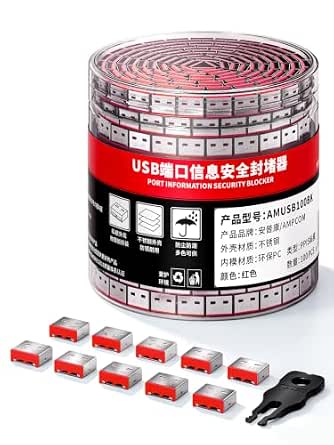
AMPCOM USB-A Port Locks, 100-Pack with 10 Keys, Nickel-Plated Stainless Steel Physical Security Blockers, Red
For organizations securing many endpoints, I’d rank the AMPCOM set above the smaller PortPlugs, PoParttg, and 12-lock kits because it pairs 100 blockers with 10 keys. That scale suits data centers, kiosks, ATMs, and other installations where distributing access across a team matters more than keeping the kit compact. Its nickel-plated stainless steel construction and dual-keyhole removal design are also more specifically described than the general metal construction of the smaller sets; the stated goal is to help remove blockers without damaging ports. Low-profile bodies leave adjacent ports accessible, which can matter on densely arranged equipment. The cost of that deployment flexibility is a dedicated key system: the locks require AMPCOM keys, and USB-C ports are not supported. I’d reserve this bulk set for managed USB-A fleets, not occasional household use.
Pros:- 100 blockers and 10 keys support large deployments and multiple authorized key holders.
- Nickel-plated stainless steel construction is specified for corrosion and heat resistance.
- Dual-keyhole design is intended to support damage-free removal.
- Low-profile design allows adjacent USB-A ports to remain accessible.
Cons:- Requires dedicated AMPCOM keys for removal.
- USB-A only; it does not fit USB-C ports.
- The 100-piece quantity is excessive for small home or office setups.
Best for: IT administrators and facilities teams securing USB-A ports across servers, kiosks, ATMs, network switches, and other large device fleets.
Not ideal for: Home users or small teams needing only a handful of blockers, and anyone whose equipment relies on USB-C ports.
- Quantity:100 blockers
- Included keys:10
- Material:Nickel-plated stainless steel
- Connector type:USB Type A (male)
- Color:Red
- Model:AMUSB1HRD
- Weight:70 g
- Operating temperature:-4°F to 158°F
- Compatible devices:Laptops, desktops, servers, kiosks, ATMs, and network switches
Our verdict“Choose AMPCOM for a large, managed USB-A deployment that benefits from many blockers and keys, and skip it for small setups or USB-C equipment.”
100-Pack USB Port Locks with 5 Keys – Metal USB‑A Port Blockers, Anti‑Theft, Dust & Moisture Proof, Removable (Red)
For an office, lab, or school securing many computers, this 100-lock metal set covers far more ports than the PortPlugs 5-Pack, while its five keys offer more shared access than the GINTOOYUN set’s two. The metal construction and tool-free removal suit environments where ports need both a physical barrier and occasional authorized access. Its red finish can also make blocked ports easier to spot during a device check. The tradeoff is scale: a hundred locks are excessive for a home user or a small team, and this set works with USB-A only, not USB-C. I’d choose it for broad deployment, but compare its five-key setup with the 100-Piece USB-A Port Lock Set if more key copies matter.
Pros:- 100 metal blockers support deployment across a large fleet of devices.
- Five included keys allow access to be shared among multiple authorized users.
- Tool-free installation and removal suit ports that occasionally need approved access.
- Designed to block unauthorized connections while shielding ports from dust and moisture.
Cons:- The 100-piece quantity can leave small deployments with many unused locks.
- Compatible with USB-A ports only.
- Five keys may be less convenient for broad access management than sets with more key copies.
Best for: IT administrators, schools, and offices that need to block USB-A ports across many devices and want several keys for shared management.
Not ideal for: Home users or small teams securing only a few ports, and anyone whose devices rely on USB-C.
- Brand:PoParttg
- Quantity:100 metal USB-A port locks
- Keys included:5 metal unlock keys
- Material:Metal
- Color:Red
- Compatibility:USB-A
- Dimensions:0.48 x 0.41 x 0.22 inches
- Warranty:2 years
Our verdict“Choose this red metal set for large USB-A deployments where 100 blockers and five shared keys fit the scale of the job.”
GINTOOYUN USB Port Lock Removable USB-A Port Blocker with 2 Keys and 10 Locks for PC, Laptop & Protect Information Security, Dust & Moisture Resistant Shield (Black)
The GINTOOYUN 10-pack makes more sense for a small office or a few household devices than the 100-piece metal sets from PoParttg and B0FH6MZNFJ. Its PP plastic shields snap into standard USB-A ports and come with two keys, giving a modest team a straightforward way to block unused connections without keeping a large stock of hardware. The listed compatibility spans USB 2.0 and 3.0 devices, including computers, printers, tablets, and chargers. Compared with the PortPlugs 5-Pack, this set gives you more blockers, though it uses plastic rather than zinc alloy. That keeps the design simple, but buyers who prioritize a metal build may prefer PortPlugs. It still only addresses USB-A ports, and its two keys may not suit workplaces where many people need authorized removal.
Pros:- Ten shields cover multiple devices without the surplus of a 100-piece set.
- Two included keys provide more shared access than a single-key kit.
- PP plastic construction keeps the blockers distinct from metal alternatives.
- Fits standard USB 2.0 and 3.0 USB-A ports across a range of listed devices.
Cons:- Plastic may feel less robust than the metal PortPlugs and PoParttg alternatives.
- USB-A only, so it does not block USB-C ports.
- Two keys may be limiting for teams with several people who need access.
Best for: Small offices, classrooms, or households that need several USB-A ports blocked and prefer a 10-piece kit with two keys.
Not ideal for: Organizations seeking metal blockers, wide-scale coverage, or many separate keys for a larger group of authorized users.
- Product name:USB-A Port Blocker
- Quantity:10 port shields
- Keys included:2 keys
- Material:PP plastic
- Color:Black
- Compatibility:Standard USB 2.0 and USB 3.0 ports
- Applicable devices:USB-A desktops, notebooks, printers, tablets, and chargers
Our verdict“Pick GINTOOYUN for a small USB-A security setup where ten plastic blockers and two keys are a better fit than a bulk metal kit.”
Lindy USB Port Blocker, Pack of 4, Blue (40452)
Lindy’s four-lock set is the most restrained choice here: it covers a handful of ports without committing to the 10-, 100-, or 5-piece quantities offered by GINTOOYUN, PoParttg, and PortPlugs. The blue plastic blockers and matching key provide a simple, visible way to mark ports that should stay closed. That can suit a personal computer, a small workstation, or a limited number of shared devices. The main compromise is access management: one key is included, and it works with locks of the same color, so it is less flexible for teams managing several lock sets than the five-key PoParttg bulk kit. The supplied details also give less material and locking-system information than PortPlugs’ zinc-alloy model. Choose Lindy for a small, straightforward USB-A setup, not a broad security rollout.
Pros:- Four locks suit a small number of ports without excess inventory.
- Blue finish makes the blockers easy to distinguish visually.
- Includes a key for quick insertion and removal.
- Physical port blocking helps restrict unauthorized USB access.
Cons:- Only one key is included, limiting shared access.
- The key works only with locks of the same color.
- Plastic construction is less substantial than the metal PortPlugs and PoParttg options.
Best for: Individuals or small workstations that need only a few USB port blockers and value a blue, easy-to-identify set.
Not ideal for: Teams securing many devices, buyers who need several keys, or anyone looking for a metal construction or detailed locking mechanism.
- Brand:Lindy
- Model:40452
- Pack contents:4 locks and 1 key
- Lock type:Key lock
- Material:Plastic
- Color and finish:Blue, matte
- Dimensions:0.39 x 4.72 x 5.51 inches
- Weight:0.01 kg
Our verdict“Choose Lindy when four color-coded blockers are enough and a simple single-key setup matters more than scale or metal construction.”
100-Piece USB-A Port Lock Set with 10 Keys
This 100-piece metal set with 10 keys is aimed at deployments where both the number of ports and the number of authorized key holders are high. Compared with PoParttg’s similarly sized 100-pack, it includes twice as many keys, which can make access easier to distribute across an IT team or multiple sites. Like the smaller PortPlugs 5-Pack, it uses metal blockers, but its bulk quantity suits fleet-wide coverage rather than a few shared computers. The locks are designed for USB-A ports and help keep dust and moisture out as well as block connections. That scale is also the drawback: the kit is a poor match for a single laptop or a handful of devices. It offers no USB-C coverage, so buyers should count their port types before choosing it.
Pros:- 100 metal port locks are suited to broad deployment.
- Ten keys provide more distribution flexibility than the PoParttg 100-pack’s five.
- Designed to block unauthorized USB connections and help keep out dust and moisture.
- Black finish offers a low-visibility alternative to red bulk sets.
Cons:- The 100-lock quantity is excessive for small installations.
- Compatible with USB-A only.
- Product data does not specify a warranty or a particular locking mechanism.
Best for: IT teams and organizations that need metal USB-A blockers across many computers and want ten keys to distribute among authorized staff.
Not ideal for: Individuals or small teams with only a few ports to secure, or workplaces whose devices mainly use USB-C.
- Quantity:100 port locks
- Keys included:10
- Connector type:USB-A
- Material:Metal
- Color:Black
- Dimensions:0.48 x 0.41 x 0.22 inches
- Item weight:6.3 ounces
- Model number:1-3D
Our verdict“Choose this set for large USB-A deployments that need metal blockers and more key copies than the PoParttg 100-pack provides.”
PortPlugs USB-A Metal Port Blockers, 5-Pack with 2 Removal Keys, Black
PortPlugs takes a more security-focused approach than Lindy’s four-piece plastic set: these five blockers use zinc alloy and dual independent latches, with two metal removal keys included. That combination suits a shared workstation or public terminal where a sturdier blocker and a clear removal tool matter more than covering dozens of devices. The pack is also easier to right-size for a small number of computers than the 100-lock PoParttg and B0FH6MZNFJ kits. It fits several USB-A generations, from 2.0 through 3.2, which helps when a workplace has mixed-age hardware. The tradeoff is limited quantity; teams securing a large fleet should look to a bulk set instead. It remains USB-A only, so it cannot protect USB-C ports.
Pros:- Zinc-alloy construction offers a metal alternative to Lindy’s plastic blockers.
- Dual independent latches add a distinct locking design.
- Two metal removal keys support shared authorized access.
- Compatible with USB-A 2.0, 3.0, 3.1, and 3.2 ports.
Cons:- Five blockers are not enough for large-scale deployment.
- USB-A only, with no USB-C compatibility.
- The locking design is more specialized than needed for buyers seeking a simple, basic port cover.
Best for: Small businesses, reception areas, and IT staff securing a few shared USB-A workstations with a metal blocker and two removal keys.
Not ideal for: Large fleets needing many blockers, or users who need a solution for USB-C ports.
- Brand:PortPlugs
- Quantity:5 port blockers
- Keys included:2 metal removal keys
- Material:Zinc alloy
- Lock type:Pin tumbler
- Locking system:Dual independent latches
- Compatible ports:USB-A 2.0, 3.0, 3.1, and 3.2
- Color:Black
- Compliance:RoHS
Our verdict“Pick PortPlugs for a few shared USB-A workstations where a zinc-alloy build, dual latches, and two removal keys matter more than bulk quantity.”
PortPlugs USB-A Port Blockers, 50 Pack with 3 Removal Keys, Black
For an office, school, or library securing many USB-A ports, this 50-blocker set offers broad coverage without software or device setup. Its heat-resistant PE bodies also help keep dust and debris out of unused ports, giving it a practical dual role beyond restricting connections. Compared with the metal PortPlugs 50-pack, this set trades the zinc-alloy construction and dual-latch design for a lighter plastic blocker and includes three removal keys rather than two. That extra key can make distribution across several staff members easier, while the plastic body is less suited to buyers prioritizing resistance to physical tampering. It blocks USB-A only, and it should be treated as one layer of protection, not a replacement for software security controls.
Pros:- 50 blockers cover a large number of devices or spare ports
- Three removal keys allow access to be distributed among staff
- Heat-resistant PE helps keep dust and debris out of unused ports
- Physical installation needs no software or configuration
Cons:- Plastic construction offers less resistance to tampering than the zinc-alloy PortPlugs 50-pack
- Works with USB-A ports only
- Physical blockers do not replace software security controls
Best for: IT staff, schools, and libraries that need to cover many standard USB-A ports and share removal access among several administrators.
Not ideal for: Organizations seeking a metal, dual-latch deterrent or buyers who need to secure USB-C ports as well as USB-A.
- Brand:PortPlugs
- Connector type:USB-A
- Quantity:50 blockers
- Removal keys:3
- Material:Heat-resistant PE
- Color:Black
- Model number:USBA_Lock
- Recommended uses:Offices, schools, libraries, shared environments, travel, and public workspaces
Our verdict“Choose this set for wide USB-A coverage and several shared keys, but pick the metal PortPlugs 50-pack if tamper resistance matters more than key count.”
PortPlugs USB-A Metal Port Blockers (50 Pack) with 2 Keys
This is the strongest fit in this group for buyers who want a metal body and dual-latch mechanism across a large fleet of USB-A devices. The zinc-alloy construction and two independent latches are designed to make casual interference harder than with the PE PortPlugs 50-pack, which favors lighter blockers and supplies an extra key. That difference matters when physical deterrence is the priority; the tradeoff is that fewer keys are included, so access needs tighter key control. The pack suits environments such as kiosks, servers, and shared workstations where USB-A ports need a keyed physical barrier. It still does not cover USB-C connections, and losing or misplacing a key can complicate authorized removal.
Pros:- Zinc-alloy construction is more substantial than the PE PortPlugs 50-pack
- Dual independent latches provide two-point retention
- Includes 50 blockers for fleet-wide deployment
- Fits USB-A 2.0, 3.0, 3.1, and 3.2 ports
Cons:- Only two metal keys are included for the 50 blockers
- Key management is necessary for authorized removal
- Does not secure USB-C or other connector types
Best for: IT administrators securing USB-A ports on shared workstations, kiosks, or servers who prefer metal construction and a dual-latch design.
Not ideal for: Teams that need several keys distributed among staff, or organizations whose devices mainly use USB-C ports.
- Quantity:50 blockers
- Material:Zinc alloy
- Color:Black
- Included keys:2 metal keys
- Compatibility:USB-A 2.0, 3.0, 3.1, and 3.2
- Lock design:Dual-latch mechanical system
- Product dimensions:6 x 4 x 1 inches
- Model number:M-PB-50PCK
Our verdict“Pick this metal set when dual-latch retention matters more than having extra shared keys.”
24-Pack USB Metal Port Lock Blocker with 2 Keys – USB-A Security Lock for PC and Laptop
With 24 metal blockers and two emergency keys, this set lands between small desk-level packs and the 50-piece PortPlugs options. That middle quantity can suit a department or a handful of PCs without leaving a large surplus, while the metal build offers a more substantial barrier than the plastic PortPlugs 10-pack. Installation is described as a simple insert-and-twist process, so deployment does not call for tools; the blockers also help shield open ports from dust and moisture. The tradeoff is the red finish, which may stand out on dark equipment, and metal needs careful handling around the port to avoid scratching nearby surfaces. Like the other USB-A-only picks, it cannot cover USB-C ports.
Pros:- 24-piece quantity suits a mid-size deployment
- Metal construction provides a sturdier physical barrier than plastic options
- Insert-and-twist installation does not require tools
- Two keys provide a backup for authorized removal
Cons:- Red color may be conspicuous on equipment
- Metal blockers may scratch surrounding port areas if handled carelessly
- Compatible with USB-A ports only
Best for: Small IT teams or offices securing a few dozen USB-A ports that want metal blockers without buying a 50-piece set.
Not ideal for: Buyers who prefer unobtrusive black blockers, need USB-C coverage, or want to avoid handling metal close to device ports.
- Quantity:24 blockers
- Connector type:USB-A
- Material:Metal
- Color:Red
- Keys:2 emergency keys
- Installation:Insert-and-twist, tool-free
- Product dimensions:0.48 x 0.41 x 0.22 inches
- Model number:1-3D
Our verdict“Choose this set for a moderate number of USB-A ports when metal construction matters more than a discreet finish.”
PortPlugs USB-A Port Blockers, 10 Pack with Removal Key, Black
This 10-piece keyed set is a sensible choice when only a few computers or shared devices need USB-A port blocking. Its reusable, heat-resistant PE blockers also help guard unused ports against dust and moisture, while the black finish is less visually prominent than the red 24-pack. Compared with the 50-piece PE PortPlugs set, this one takes up less space in a small deployment but includes only one removal key, so access depends on keeping that key available. The plastic construction makes it less suited to buyers seeking a more substantial physical deterrent, such as the zinc-alloy PortPlugs 50-pack. It works only with standard USB-A ports, and removal remains tied to the included key.
Pros:- Ten blockers suit small deployments without a large surplus
- Reusable keyed design allows authorized removal
- Heat-resistant PE helps keep dust and moisture out
- Black color is relatively discreet on many devices
Cons:- Only one removal key is included
- Plastic construction is less suited to buyers prioritizing tamper resistance
- Compatible with standard USB-A ports only
Best for: Home offices, small teams, or individual device owners who need keyed blockers for a limited number of standard USB-A ports.
Not ideal for: Large organizations needing many blockers and shared keys, or buyers who want metal construction or USB-C coverage.
- Brand:PortPlugs
- Compatibility:Standard USB-A ports
- Quantity:10 blockers
- Included key:1 removal key
- Material:Heat-resistant PE plastic
- Color:Black
- Reusable:Yes
- Dimensions:0.58 x 0.58 x 0.29 inches
Our verdict“Choose this pack for a small USB-A setup where a reusable plastic blocker and one controlled removal key are enough.”
12-Pack USB-A Port Blockers with 1 Key, Removable Physical Security Locks, Anti-Tampering Data Protection for Laptops, PCs & Game Consoles (Black)
The compact 12-piece pack is aimed at owners protecting USB-A ports on laptops, PCs, and game consoles without carrying a bulkier workplace kit. Its PC blocker bodies are described as heat-resistant, and the metal key supports keyed removal. Compared with the PortPlugs 10-pack, it supplies two extra blockers, but both sets include just one key; compared with the 24-piece metal set, this option favors portability and a compact plastic body over all-metal construction and a larger deployment. That makes it a practical match for a few personal devices, not a high-security fleet solution. One key for all 12 blockers also creates a single point of failure, and USB-C ports remain outside its coverage.
Pros:- 12 blockers cover several personal devices
- Compact dimensions suit portable-device kits
- Heat-resistant PC body and metal removal key
- Anti-slip design is specified to aid insertion
Cons:- Only one key is included for the entire set
- PC body is not an all-metal construction like the 24-piece metal set
- Blocks USB-A ports only
Best for: Laptop, PC, and game-console owners who want a compact set of USB-A blockers for a few personal devices.
Not ideal for: IT teams needing multiple removal keys, buyers seeking all-metal blockers, or anyone needing USB-C port protection.
- Quantity:12 blockers
- Compatibility:USB-A ports
- Blocker material:Heat-resistant PC
- Key material:Metal
- Included key:1
- Product dimensions:0.46 x 0.4 x 0.22 inches
- Color:Black
- Manufacturer:PoParttg
Our verdict“Pick this pack for portable personal-device coverage, but choose a multi-key set for shared or managed equipment.”

How We Picked
I compared the 15 listings on the details that shape a USB port lock purchase: stated material and locking design, number of blockers, number of removal keys, and the intended scale of use. I gave more weight to listings with clearer construction or access details, since those help buyers judge durability and day-to-day control. Pack size mattered, but a large count alone did not make a set a stronger choice if key access was less convenient.
The order reflects how clearly each option serves a distinct buyer need, from a specified metal locking design to bulk deployment and small port counts. Many listings provide limited information beyond count, color, and USB-A compatibility, so I avoid treating unlisted security claims or fit details as proven. These products are physical port blockers, not a substitute for device policy, encryption, or protection against access through other interfaces.
Factors to Consider When Choosing Usb Port Locks
Choosing among USB port locks is less about finding the biggest set and more about matching port compatibility, access control, and deployment scale. I’d settle those points before comparing colors or raw blocker counts.
Confirm the port type and physical fit
Start by identifying the ports you actually need to block: this lineup is centered on USB-A, which is not interchangeable with USB-C or other connectors. Check device manuals or inspect the port shape rather than relying on a product title that says it fits computers broadly. A blocker that does not match the port cannot provide the intended physical barrier. Also check whether a port sits beside another connector, recessed behind a panel, or inside a case where a removal key may be hard to position. If fit information is missing, seek confirmation before ordering a large quantity. Buying a small set first can reduce the risk of ending up with blockers that do not suit the hardware.
Match key count to who needs access
Blockers are useful only if authorized users can remove them when needed, so treat the keys as part of the access plan, not an accessory count. One key may be workable for a single workstation, while a shared office or several sites may need keys assigned to separate custodians. A set with more keys can reduce handoffs, but it also means more keys to track and secure. Decide who may unblock ports, where keys will be stored, and what happens if one is lost. Avoid assuming that similar-looking blockers use the same key; verify compatibility with the seller or product documentation. For sensitive environments, keep a controlled spare rather than leaving a removal key near the protected devices.
Choose a pack size around deployment, not the headline count
Estimate the number of ports to block across all devices, then add a modest allowance for replacements or future equipment. Small packs reduce unused stock for a home setup, while large sets make more sense when standardizing many computers or keeping spares on hand. Count ports, not devices: one computer may have several accessible USB-A sockets. A large pack can still be awkward if its key supply does not suit the number of rooms or administrators. For a rollout, plan where unused blockers and keys will be stored so they remain identifiable. If your deployment is uncertain, buying a smaller quantity first is safer than assuming every port needs to be blocked permanently.
Treat material and locking claims as specific, not universal
Listings that state metal construction or describe a particular locking design give more information than listings that only identify a blocker count. That does not by itself prove resistance to tampering, so avoid treating words like anti-theft as a guarantee against removal or damage. Consider how often blockers will be handled: frequently accessed ports make ease of removal and key availability more relevant, while rarely used ports may favor a simple set-and-store approach. Look for clear information about the blocker body and removal method before buying. If the listing does not specify a feature, do not assume it is present based on another product in the same category. For stronger protection, pair physical blockers with device controls and clear access rules.
Balance dust protection with service access
Some listings describe resistance to dust or moisture, but a port blocker should not be treated as a sealed enclosure unless the manufacturer provides that specific claim and supporting details. Its basic role is to occupy the port and limit access; it does not protect a whole device from spills or environmental exposure. Think about maintenance before blocking ports used for diagnostics, imaging, or peripherals. A blocker left in place can slow support work if the responsible key is unavailable. Keep a record of which ports are blocked and who can remove each set, especially on shared equipment. This avoids turning a basic access measure into an obstacle during routine repairs.
Use port locks as one layer of device security
A physical blocker can discourage casual plugging into an exposed USB-A port, but it does not stop every route to data or device access. Pair it with operating-system controls, endpoint policies, and encryption when the data risk calls for stronger safeguards. Before blocking ports, identify approved uses such as keyboards, recovery tools, or maintenance devices, and document an exception process. A blanket rule may disrupt work if staff depend on removable storage or service connections. For managed fleets, standardize the blocker type and key custody process to make replacement and support easier. The right choice is the one that fits a defined policy, not simply the set with the most blockers.
Frequently Asked Questions
Will these USB port locks fit USB-C ports?
The listed products are described as USB-A blockers, so I would not expect them to fit USB-C sockets. The connector shapes and dimensions differ, and forcing a blocker into the wrong port could damage the device. Check the exact port type on each computer or peripheral before ordering. If you need to block USB-C, choose a product specifically identified for USB-C and verify its removal method and compatibility separately.
How many removal keys should I get for a multi-device setup?
Choose key count based on the number of people or locations that need authorized access, not just the number of blockers. A single key can work for one controlled room, but it creates a bottleneck when devices are spread across departments. Extra keys can improve availability while increasing the need for secure storage and tracking. For a larger deployment, assign key holders and keep a documented spare; confirm that the keys included are meant to work with the blockers in that set.
Is a metal USB port lock automatically more secure than a plastic one?
Material alone does not establish security. Metal construction may be a useful durability signal, but a product’s fit, locking mechanism, and removal-key control also affect how well it serves its purpose. The listings in this roundup do not provide a consistent, independently verified tamper-resistance measure for comparison. Treat physical blockers as a way to restrict casual access, not as a guarantee against a determined person. For higher-risk devices, combine them with software controls and physical device security.
Should I block every USB port on a computer?
Not automatically. Blocking every port can interfere with keyboards, approved peripherals, recovery work, and maintenance, so first map how each USB-A port is used. Some organizations block only exposed or unused ports and retain controlled access to ports needed for support. If you do block all available ports, define who holds the key and how urgent repairs will be handled. A documented exception process can preserve security without leaving staff unable to service a device.
Can I reuse the same USB port locks on several devices?
Reuse depends on whether the blocker can be removed and whether its key matches the set; confirm those details in the product information rather than assuming all USB port locks share a key system. Reusing a small set may suit occasional use, but it means the blockers must be moved and tracked each time. For a fixed deployment, leaving blockers installed is simpler and avoids gaps in coverage. Keep the removal key with an authorized person and record which devices are temporarily unblocked.
Conclusion
For most buyers, I’d start with the PortPlugs 10-Pack Zinc Alloy Two-Point Lock because it has the clearest combination of specified metal construction and locking design. For best value in a small deployment, the PortPlugs five-pack with two removal keys keeps the count modest while providing a spare key; buyers who want the simplest small setup can compare it with Lindy’s four-pack. For bulk use, AMPCOM’s 100-pack is the strongest fit when its 10-key arrangement matches your access plan, while the larger 100-piece options suit buyers prioritizing quantity. Beginners should favor a small set and confirm USB-A fit before scaling up. If your specific need is a large rollout, choose by key distribution as much as blocker count; if you need USB-C coverage or stronger security than a physical barrier provides, select a purpose-built alternative and pair it with device controls.