
If you’re looking for the best console servers for serial over IP, I’ve got some top picks for you, including models like the Vertiv Avocent ACS8000, Tripp Lite 4-Port IP Console, and Digi 70001953. These solutions offer excellent security, remote management, environmental monitoring, and redundancy features suitable for various enterprise needs. Keep exploring, and you’ll find detailed insights on features, compatibility, and ideal use cases to help you make the right choice.
Key Takeaways
- Console servers enable remote management of serial devices over IP networks with support for various protocols like SSH, SSL, and Telnet.
- They offer features such as multiple port configurations, network redundancy, and high security for reliable remote access.
- Environmental and security monitoring capabilities help protect hardware and ensure optimal operation in critical environments.
- Suitable for data centers, large enterprises, and industrial settings requiring scalable and secure serial device management.
- Selection depends on port support, security features, environmental monitoring, size, and compatibility with existing infrastructure.
Vertiv Avocent ACS8000 Serial Console Server (ACS8016MDAC-400)

Are you managing a large-scale data center or enterprise network that demands high security and reliable remote access? The Vertiv Avocent ACS8000 Serial Console Server (ACS8016MDAC-400) offers 16 ports for secure, remote management of IT assets via in-band and out-of-band access. It features dual AC power supplies for high availability, along with 8 USB ports supporting external devices. Its automated zero-touch provisioning, combined with a powerful dual-core ARM processor and environmental sensors, enhances efficiency and monitoring. Compatible with over 20 brands like Cisco and Dell, it’s designed for large organizations needing scalable, secure, and reliable console management.
Best For: large organizations and data centers needing scalable, secure, and reliable remote management of IT assets with high security and automation features.
Pros:
- Supports 16 serial ports and 8 USB ports for versatile device management
- Equipped with dual power supplies ensuring high availability and reliability
- Advanced security features including OTP authentication, IP filtering, and custom security profiles
Cons:
- Initial setup may be complex and require technical expertise
- Designed primarily for enterprise environments, not suitable for small or home-office use
- Physical size and weight may pose installation challenges in limited spaces
Vertiv Avocent ACS 8000 Serial Console Server

The Vertiv Avocent ACS 8000 Serial Console Server stands out for organizations that require reliable remote management with built-in failover capabilities. It offers 32 ports for serial device access, enabling seamless troubleshooting across multiple locations. Its automatic network failover switches between wired Ethernet and cellular networks, ensuring continuous connectivity. Powered by a dual-core ARM processor with 16GB flash memory, it supports automated provisioning and scripting for efficient management. With 8 USB ports and environmental sensor support, it also monitors temperature, humidity, and security sensors. This robust design makes it ideal for maintaining data center uptime and environmental security remotely.
Best For: organizations seeking reliable remote serial device management with automatic network failover and environmental monitoring capabilities.
Pros:
- Supports 32 serial ports for extensive device management across multiple locations
- Features automatic network failover between wired Ethernet and cellular networks to ensure continuous connectivity
- Includes environmental sensors for monitoring temperature, humidity, leaks, and security, enhancing data center safety
Cons:
- May require additional configuration for complex automation scripting beyond basic provisioning
- The device’s size and number of ports could be overkill for small-scale setups
- Limited to serial device management, which may not suit organizations transitioning to IP-based systems
TRIPP LITE 4-Port IP Serial Console / Terminal Server
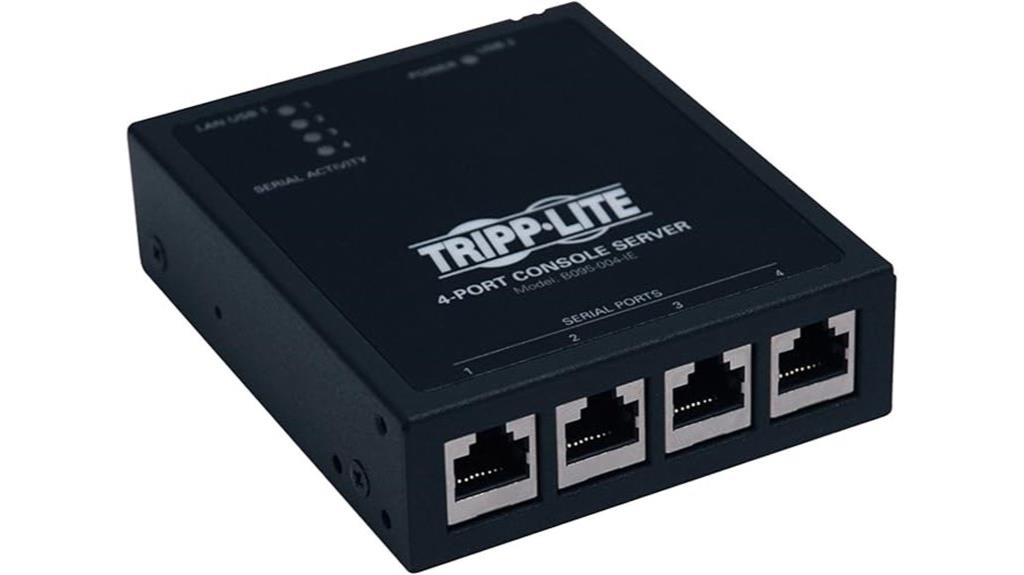
If you’re managing multiple network devices and need reliable serial over IP access, the TRIPP LITE 4-Port IP Serial Console / Terminal Server stands out with its support for four RS-232 serial console ports and Cisco-compatible cabling. Its compact size (3.5 x 1.13 x 4 inches) and lightweight design make deployment easy. Running Linux, it offers secure reverse telnet and console access, along with features like UPS monitoring and PDU control. One port can serve as a console port for the device itself. Customers praise its straightforward setup, especially with included Cisco cables, and its durability, backed by a 4-year warranty.
Best For: organizations and network administrators needing reliable remote serial console access for managing multiple network devices securely and efficiently.
Pros:
- Supports four RS-232 serial console ports compatible with Cisco cabling standards for versatile connectivity.
- Compact, lightweight design (3.5 x 1.13 x 4 inches) simplifies deployment in various environments.
- Runs Linux with secure reverse telnet and console access, plus support for UPS monitoring and PDU control.
Cons:
- Limited to four serial ports, which may not suffice for larger-scale setups.
- Requires network connectivity; does not operate independently of an IP network.
- May need some technical knowledge for setup, especially for advanced features like secure remote access.
Vertiv Avocent MergePoint Unity KVM over IP and Serial Console Switch

Looking for a reliable console server that combines secure remote access with flexible management options? The Vertiv Avocent MergePoint Unity KVM over IP and Serial Console Switch (model MPU8032DAC-001) fits the bill. It offers centralized control of servers via web browser or multi-platform software, supporting analog and digital technology, virtual media, remote USB, and smartcard/CAC readers. With 32 serial ports, 8 KVM paths, VGA, USB inputs, dual power supplies, and IP-rated protection, it’s ideal for small data centers, retail, healthcare, and edge environments. Its versatile connectivity and management options make remote troubleshooting and maintenance straightforward, even for less-trained operators.
Best For: organizations managing small data centers, retail outlets, healthcare facilities, and edge environments seeking secure, centralized remote server management with flexible connectivity options.
Pros:
- Supports both analog and digital technology for versatile control.
- Features 32 serial ports and 8 KVM paths for extensive device management.
- Equipped with dual power supplies and IP-rated protection for reliable operation.
Cons:
- Customer reviews indicate mixed satisfaction, with a low average rating.
- May be complex to configure for users unfamiliar with KVM or console switch systems.
- Larger footprint and weight could be a consideration for space-constrained setups.
Digi International 70001953 RS-232 Console Server

For those managing large-scale serial device networks, the Digi International 70001953 RS-232 Console Server stands out with its impressive 48 RJ-45 ports, making it ideal for extensive console management. Its compact size (21.7 x 15.5 x 5 inches) and 6-pound weight make installation flexible. With 48 ports plus an additional one, it handles multiple serial connections efficiently. Since its release in 2003, it remains available and supported, with warranty options through customer service. Its robust port count and long-standing presence make it a reliable choice for organizations needing centralized serial device access and management over IP networks.
Best For: organizations managing large-scale serial device networks requiring centralized and reliable console access over IP.
Pros:
- High port density with 48 RJ-45 ports for extensive device management
- Compact size and lightweight design facilitate flexible installation
- Long-standing product support and availability since 2003 ensure reliability
Cons:
- May require additional configuration for network integration
- No mention of advanced features like remote access via modern protocols
- Larger physical footprint compared to some newer, more compact solutions
Sipeed NanoKVM IP-KVM Mini Remote Control Operations Maintenance Server
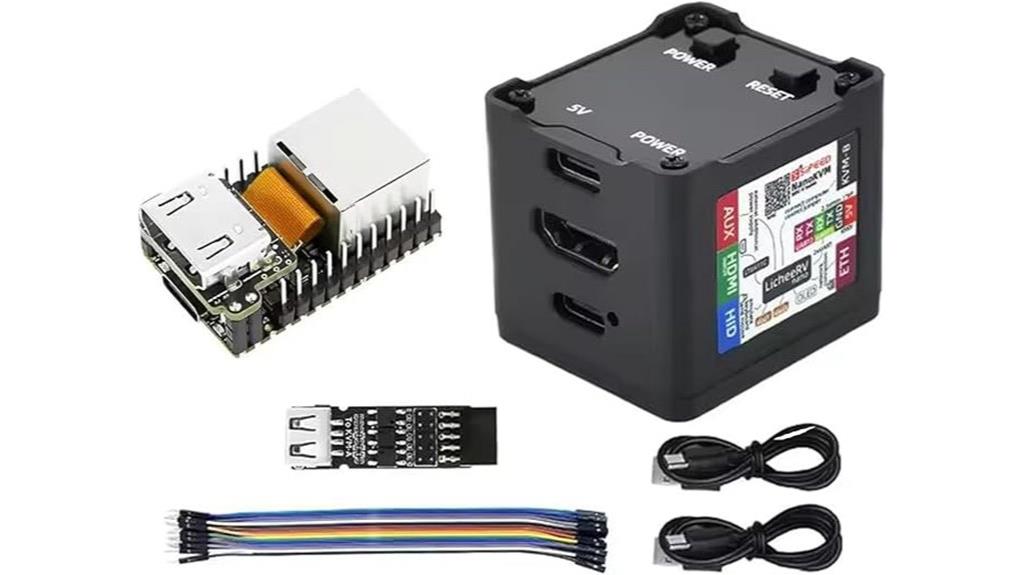
The Sipeed NanoKVM IP-KVM Mini Remote Control Operations Maintenance Server stands out as an ideal choice for tech enthusiasts and small to medium enterprises seeking compact, high-performance remote server management. Its small size (40x36x36mm) packs powerful features like a 1GHz RISC-V CPU, 256MB RAM, and 2Gbit Ethernet, supporting 1080P video at 60fps with low latency. It functions as an IP-KVM, enabling real-time monitoring, remote control, and hardware management without relying on host internet. With HDMI and USB ports, plus options for storage expansion and full remote capabilities, it’s versatile, expandable, and perfect for streamlined remote server operations.
Best For: small to medium enterprises and tech enthusiasts seeking a compact, high-performance remote server management solution with real-time control capabilities.
Pros:
- Compact size (40x36x36mm) ideal for space-constrained environments
- Supports high-quality 1080P 60fps video encoding with low latency
- Offers versatile remote management features including HDMI, USB, and network connectivity
Cons:
- Limited RAM (256MB) may restrict performance for intensive tasks
- WIP status on H264 video encoding could impact current functionality
- Requires technical expertise for setup and customization, especially for advanced features
Perle IOLAN SCS Console Server
If you’re managing a large data center and need reliable, secure remote access to serial devices, the Perle IOLAN SCS Console Server stands out as an ideal solution. It offers fault-tolerant architecture with dual Ethernet ports, Redundant Path technology, and clustering for seamless management of multiple console ports. Equipped with a powerful 400 MHz processor and integrated hardware encryption, it ensures high performance and security. Features like primary/backup host failover, easy web access, and support for IPv6 make it future-proof. Its robust design, combined with a lifetime warranty, provides peace of mind for enterprise environments needing resilient, secure remote device control.
Best For: large data centers and enterprise IT teams seeking reliable, secure remote management of serial devices with fault tolerance and high performance.
Pros:
- Fault-tolerant architecture with redundancy and clustering for high availability
- Advanced security features including encryption, multiple user authentication options, and compliance with US Government standards
- Supports IPv6, hardware encryption, and remote power management for future-proof and comprehensive device control
Cons:
- May require technical expertise to configure and manage advanced features effectively
- Higher initial investment cost compared to simpler console management solutions
- Larger physical footprint, which could be a concern for space-constrained environments
Factors to Consider When Choosing Console Servers for Serial Over IP
When selecting a console server, I consider factors like device compatibility, security features, and connection options to guarantee seamless integration. Security is vital, so I look for robust access controls and encryption. Additionally, I evaluate management tools and power redundancy to keep everything running smoothly and securely.
Compatibility With Devices
Choosing a console server that seamlessly works with your devices starts with verifying compatibility. First, confirm the server supports your device’s interfaces, like RS-232 or RS-485, to guarantee proper communication. Check that its firmware and software are compatible with your device’s operating system and management protocols, avoiding integration issues. It’s also essential to validate support for standard cabling types, such as Cisco-style RJ45 or DB9 connectors, matching your existing connections. Additionally, verify the server can handle the baud rates and serial communication settings your devices use to prevent data transfer problems. Finally, consider whether the console server can integrate smoothly into your network infrastructure, including compatibility with your security and management tools. Compatibility ensures reliable operation and minimizes setup headaches.
Security Features Offered
Security features are a critical factor to contemplate when selecting a console server for serial over IP, as they safeguard sensitive data and prevent unauthorized access. Look for devices supporting strong encryption protocols like SSH and SSL, ensuring secure remote connections. Multi-factor authentication options, such as OTP, RADIUS, or LDAP, add an extra layer of user verification. Features like IP packet filtering and customizable security profiles help restrict network access and mitigate threats. Hardware encryption modules and compliance with standards like FIPS 140-2 demonstrate a focus on robust security. Additionally, role-based access controls and extensive logging support secure user management and enable security audits. Prioritizing these features ensures your console server maintains the integrity and confidentiality of your serial device communications.
Connection and Port Types
Have you considered how the port types supported by a console server can impact your device management? Different devices may require specific serial interfaces like RS-232, RS-422, or RS-485, so it’s important to choose a server compatible with your hardware. Serial over IP connections typically use RJ45 or DB9 connectors, so verifying these are supported guarantees smooth integration. Many console servers offer multiple port configurations, from 4 up to 48 ports, giving flexibility for various setups. The port type also influences transmission distance and compatibility, making it critical to match your existing infrastructure. Additionally, support for standard protocols like Telnet, SSH, or HTTPS is indispensable to enable secure remote access over the network. Selecting the right port types ensures reliable, secure, and efficient device management.
Automation and Management
Automation and management features are indispensable when selecting a console server for Serial Over IP, as they directly influence deployment speed and ongoing efficiency. I look for devices that support automated provisioning and zero-touch configuration to minimize manual setup time. Scripting capabilities and detailed logging help streamline automation, troubleshooting, and guarantee compliance. Event notifications and auto-buffering are critical for proactive management, enabling real-time responses to network events. Remote management functions, like auto discovery and remote configuration, simplify ongoing operations. Security features such as IP filtering, group authorization, and OTP authentication are essential to maintain secure, automated workflows. Overall, these features help improve reliability, reduce operational costs, and guarantee seamless management of network infrastructure.
Power Redundancy Options
Power redundancy is a key consideration when selecting console servers for Serial Over IP, as it directly impacts system uptime and reliability. Many models feature dual power supplies that can operate independently, ensuring continuous operation during power failures. Automatic transfer switching (ATS) is often supported, allowing seamless switching between primary and backup power sources without service interruption. Some consoles even include hot-swappable power modules, so maintenance or replacements can happen without shutting down the device. The inclusion of dual power inputs enables connection to separate power circuits, reducing the risk of total failure caused by a single source issue. These redundancy features are essential for maintaining high availability in critical network environments, ensuring your console server stays operational no matter what power challenges arise.
Environmental Monitoring Capabilities
Why should environmental monitoring be a priority when choosing console servers for Serial Over IP? Because it’s vital for protecting your hardware and maintaining ideal operation. Environmental monitoring capabilities let me track temperature, humidity, leak detection, door status, and differential pressure in real-time, preventing equipment failures. Integrating sensors simplifies centralized management and speeds up troubleshooting. When thresholds are exceeded, automated responses like alarms or cooling activation help mitigate risks immediately. Plus, monitoring environmental conditions ensures compliance with industry standards and regulations. Devices that support multiple sensors give me an all-encompassing view of my data center’s environment, reducing the chance of unnoticed hazards. Prioritizing environmental monitoring in my selection process helps me safeguard my infrastructure and maintain continuous, reliable service.
Ease of Installation
When choosing a console server for Serial Over IP, ease of installation should be a top priority to save time and reduce frustration. Look for models with clear, detailed instructions and thorough documentation that guide you through setup. A user-friendly interface or automation features can considerably streamline initial configuration and ongoing management. Compatibility with your existing network and management tools is essential to minimize integration issues. Physical design elements like modular components or tool-less access make installation and maintenance more straightforward. Additionally, strong vendor support, including technical assistance and troubleshooting resources, ensures you can resolve issues quickly. Prioritizing these factors helps ensure a smooth installation process, saving you time and reducing potential headaches down the line.
Frequently Asked Questions
What Security Features Do Console Servers Typically Include?
Console servers typically include security features like encrypted access, strong password requirements, and user authentication protocols to protect your network. I also look for IP filtering, SSH and SSL support, and audit logs to monitor activity. These features help prevent unauthorized access and guarantee data integrity. When choosing a console server, I prioritize those with robust security measures to keep my systems safe from potential threats.
How Scalable Are Different Console Server Models?
I find that scalability varies widely among console server models. Some are designed for small setups, supporting just a few devices, while others can handle dozens or even hundreds simultaneously. When choosing, I consider future growth; models with modular hardware or multi-port options offer better scalability. This way, I can expand my network without replacing the entire console server, ensuring long-term flexibility and cost efficiency.
Can Console Servers Support Multiple Concurrent Users?
They say, “Many hands make light work,” and that’s true for console servers supporting multiple users. I’ve seen many models that handle several concurrent connections seamlessly, especially those designed for enterprise environments. These servers use robust management features to guarantee smooth access for multiple users without conflicts. So, yes, many console servers can support multiple users simultaneously, making remote management efficient and reliable for busy networks.
What Is the Typical Setup Time for a Console Server?
Setting up a console server usually takes me around 30 minutes to a few hours, depending on the complexity of the network. I start by connecting the hardware, then configure network settings, user access, and security features. If I have everything prepared, it’s pretty quick. However, for larger setups or custom configurations, I allocate more time to guarantee everything functions smoothly and securely.
How Do Firmware Updates Affect Console Server Performance?
Firmware updates are like fresh coats of paint for a console server; they boost performance and fix bugs. When I update mine, I notice smoother operation and enhanced stability. However, if not done correctly, updates can cause temporary glitches or compatibility issues. Regularly updating firmware guarantees my server runs efficiently, just like tuning a car keeps it in top shape. Always back up settings before updating for a seamless experience.
Conclusion
Choosing the right console server is like assembling your own command center, where each piece plays a crucial role in keeping your network running smoothly. Whether you lean towards robust Vertiv models or versatile Digi and Sipeed options, remember that the perfect fit depends on your specific needs. Like a conductor guiding an orchestra, your choice guarantees seamless control and reliability—bringing harmony to your serial over IP setup.