
The point of a 10GbE PoE switch for cameras is simple: multi-gigabit camera ports to feed high-resolution streams, PoE power to run those cameras without separate supplies, and 10G uplinks so footage reaches your NVR without bottlenecking. My top overall pick is the Ubiquiti USW-Pro-XG-8-PoE, which combines true 10G RJ45 ports with PoE++ delivery and a polished management layer. For tighter budgets, the NETGEAR MS510TXUP offers smart-managed multi-gig flexibility at a friendlier price, while the TRENDnet TPE-7124SBF stands out for larger installs needing 12 powered ports. The main tradeoffs you’ll face in this category are PoE budget versus port count, unmanaged simplicity versus VLAN control for camera segmentation, and whether every camera port needs multi-gig speed or just the uplink does. Read on for the full breakdown.

Get privacy and security gear delivered free with Prime
- Fast, free delivery on millions of items
- Prime Video, Amazon Music and more included
- Member-only deals all year
Key Takeaways
- Only three switches in this lineup (the Ubiquiti, YuanLey 8-port, and TRENDnet) deliver multi-gig speeds on the camera ports themselves — the NICGIGA and generic 8-port models are 2.5G access switches with 10G reserved for uplinks, which is plenty for most camera loads.
- PoE budget varied more than any other spec: from roughly 65W on the generic 8-port unit to 110–155W on the YuanLey and Ubiquiti, and that gap determines how many high-draw PTZ and IR-heavy cameras you can actually power.
- The YuanLey 48-port occupies a completely different niche — it’s for camera counts in the dozens, trading 10G camera ports for massive port density plus 10G SFP+ aggregation.
- Every unmanaged option here is a plug-and-play win for beginners but a liability for anyone who needs VLAN isolation, camera subnetting, or per-port power monitoring.
- SFP+ uplinks appeared on six of eight models, confirming that 10G fiber or DAC runs to the NVR are now the standard backbone for serious camera deployments.
| Ubiquiti Networks USW-Pro-XG-8-PoE (155W) 8-Port 10GbE PoE++ Network Switch with RJ45 and SFP+ Interfaces |  | Best Overall | Ports: 8x 10 GbE RJ45 + 2x 10G SFP+ | PoE Standard: PoE++ | PoE Budget: 155W | VIEW ON AMAZON | See Our Full Breakdown |
| NETGEAR MS510TXUP 10-Port 10G Multi-Gig PoE++ Smart Managed Switch |  | Best Power Budget | Ports: 4x 10G + 4x 2.5G Multi-Gig PoE++, 2x 10G SFP+ | PoE Budget: 295W | Switch Type: Smart managed | VIEW ON AMAZON | See Our Full Breakdown |
| NICGIGA 10-Port 2.5G Unmanaged PoE+ Switch with 2 x 10G SFP+ Uplinks |  | Best Value | PoE Ports: 8x 2.5GbE | Uplink Ports: 2x 10G SFP+ | PoE Standard: IEEE 802.3af/at | VIEW ON AMAZON | See Our Full Breakdown |
| 8-Port 2.5G PoE+ Switch with 10G SFP Uplink |  | Best Budget Pick | PoE Ports: 8x 2.5GbE | Uplink: 1x 10G SFP | PoE Standards: IEEE 802.3af/at | VIEW ON AMAZON | See Our Full Breakdown |
| YuanLey 8-Port 10G PoE Switch, Unmanaged, 110W, Multi-Gig (1G/2.5G/5G/10G), Metal Rackmount/Wall Mount |  | Best Full 10G Copper on a Budget | Ports: 8x 10G Base-T PoE | PoE Standard: IEEE 802.3af/at | Total PoE Budget: 110W | VIEW ON AMAZON | See Our Full Breakdown |
| TRENDnet 12-Port 10G PoE++ Web Smart Switch (TPE-7124SBF) | 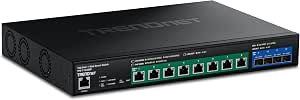 | Best Premium Pick | Ports: 12 total: 8 x 10G PoE++ and 4 x 10G SFP+ | PoE Power Budget: 720W shared | Max PoE++ Per Port: Up to 90W | VIEW ON AMAZON | See Our Full Breakdown |
| YuanLey 48-Port Gigabit Managed PoE+ Switch with 6x 10G SFP+, L3 Smart Ethernet Switch |  | Best for Large Camera Deployments | Number of Ports: 54 (48 PoE+ Gigabit, 6 SFP+) | PoE Budget: 460W (up to 30W per port) | Switching Capacity: 216 Gbps | VIEW ON AMAZON | See Our Full Breakdown |
| NICGIGA 10-Port 2.5Gb PoE Network Switch (8x 2.5G PoE + 2x 10G Uplink, 130W) |  | Best Plug-and-Play Value | Number of Ports: 10 (8x 2.5Gb PoE + 2x 10Gb RJ45 uplink) | PoE Standard: IEEE 802.3af/at | PoE Power Budget: 130W total (30W max per port) | VIEW ON AMAZON | See Our Full Breakdown |
| 10gbe poe switches for camera | Switch Type | Cooling | Ports | PoE Standard |
|---|---|---|---|---|
| Ubiquiti Networks USW-Pro-XG-8 | — | — | 8x 10 GbE RJ45 + 2x 10G SFP+ | PoE++ |
| NETGEAR MS510TXUP 10-Port 10G | Smart managed | — | 4x 10G + 4x 2.5G Multi-Gig PoE++, 2x 10G SFP+ | — |
| NICGIGA 10-Port 2.5G Unmanaged | Unmanaged, plug-and-play | Fanless metal case | — | IEEE 802.3af/at |
| 8-Port 2.5G PoE+ Switch with 1 | — | Fanless | — | — |
| YuanLey 8-Port 10G PoE Switch | Unmanaged, plug-and-play | 24 dB fan | 8x 10G Base-T PoE | IEEE 802.3af/at |
| TRENDnet 12-Port 10G PoE++ Web | — | — | 12 total: 8 x 10G PoE++ and 4 x 10G SFP+ | — |
| YuanLey 48-Port Gigabit Manage | Managed Layer 3 | Fanless | — | — |
| NICGIGA 10-Port 2.5Gb PoE Netw | Unmanaged plug-and-play | Fanless, double-side cooling holes | — | IEEE 802.3af/at |
More Details on Our Top Picks
Ubiquiti Networks USW-Pro-XG-8-PoE (155W) 8-Port 10GbE PoE++ Network Switch with RJ45 and SFP+ Interfaces
This Ubiquiti option stands out for putting true 10GbE on every copper port in a compact desktop chassis — something the NICGIGA and YuanLey picks in this lineup only partially deliver. For camera deployments, eight multi-gig PoE++ ports mean 4K or AI-enabled cameras never contend for bandwidth, and the two SFP+ uplinks give you a clean 10G fiber path back to a core switch or NVR. Layer 3 management is where this model pulls ahead of the unmanaged alternatives: VLANs per camera group, monitoring, and traffic control all matter once a surveillance network grows past a handful of devices.
The tradeoff is cost and capacity. Ubiquiti Pro hardware carries a premium, and the 155W PoE budget across eight ports means roughly 19W per port on average — enough for most cameras, but tight for PTZ units with heaters. Compared with the NETGEAR MS510TXUP’s 295W budget, this is the smarter pick when management depth matters more than raw power headroom.
Pros:- True 10GbE on all eight copper ports plus two SFP+ uplinks
- Layer 3 managed features like VLANs and monitoring for organized camera networks
- PoE++ with a 155W budget covering typical camera loads comfortably
- Compact desktop or wall-mount form fits tight install spaces
Cons:- Premium pricing typical of Ubiquiti Pro hardware
- Only 8 ports, limiting room for camera network growth
- 155W budget can be stretched by multiple high-draw PTZ cameras
Best for: Integrators and prosumers building a managed multi-gig camera network inside the Ubiquiti ecosystem who need VLAN control and 10G uplinks
Not ideal for: Budget-conscious buyers running a few standard IP cameras — the price and Layer 3 features would go largely unused
- Ports:8x 10 GbE RJ45 + 2x 10G SFP+
- PoE Standard:PoE++
- PoE Budget:155W
- Network Layer:Layer 3 managed
- Data Transfer Rate:10 Gbps
- Form Factor:Desktop / wall-mount
Our verdict“This pick makes the most sense for a managed, high-bandwidth camera network where Layer 3 control and full 10G copper are non-negotiable.”
NETGEAR MS510TXUP 10-Port 10G Multi-Gig PoE++ Smart Managed Switch
If your camera count includes power-hungry devices like PTZ cameras, illuminators, or heated outdoor housings, the 295W PoE++ budget here is the headline feature — nearly double the Ubiquiti USW-Pro-XG-8-PoE’s 155W and more than twice the NICGIGA’s 120W. The mixed port layout (4x 10G, 4x 2.5G) is pragmatic rather than limiting: most cameras happily run at 2.5G while the 10G ports absorb your highest-bitrate streams and the SFP+ pair handles uplinks.
Smart management sits between the Ubiquiti’s full Layer 3 feature set and the completely unmanaged NICGIGA — you get configuration and remote administration through NETGEAR Insight cloud management, but only the first year is included, which is a real recurring cost to factor in. At 3.5 kg it’s also the heaviest compact option here, so wall-mounting takes more care.
Pros:- 295W PoE++ budget supports demanding cameras and multi-device loads
- Auto-negotiating multi-gig ports match each camera’s actual speed
- Two 10G SFP+ uplinks for fiber runs to an NVR or core switch
- Rack-mount kit included alongside desktop placement
Cons:- NETGEAR Insight cloud management is only included for one year
- Heavier than comparable compact switches at 3.5 kg
- Only 4 of 8 PoE ports run at full 10G
Best for: Installers running several high-wattage PoE cameras and access points who need serious power headroom and remote management
Not ideal for: Buyers who want zero subscription strings attached — the cloud management fee after year one adds long-term cost
- Ports:4x 10G + 4x 2.5G Multi-Gig PoE++, 2x 10G SFP+
- PoE Budget:295W
- Switch Type:Smart managed
- Cloud Management:NETGEAR Insight (1 year included)
- Dimensions:13″ x 8.1″ x 1.7″
- Weight:3.5 kg
Our verdict“This model is better suited than anything else here for power-hungry camera clusters, provided you accept the eventual cloud-management fee.”
NICGIGA 10-Port 2.5G Unmanaged PoE+ Switch with 2 x 10G SFP+ Uplinks
The smart play here is the port math: eight powered 2.5GbE camera ports plus two 10G SFP+ uplinks at a price point far below the managed NETGEAR or Ubiquiti options. For most modern IP cameras, 2.5G is already more bandwidth than a single stream will ever use, so the 10G uplinks are what actually prevent bottlenecking when eight cameras feed one NVR simultaneously. The fanless metal case means it can sit in a quiet office or closet without noise complaints — an advantage over the YuanLey, which uses an audible 24dB fan.
What you give up is control. Compared with the NETGEAR MS510TXUP, there’s no VLAN support, no QoS, and no monitoring — if a camera misbehaves, you’re troubleshooting blind. The 120W total budget also caps you at about 15W average per port, fine for fixed dome cameras but restrictive for PTZ models. Note the 44–57V device requirement before buying.
Pros:- Eight PoE+ camera ports paired with two 10G SFP+ uplinks
- Truly plug-and-play with automatic device detection
- Fanless design runs silently in occupied spaces
- Handles access points, cameras, and routers from one box
Cons:- Unmanaged — no software configuration, VLANs, or diagnostics
- 120W total PoE budget limits per-camera power
- Requires PoE devices operating at 44–57V
Best for: Small-business or home installers running several standard fixed IP cameras who want 10G uplink speed without managed-switch complexity or cost
Not ideal for: Anyone needing VLANs, QoS, or traffic monitoring — the unmanaged design offers none of it
- PoE Ports:8x 2.5GbE
- Uplink Ports:2x 10G SFP+
- PoE Standard:IEEE 802.3af/at
- Total PoE Budget:120W
- Max Power Per Port:30W
- Switch Type:Unmanaged, plug-and-play
- Cooling:Fanless metal case
Our verdict“This pick makes the most sense for straightforward fixed-camera setups where silent operation and 10G uplinks matter more than management features.”
8-Port 2.5G PoE+ Switch with 10G SFP Uplink
This is the entry point of the roundup — similar in concept to the NICGIGA 10-port model but trimmed down to one 10G SFP uplink instead of two, which keeps the cost down for single-NVR setups. Eight 2.5G PoE+ ports cover a typical small camera system, and the 135W budget actually edges out the NICGIGA’s 120W, giving slightly more headroom per camera. The 6KV lightning protection is a thoughtful touch for outdoor-adjacent installations where surges from nearby strikes travel through cabling.
The single uplink is the real limitation: compared with the NICGIGA, you lose redundancy and the ability to split traffic between an NVR and a backbone. Also plan for a separately sourced SFP module, since transceivers typically aren’t bundled. Like the NICGIGA, it’s fully unmanaged, so it trades any configuration ability for simplicity.
Pros:- Eight 2.5GbE PoE+ ports with a workable 135W budget
- 6KV lightning protection for surge-prone installations
- Fanless operation suits closets and living spaces
- Desktop or rack-mount flexibility
Cons:- Single 10G SFP uplink limits topology options
- SFP module likely needs separate purchase
- No management features whatsoever
Best for: First-time camera system builders on a tight budget feeding one NVR through a single uplink
Not ideal for: Growing networks — one SFP uplink and no management leave no room to expand or segment traffic
- PoE Ports:8x 2.5GbE
- Uplink:1x 10G SFP
- PoE Standards:IEEE 802.3af/at
- Total PoE Budget:135W
- Lightning Protection:6KV
- Cooling:Fanless
- Installation:Desktop or rack mount
Our verdict“A sensible low-cost choice for a compact, single-NVR camera system where one uplink is genuinely all you need.”
YuanLey 8-Port 10G PoE Switch, Unmanaged, 110W, Multi-Gig (1G/2.5G/5G/10G), Metal Rackmount/Wall Mount
This is the affordable route to 10G Base-T on every camera port — something otherwise only the much pricier Ubiquiti USW-Pro-XG-8-PoE offers in this roundup. Auto-negotiation from 100Mbps to 10Gbps means older 1G cameras coexist with future 10G multi-gig units without replacing the switch, and the 160Gbps switching capacity means the backplane never chokes. For future-proofing a camera closet on a modest budget, that flexibility is the whole argument.
Two tradeoffs shape who should buy it. First, the 110W PoE budget is the lowest here — roughly 13W per port across all eight, workable for basic IP cameras but not PTZs or heated enclosures. Second, it uses an active 24dB fan, so unlike the fanless NICGIGA models, it isn’t silent; in a hallway closet that’s fine, in an office it may register. No VLANs or monitoring, as with the other unmanaged picks.
Pros:- True 10G Base-T auto-negotiation on all eight ports
- 160Gbps switching capacity prevents backplane bottlenecks
- 4KV lightning protection and metal construction
- Rack or wall mounting for flexible placement
Cons:- Lowest PoE budget in the lineup at 110W total
- Cooling fan produces audible 24dB noise
- Unmanaged — no VLANs, QoS, or monitoring
Best for: Buyers wanting full 10G-capable copper ports for future-proofing a camera network without paying managed-switch prices
Not ideal for: High-wattage camera installs and quiet indoor spaces — the 110W budget and audible fan both work against you
- Ports:8x 10G Base-T PoE
- PoE Standard:IEEE 802.3af/at
- Total PoE Budget:110W
- Max PoE Per Port:30W
- Switching Capacity:160 Gbps
- Switch Type:Unmanaged, plug-and-play
- Mounting:19in rackmount / wall mount
- Cooling:24 dB fan
Our verdict“The most affordable path to all-ports 10G copper, best for low-power camera fleets where future speed matters more than management or silence.”
TRENDnet 12-Port 10G PoE++ Web Smart Switch (TPE-7124SBF)
For deployments where every camera port needs true 10G PoE++ power, this TRENDnet is the most serious option in the lineup. Its 720W PoE budget dwarfs the YuanLey 48-port’s 460W and the NICGIGA’s 130W, and the 90W-per-port ceiling means it can drive PTZ cameras, heaters, and multi-sensor units that 802.3at switches simply can’t feed. Compared with the Ubiquiti USW-Pro-XG-8-PoE, the TRENDnet offers a similar all-10G camera-facing port count but a far larger power envelope and web-smart VLAN, QoS, and SNMP controls without vendor lock-in. The tradeoff is cost per port: eight powered ports is modest for the price, and the budget is shared, so a rack of power-hungry cameras will pull it down. This pick makes the most sense for integrators who need perpetual PoE and device recovery in a 1U rack chassis they won’t touch for a decade.
Pros:- Eight true 10G PoE++ ports with up to 90W per port for power-hungry cameras
- Massive 720W shared PoE budget, the largest in this roundup
- Web-smart management with VLANs, QoS, link aggregation, and SNMP monitoring
- Perpetual PoE and device recovery features plus lifetime warranty and 1U rack mounting
Cons:- 720W budget is shared across all ports, so eight fully loaded 90W devices exceed it
- Only eight powered ports for the price — poor port density compared with the YuanLey 48-port
- Web-based management requires configuration knowledge that plug-and-play buyers may lack
Best for: Integrators and businesses running a small number of power-hungry 10G cameras, PTZ domes, or multi-sensor units that need up to 90W per port and remote recovery features
Not ideal for: Budget-conscious buyers wiring dozens of standard gigabit cameras — at eight powered ports, the cost per camera connection is far higher than the YuanLey 48-port
- Ports:12 total: 8 x 10G PoE++ and 4 x 10G SFP+
- PoE Power Budget:720W shared
- Max PoE++ Per Port:Up to 90W
- Data Transfer Rate:10 Gbps
- Management:Web-based smart management with SNMP
- Mounting:1U 19-inch rack mountable
- Warranty:Lifetime manufacturer protection
Our verdict“This is the pick for small, power-dense 10G camera deployments where 90W per port and remote recovery matter more than port count.”
YuanLey 48-Port Gigabit Managed PoE+ Switch with 6x 10G SFP+, L3 Smart Ethernet Switch
When the job is wiring an entire building with cameras, port count beats per-port speed, and that’s exactly this switch’s strength. With 48 PoE+ ports and six 10G SFP+ uplinks, it can connect a hotel, school, or warehouse full of IP cameras and still push aggregated traffic to the NVR at 10G. It sits at the opposite end of the spectrum from the TRENDnet TPE-7124SBF: instead of eight very fast, very powerful ports, you get 48 gigabit ports with a Layer 3 feature set — VLANs, ACLs, 802.1X, spanning tree — that outclasses anything unmanaged like the NICGIGA 10-port. The 460W budget averages under 10W per port, so full 30W to every camera simultaneously is off the table; plan power draw realistically. And unlike Ubiquiti or NETGEAR, YuanLey’s support ecosystem is thinner, which matters for mission-critical sites.
Pros:- 48 PoE+ ports in a single chassis — the highest camera density in this roundup
- Layer 3 management with VLAN, QoS, ACL, 802.1X, and spanning tree protocols
- Six 10G SFP+ uplink slots for flexible fiber aggregation to NVRs or core switches
- Fanless design keeps the rack room quiet and energy costs down
Cons:- 460W budget cannot deliver the full 30W to all 48 ports at once — power planning is required
- Camera ports are gigabit only, so multi-gig cameras won’t reach 2.5G or faster speeds
- Smaller brand with a weaker support and documentation ecosystem than major networking vendors
Best for: IT managers at schools, hotels, or multi-building sites deploying dozens of standard gigabit IP cameras and APs that need VLAN segmentation and 10G uplinks to an NVR
Not ideal for: Small setups of 8–10 cameras — most ports sit unused, and the NICGIGA 10-port handles that scale for far less
- Number of Ports:54 (48 PoE+ Gigabit, 6 SFP+)
- PoE Budget:460W (up to 30W per port)
- Switching Capacity:216 Gbps
- Switch Type:Managed Layer 3
- Management:Web GUI, CLI (Console/Telnet), SNMP v1/v2/v3
- Cooling:Fanless
- Form Factor:Rackmount
Our verdict“Buy this when camera count, not per-camera bandwidth, is the constraint — dozens of gigabit cameras with proper Layer 3 segmentation under one roof.”
NICGIGA 10-Port 2.5Gb PoE Network Switch (8x 2.5G PoE + 2x 10G Uplink, 130W)
This NICGIGA nails the sweet spot most home and small-business camera installs actually need: 2.5G to every camera, which is more than gigabit but far cheaper than the 10G-per-camera approach of the TRENDnet or YuanLey 8-port unmanaged models. The two 10G RJ45 uplinks mean an NVR or NAS never becomes the bottleneck even when all eight cameras are recording simultaneously. Setup is genuinely zero-config — no VLANs, no CLI, no login — which makes it the natural choice for anyone who found the YuanLey 48-port’s Layer 3 feature list intimidating. The compromises are real, though: no management at all means no VLAN isolation for a camera network, and the 130W budget spreads thin if you attach WiFi 6/7 APs drawing 25W+ alongside cameras. The fanless metal case with 4KV lightning protection makes it reliable for closets, garages, and sheds.
Pros:- 2.5G PoE on every camera port with two 10G uplinks to keep the NVR fed
- True plug-and-play operation with zero configuration required
- Fanless silent operation with a metal case and 4KV lightning protection
- Wide -10 to 50°C operating range suits garages, sheds, and unheated spaces
Cons:- Completely unmanaged — no VLANs, QoS, or monitoring of any kind
- 130W PoE budget limits how many high-draw APs and PTZ cameras you can attach
- Only supports 44–57V PoE devices, so check camera voltage compatibility first
Best for: Homeowners and small offices running 4K PoE cameras plus a WiFi 6 AP or two, who want multi-gig speeds and 10G uplinks without touching a single setting
Not ideal for: Anyone needing camera-network isolation or QoS — the fully unmanaged design offers no VLANs, and the 130W budget strains under multiple high-power APs
- Number of Ports:10 (8x 2.5Gb PoE + 2x 10Gb RJ45 uplink)
- PoE Standard:IEEE 802.3af/at
- PoE Power Budget:130W total (30W max per port)
- Switch Type:Unmanaged plug-and-play
- Cooling:Fanless, double-side cooling holes
- Lightning Protection:4KV
- Operating Temperature:-10 to 50°C
- Warranty:1 year
Our verdict“The right choice when you want to unbox, plug in eight cameras, and walk away — just accept there’s no management layer if the network grows.”

How We Picked
I ranked these switches by the criteria that actually decide a camera-network purchase: real port speeds on the camera side (not just uplink marketing), total PoE budget against realistic camera draw, management depth (unmanaged versus smart-managed versus fully managed L3), and physical flexibility like rack-mount versus desktop versus wall-mount. A switch that promises 10G but only powers four cameras before hitting its budget ceiling scores worse than a modest 2.5G unit that comfortably runs twelve.
The ranking also reflects distinct buyer roles rather than a single quality ladder. The Ubiquiti earns the top spot for balancing everything at once; NETGEAR and TRENDnet cover buyers who want management features without enterprise pricing; the NICGIGA and generic 8-port switches serve budget builds; and the YuanLey models bookend the lineup at opposite extremes — one ultra-simple multi-gig workhorse, one port-density monster for large facilities.
| 10gbe poe switches for camera | PoE Standard | Switch Type |
|---|---|---|
| Ubiquiti Networks USW-Pro-XG-8 | PoE++ | — |
| NETGEAR MS510TXUP 10-Port 10G | — | Smart managed |
| NICGIGA 10-Port 2.5G Unmanaged | IEEE 802.3af/at | Unmanaged, plug-and-play |
| 8-Port 2.5G PoE+ Switch with 1 | — | — |
| YuanLey 8-Port 10G PoE Switch | IEEE 802.3af/at | Unmanaged, plug-and-play |
| TRENDnet 12-Port 10G PoE++ Web | — | — |
| YuanLey 48-Port Gigabit Manage | — | Managed Layer 3 |
| NICGIGA 10-Port 2.5Gb PoE Netw | IEEE 802.3af/at | Unmanaged plug-and-play |
Factors to Consider When Choosing 10gbe Poe Switches For Cameras
Before settling on a specific model, it helps to understand the structural decisions that shape a camera network — decisions that matter more than any single switch’s spec sheet. These are the factors I weighed, and the mistakes I saw buyers make most often.
Multi-Gig Camera Ports vs. 10G Uplinks Only
The biggest source of confusion in this category is the label “10GbE switch.” Some of these switches put multi-gig or 10G on the camera-facing ports, while others offer 2.5G access with 10G reserved for the uplink to your NVR or core switch. For most deployments, the second design is actually correct: a 4K camera streaming 20–40 Mbps barely dents 2.5G, so paying for 10G on every camera port usually buys headroom you’ll never use. True 10G camera ports only pay off when you’re feeding multi-gig NVR connections directly, running long fiber camera runs, or aggregating many cameras through a single switch. The common mistake is buying 10G-everywhere hardware out of future-proofing anxiety and ending up with half the PoE budget you needed. Match the port speed to where the traffic actually concentrates.
PoE Budget Math — Where Builds Actually Fail
More camera installs die on PoE budget than on bandwidth. Add up the draw of every device: a basic bullet camera might pull 5–8W, but a PTZ camera with heaters and IR illuminators can demand 25–60W each. A switch advertising 110W across 8 ports sounds generous until you attach four PTZ units and hit the ceiling. Also check whether the budget is total or per-port — PoE++ (802.3bt) support means individual ports can deliver up to 60–90W, which matters for PTZ and multi-sensor cameras, while PoE+ caps each port around 30W. Always leave 20% headroom above your calculated load, because PoE budgets degrade with cable length and heat. The quiet failures — cameras rebooting at night when IR kicks in — almost always trace back to an overloaded budget.
Unmanaged vs. Smart Managed for Camera Networks
Unmanaged switches are tempting because they work in five minutes, but camera networks have a security dimension that plain plug-and-play ignores. With a smart managed or L3 switch, you can put cameras on a separate VLAN so a compromised camera can’t reach your general network, and monitor per-port power to catch a failing camera before it dies. For a home with four cameras, unmanaged is a reasonable choice. For a business with a dozen or more, VLAN isolation is close to mandatory — many insurers and IT policies expect it. The middle ground is a web-smart switch like the NETGEAR or TRENDnet, which gives you VLANs and PoE controls without the complexity of a full CLI. Don’t pay for full L3 routing unless you’re segmenting multiple subnets across a large facility.
SFP+ Uplinks and Cable Distance
Every serious camera deployment should plan its uplink path before buying the switch. RJ45 10G tops out at 100 meters but needs Cat6a to get there; beyond that distance, or between buildings, SFP+ fiber uplinks are the only sane option — and they also electrically isolate buildings against ground loops and lightning-induced surges, a common killer of camera gear. Six of the eight switches here include SFP+ ports for exactly this reason. If your NVR sits in a different room or building, treat SFP+ as non-negotiable rather than a nice-to-have. Also confirm the switch ships with or supports DAC cables for short rack-to-rack runs, since fiber transceivers add real per-link cost when you’re aggregating several switches.
Scale: Port Count Now vs. in Two Years
Camera networks grow — a property that starts with eight cameras often ends with fourteen. But overbuying ports is its own trap: an idle 48-port switch burns power, costs more, and its PoE budget is spread thin per port compared with a dedicated smaller unit. My rule of thumb is to buy about 30–50% more ports than your current camera count, and only jump to 24+ or 48-port density (like the YuanLey L3) when you genuinely expect to fill it. An alternative pattern worth considering: several small access switches near camera clusters, each with a 10G uplink back to a core, rather than one big switch with long cable pulls everywhere. That approach often costs less in cabling labor than the switch premium for a chassis unit.
Build, Cooling, and Mounting Reality
Camera switches frequently live in garages, utility rooms, or outdoor cabinets where a fanless metal chassis beats a plastic desktop unit. Fanless designs matter because fans collect dust and fail silently, and a failed fan in a warm enclosure takes the whole camera system down. Check mounting options too: rack ears turn a cheap switch into a clean installation, while wall-mount tabs suit tight enclosures. Metal enclosures also dissipate PoE heat far better than plastic, and PoE switches run warm by nature — every watt delivered to cameras becomes heat inside the box. Finally, confirm the power supply is internal or at least secured; wall-wart adapters dangling in a network cabinet are a reliability and security liability.
Frequently Asked Questions
Do I actually need 10G camera ports, or just a 10G uplink?
For the overwhelming majority of camera deployments, you need the 10G uplink, not 10G camera ports. Even a high-bitrate 4K camera streams well under 50 Mbps, so a 2.5G access port with a 10G SFP+ uplink — the design used by the NICGIGA and generic 8-port models — handles a full load of cameras without breaking a sweat. True 10G camera ports, like those on the Ubiquiti or YuanLey 8-port, only make sense when you’re connecting an NVR, a storage node, or multi-gig backbone gear directly to those ports, or when you want maximum future flexibility. Paying extra for 10G on every camera port while sacrificing PoE budget or management features is the most common misallocation of budget I see in this category.
What’s the difference between PoE, PoE+, and PoE++ for camera deployments?
PoE (802.3af) delivers up to about 15W per port, which covers small fixed cameras only. PoE+ (802.3at) roughly doubles that to 30W per port and handles most bullet, dome, and turret cameras comfortably. PoE++ (802.3bt) delivers 60–90W per port, which you need for PTZ cameras, multi-sensor units, and cameras with integrated heaters or IR floodlights. The catch is that per-port class doesn’t tell you the total: a PoE++ switch might still only have a 110W total budget, meaning it can’t run multiple high-draw cameras simultaneously even though each port could. Check both numbers — per-port class and total budget — before committing, and remember that cold-weather installations can push heater-equipped cameras well above their rated typical draw.
Can I use an unmanaged switch for a business camera system?
You can, but you probably shouldn’t for anything beyond a handful of cameras. The issue isn’t performance — unmanaged switches like the NICGIGA models forward camera traffic perfectly well — it’s security and troubleshooting. Without VLAN support, your cameras share a broadcast domain with your office or home network, meaning a compromised camera becomes a foothold into everything else. Without per-port PoE monitoring, you can’t see which camera is drawing abnormal power before it fails. For a home with four to eight cameras, unmanaged is a defensible choice. For a business, a web-smart switch like the NETGEAR MS510TXUP or TRENDnet TPE-7124SBF gives you VLAN isolation and diagnostics for a modest premium, and most security auditors now expect that baseline.
How far can I run cameras from a 10GbE PoE switch?
Over copper, the standard limit is 100 meters (about 328 feet) for both data and PoE, and for 10G over RJ45 you want Cat6a cable to reliably hit that distance — Cat5e won’t carry 10G beyond short runs. If cameras sit farther out, or in a separate building, SFP+ fiber is the answer: single-mode fiber reaches kilometers while carrying no electrical current, which also protects your switch from ground loops and lightning surges between structures. A common failure pattern is stretching a copper run to 120 meters and getting intermittent camera drops that look like a switch fault. If you must exceed copper limits, a mid-span PoE injector or a small powered fiber-linked switch at the remote end solves it cleanly.
Is a 48-port switch like the YuanLey overkill for a growing home or small business system?
Usually, yes — but not always. A 48-port unit only earns its place when you genuinely expect to deploy dozens of cameras or need to consolidate other network gear onto the same chassis. Its tradeoffs are real: it consumes more power, takes up rack space, and its per-port PoE budget is modest compared with dedicated smaller switches, since a 400W-class budget divided across 48 ports runs out fast if you attach many high-draw cameras. The smarter architecture for most growing systems is a clustered design: one compact multi-gig switch per camera zone, each with a 10G SFP+ uplink back to a small core switch. That keeps cable runs short, isolates failures, and lets you add capacity one zone at a time rather than paying for 48 ports up front.
Conclusion
The right choice here depends entirely on the shape of your camera deployment. For the best overall balance of true 10G camera ports, PoE++ power, and clean management, the Ubiquiti USW-Pro-XG-8-PoE is the pick I’d point most serious installs toward. For best value, the NICGIGA 10-port 2.5G PoE+ switch delivers the access-plus-10G-uplink architecture most camera networks actually need at a fraction of the cost. The NETGEAR MS510TXUP makes sense as the best premium-lite option for buyers who want VLANs and smart management without enterprise pricing, while the TRENDnet TPE-7124SBF covers larger managed deployments needing 12 powered ports. For beginners, the generic 8-port 2.5G PoE+ switch is the simplest possible entry point — plug in and go. The YuanLey 8-port 10G suits multi-gig purists who want 10G on every camera port unmanaged, and the YuanLey 48-port L3 is the clear choice for facilities running dozens of cameras with VLAN segmentation. Whatever you pick, size the PoE budget to your actual camera draw first — that’s the constraint that decides whether your system runs for years or reboots every cold night.
Halloween Picks
halloween
As an affiliate, we earn on qualifying purchases.