Encrypted thumb drives add a layer of protection when you carry sensitive files, but they differ in how you unlock them, how much storage they offer, and how clearly their security credentials are documented. My best overall pick is the Kingston IronKey Keypad 200 for its physical keypad, while the Kingston IronKey Vault Privacy 50 stands out for buyers who want a more conventional password-driven USB experience. For keypad access with a different design, I’d also look at the Apricorn Aegis Secure Key 3 NX. The main tradeoff is between keypad convenience away from a computer, simpler plug-in use, and capacity. Read on for the full comparison and guidance on which features matter for your files.

Get privacy and security gear delivered free with Prime
- Fast, free delivery on millions of items
- Prime Video, Amazon Music and more included
- Member-only deals all year
Key Takeaways
- The keypad models stand apart: The Kingston IronKey Keypad 200 and Apricorn Aegis Secure Key 3 NX let you enter a PIN on the drive, which can suit use across different computers.
- Capacity changes the shortlist: The Apricorn 3NX 64GB and Integral Secure 360 64GB offer more room than the 16GB and 32GB options, while the 4GB Crypto-197 is best kept for a small set of files.
- Security claims are not equally specific: The Apricorn 8GB Aegis Secure Key 3 NX listing names FIPS 140-2 Level 3 validation; several other listings give encryption details but less certification information.
- Familiarity and hands-on access point in different directions: The IronKey Vault Privacy 50 and Locker+ 50 G2 suit buyers seeking a conventional USB workflow, while keypad drives favor PIN entry on the device.
- Some listings need extra verification: Generic titles such as the 32GB Secure USB 3.0 drive provide fewer clues about the maker and exact model, so I rank them below named product lines with clearer identities.
| INNOPLUS Secure Flash Drive 256-bit, 32GB Encrypted USB 3.0 Drive |  | Best for Cross-Platform Simplicity | Capacity: 32GB | Interface: USB 3.0 | Encryption: 256-bit AES XTS hardware encryption | VIEW ON AMAZON | See Our Full Breakdown |
| Kingston IronKey Locker+ 50 G2 32GB Encrypted USB Drive | 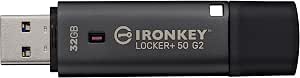 | Best for Separate User Access | Capacity: 32GB | Interface: USB 3.2 Gen 1 | Encryption: XTS-AES 256-bit hardware encryption | VIEW ON AMAZON | See Our Full Breakdown |
| Secure 32GB Encrypted USB 3.0 Flash Drive with 256-bit Hardware Encryption |  | Best for a Metal Casing | Capacity: 32GB | Interface: USB 3.0 | Encryption: 256-bit AES XTS hardware encryption | VIEW ON AMAZON | See Our Full Breakdown |
| Apricorn Aegis Secure Key 3 NX 32GB USB 3.0 Flash Drive |  | Best for Advanced Access Controls | Capacity: 32GB | Interface: USB 3.0 | Encryption: 256-bit AES XTS | VIEW ON AMAZON | See Our Full Breakdown |
| 64GB Encrypted USB 3.0 Flash Drive with AES-256 Hardware Security and Automatic Lock |  | Best for Higher Capacity and Auto-Lock | Capacity: 64GB | Interface: USB 3.0 | Encryption: AES-256-bit hardware encryption | VIEW ON AMAZON | See Our Full Breakdown |
| Kingston IronKey Keypad 200 16GB Encrypted USB Flash Drive (Blue) |  | Best for Keypad-Based High-Assurance Security | Capacity: 16 GB | Interface: USB 3.2 Gen 1 | Encryption: XTS-AES 256-bit hardware encryption | VIEW ON AMAZON | See Our Full Breakdown |
| Integral 32GB Secure 360 Encrypted USB 3.0 Flash Drive (256-bit AES) |  | Best for Separating Everyday and Sensitive Files | Capacity: 32 GB | Interface: USB 3.0 (SuperSpeed) | Encryption: 256-bit AES | VIEW ON AMAZON | See Our Full Breakdown |
| Kingston IronKey Vault Privacy 50 16GB Encrypted USB Drive |  | Best for Enterprise Procurement | Capacity: 16 GB | Interface: USB 3.2 Gen 1 | Encryption: FIPS 197 XTS-AES 256-bit hardware encryption | VIEW ON AMAZON | See Our Full Breakdown |
| Apricorn 8GB Aegis Secure Key 3 NX 256-bit Encrypted FIPS 140-2 Level 3 Validated Secure USB 3.0 Flash Drive | | Best for Admin-Controlled, Low-Volume Transfers | Capacity: 8 GB | Interface: USB 3.0 | Encryption: 256-bit | VIEW ON AMAZON | See Our Full Breakdown |
| Integral 64GB Secure 360 Encrypted USB 3.0 Flash Drive (256-bit AES Encryption) |  | Best for Read-Heavy Files on a Higher-Capacity Drive | Capacity: 64 GB | Interface: USB 3.0 | Encryption: 256-bit AES | VIEW ON AMAZON | See Our Full Breakdown |
| Integral Crypto-197 16GB Hardware-Encrypted USB 3.0 Flash Drive |  | Best for Rugged, Self-Erasing Protection | Storage capacity: 16GB | Encryption: AES 256-bit hardware encryption | Certification: FIPS 197 | VIEW ON AMAZON | See Our Full Breakdown |
| Integral 4GB Crypto-197 256-Bit USB 3.0 Flash Drive | | Best for Small, Sensitive File Transfers | Storage capacity: 4GB | Encryption: 256-bit AES hardware encryption | Certification: FIPS 197 | VIEW ON AMAZON | See Our Full Breakdown |
| Apricorn Aegis Secure Key 3NX 64GB USB 3.1 Flash Drive |  | Best for Keypad-Led, Tamper-Resistant Security | Storage capacity: 64GB | Encryption: 256-bit AES XTS | Security validation: FIPS 140-2 Level 3 | VIEW ON AMAZON | See Our Full Breakdown |
| encrypted thumb drife | Interface | Encryption | Capacity | Compatibility |
|---|---|---|---|---|
| INNOPLUS Secure Flash Drive 25 | USB 3.0 | 256-bit AES XTS hardware encryption | 32GB | Windows, Mac, Linux, embedded systems |
| Kingston IronKey Locker+ 50 G2 | USB 3.2 Gen 1 | XTS-AES 256-bit hardware encryption | 32GB | — |
| Secure 32GB Encrypted USB 3.0 | USB 3.0 | 256-bit AES XTS hardware encryption | 32GB | Windows, Mac, Linux, embedded systems |
| Apricorn Aegis Secure Key 3 NX | USB 3.0 | 256-bit AES XTS | 32GB | Windows, iOS, Linux, Android, Chrome |
| 64GB Encrypted USB 3.0 Flash D | USB 3.0 | AES-256-bit hardware encryption | 64GB | Windows, CentOS 7, Red Hat 7.5, Windows Server 2012/2016 |
| Kingston IronKey Keypad 200 16 | USB 3.2 Gen 1 | XTS-AES 256-bit hardware encryption | 16 GB | Windows, macOS, Linux, Chrome OS, Android |
| Integral 32GB Secure 360 Encry | USB 3.0 (SuperSpeed) | 256-bit AES | 32 GB | Windows, macOS |
| Kingston IronKey Vault Privacy | USB 3.2 Gen 1 | FIPS 197 XTS-AES 256-bit hardware encryption | 16 GB | — |
| Apricorn 8GB Aegis Secure Key | USB 3.0 | 256-bit | 8 GB | — |
| Integral 64GB Secure 360 Encry | USB 3.0 | 256-bit AES | 64 GB | — |
| Integral Crypto-197 16GB Hardw | USB 3.0 | AES 256-bit hardware encryption | — | PC and Mac |
| Integral 4GB Crypto-197 256-Bi | USB 3.0 | 256-bit AES hardware encryption | — | PC and Mac |
| Apricorn Aegis Secure Key 3NX | USB 3.1 (3.0) | 256-bit AES XTS | — | Windows, iOS, Linux, Android, and Chrome |
More Details on Our Top Picks
INNOPLUS Secure Flash Drive 256-bit, 32GB Encrypted USB 3.0 Drive
The INNOPLUS pairs 256-bit AES XTS hardware encryption with plug-and-play use across Windows, Mac, Linux, and embedded systems, making it a good fit for buyers who move protected files between different computers. Unlike the Kingston IronKey Locker+ 50 G2, which offers separate Admin and User password modes, this model keeps access simpler and does not require software or drivers. Its listed 480MB/s read speed is also much higher than the Kingston’s, though actual transfer rates can depend on the host system. The tradeoff is its modest 32GB capacity and an automatic wipe after 10 incorrect password attempts; a forgotten password can mean permanent data loss. The zinc alloy and ABS shell adds a sturdy, portable feel.
Pros:- 256-bit AES XTS encryption runs in hardware without requiring software or drivers.
- Compatibility includes Windows, Mac, Linux, and embedded systems.
- Listed read and write speeds are up to 480MB/s and 160MB/s.
- Zinc alloy and ABS construction offers a durable portable casing.
Cons:- 32GB may be restrictive for large media collections or frequent backups.
- Ten incorrect password attempts trigger permanent data erasure.
Best for: People who move sensitive documents among Windows, Mac, Linux, or embedded systems and want encrypted access without installing software.
Not ideal for: Anyone storing large video libraries or likely to forget a password, since capacity is 32GB and repeated incorrect attempts erase the drive.
- Capacity:32GB
- Interface:USB 3.0
- Encryption:256-bit AES XTS hardware encryption
- Read speed:Up to 480MB/s
- Write speed:Up to 160MB/s
- Material:Zinc alloy and ABS
- Compatibility:Windows, Mac, Linux, embedded systems
- Failed-password protection:Automatic data erasure after 10 incorrect attempts
Our verdict“Choose the INNOPLUS for straightforward encrypted file access across varied operating systems, provided 32GB and its strict password limit fit your needs.”
Kingston IronKey Locker+ 50 G2 32GB Encrypted USB Drive
The Kingston IronKey Locker+ 50 G2 is the lineup’s clearest choice for buyers who need separate Admin and User password modes, such as a team lead who manages a drive used by another person. Its XTS-AES 256-bit hardware encryption and FIPS 197 certification give it a more formal security profile than the basic, driver-free INNOPLUS Secure Flash Drive. The tradeoff is speed: Kingston lists read and write performance of 145MB/s and 115MB/s, well below the INNOPLUS’s claimed read speed. The product information also notes that some systems may need specific drivers or software, so it is not as simple a cross-platform plug-in option. With 32GB of storage, it suits documents and work files better than bulky media archives.
Pros:- XTS-AES 256-bit hardware encryption with FIPS 197 certification.
- Admin and User password modes support distinct access roles.
- USB 3.2 Gen 1 interface suits modern computers.
- Listed read speed of up to 145MB/s is paired with 115MB/s write speed.
Cons:- Listed transfer speeds are lower than those of the INNOPLUS and Secure 32GB drives.
- Some systems may require specific drivers or software.
- 32GB capacity limits use for large media or broad backups.
Best for: Small teams or individuals who want separate administrator and user passwords on a compact drive for work documents.
Not ideal for: Buyers who prioritize the fastest listed transfers, need more than 32GB, or require a setup-free drive on every system.
- Capacity:32GB
- Interface:USB 3.2 Gen 1
- Encryption:XTS-AES 256-bit hardware encryption
- Certification:FIPS 197
- Read speed:Up to 145MB/s
- Write speed:Up to 115MB/s
- Password modes:Admin and User
Our verdict“Pick the Kingston when distinct Admin and User access matters more than top listed transfer speeds or universal setup simplicity.”
Secure 32GB Encrypted USB 3.0 Flash Drive with 256-bit Hardware Encryption
This Secure 32GB drive is a close match for the INNOPLUS, sharing 256-bit AES XTS hardware encryption, the same listed transfer speeds, and compatibility with Windows, Mac, Linux, and embedded systems. Its distinguishing detail is a zinc alloy casing, rather than the INNOPLUS’s zinc alloy and ABS shell, which may appeal to buyers who prefer an all-metal exterior. Both models avoid software or driver requirements and erase data after ten incorrect password attempts, so neither is a forgiving choice for anyone who may lose track of a password. This drive’s appeal is a simple, durable-feeling encrypted stick rather than extra access management: unlike the Kingston IronKey Locker+ 50 G2, it has no listed Admin and User modes. Its 32GB capacity also keeps it best suited to focused file storage.
Pros:- 256-bit AES XTS hardware encryption requires no software or drivers.
- Zinc alloy casing provides a metal exterior.
- Listed speeds reach 480MB/s read and 160MB/s write.
- Compatibility includes Windows, Mac, Linux, and embedded systems.
Cons:- Ten incorrect password attempts erase the stored data.
- 32GB is limited for large media collections and full-device backups.
- No Admin and User password modes are listed, unlike the Kingston IronKey Locker+ 50 G2.
Best for: Buyers who want a compact encrypted drive with a zinc alloy casing and broad operating-system compatibility for documents and work files.
Not ideal for: People who need administrator and user access roles, larger storage, or a password recovery path before data is erased.
- Capacity:32GB
- Interface:USB 3.0
- Encryption:256-bit AES XTS hardware encryption
- Read speed:Up to 480MB/s
- Write speed:Up to 160MB/s
- Material:Zinc alloy
- Compatibility:Windows, Mac, Linux, embedded systems
- Failed-password protection:Automatic data erasure after 10 incorrect attempts
Our verdict“Choose this model for a zinc-cased, driver-free encrypted drive, but skip it if you need role-based access or more storage.”
Apricorn Aegis Secure Key 3 NX 32GB USB 3.0 Flash Drive
The Apricorn Aegis Secure Key 3 NX earns its place through separate Admin and User modes, read-only options, and data recovery PINs—controls that go beyond the simpler password setup on the INNOPLUS Secure Flash Drive. Its listed FIPS 140-2 Level 3 security standard makes it a candidate for buyers with formal security requirements, though the supplied listing also says validation was pending; I would verify its current status before relying on that credential. This is not the fast-transfer pick: its 77MB/s read and 60MB/s write speeds trail the INNOPLUS’s listed 480MB/s and 160MB/s. In exchange, it supports a wide range of systems, including iOS, Android, and Chrome, and adds recovery and read-only controls. The 32GB capacity remains a limit for large files.
Pros:- Includes separate Admin and User modes, read-only options, and data recovery PINs.
- Lists FIPS 140-2 Level 3 security.
- Compatibility spans Windows, iOS, Linux, Android, and Chrome.
- Recovery PINs provide an additional account-recovery option.
Cons:- Listed 77MB/s read and 60MB/s write speeds are slower than the INNOPLUS.
- Capacity is limited to 32GB.
- The product information also describes validation as pending, so current status needs checking.
Best for: Security-conscious professionals who need Admin and User modes, read-only access, recovery PINs, and support across mobile and desktop systems.
Not ideal for: People who move large files frequently or need more storage; buyers with formal compliance needs should verify the listed validation status.
- Capacity:32GB
- Interface:USB 3.0
- Encryption:256-bit AES XTS
- Security standard:FIPS 140-2 Level 3; listing also notes validation was pending
- Read speed:77MB/s
- Write speed:60MB/s
- Security controls:Admin and User modes, read-only options, data recovery PINs
- Compatibility:Windows, iOS, Linux, Android, Chrome
Our verdict“Choose the Apricorn for access controls and recovery features across varied devices, not for fast transfers or large storage.”
64GB Encrypted USB 3.0 Flash Drive with AES-256 Hardware Security and Automatic Lock
At 64GB, this drive holds twice as much as the 32GB INNOPLUS and gives buyers more room for work files without stepping up to a large external drive. Its standout security behavior is automatic locking after unplugging or 30 seconds of inactivity, paired with a physical key unlock mechanism and self-wipe after ten failed password attempts. That makes it a different proposition from the Apricorn Aegis Secure Key 3 NX, which lists Admin and User modes, read-only options, and recovery PINs instead. The key limitation is the FAT32 file system: individual files cannot exceed 4GB, which rules out some large video and disk-image files. Compatibility is also less broadly listed than the INNOPLUS’s, and no specific transfer speeds are provided despite the USB 3.0 interface.
Pros:- 64GB capacity offers more room than the 32GB drives in this roundup.
- Automatic lock activates when unplugged or after 30 seconds idle.
- Physical key unlock mechanism and AES-256 hardware encryption protect access.
- Compact aluminum alloy body includes a keyring hole.
Cons:- FAT32 limits individual files to 4GB.
- Compatibility details are narrower than those listed for the INNOPLUS and Apricorn drives.
- Ten incorrect password attempts trigger self-wipe, and no transfer-speed figures are provided.
Best for: Windows users and supported Linux-system users who need more storage than a 32GB drive and value automatic locking between uses.
Not ideal for: People who store individual files larger than 4GB, need broad Mac or mobile compatibility, or may forget their unlock code.
- Capacity:64GB
- Interface:USB 3.0
- Encryption:AES-256-bit hardware encryption
- File system:FAT32
- Material:Aluminum alloy
- Dimensions:3.2 x 1.02 x 0.43 inches
- Automatic lock:When unplugged or after 30 seconds idle
- Compatibility:Windows, CentOS 7, Red Hat 7.5, Windows Server 2012/2016
- Failed-password protection:Self-wipe after 10 incorrect attempts
Our verdict“Choose this 64GB drive for extra capacity and automatic relocking if FAT32 file limits and its narrower compatibility list suit your devices.”
Kingston IronKey Keypad 200 16GB Encrypted USB Flash Drive (Blue)
I rank the IronKey Keypad 200 for buyers who want access control built into the drive, not dependent on a computer’s software. Its keypad and multi-PIN access let users enter credentials on the device, while XTS-AES 256-bit hardware encryption, brute-force protection, and digitally signed firmware address different attack paths. The epoxy-coated circuitry adds a physical barrier that the Integral Secure 360 does not specify. The tradeoff is capacity: at 16GB, it holds less than that 32GB option, and its keypad may be less convenient to carry than a standard stick. Its FIPS 140-3 Level 3 status is pending, not finalized. I’d choose it for sensitive files and cross-platform use, but not for bulk storage.
Pros:- Hardware-based XTS-AES 256-bit encryption
- Keypad with multi-PIN access and brute-force protection
- Epoxy-coated circuitry helps resist physical tampering
- Compatibility includes Windows, macOS, Linux, Chrome OS, and Android
Cons:- FIPS 140-3 Level 3 certification is pending
- 16GB capacity is restrictive for large files
- The keypad design may be bulkier than a conventional USB drive
Best for: People carrying sensitive files between Windows, macOS, Linux, Chrome OS, and Android who want PIN entry on the drive itself
Not ideal for: Users who need ample room for large media libraries or require a finalized FIPS 140-3 Level 3 certification
- Capacity:16 GB
- Interface:USB 3.2 Gen 1
- Encryption:XTS-AES 256-bit hardware encryption
- Certification:FIPS 140-3 Level 3 (Pending)
- Read speed:145 MB/s
- Write speed:115 MB/s
- Compatibility:Windows, macOS, Linux, Chrome OS, Android
- Color:Blue
Our verdict“Choose the Keypad 200 for on-device PIN entry and layered physical protection, provided 16GB is enough and pending certification fits your requirements.”
Integral 32GB Secure 360 Encrypted USB 3.0 Flash Drive (256-bit AES)
The Integral Secure 360 32GB suits buyers who want a clear division between ordinary files and protected data. Its dual-partition layout gives each type of file a designated space, and zero-footprint use means there is no software to install on a borrowed or managed computer. That simpler setup contrasts with the Kingston IronKey Vault Privacy 50, which offers hardware encryption and enterprise-focused protections. The Secure 360 instead uses 256-bit AES encryption and carries a meaningful risk: ten failed password attempts erase the data. That can protect a lost drive, but a forgotten password or repeated typing error can destroy files too. Its 32GB capacity is more practical than the 16GB Vault Privacy 50, though the drive is limited to Windows and macOS.
Pros:- Dual partitions separate regular files from sensitive data
- Zero-footprint operation requires no software installation
- 32GB capacity exceeds the 16GB Kingston Vault Privacy 50
- Rotating capless design avoids a separate cap to lose
Cons:- Automatic erasure after ten failed password attempts can cause permanent data loss
- Compatibility is limited to Windows and macOS
- Uses AES encryption software rather than the stated hardware encryption of the Kingston Vault Privacy 50
Best for: Windows and macOS users who want to separate routine files from sensitive documents without installing software
Not ideal for: People who need hardware-based encryption, broader operating-system support, or a forgiving recovery path after missed password attempts
- Capacity:32 GB
- Interface:USB 3.0 (SuperSpeed)
- Encryption:256-bit AES
- Security feature:Automatic data erasure after 10 failed attempts
- Compatibility:Windows, macOS
- Warranty:2 years
Our verdict“Pick the Secure 360 32GB if software-free use and file separation matter more to you than broad compatibility or hardware encryption.”
Kingston IronKey Vault Privacy 50 16GB Encrypted USB Drive
I’d shortlist the IronKey Vault Privacy 50 for organizations that need documented security features and procurement fit, not extra storage. It combines FIPS 197 XTS-AES 256-bit hardware encryption with brute-force and BadUSB protection, flexible multi-password options, and TAA compliance. Its listed 250 MB/s read and 180 MB/s write speeds also exceed the Keypad 200’s stated rates, although the two Kingston drives serve different access preferences: the Keypad 200 has a physical keypad, while this model is framed around enterprise deployment. The main compromise is its 16GB capacity, which can constrain larger work files. Unlike the Integral Secure 360, it specifies hardware encryption, but it still depends on keeping the physical drive under control; it is not a cloud-access substitute.
Pros:- FIPS 197 XTS-AES 256-bit hardware encryption
- Protection against brute-force and BadUSB attacks
- Flexible multi-password options
- TAA compliant for government and enterprise procurement
Cons:- 16GB capacity may not fit large work files
- Physical possession of the drive is required for access
- Does not provide cloud-based access or collaboration
Best for: Government and business buyers who need TAA-compliant hardware encryption for transporting a limited set of sensitive files
Not ideal for: People storing large projects or those who need remote access and shared cloud-based workflows
- Capacity:16 GB
- Interface:USB 3.2 Gen 1
- Encryption:FIPS 197 XTS-AES 256-bit hardware encryption
- Read speed:250 MB/s
- Write speed:180 MB/s
- Compliance:TAA compliant
- Color:Blue
Our verdict“Choose the Vault Privacy 50 for enterprise security features and TAA compliance if its 16GB capacity meets your workflow.”
Apricorn 8GB Aegis Secure Key 3 NX 256-bit Encrypted FIPS 140-2 Level 3 Validated Secure USB 3.0 Flash Drive
The Apricorn Aegis Secure Key 3 NX 8GB makes sense when access policy matters more than storage room. Its FIPS 140-2 Level 3 validation gives security-focused buyers a finalized standard to assess, unlike the pending FIPS 140-3 Level 3 status of the Kingston Keypad 200. Separate admin and user modes, read-only modes, and recovery PINs add control over who can access or alter files. That flexibility is useful for controlled handoffs, but the 8GB capacity is the smallest in this group and limits its role to documents or modest file sets. Full use of its options also requires specific configuration software, making it less straightforward than the Integral Secure 360’s no-install approach. I’d favor this Apricorn for tightly managed transfers, not general-purpose storage.
Pros:- FIPS 140-2 Level 3 validated
- Separate admin and user modes
- Two read-only modes support restricted access
- Data recovery PINs provide an additional access option
Cons:- 8GB capacity is limiting for larger files
- Specific configuration software is needed to use all features
- The USB 3.0 interface is an older generation than USB 3.2 Gen 1 options in this roundup
Best for: Security administrators who need validated protection and separate admin and user controls for small file transfers
Not ideal for: Users carrying large files or anyone who wants to access all security settings without configuration software
- Capacity:8 GB
- Interface:USB 3.0
- Encryption:256-bit
- Security standard:FIPS 140-2 Level 3 validated
- Model:ASK3-NX-8GB
- Color:Black
Our verdict“Pick this Aegis Secure Key for validated security and managed access on small transfers, but skip it if capacity or software-free setup is a priority.”
Integral 64GB Secure 360 Encrypted USB 3.0 Flash Drive (256-bit AES Encryption)
The Integral Secure 360 64GB is the capacity pick among these five, making it more suited to carrying larger collections than the 32GB Secure 360 or either 16GB Kingston drive. Its listed read speed of up to 625 MB/s favors workflows that open or copy files from the drive, while the 60 MB/s write speed is much lower. That imbalance matters when loading a fresh batch of data: the listed read figure does not translate into equally quick saves. Like the smaller Secure 360, it uses 256-bit AES encryption, but the supplied details do not specify the dual-partition layout or automatic erasure described for the 32GB version. I’d choose it for portable, read-heavy storage, not for frequent large write jobs or buyers seeking detailed hardware-security claims.
Pros:- 64GB capacity is greater than the other four products in this selection
- Listed read speed reaches up to 625 MB/s
- 256-bit AES encryption
- Lightweight form factor for portable storage
Cons:- 60 MB/s write speed is much lower than the listed read speed
- The supplied details do not specify hardware-based encryption
- Security controls beyond AES encryption are not listed
Best for: People who need 64GB for read-heavy files and want AES encryption in a lightweight USB 3.0 drive
Not ideal for: Users who frequently write large files, need specified hardware encryption, or want documented access-control features
- Capacity:64 GB
- Interface:USB 3.0
- Encryption:256-bit AES
- Read speed:Up to 625 MB/s
- Write speed:60 MB/s
- Color:Black
- Form factor:Lightweight
Our verdict“Choose the 64GB Secure 360 for higher-capacity, read-heavy storage, but not if fast writes or detailed hardware security are your priority.”
Integral Crypto-197 16GB Hardware-Encrypted USB 3.0 Flash Drive
I’d choose the Integral Crypto-197 16GB for sensitive files that need more room than the 4GB Integral Crypto-197 while keeping a physical-damage-conscious design. Its FIPS 197-certified AES 256-bit hardware encryption and automatic locking when disconnected or when the host computer locks reduce the chance of leaving an open drive behind. The double-layer waterproof construction adds reassurance for carrying it outside a desk drawer. The main tradeoff is its fail-secure behavior: six incorrect password attempts erase the data and encryption key, so a forgotten or mistyped password can mean permanent loss. Its 8–16 character alphanumeric password requirement also adds friction compared with a simpler storage device. I’d favor the Apricorn Aegis Secure Key 3NX when keypad PIN access and higher-capacity storage matter more than this model’s rugged casing.
Pros:- FIPS 197-certified AES 256-bit hardware encryption
- Locks automatically when disconnected or when the host computer locks
- Waterproof double-layer design with hardened inner case and silicone outer casing
- 16GB capacity exceeds the 4GB Integral Crypto-197 option
Cons:- Six failed password attempts permanently erase data and the encryption key
- Requires an 8–16 character alphanumeric password
Best for: PC and Mac users carrying sensitive work files who want waterproof construction, automatic locking, and room for more than a few small documents.
Not ideal for: People who may forget passwords or need forgiving account recovery, since six failed attempts erase the stored data and encryption key.
- Storage capacity:16GB
- Encryption:AES 256-bit hardware encryption
- Certification:FIPS 197
- Interface:USB 3.0
- Password requirement:8–16 character alphanumeric password
- Failed access protection:Erases data and encryption key after 6 failed attempts
- Compatibility:PC and Mac
- Water protection:Double-layer waterproof design
Our verdict“Choose it for portable sensitive files when waterproof construction and automatic locking matter more than easy password recovery.”
Integral 4GB Crypto-197 256-Bit USB 3.0 Flash Drive
The Integral 4GB Crypto-197 makes sense when the job is protecting a small set of sensitive files, not carrying a broad archive. It pairs FIPS 197-certified 256-bit AES hardware encryption with zero-footprint setup, so I’d pick it for managed computers where installing software is not an option. Its waterproof, shock-resistant construction also suits frequent transport better than a basic unprotected drive. Capacity is the clear limit: the Integral Crypto-197 16GB holds four times as much, making that model the better fit for larger folders or regular backups. Like its 16GB sibling, this drive erases data after failed login attempts, and a forgotten password can leave files inaccessible. I’d skip it for anyone storing a growing collection of documents; its strength is a narrow, software-free role.
Pros:- FIPS 197-certified 256-bit AES hardware encryption
- Zero-footprint setup requires no software installation
- Waterproof and shock-resistant design
- Automatic data erasure after six failed password attempts
Cons:- 4GB capacity is restrictive for larger folders or ongoing backups
- Forgetting the password can permanently block access to stored files
Best for: Traveling staff or contractors who need to move a few sensitive documents between PC and Mac without installing software.
Not ideal for: Users keeping large folders, media libraries, or backups, since 4GB leaves little room and forgotten-password access cannot be recovered.
- Storage capacity:4GB
- Encryption:256-bit AES hardware encryption
- Certification:FIPS 197
- Interface:USB 3.0
- Compatibility:PC and Mac
- Setup:Zero-footprint; no software installation required
- Security features:Brute-force protection and auto-lock
- Construction:Waterproof and shock-resistant
Our verdict“Pick this drive for a small, defined set of files when software-free encrypted transfers matter more than capacity.”
Apricorn Aegis Secure Key 3NX 64GB USB 3.1 Flash Drive
I’d put the Apricorn Aegis Secure Key 3NX 64GB near the top for buyers who want authentication on the drive itself, rather than relying on software on the host computer. Its onboard keypad accepts a PIN, while FIPS 140-2 Level 3 validation and hardened epoxy address compliance and physical tampering concerns. At 64GB, it also offers far more room than either Integral Crypto-197 in this group. That extra capacity comes with a usability cost: I’d have to enter the PIN for every access, and the listed write speed of 72 KB/s is slow for frequent transfers of large files. Compared with the Integral 16GB, it is the more specialized security tool, not the convenient everyday choice. Its USB Type-A connection and broad platform support add flexibility, but the speed tradeoff is substantial.
Pros:- 256-bit AES XTS hardware encryption with no software required
- FIPS 140-2 Level 3 validated
- Onboard keypad provides PIN authentication
- Hardened epoxy protection and broad platform compatibility
Cons:- Requires manual PIN entry for every access
- Listed write speed of 72 KB/s is slow for large or frequent transfers
Best for: Security-conscious professionals who need a larger encrypted drive, onboard PIN entry, and compatibility across several operating systems.
Not ideal for: People who frequently transfer large files or want quick access, since PIN entry is manual and the listed write speed is 72 KB/s.
- Storage capacity:64GB
- Encryption:256-bit AES XTS
- Security validation:FIPS 140-2 Level 3
- Interface:USB 3.1 (3.0)
- Connector:USB Type-A
- Authentication:Onboard keypad PIN
- Compatibility:Windows, iOS, Linux, Android, and Chrome
- Physical protection:Hardened epoxy
- Warranty:3 years
Our verdict“Choose it when onboard PIN security, tamper resistance, and 64GB capacity outweigh slower file transfers and repeated keypad entry.”

How We Picked
I compared the drives by the details buyers can use to make a practical choice: stated encryption and security features, whether authentication happens on the drive or through a computer workflow, available capacity, and how clearly the exact model and any validation are identified. I gave more weight to specific, named product lines and distinct security approaches than to broad claims in generic listings. Capacity matters, but a larger drive does not by itself make a model more secure; the right size depends on the files you carry and how often you need to move them.
My order reflects those priorities, not a claim that every model has undergone the same independent verification. I place the Kingston IronKey Keypad 200 first for its device-based PIN approach; then the Apricorn Aegis Secure Key 3 NX 32GB, Kingston IronKey Vault Privacy 50, and Kingston IronKey Locker+ 50 G2 for buyers choosing between keypad access and a more conventional password workflow. The Apricorn Aegis Secure Key 3NX 64GB and Apricorn 8GB Aegis Secure Key 3 NX FIPS 140-2 Level 3 model follow for capacity-focused and specifically validated needs. Next are the Integral Secure 360 64GB, 64GB AES-256 Automatic Lock drive, and Integral Secure 360 32GB; the INNOPLUS 32GB and generic 32GB hardware-encryption drive rank lower because their listings offer less model-specific context. I place the Integral Crypto-197 16GB and Integral Crypto-197 4GB last for buyers who need modest storage, with the smaller capacity narrowing their everyday usefulness.
| encrypted thumb drife | Interface |
|---|---|
| INNOPLUS Secure Flash Drive 25 | USB 3.0 |
| Kingston IronKey Locker+ 50 G2 | USB 3.2 Gen 1 |
| Secure 32GB Encrypted USB 3.0 | USB 3.0 |
| Apricorn Aegis Secure Key 3 NX | USB 3.0 |
| 64GB Encrypted USB 3.0 Flash D | USB 3.0 |
| Kingston IronKey Keypad 200 16 | USB 3.2 Gen 1 |
| Integral 32GB Secure 360 Encry | USB 3.0 (SuperSpeed) |
| Kingston IronKey Vault Privacy | USB 3.2 Gen 1 |
| Apricorn 8GB Aegis Secure Key | USB 3.0 |
| Integral 64GB Secure 360 Encry | USB 3.0 |
| Integral Crypto-197 16GB Hardw | USB 3.0 |
| Integral 4GB Crypto-197 256-Bi | USB 3.0 |
| Apricorn Aegis Secure Key 3NX | USB 3.1 (3.0) |
Factors to Consider When Choosing Encrypted Thumb Drives
I’d choose an encrypted drive by matching its unlock method and documentation to the way I handle sensitive files—not by treating a single encryption label as the whole decision. These broader checks can help you avoid buying a drive that is secure on paper but awkward for your devices or routine.
Match the Unlock Method to Your Devices
A keypad drive accepts a PIN on the device itself, which can be useful when moving files between computers where you cannot install software or trust the host environment. A password-driven model may feel more familiar, but the setup and unlock process can depend on the computer and the drive’s specific software. Before choosing, check whether you need to unlock the drive on work-managed computers, tablets, or systems with restricted USB software. Also check the connector and operating-system requirements; a secure drive that cannot connect conveniently may lead you to leave it behind. I’d favor a keypad model for frequent cross-device use and a simpler password workflow when the drive will stay within a known setup.
Read Security Claims as Separate Pieces of Evidence
AES-256 describes an encryption standard, but it does not answer every question about how a drive handles PIN attempts, resets, firmware, or physical tampering. A named validation, such as the FIPS 140-2 Level 3 claim on the 8GB Apricorn listing, is a distinct credential; it should not be assumed for every capacity or every product with a similar name. Confirm the exact model number and capacity against the manufacturer’s current documentation, especially when a listing uses a broad product title. For workplace or regulated data, ask your security team which certifications and handling rules apply before buying. For personal files, a clear authentication method and a recovery plan may matter more than a certification you do not need.
Choose Capacity Around Your Carrying Routine
Pick a size based on the files you need available offline, not on the idea that more storage is always better. Documents and small work files can fit comfortably on a lower-capacity drive, while media projects and larger archives can make a 64GB model more practical. Keeping only necessary files on a secure drive can reduce the amount of sensitive data at risk if it is lost. Buyers often overlook how much free space they need for updates or new files, so leave room rather than filling the drive to its limit. I’d also separate long-term backups from a portable thumb drive; one small device should not be the only copy of important data.
Plan for Lost PINs, Passwords, and Recovery
Security features can make forgotten credentials harder to bypass, which is useful against unauthorized access but inconvenient for the owner. Before relying on a drive, read its documented reset and recovery process and learn what happens after repeated incorrect PIN entries. Do not assume that a manufacturer can restore encrypted files if you lose the credential. Keep a separate, protected backup of important data and store any recovery information somewhere other than the drive itself. For shared or business use, decide who manages credentials and what happens when the original user is unavailable.
Balance Durability and Convenience
A secure drive still needs to survive daily carrying, plugging, and unplugging. Look for clear information about the connector, cap or cover, and any environmental protection rather than inferring toughness from the security branding. A keypad adds a physical control that may suit frequent use, but it can also make a drive bulkier than a plain USB stick. Check whether the drive will fit beside other ports on your laptop or dock, especially if it has a wider body. If it will live in a bag, a protective case and a separate backup may be more useful than choosing a model solely for a rugged-sounding name.
Frequently Asked Questions
Is a keypad encrypted thumb drive better than a password-based model?
Neither approach is automatically better for every buyer. A keypad lets you enter a PIN on the drive, which can help when you use computers that do not allow extra software or are outside your control. A password-based drive may be easier if you mainly use one familiar computer and prefer a conventional unlock process. I’d check compatibility, credential recovery, and the exact security documentation before choosing. In this roundup, the IronKey Keypad 200 and Apricorn Aegis Secure Key 3 NX represent the keypad route, while the Vault Privacy 50 and Locker+ 50 G2 suit buyers comparing more conventional workflows.
Does every Apricorn Aegis Secure Key 3 NX capacity have FIPS 140-2 Level 3 validation?
I would not assume that a validation claim attached to one listing applies to every capacity or variation. The 8GB model in this roundup explicitly names FIPS 140-2 Level 3 validation, while similar product names and larger capacities should be checked against their exact manufacturer documentation. Confirm the model number and certificate details if your workplace requires a particular validation. For personal use, the right capacity and authentication method may be more relevant than a formal credential. Keep product names and validation claims separate when comparing listings.
Can I use an encrypted thumb drive as my only backup?
I would not use any single thumb drive as the only copy of important files. Encryption protects data on the device from unauthorized access, but it does not prevent loss, physical damage, or accidental deletion. Keep another copy in a separate, protected location and check that you can restore it when needed. A portable drive is useful for carrying selected files, not a replacement for a backup plan. For sensitive files, protect the backup with access controls suited to where it is stored.
Should I buy a larger-capacity model even if I only carry a few files now?
Extra capacity can reduce the chance that you run out of room, but it does not improve the drive’s encryption by itself. A 64GB option such as the Apricorn 3NX or Integral Secure 360 makes more sense if your files are growing or include large media. For a small, fixed set of documents, a 16GB or 32GB model may be easier to manage. I’d avoid carrying unnecessary sensitive files just because space is available. Keep capacity, portability, and the number of files exposed in balance.
What should I verify before buying a generic encrypted USB listing?
Check the maker, exact model identifier, encryption method, authentication process, and what happens after repeated failed unlock attempts. Look for manufacturer documentation that matches the specific listing rather than relying on a broad phrase such as hardware encryption. Confirm which computers and operating systems can use the drive, and read the recovery instructions before storing files. If you need a formal certification, verify it for the exact model and capacity. When key details are missing, I’d favor a clearly identified product line instead of guessing what the listing means.
Conclusion
For most buyers who want PIN entry on the drive, I’d start with the Kingston IronKey Keypad 200 as my best overall pick. My best value-oriented choice is the Integral Secure 360 64GB for buyers who want more storage in a named product line, while the Apricorn Aegis Secure Key 3NX 64GB is my best premium fit for those who want keypad access and higher capacity. For beginners who prefer a more familiar USB workflow, I’d compare the Kingston IronKey Locker+ 50 G2 and Vault Privacy 50 against their device requirements. For a specific validation need, the 8GB Apricorn Aegis Secure Key 3 NX listing is the one here that explicitly names FIPS 140-2 Level 3 validation; for a tiny set of files, the Integral Crypto-197 4GB keeps capacity modest. My final check would be the exact model documentation, recovery process, and compatibility with the computers you actually use.