
Searching for 1U short-depth switches usually means looking for a rackmount KVM console: a screen, keyboard, and pointing device that let me control equipment without using up space for a separate console. My top pick is the Kinan LH1601, with a stated rack-depth range that suits compact cabinets and a built-in single-port HDMI KVM. For several machines, the MT-VIKI 8-port adds useful switching controls, while the Tripp Lite B021-SWHD-K offers the largest screen in this group.

Get privacy and security gear delivered free with Prime
- Fast, free delivery on millions of items
- Prime Video, Amazon Music and more included
- Member-only deals all year
The tradeoff is that a slimmer setup does not automatically mean a better fit for every rack. I compare these models by usable depth, number of connected systems, console layout, and the amount of space and cabling they demand. One distinction matters: these are rackmount KVM consoles, not Ethernet network switches. The MT-VIKI and Kinan include KVM switching functions; the Tripp Lite console is described as requiring a server or KVM switch with USB console connections.
Key Takeaways
- Kinan LH1601 is my compact single-host pick, with a listed compatible rack-depth range of 11.8–18.5 inches.
- Tripp Lite B021-SWHD-K has the largest screen at 18.5 inches, but its listed weight is 30.6 pounds and it relies on a server or external KVM switch.
- MT-VIKI MT-1568HL controls up to eight computers and includes eight cables, but its stated rack-depth range starts at 18.9 inches.
- All three are 1U rackmount consoles; their key differences are host capacity, depth information, screen size, and whether KVM switching is built in.
- Measure usable cabinet depth and allow room for cables before choosing; nominal rack width alone does not confirm a fit.
| Kinan 1U Rack-Mount KVM Console with 15.6-Inch 1080p LCD, HDMI KVM, Keyboard, and Touchpad |  | Best Overall for Short-Depth Single-Host Setups | Rack height: 1U | Display: 15.6-inch LCD, 1920 × 1080 at 60 Hz | KVM capacity: 1 HDMI port | VIEW ON AMAZON | See Our Full Breakdown |
| Tripp Lite B021-SWHD-K 1U Short-Depth Rackmount KVM Console with 18.5-Inch 1080p LCD |  | Best for a Larger Built-In Screen | Rack format: 1U, 19-inch EIA-standard rack | Display: 18.5-inch widescreen LCD, 1920 × 1080 at 60 Hz | Keyboard: 105-key PC-compatible keyboard with numeric keypad | VIEW ON AMAZON | See Our Full Breakdown |
| MT-VIKI 8-Port HDMI KVM Console with 15.6-Inch Full HD Monitor | 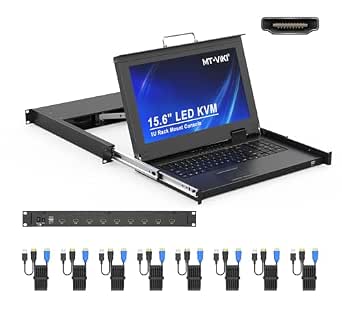 | Best for Multi-Computer Control | Rack format: 1U rackmount | KVM capacity: 8 ports | Display: 15.6-inch LCD, 1920 × 1080 at 60 Hz | VIEW ON AMAZON | See Our Full Breakdown |
| 1u short depth switch | Display | Warranty | KVM capacity | Keyboard |
|---|---|---|---|---|
| Kinan 1U Rack-Mount KVM Consol | 15.6-inch LCD, 1920 × 1080 at 60 Hz | 2 years | 1 HDMI port | 99-key full-size keyboard with number pad |
| Tripp Lite B021-SWHD-K 1U Shor | 18.5-inch widescreen LCD, 1920 × 1080 at 60 Hz | 1 year | — | 105-key PC-compatible keyboard with numeric keypad |
| MT-VIKI 8-Port HDMI KVM Consol | 15.6-inch LCD, 1920 × 1080 at 60 Hz | 2 years | 8 ports | — |
More Details on Our Top Picks
Kinan 1U Rack-Mount KVM Console with 15.6-Inch 1080p LCD, HDMI KVM, Keyboard, and Touchpad
The Kinan LH1601 is my first choice when rack depth is the main constraint and one connected computer or server is enough. Its stated compatibility with racks 11.8–18.5 inches deep gives buyers a concrete range to compare with their cabinet, unlike the MT-VIKI, whose listed minimum is 18.9 inches. The compact 14.17-inch console depth and 1U format keep the front-end equipment together, while the integrated 15.6-inch Full HD display, keyboard, and touchpad avoid separate desk or shelf hardware.
The built-in HDMI KVM is a useful distinction from the Tripp Lite console, which is described as working with a server or external KVM switch. Here, the Kinan’s single port is also its main limit: it is aimed at direct access to one system, not at managing a bank of servers. Its 99-key keyboard includes a number pad, and the screen rotates up to 125 degrees, giving some flexibility when the drawer is open and the rack position is awkward. The 250 cd/m² brightness is a modest specification, so I would not choose it expecting an unusually bright panel.
Mounting brackets and cables are included, and a two-year manufacturer warranty gives it a longer stated warranty than the Tripp Lite’s one year. I would still measure the full rack interior and rear cable space: the stated compatibility range is not a substitute for checking obstructions. For buyers who need the shortest clearly specified fit and only one host, it is the most balanced option here. If the job calls for eight systems, MT-VIKI is the better match despite its deeper rack requirement.
Pros:- Stated compatible rack depth of 11.8–18.5 inches
- Combines 1U console, 15.6-inch 1080p display, keyboard, touchpad, and single-port HDMI KVM
- Display rotates up to 125 degrees
- Includes brackets and cables, with a two-year manufacturer warranty
Cons:- Single-port KVM is limited to one connected computer or server
- Rack depth and cable clearance still need to be checked
- 250 cd/m² brightness may not suit buyers who want a brighter display
Best for: Buyers with a shallow 19-inch rack who need an integrated console for one HDMI-connected computer or server.
Not ideal for: Buyers managing several computers from one console, or anyone whose cabinet depth and rear clearance have not been measured.
- Rack height:1U
- Display:15.6-inch LCD, 1920 × 1080 at 60 Hz
- KVM capacity:1 HDMI port
- Keyboard:99-key full-size keyboard with number pad
- Dimensions:17.6 × 14.17 × 1.67 inches (W × D × H)
- Compatible rack depth:11.8–18.5 inches
- Display rotation:Up to 125 degrees
- Warranty:2 years
Our verdict“I recommend the Kinan for shallow racks and single-host access because it gives the clearest compact-fit specification in this lineup.”
Tripp Lite B021-SWHD-K 1U Short-Depth Rackmount KVM Console with 18.5-Inch 1080p LCD
If screen size is more useful to me than an especially compact footprint, the Tripp Lite B021-SWHD-K has the strongest case. Its 18.5-inch 1080p widescreen panel is three inches larger diagonally than the displays on the Kinan and MT-VIKI. That extra area can make console text and interface elements easier to work with during maintenance, while the 105-key keyboard adds a full numeric keypad. It remains a 1U console for a standard 19-inch rack and includes short-depth mounting rails.
There is a functional distinction behind its place in the ranking. The Kinan includes a single-port HDMI KVM, and MT-VIKI supports up to eight computers with OSD, hotkey, and push-button selection. Tripp Lite is presented as a console for a server or KVM-connected systems and requires USB console connections; I would not select it as a stand-alone multi-host KVM based on the supplied details. Its broad operating-system compatibility—Windows, macOS, Linux, and Sun—may suit mixed environments, but the connection requirements still determine whether it will work with a particular setup.
At 30.6 pounds, it is also the heaviest option by the stated weight, which makes installation and support worth planning rather than treating as an afterthought. The listed dimensions are 26 × 32 × 5.51 inches, so I would confirm the manufacturer’s rail and cabinet fit details before ordering rather than infer usable depth from the product name. The one-year warranty is shorter than the two-year coverage listed for Kinan and MT-VIKI. I rank it below Kinan for short-depth certainty, but above MT-VIKI for buyers whose priority is a larger screen and whose rack can accommodate the hardware.
Pros:- Largest display in this roundup at 18.5 inches
- 1080p resolution at 60 Hz
- 105-key keyboard includes a numeric keypad, plus a touchpad
- Short-depth mounting rails and stated compatibility with several operating systems
Cons:- Weighs 30.6 pounds
- Requires a server or KVM switch with USB console connectors
- One-year warranty is shorter than the coverage listed for the other two picks
Best for: Rack users who prefer a larger 18.5-inch display and need a console for compatible USB-connected server or KVM equipment.
Not ideal for: Buyers who need a documented shallow depth, a built-in multi-computer KVM switch, or a lighter console for frequent installation changes.
- Rack format:1U, 19-inch EIA-standard rack
- Display:18.5-inch widescreen LCD, 1920 × 1080 at 60 Hz
- Keyboard:105-key PC-compatible keyboard with numeric keypad
- Pointing device:Touchpad
- Connections:HDMI and USB
- Weight:30.6 pounds
- Dimensions:26 × 32 × 5.51 inches
- Warranty:1 year
Our verdict“I would choose Tripp Lite for its larger screen and full keyboard, but only after confirming the rail fit and console connections for my rack.”
MT-VIKI 8-Port HDMI KVM Console with 15.6-Inch Full HD Monitor
The MT-VIKI MT-1568HL is the clear pick when I need one console to control several computers rather than the shallowest possible rack fit. Its eight HDMI KVM ports support up to eight systems, and I can switch using an OSD menu, hotkey, or push button. That is a substantial step up from the Kinan’s single-host design. Eight included five-foot USB HDMI KVM cables also reduce the need to source each connection separately, though cable routing and available reach still depend on the rack layout.
Its 15.6-inch 1080p display matches the Kinan’s screen size, but its defining advantage is multi-host switching, not a larger viewing area. It also provides HDMI output for an external monitor, which may help when a second viewing position is useful. The steel drawer shell and aluminum interior make up the stated construction, and the product includes adjustable rails in short and long configurations. Those details support a flexible installation, but they do not make it a safe choice for every short cabinet.
The depth requirement is the main reason I rank it third for a roundup focused on short depth: the listed compatible rack range begins at 18.9 inches and extends to 31.5 inches. That is deeper than the Kinan’s specified maximum and leaves less room for shallow enclosures. I would also check rear clearance, cable bends, and rail adjustment before committing. Compared with Tripp Lite, MT-VIKI offers built-in eight-computer switching and a two-year warranty, but its screen is smaller. Choose it for several HDMI systems in a rack that meets its depth range; skip it if the cabinet is unusually shallow or the computers lack compatible HDMI connections.
Pros:- Built-in switching for up to eight computers
- OSD, hotkey, and push-button switching options
- Includes eight five-foot USB HDMI KVM cables and adjustable rails
- HDMI output supports an external monitor
Cons:- Listed rack-depth compatibility starts at 18.9 inches
- Requires HDMI-compatible computer connections
- Its 15.6-inch display is smaller than Tripp Lite’s 18.5-inch panel
Best for: IT staff or lab operators who need a single 1U console to switch among as many as eight HDMI-connected computers.
Not ideal for: Buyers with a rack shallower than 18.9 inches, a single-host setup, or computers that do not support the required HDMI connections.
- Rack format:1U rackmount
- KVM capacity:8 ports
- Display:15.6-inch LCD, 1920 × 1080 at 60 Hz
- Rack-depth compatibility:18.9–31.5 inches (480–800 mm)
- Switching methods:OSD menu, hotkey, and push button
- Included cables:8 USB HDMI KVM cables, 5 feet each
- Physical dimensions:18.9 × 23.6 × 1.77 inches
- Warranty:2 years
Our verdict“I recommend MT-VIKI for multi-computer control when the rack meets its 18.9-inch minimum depth, not for the shallowest installations.”

How We Picked
I ranked these products around the specific problem behind a 1U short-depth KVM setup: gaining console access without assuming there is spare rack space. I gave the strongest weight to stated depth fit. Kinan provides a compatible rack-depth range of 11.8–18.5 inches, so it earns the top position for shallow cabinets. MT-VIKI lists a minimum rack depth of 18.9 inches; despite its broad switching feature set, that lower bound makes it a weaker match for genuinely short racks.
I also separated built-in KVM switching from console-only functionality. A single-port console can be a good fit for one system, but it does not replace a multi-host switch. MT-VIKI’s eight ports, included cables, and three switching methods make it the clear choice for several computers. Tripp Lite’s larger display and keyboard stand out, yet the supplied description calls for a server or KVM switch with USB console connectors, so I do not treat it as an equivalent eight-host switching solution.
Finally, I compared screen size, input layout, stated compatibility, included mounting parts, and drawbacks that affect installation. I did not rank on unsupported assumptions about cabinet fit: rack depth, rear clearance, rail adjustment, and cable bend room all need checking against the actual cabinet. My order reflects short-depth suitability first, then the value of each model’s distinctive strengths for buyers whose requirements differ.
Factors to Consider When Choosing 1u Short Depth Switches
I would start with the rack and the number of systems, then compare screen and console details. Those checks separate a genuinely compatible short-depth KVM console from a 1U model that only fits a deeper cabinet.
Measure usable depth, not just rack width
A 19-inch rack describes the mounting width; it does not say how much front-to-back room the console has. Measure from the front mounting point to the first rear obstruction, and account for doors, rails, power distribution units, and cable plugs. Kinan lists compatibility with racks 11.8–18.5 inches deep, making it the easiest fit to evaluate for a shallow cabinet. MT-VIKI specifies 18.9–31.5 inches, so it is not the right choice if the usable rack depth falls below that range. Tripp Lite includes short-depth rails, but I would verify its fit against the cabinet and rail documentation before purchase.
Leave space for cables to bend without pressing against a rear door or adjacent equipment. A chassis that fits when pushed fully in can still be awkward to service if the cables are sharply pinched. I would compare the product’s depth information to usable internal clearance, not the rack’s outside measurement.
Match KVM capacity to the equipment
For one computer or server, Kinan’s built-in single-port HDMI KVM keeps the arrangement simple. If I need to move among several systems, MT-VIKI is the only model here with explicit multi-host capacity: it supports up to eight computers and offers three ways to switch. Tripp Lite’s console is a different proposition; the supplied information describes USB and HDMI connections and says it requires a server or KVM switch with USB console connectors. I would check the exact host connection requirements rather than assume every console can switch between multiple machines.
Before choosing, list the video and USB connections on each computer. An HDMI display connection by itself may not provide all the keyboard and mouse control a KVM setup needs. The model’s stated cables and port arrangement should match the actual equipment.
Choose a screen and input layout for the work
The Tripp Lite’s 18.5-inch display is the largest here and pairs with a 105-key keyboard and number pad. That may suit frequent console work or users who want a roomier panel. Kinan and MT-VIKI use 15.6-inch 1080p displays; Kinan adds up to 125 degrees of screen rotation, while MT-VIKI trades that listed feature for its eight-host switching and external-monitor output. Think about the tasks performed at the rack: occasional setup may not call for the largest panel, while frequent command-line or maintenance work can make screen area and keyboard layout more meaningful.
Plan installation and ongoing access
Included brackets, rails, and cables can reduce the number of parts to source, but they do not remove the need to check rack compatibility. MT-VIKI comes with eight cables and adjustable rails; Kinan includes mounting brackets and cables; Tripp Lite includes rack hardware and cables and lists a 30.6-pound weight. I would plan support during installation, especially for the heavier console, and confirm the drawer can open without striking a rack door or nearby equipment.
Warranty length is another useful comparison, though it should not outweigh fit and connection needs. Kinan and MT-VIKI list two years, while Tripp Lite lists one year. My practical order is to confirm depth and clearance, verify host connections and switching capacity, then choose the screen and support details that suit the job.
Frequently Asked Questions
Are these 1U short-depth network switches?
No. These products are rackmount KVM consoles, which combine a display, keyboard, and pointing device for controlling computers or servers. Kinan and MT-VIKI include KVM switching functionality; Tripp Lite is described as a console used with a server or KVM switch. They are not Ethernet network switches for connecting network devices.
Which model is the best fit for a shallow rack?
Kinan is the clearest choice from the listed measurements because its compatible rack-depth range is 11.8–18.5 inches. MT-VIKI requires a stated rack depth of at least 18.9 inches. Tripp Lite includes short-depth rails, but I would confirm its exact fit with the cabinet and rail information before selecting it for a particularly shallow enclosure.
Which console can control the most computers?
MT-VIKI supports up to eight computers and includes OSD, hotkey, and push-button switching. Kinan’s KVM is single-port, so it suits one connected system rather than a group of computers. Tripp Lite is presented as a console for a server or KVM-connected systems, so buyers who need multi-host switching should confirm the required external KVM arrangement.
What should I measure before ordering?
Measure usable depth from the front rack mounting plane to the nearest rear obstruction, then allow room for rail travel, cable plugs, and cable bends. Also check the rack’s 19-inch mounting compatibility, rear door clearance, and the space needed to pull out or open the console. Compare those measurements with the product’s stated range rather than relying on the rack’s exterior depth.
Do all three products include a built-in KVM switch?
No. Kinan lists a single HDMI KVM port, and MT-VIKI explicitly supports switching among eight computers. Tripp Lite’s supplied description says it requires a server or KVM switch with USB console connectors, so I would treat it as a console that may need separate KVM equipment for multi-system switching. Check the product connections against the computers before making a selection.
Conclusion
For a shallow rack and one host, I would choose the Kinan LH1601 because its stated depth range is the strongest match for this roundup’s focus. If a larger screen and full numeric keypad matter more than a clearly stated shallow fit, the Tripp Lite is the better screen-first option, provided its connections and rail fit suit the rack. For eight-computer control, MT-VIKI is the specialist pick, but only when the cabinet meets its 18.9-inch minimum depth. I would measure first, confirm the KVM connection requirements, and then choose by host count and screen preference.
Halloween Picks
halloween
As an affiliate, we earn on qualifying purchases.