Managed switches are key for growing networks because they give you control over traffic, security, and performance. You can configure VLANs to segment your network, isolate sensitive data, and prioritize critical applications. They also support features like traffic monitoring and dynamic adjustments, making troubleshooting easier and boosting scalability. As your network expands, these advanced capabilities help you stay organized and secure. Keep exploring to discover how these switches can adapt to your evolving needs.
Key Takeaways
- Managed switches offer enhanced control over network traffic, optimizing performance and security as networks expand.
- They support VLAN configuration, enabling logical segmentation to isolate sensitive data and departments.
- Features like traffic prioritization ensure critical applications run smoothly in growing networks.
- Dynamic VLAN management and troubleshooting tools facilitate scalable and adaptable network infrastructure.
- Understanding managed switch capabilities helps maintain security, efficiency, and reliable operations in expanding networks.
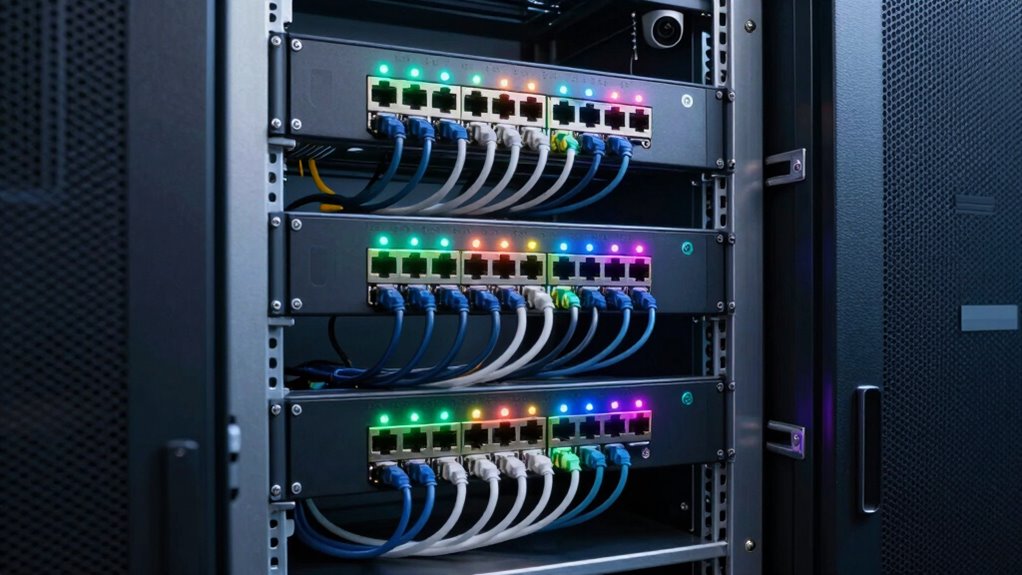
As your network grows, managing traffic efficiently becomes increasingly important, and that’s where managed switches come into play. Unlike unmanaged switches, managed switches give you greater control over your network traffic, allowing you to optimize performance and enhance security. One of the key features you’ll leverage is VLAN configuration, which enables you to segment your network into smaller, more manageable parts. By creating Virtual Local Area Networks (VLANs), you can isolate sensitive data, separate different departments, or prioritize traffic, all without needing additional physical hardware. This segmentation not only boosts efficiency but also simplifies troubleshooting and reduces congestion.
Segment your network with VLANs to improve efficiency, security, and troubleshooting without extra hardware.
With VLAN configuration, you can assign devices to specific VLANs based on their function or security requirements. For example, you might create a dedicated VLAN for your finance team that’s isolated from other departments, reducing the risk of unauthorized access. This logical separation ensures that even if one part of your network is compromised, the rest remains secure. Managed switches also support features like VLAN tagging, allowing multiple VLANs to coexist on a single physical port, which provides flexibility for complex network setups. As your network expands, these capabilities help you maintain an organized structure and adapt quickly to new needs. Additionally, network segmentation enhances overall network security by limiting the scope of potential breaches or malicious activity. Incorporating VLAN management capabilities further allows for dynamic adjustments as organizational needs evolve. Understanding network management capabilities in managed switches can help you monitor and troubleshoot issues more effectively, ensuring your network remains reliable as it grows. Moreover, leveraging traffic prioritization features can improve the performance of critical applications as your network traffic increases. A comprehensive understanding of managed switch features can enable you to optimize your network infrastructure further.

TP-Link 8 Port Gigabit Switch | Easy Smart Managed | Plug & Play | Desktop/Wall-Mount | Sturdy Metal w/ Shielded Ports | Support QoS, Vlan, IGMP and LAG (TL-SG108E)
- 8 Gigabit Ethernet Ports: High-speed network expansion
- Easy Smart Management: Web interface for effortless setup
- Supports VLAN Segmentation: Up to 32 VLANs for security
As an affiliate, we earn on qualifying purchases.
As an affiliate, we earn on qualifying purchases.
Frequently Asked Questions
Can Managed Switches Be Used in Home Networks?
Yes, you can use managed switches in your home network. They allow you to customize your network and improve performance, especially if you have multiple devices. Managed switches also offer security enhancements, helping protect your data from unauthorized access. While they’re more advanced than unmanaged switches, their features can be beneficial for tech-savvy users wanting better control and security in their home setup.
What Is the Cost Difference Between Managed and Unmanaged Switches?
Managed switches typically cost more than unmanaged ones, often by a few hundred dollars depending on features. This price difference reflects their advanced capabilities like enhanced network security and VLAN configuration, which unmanaged switches lack. If you’re aiming for better control, security, and network segmentation as your network grows, investing in a managed switch is worthwhile. However, for simple setups, unmanaged switches may suffice and save you money.
How Easy Is It to Upgrade a Managed Switch?
Upgrading a managed switch is generally straightforward, especially with firmware customization options. You can easily update firmware to fix bugs or add features, often through a web interface or command-line. VLAN configuration remains intact during updates, so your network segmentation stays secure. Just make certain you follow manufacturer instructions carefully, back up your settings beforehand, and perform upgrades during maintenance windows to minimize disruptions.
Do Managed Switches Support Wireless Connectivity?
Ever wondered if managed switches support wireless connectivity? While traditional managed switches primarily handle wired connections, many advanced models now offer wireless integration, allowing you to connect wireless devices seamlessly. Plus, with remote management features, you can monitor and control your network from anywhere. Not all switches support wireless, so check the specifications—this guarantees your expanding network stays flexible and efficient without sacrificing management capabilities.
Are Managed Switches Compatible With All Network Types?
Managed switches are compatible with most network types because they support features like VLAN configuration and network segmentation. These features help you organize your network efficiently, improving security and performance. Whether you’re working with Ethernet, fiber, or hybrid setups, a managed switch adapts well, giving you control over traffic flow and network management. This flexibility makes them suitable for growing networks with diverse infrastructure needs.

NETGEAR 5-Port Gigabit Ethernet Easy Smart Managed Essentials Switch GS305E – Desktop or Wall Mount, Home Network Hub, Office Ethernet Splitter
- Number of Ports: 5 Gigabit Ethernet Ports
- Network Speed: Supports 10/100/1000Mbps
- Management Software: Easy Smart Managed Essentials
As an affiliate, we earn on qualifying purchases.
As an affiliate, we earn on qualifying purchases.
Conclusion
Think of your network as a bustling city. A managed switch is like the traffic controller, guiding data smoothly through busy intersections. When you choose the right switch, you’re fundamentally building a well-organized street map that grows with you. As your network expands, this controller ensures everything runs seamlessly, preventing gridlocks and dead ends. Investing in a managed switch now is like planting a sturdy tree—ready to support your network’s future growth, no matter how busy it gets.

TRENDnet 12-Port 10G Layer 2 Managed SFP+ Switch, TL2-F7120, 12 x 10G SFP+ Ports, 240Gbps, Ethernet Splitter, NDAA & TAA Compliant, Lifetime Protection, Black
- Number of SFP+ Ports: 12 x 10G SFP+ ports
- Console Port: RJ-45 out-of-band port
- Protection: Lifetime manufacturer protection
As an affiliate, we earn on qualifying purchases.
As an affiliate, we earn on qualifying purchases.

NETGEAR 8-Port Gigabit Ethernet Easy Smart Managed Essentials Switch (GS308E) – Desktop or Wall Mount, Home Network Hub, Office Ethernet Splitter, Silent Operation
- Number of Ports: 8 Gigabit Ethernet ports
- Management Software: Easy Smart Managed Essentials
- Mounting Options: Desktop or wall mount
As an affiliate, we earn on qualifying purchases.
As an affiliate, we earn on qualifying purchases.