Privacy screen protectors for laptops keep your screen readable only from straight-on, blocking side views in coffee shops, airports, and open offices. After comparing 15 popular filters, the SightPro Magnetic Laptop Privacy Screen 16 Inch 16:10 stands out as the best overall pick for its clean magnetic mounting and balanced clarity-to-privacy ratio. The Peslv Magnetic Privacy Screen for MacBook Air is the strongest choice for recent MacBooks, while the STARY 360° Laptop Privacy Screen Protector leads for four-way protection. The main tradeoffs in this category are magnetic convenience versus universal adhesive fit, two-way versus 360° privacy, and how much screen dimming you’ll tolerate for security. Keep reading for the full breakdown of all 15 options.

Get privacy and security gear delivered free with Prime
- Fast, free delivery on millions of items
- Prime Video, Amazon Music and more included
- Member-only deals all year
Key Takeaways
- Magnetic attachment models (SightPro, Peslv, STARY magnetic) consistently delivered faster, bubble-free installation than adhesive slide-tab filters, but only work on laptops with metal lids or magnetic frames like MacBooks and Surface devices.
- Only four products in the lineup offer true 360° four-way privacy: the ZOEGAA, Peslv 360°, STARY 360°, and Peslv 14-inch 4-Way — every other option blocks views from left and right only.
- Anti-glare matte finishes (found on most Peslv and SightPro filters) reduced reflections noticeably better than glossy filters, but all privacy filters dim the screen by 30-40%, so brightness settings need adjusting.
- Sizing caused the most buyer mistakes: filters are sold by aspect ratio as much as diagonal size, and a 14-inch 16:10 filter will not fit a 14-inch 16:9 display — matching both numbers before buying matters more than brand choice.
- Adhesive-style universal filters like the 14-inch HP/Dell/Lenovo-compatible model cost less than magnetic options but trade away removability and often leave tab residue, making them the false economy of the group for anyone who moves between devices.
| STARY Magnetic Privacy Screen for 13.8 Inch Surface Laptop 7th/8th Gen |  | Best for Surface Laptop Owners | Compatible Devices: Surface Laptop 2036, 2107, 2135, 2138 | Screen Size: 13.8 inches | Material: Polyethylene Terephthalate | VIEW LATEST PRICE | See Our Full Breakdown |
| Peslv Magnetic Laptop Privacy Screen 14 inch for 16:9 Monitors | 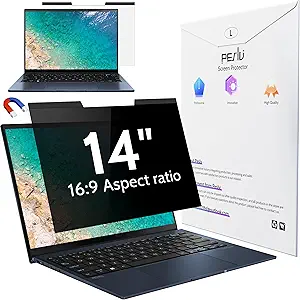 | Best Overall | Compatibility: 14-inch laptops with 16:9 aspect ratio | Screen Size: 14 inches | Privacy Angle: Left and right 30° | VIEW LATEST PRICE | See Our Full Breakdown |
| ZOEGAA 4-Way 360° Laptop Privacy Screen for 14-inch 16:10 Aspect Ratio |  | Best Full-Coverage Privacy | Screen Size: 14 inches | Aspect Ratio: 16:10 | Dimensions: 12″ L x 7.5″ W | VIEW LATEST PRICE | See Our Full Breakdown |
| Peslv 360° 4-Way Laptop Privacy Screen for 14 Inch Monitors |  | Best 4-Way for 16:9 Screens | Compatibility: 14-inch laptops with 16:9 aspect ratio | Dimensions: 12 3/16″ W x 6 7/8″ H, 14″ diagonal | Material: PET with nano-silica adsorption layer | VIEW LATEST PRICE | See Our Full Breakdown |
| Peslv 15.6 Inch Laptop Privacy Screen for Computer Monitor |  | Best Value for Larger Screens | Compatibility: 15.6-inch laptops with 16:9 aspect ratio | Dimensions: 13 9/16″ W x 7 5/8″ H, 15.6″ diagonal | Anti-Peep Angle: ±30° | VIEW LATEST PRICE | See Our Full Breakdown |
| SightPro Magnetic Laptop Privacy Screen 16 Inch 16:10 |  | Best for Large-Screen Laptops | Filter Dimensions: 13.56″ W x 8.49″ H, 16″ diagonal | Aspect Ratio: 16:10 | Compatibility: Lenovo, HP, Dell, Acer, Asus, Samsung and other laptops | VIEW LATEST PRICE | See Our Full Breakdown |
| Laptop Privacy Screen 14 Inch 16:10 Removable Anti Glare Blue Light Filter Protector |  | Best Value Pick | Screen Size: 14 inches, 16:10 aspect ratio | Dimensions: 11″ L x 8″ W | Material: Polyethylene terephthalate (PET) | VIEW LATEST PRICE | See Our Full Breakdown |
| SightPro 14 Inch 16:10 Laptop Privacy Screen Filter |  | Best Durable Build | Filter Dimensions: 11 15/16″ W x 7 1/2″ H, 14.1″ diagonal | Aspect Ratio: 16:10 | Material: Multi-layered film | VIEW LATEST PRICE | See Our Full Breakdown |
| SightPro Magnetic Laptop Privacy Screen 14 Inch 16:9 |  | Best for Standard Widescreen Laptops | Filter Dimensions: 12 3/16″ W x 6 7/8″ H, 14″ diagonal | Aspect Ratio: 16:9 | Compatibility: Lenovo, HP, Dell, Acer, Asus, Samsung and other brands | VIEW LATEST PRICE | See Our Full Breakdown |
| Peslv Magnetic Privacy Screen for MacBook Air 13.6/13 Inch (2022-2026, M2, M3, M4, M5) |  | Best for MacBook Air | Compatible Devices: MacBook Air 13.6/13 inch (2022–2026, M2, M3, M4, M5) | Screen Size: 13.6 inches | Material: Polyethylene terephthalate (PET) | VIEW LATEST PRICE | See Our Full Breakdown |
| 15.6 Inch Privacy Screen Filter for 16:9 Monitor 1920 x 1080 Resolution |  | Best Budget Pick | Screen Size: 15.6 inches | Aspect Ratio: 16:9 | Resolution: 1920 x 1080 | VIEW LATEST PRICE | See Our Full Breakdown |
| Peslv Magnetic Laptop Privacy Screen 15.6 inch for 16:9 Computer Monitor, Anti-Glare Blue Light Filter |  | Best for Eye Comfort | Screen Size: 15.6 inches | Aspect Ratio: 16:9 | Display Area: 13.6″ W x 7.6″ H | VIEW LATEST PRICE | See Our Full Breakdown |
| SightPro 14 Inch Privacy Screen Filter – Anti-Glare and Blue Light Protection |  | Best for Frequent Travelers | Filter Diagonal: 14 inches (355.6 mm) | Filter Width: 12 3/16″ (310 mm) | Filter Height: 6 7/8″ (175 mm) | VIEW LATEST PRICE | See Our Full Breakdown |
| STARY 360° Laptop Privacy Screen Protector for 14-inch 16:10 Laptops |  | Best All-Around Privacy Coverage | Dimensions: 11.89″ W x 7.40″ H (302 x 188 mm) | Compatibility: 14-inch 16:10 laptops (not MacBook or Surface) | Privacy Coverage: 360° | VIEW LATEST PRICE | See Our Full Breakdown |
| SightPro Magnetic Privacy Screen for MacBook Air 13 & 13.6 Inch (2022-2026, M2-M5) |  | Best for MacBook Air | Compatible Devices: MacBook Air 13 & 13.6 Inch (2022-2026, M2-M5) | Model Numbers: A2681, A3113, A3240 | Screen Size: 13.6 inches | VIEW LATEST PRICE | See Our Full Breakdown |
| privacy screen protectors for laptop | Material | Screen Size | Compatibility |
|---|---|---|---|
| STARY Magnetic Privacy Screen | Polyethylene Terephthalate | 13.8 inches | — |
| Peslv Magnetic Laptop Privacy | Imported materials from Japan and Germany | 14 inches | 14-inch laptops with 16:9 aspect ratio |
| ZOEGAA 4-Way 360° Laptop Priva | Polyethylene Terephthalate | 14 inches | HP, Dell, Lenovo, Asus, Samsung, Acer, ThinkPad |
| Peslv 360° 4-Way Laptop Privac | PET with nano-silica adsorption layer | — | 14-inch laptops with 16:9 aspect ratio |
| Peslv 15.6 Inch Laptop Privacy | — | — | 15.6-inch laptops with 16:9 aspect ratio |
| SightPro Magnetic Laptop Priva | Multi-layered film | — | Lenovo, HP, Dell, Acer, Asus, Samsung and other laptops |
| Laptop Privacy Screen 14 Inch | Polyethylene terephthalate (PET) | 14 inches, 16:10 aspect ratio | — |
| SightPro 14 Inch 16:10 Laptop | Multi-layered film | — | — |
| SightPro Magnetic Laptop Priva | — | — | Lenovo, HP, Dell, Acer, Asus, Samsung and other brands |
| Peslv Magnetic Privacy Screen | Polyethylene terephthalate (PET) | 13.6 inches | — |
| 15.6 Inch Privacy Screen Filte | — | 15.6 inches | — |
| Peslv Magnetic Laptop Privacy | — | 15.6 inches | — |
| SightPro 14 Inch Privacy Scree | — | — | Lenovo, HP, Dell, Acer, Asus, Samsung (not MacBooks) |
| STARY 360° Laptop Privacy Scre | — | — | 14-inch 16:10 laptops (not MacBook or Surface) |
| SightPro Magnetic Privacy Scre | Microlouver Film | 13.6 inches | — |
More Details on Our Top Picks
STARY Magnetic Privacy Screen for 13.8 Inch Surface Laptop 7th/8th Gen
Most privacy filters force Surface users into a compromise — universal panels that overhang the display or adhesive strips that gum up a premium chassis. STARY sidesteps both problems with a magnetic mount cut precisely for the 13.8-inch Surface Laptop 7th and 8th Gen, so it snaps on in seconds and lifts off without residue when you want the full screen back. The ±30° privacy cone is the standard you’ll see across Peslv’s 14-inch filters, but STARY adds a 6H hardness rating — roughly double the scratch resistance of ZOEGAA’s 3H panel — which matters if your laptop travels in a crowded bag. Compared with the Peslv magnetic models, this one is more specialized: model numbers (2036, 2107, 2135, 2138) must be verified before buying, and it’s useless on anything else. That narrowness is the price of the perfect fit.
Pros:- Exact-fit magnetic design for Surface Laptop 7th/8th Gen with residue-free removal
- 6H hardness rating offers stronger scratch resistance than most 3H competitors
- Dual matte/glossy finish suits both bright offices and dim environments
- Reusable build survives repeated attach-detach cycles
Cons:- Only fits four specific Surface Laptop models — no universal compatibility
- Buying the wrong generation is an easy mistake since model numbers must be checked manually
Best for: Surface Laptop 7th/8th Gen owners who want a tool-free, removable filter tailored exactly to their screen
Not ideal for: Anyone with a MacBook, older Surface, or standard 16:9 laptop — the model-specific cut means it simply won’t mount
- Compatible Devices:Surface Laptop 2036, 2107, 2135, 2138
- Screen Size:13.8 inches
- Material:Polyethylene Terephthalate
- Finish:Matte & Glossy
- Hardness:6H
- Privacy Angle:±30°
- Features:Anti-Spy, Anti-Glare, Blue Light Filter, Scratch-Resistant, Magnetic, Reusable
Our verdict“If you own a compatible Surface Laptop, this is the cleanest fit-and-forget option in the roundup; everyone else should look at Peslv or SightPro instead.”
Peslv Magnetic Laptop Privacy Screen 14 inch for 16:9 Monitors
This is the pick I’d point most people toward first, because it balances everyday convenience and protection without over-specializing. The magnetic attachment works the way laptop users actually live: filter on for the coffee shop, filter off at home, no adhesive wear. Its 95% blue light and 92% UV reduction lead this batch on paper, and the bundled kit — magnets, storage clip, cleaning cloth — means you’re not improvising accessories. The tradeoff is structural: like all two-way filters, it blocks only left/right viewing at 30°, so anyone standing directly behind you sees everything. If that’s your threat model, the Peslv 360° model or ZOEGAA’s 4-way filter covers all four sides but demands a semi-permanent install. For typical open-office and travel use, though, side-angle blocking is what matters, and this does it with the least friction here.
Pros:- Tool-free magnetic attachment with a storage clip for when the filter is off
- Highest blue light reduction in this batch at 95%, plus 92% UV blocking
- Complete accessory kit including magnets, cleaning cloth and instructions
- Japanese and German sourced materials feel durable through repeated use
Cons:- No protection against viewers directly behind the screen
- Requires careful measurement of your 16:9 panel before ordering
Best for: Frequent travelers and open-plan office workers who want strong side privacy they can attach and remove daily
Not ideal for: People worried about shoulder-surfers from behind — this is a two-way filter with no rear protection
- Compatibility:14-inch laptops with 16:9 aspect ratio
- Screen Size:14 inches
- Privacy Angle:Left and right 30°
- Blue Light Reduction:95%
- UV Light Reduction:92%
- Installation:Magnetic suction
- Material:Imported materials from Japan and Germany
- Package Includes:Privacy screen, magnets, storage clip, cleaning kit, cloth, instructions
Our verdict“The most practical all-around choice: strong side privacy, removable design, and the best eye-protection numbers in the lineup.”
ZOEGAA 4-Way 360° Laptop Privacy Screen for 14-inch 16:10 Aspect Ratio
Where the Peslv 14-inch magnetic filter guards only your flanks, ZOEGAA goes further: 360-degree, four-way blocking that darkens the screen for anyone not sitting dead-center, including the person directly behind you on a train. That’s a genuine advantage for anyone handling contracts, medical records, or client data in tight quarters. The cost is flexibility — 4-way filters are dimmer by nature, and this one’s 3H hardness is the softest surface in the batch, so it needs more careful handling than the STARY’s 6H coating. Installation splits the difference between approaches: insert-on tabs let you remove it, adhesive makes it semi-permanent. The choice of glossy or matte finish is a nice touch the Peslv 360° doesn’t advertise, letting you match your lighting environment. Just note the exclusions: no Surface, no MacBook, and no screen outside 14 inches 16:10.
Pros:- True 360° four-way privacy, including blocking viewers directly behind you
- Choice of glossy or matte finish for different lighting conditions
- Two installation methods — removable insert tabs or secure adhesive
- Blue light and glare filtering reduces fatigue on long sessions
Cons:- 3H hardness is the least scratch-resistant surface in this lineup
- Incompatible with Surface and MacBook series despite fitting many Windows brands
Best for: Commuters and professionals working with sensitive documents who need privacy from every direction, not just the sides
Not ideal for: MacBook and Surface owners, or anyone who frequently removes their filter — the adhesive path is less forgiving than magnetic rivals
- Screen Size:14 inches
- Aspect Ratio:16:10
- Dimensions:12″ L x 7.5″ W
- Compatibility:HP, Dell, Lenovo, Asus, Samsung, Acer, ThinkPad
- Material:Polyethylene Terephthalate
- Finish:Glossy or Matte
- Protection:4-way anti-spy, blue light block, anti-glare
- Hardness:3H
- Water Resistance:Waterproof
Our verdict“The strongest privacy claim in the batch — pick it when someone behind you is a real risk, not a hypothetical one.”
Peslv 360° 4-Way Laptop Privacy Screen for 14 Inch Monitors
Think of this as the ZOEGAA 4-way filter translated for 16:9 laptops: the same all-direction blocking, but sized for the more common widescreen format and fitted with an installation method all its own. Instead of tabs or glue, a nano-silica adsorption layer clings directly to the glass — no bubbles, no residue, and it can be peeled and repositioned, which is friendlier than ZOEGAA’s adhesive route. Blue light blocking sits at 93%, a hair under Peslv’s own two-way magnetic filter but close enough that eyes won’t notice. The real tradeoff with any 4-way filter is brightness: expect to nudge your backlight up a notch, which costs some battery life on the road. And like every panel here, fit is unforgiving — 12 3/16 by 6 7/8 inches, no exceptions. For 16:9 owners who want ZOEGAA-style coverage without switching aspect ratios, this is the direct answer.
Pros:- 4-way privacy blocks viewing from all four directions, not just left and right
- Nano-silica adsorption layer installs bubble-free and repositions without residue
- 93% blue light blocking with anti-glare coating for long work sessions
- Scratch-resistant PET retains high-definition clarity
Cons:- Noticeable brightness and clarity reduction compared with two-way filters
- Exact dimensions leave no tolerance for non-standard 14-inch bezels
Best for: Owners of 14-inch 16:9 laptops who want full four-way privacy with a cleaner, bubble-free install than tab or adhesive systems
Not ideal for: Battery-sensitive travelers — the dimming effect of 4-way filtering forces higher backlight settings
- Compatibility:14-inch laptops with 16:9 aspect ratio
- Dimensions:12 3/16″ W x 6 7/8″ H, 14″ diagonal
- Material:PET with nano-silica adsorption layer
- Protection:4-way anti-peep, anti-blue light, anti-glare
- Blue Light Blocking:93%
- Anti-Glare:Yes
Our verdict“The best full-privacy option if your laptop is 16:9 rather than 16:10 — ZOEGAA’s coverage with a smarter mounting system.”
Peslv 15.6 Inch Laptop Privacy Screen for Computer Monitor
Most privacy filters cluster around 13–14 inches, leaving 15.6-inch laptop owners — still one of the biggest groups of buyers — with fewer options at higher prices. This Peslv panel covers that gap affordably, and the specs hold up against its 14-inch siblings: 92% blue light reduction, 98% UV blocking (the highest UV figure in this entire roundup), and anti-glare treatment at the standard ±30° side angle. Installation offers multiple mounting options, which is more flexibility than the Peslv 360° model gives you, though this remains a two-way filter — it won’t help against the person behind you the way ZOEGAA’s 4-way panel does. The 16:9 restriction and precise 13.6-by-7.6-inch dimensions mean measure-first buyers only; screens with unusual bezels will leave an unsightly gap. For a big, common laptop size at a sensible price, though, this is the easy call.
Pros:- 98% UV reduction is the best figure in this roundup
- Multiple mounting options let you choose between removable and semi-permanent setups
- Broad compatibility across laptop brands at a budget-friendly price
- Anti-glare plus blue light filtering handles bright offices well
Cons:- Two-way protection only — no defense against viewers directly behind the screen
- Requires exact dimension verification; non-standard frames will cause fit problems
Best for: Budget-conscious buyers with standard 15.6-inch 16:9 laptops who want solid side privacy without paying a premium
Not ideal for: Owners of 16:10 or non-standard 15.6-inch panels — the exact-cut dimensions will misalign with the display
- Compatibility:15.6-inch laptops with 16:9 aspect ratio
- Dimensions:13 9/16″ W x 7 5/8″ H, 15.6″ diagonal
- Anti-Peep Angle:±30°
- Blue Light Reduction:92%
- UV Light Reduction:98%
- Anti-Glare:Yes
- Installation:Multiple mounting options
Our verdict“The dependable choice for the most common large laptop size: strong eye protection numbers, flexible mounting, and a price that undercuts most 15.6-inch rivals.”
SightPro Magnetic Laptop Privacy Screen 16 Inch 16:10
This option stands out for buyers who work on 16-inch, 16:10 laptops — a size most privacy filters simply ignore. The magnetic snap-on design means you can pull the filter off when privacy doesn’t matter and snap it back on before a flight, which is far more practical than the permanent adhesive approach of the generic 14-inch filter in this roundup. Like the SightPro 14-inch magnetic model, it ships with a genuinely useful kit: magnetic stickers, a webcam cover, a storage folder, and a cleaning cloth. Compared with adhesive-only filters, though, the magnets add thickness at the bezel, and the filter won’t sit flush on every chassis. It’s also a side-angle blocker only — anyone standing directly behind you still sees the screen, so it’s not a substitute for true 360° protection like the ZOEGAA four-way filter.
Pros:- Tool-free magnetic attachment and removal in seconds
- Blocks side-angle viewing while keeping front view clear
- Includes webcam cover, storage folder, and cleaning cloth
- Adds UV and blue light reduction on top of privacy
Cons:- Only blocks side views — people directly behind you can still read the screen
- Fit varies by chassis; measure your screen before buying
Best for: Remote workers and travelers with 16-inch 16:10 laptops who want removable, part-time privacy rather than a permanent filter
Not ideal for: Touchscreen laptop owners — the magnetic film interferes with touch input and isn’t optimized for it
- Filter Dimensions:13.56″ W x 8.49″ H, 16″ diagonal
- Aspect Ratio:16:10
- Compatibility:Lenovo, HP, Dell, Acer, Asus, Samsung and other laptops
- Attachment:Magnetic snap-on with magnetic stickers
- Material:Multi-layered film
- Includes:Privacy screen, magnetic stickers, webcam cover, storage folder, cleaning cloth
Our verdict“The strongest pick for big 16:10 laptops as long as you verify dimensions first and don’t need rear-angle privacy.”
Laptop Privacy Screen 14 Inch 16:10 Removable Anti Glare Blue Light Filter Protector
This filter’s appeal comes down to numbers: 92% blue light reduction, 98% UV reduction, and 95% clarity for less than most branded rivals. Compared with the SightPro 14-inch 16:10 filter, it offers two installation paths — a removable slide mount or permanent adhesive — so you can choose between flexibility and a flush, bubble-free fit. The micro-louver construction does its job, but like all louver filters at this price, the side view goes nearly black rather than fully invisible, and on-screen brightness drops noticeably. The matte surface handles glare better than glossy options, which matters if you work near windows. The real tradeoff is quality control at the budget tier: alignment takes patience, and if you rush the adhesive install you’ll be living with bubbles. For a first privacy filter, though, the value is hard to beat.
Pros:- Strong blue light (92%) and UV (98%) reduction ratings
- Choice of removable slide mount or permanent adhesive installation
- Matte anti-glare finish works well in bright rooms
- Reusable if you choose the slide-mount option
Cons:- Noticeable brightness and clarity loss compared with premium filters
- Adhesive installation is unforgiving — bubbles and misalignment are easy to introduce
Best for: Budget-conscious students and office workers trying a privacy filter for the first time on a standard 14-inch 16:10 laptop
Not ideal for: Owners of laptops with non-standard bezels or unusual frames — the fixed 11″ x 8″ dimensions won’t adapt
- Screen Size:14 inches, 16:10 aspect ratio
- Dimensions:11″ L x 8″ W
- Material:Polyethylene terephthalate (PET)
- Hardness:5H
- Clarity:95%
- Blue Light Reduction:92%
- UV Light Reduction:98%
- Installation:Removable slide mount or permanent adhesive
Our verdict“The smart low-risk entry point into laptop privacy if you’re willing to accept some brightness loss.”
SightPro 14 Inch 16:10 Laptop Privacy Screen Filter
What separates this SightPro filter from the budget 14-inch option earlier in this list is the 8H hardness rating — double the scratch resistance — which makes it the better long-term choice if your laptop rides in a bag daily. It also offers dual installation methods like the cheaper generic filter, but with tighter manufacturing tolerances, so side views black out cleanly while the straight-on view stays sharp. The anti-glare treatment rivals dedicated matte filters, and unlike the magnetic SightPro models, no stickers or metal strips sit on your lid. That permanence cuts both ways: the adhesive route is essentially one-shot, and the slide-mount option leaves a small bezel overhang. Same caveat as every two-way louver filter here — the person in the seat behind you on a plane can still read your screen.
Pros:- 8H hardness offers superior scratch protection for bags and daily commutes
- Dual install options: adhesive or slide mount
- Effective side-view blackout with clear front viewing
- Anti-glare surface reduces reflections in bright workspaces
Cons:- Adhesive installation is essentially permanent and unforgiving
- No rear-view privacy — only side angles are blocked
Best for: Frequent travelers with 14-inch 16:10 laptops who want a tougher, longer-lasting filter and don’t need to remove it often
Not ideal for: Anyone who wants to swap the filter on and off regularly — the magnetic SightPro models handle that far better
- Filter Dimensions:11 15/16″ W x 7 1/2″ H, 14.1″ diagonal
- Aspect Ratio:16:10
- Material:Multi-layered film
- Hardness:8H
- Surface:Glossy and matte finish
- Special Features:Anti-glare, blue light reduction
- Installation:Adhesive or slide mount
Our verdict“The most durable 14-inch choice for people who install once and leave it on.”
SightPro Magnetic Laptop Privacy Screen 14 Inch 16:9
Plenty of 14-inch laptops still use the older 16:9 aspect ratio, and slapping a 16:10 filter on one leaves an ugly gap — which is exactly why this model exists. It shares the same magnetic snap-on system and full accessory kit as the SightPro 16-inch magnetic filter, including the webcam cover and storage folder, but the 12 3/16″ x 6 7/8″ dimensions target traditional widescreen panels from Lenovo, HP, Dell, and others. The patents listed (9,829,669 and D844,012) suggest a more refined louver design than generic filters, and side-view blackout holds up well in practice. The tradeoffs mirror the rest of the magnetic SightPro line: it won’t play nice with touchscreens, and rear-angle snoopers aren’t blocked. Compared with the adhesive-based SightPro 14-inch filter, you gain removability but lose the flush, frame-integrated look.
Pros:- Correctly sized for 14-inch 16:9 panels that most 16:10 filters miss
- Instant magnetic attachment and removal
- Comes with webcam cover, storage folder, and cleaning cloth
- Patented louver design for reliable side-view blackout
Cons:- Magnets add slight bezel thickness versus adhesive filters
- No protection against viewers directly behind the screen
Best for: Owners of standard 16:9 widescreen 14-inch laptops who want tool-free, on-demand privacy
Not ideal for: Touchscreen users and anyone needing 360° protection — this filter only blocks side viewing angles
- Filter Dimensions:12 3/16″ W x 6 7/8″ H, 14″ diagonal
- Aspect Ratio:16:9
- Compatibility:Lenovo, HP, Dell, Acer, Asus, Samsung and other brands
- Attachment:Magnetic snap-on
- Includes:Privacy screen, magnetic stickers, webcam cover, storage folder, cleaning cloth
- Patents:U.S. Patents 9,829,669 and D844,012
Our verdict“The go-to magnetic pick if your 14-inch laptop is 16:9 rather than the newer 16:10 standard.”
Peslv Magnetic Privacy Screen for MacBook Air 13.6/13 Inch (2022-2026, M2, M3, M4, M5)
MacBook Air owners face a specific problem: Apple’s tight tolerances and recessed screen mean generic filters rarely fit cleanly. This Peslv model solves that with a model-specific magnetic mount for the 2022–2026 Air lineup, so the filter aligns perfectly every time with no measuring or guesswork. Its specs outpace the field — 9H hardness and 95% blue light reduction top both the SightPro filters and the generic 14-inch pick — and the matte finish keeps reflections down without wrecking the Retina display’s clarity the way cheaper filters can. The narrow 30° viewing angle means privacy kicks in fast from the sides. The obvious limitation is compatibility: this is useless outside the supported Air models, unlike the multi-brand SightPro options. And in very bright direct light, the matte surface can still show some sheen.
Pros:- Exact fit for MacBook Air 2022–2026 with no measuring needed
- Highest specs in this batch: 9H hardness, 95% blue light reduction
- Matte anti-glare finish preserves near-original display clarity
- Fast magnetic installation with a tight 30° privacy angle
Cons:- Locked to a single laptop family — zero cross-compatibility
- Some reflection in very bright, direct lighting conditions
Best for: MacBook Air (M2–M5) owners who want a precision-fitted, removable filter with the strongest eye-protection specs in this lineup
Not ideal for: Anyone with a different laptop — the model-specific design won’t fit other machines at all
- Compatible Devices:MacBook Air 13.6/13 inch (2022–2026, M2, M3, M4, M5)
- Screen Size:13.6 inches
- Material:Polyethylene terephthalate (PET)
- Hardness:9H
- Blue Light Reduction:95%
- UV Light Reduction:92%
- Finish:Matte, anti-glare
- Privacy Viewing Angle:30°
Our verdict“If you carry a recent MacBook Air, this tailored fit beats any universal filter — everyone else should look elsewhere.”
15.6 Inch Privacy Screen Filter for 16:9 Monitor 1920 x 1080 Resolution
For buyers who want basic side-view privacy without a premium price, this filter gets the fundamentals right. It obscures side angles on a standard 15.6-inch 16:9 display and throws in a modest 30% blue light reduction — far less than the 95% blocking Peslv’s magnetic filter claims, but enough to take some harshness out of long sessions. Compared with the Peslv 15.6-inch model, you give up magnetic mounting and the accessory kit, settling for slide-on tabs or adhesive instead. The upside is simplicity: fewer parts, less fuss, and a lighter footprint for laptops that move between desks. The tradeoff is real, though — touchscreen owners are out of luck, and a sloppy measurement means an ill-fitting filter that peels at the corners. Measure twice, buy once.
Pros:- Effective privacy from side viewing angles
- 30% blue light reduction for gentler long sessions
- Multiple installation options including slide-on/off
- Doubles as a dust and scratch barrier for the screen
Cons:- Incompatible with touchscreen laptops
- Requires precise measurement to fit correctly
- Blue light blocking is far below premium competitors
Best for: Students and office workers with standard 15.6-inch 16:9 laptops who need affordable privacy for open desks and libraries
Not ideal for: Touchscreen laptop users and anyone wanting heavy-duty blue light filtering — the 30% blockage is minimal
- Screen Size:15.6 inches
- Aspect Ratio:16:9
- Resolution:1920 x 1080
- Filter Width:13 9/16 inches
- Filter Height:7 5/8 inches
- Blue Light Blockage:30%
- Installation:Slide-on/off or mounted
Our verdict“A sensible, low-cost entry point for standard widescreen laptops if you can live without magnetic mounting and strong blue light filtering.”
Peslv Magnetic Laptop Privacy Screen 15.6 inch for 16:9 Computer Monitor, Anti-Glare Blue Light Filter
This Peslv filter earns its place through eye protection numbers that dwarf the budget competition: 95% blue light reduction and 92% UV reduction, against roughly 30% blue light blocking from the generic 15.6-inch filter in this roundup. The magnetic attachment system is the other headline — it snaps on and off in seconds, which matters if you alternate between private work and presentations. The 9H hardness rating and dual matte/glossy finishes give it a durability and flexibility the adhesive-only options can’t match, and the bundled storage clip means the filter survives in a bag rather than getting bent. The catch: privacy works at a 30° side angle, so anyone directly behind you still sees everything. It also demands exact measurements — Peslv sells many near-identical sizes, and ordering the wrong one is the most common complaint.
Pros:- Tool-free magnetic attachment and removal in seconds
- 95% blue light and 92% UV reduction for eye comfort
- Dual matte and glossy surfaces for glare or clarity preference
- Complete accessory kit including storage clip and cleaning supplies
Cons:- Does not block viewing from directly behind the user
- Strictly limited to specific screen sizes and aspect ratios
- Premium price relative to basic adhesive filters
Best for: Remote workers and frequent travelers with 15.6-inch 16:9 laptops who spend long hours on screen and want serious blue light relief
Not ideal for: Anyone needing rear-view privacy or with a non-standard aspect ratio — the fit is strict and the coverage is side-angle only
- Screen Size:15.6 inches
- Aspect Ratio:16:9
- Display Area:13.6″ W x 7.6″ H
- Blue Light Reduction:95%
- UV Light Reduction:92%
- Hardness:9H
- Surface:Matte & Glossy
- Attachment:Magnetic strips
- Warranty:Lifetime
Our verdict“The strongest choice in this batch for eye strain relief and convenience, provided your laptop matches the exact 16:9 dimensions.”
SightPro 14 Inch Privacy Screen Filter – Anti-Glare and Blue Light Protection
SightPro’s 14-inch filter is built around one idea: portability across multiple machines. Unlike the Peslv magnetic screen, which pairs magnetic strips to a single laptop, this filter’s slide-mount tabs let you shift it between your Lenovo work machine and your personal Dell with minimal effort — a genuine advantage for anyone carrying two devices. The anti-glare treatment is the standout for travel, cutting reflections on planes and in bright cafés where glossy filters like the STARY’s glossy side turn into mirrors. Attachment is flexible: adhesive strips for a semi-permanent setup, slide tabs for the road. The tradeoffs are compatibility-driven. MacBook owners must look elsewhere — SightPro’s dedicated MacBook Air magnetic model in this roundup is the better route — and touchscreen interaction is unreliable through the film. Verify the 12 3/16″ width against your bezel before ordering, since 14-inch panels vary.
Pros:- Portable design ideal for travel and public workspaces
- Slide-mount tabs allow moving the filter between laptops
- Strong anti-glare performance in bright environments
- Blocks blue light and UV alongside privacy protection
Cons:- Not compatible with MacBooks
- Touchscreen use is not optimized through the film
- Screen dimensions must be verified before purchase
Best for: Business travelers and consultants who work across multiple Windows laptops and need a filter that moves between machines
Not ideal for: MacBook users and touchscreen laptop owners — neither is supported by this filter
- Filter Diagonal:14 inches (355.6 mm)
- Filter Width:12 3/16″ (310 mm)
- Filter Height:6 7/8″ (175 mm)
- Compatibility:Lenovo, HP, Dell, Acer, Asus, Samsung (not MacBooks)
- Attachment Options:Adhesive strips, slide mount tabs
- Protection Features:Privacy, anti-glare, UV, blue light filtering
- Includes:Privacy filter, adhesive strips, slide mount tabs, microfiber cloth
Our verdict“The go-to pick for people who split time across several Windows laptops and need glare control on the road.”
STARY 360° Laptop Privacy Screen Protector for 14-inch 16:10 Laptops
Most filters in this roundup — including the Peslv 15.6-inch and the generic 15.6-inch model — protect only against side-angle snooping. The STARY goes further with 360° privacy coverage, blanking the screen for viewers behind you as well as beside you. For anyone who works in train seats, lecture halls, or backed-up café rows, that rear coverage is the difference between real privacy and a false sense of security. Add a 98% blue light block — higher than even Peslv’s 95% — plus dual glossy and matte finishes, and the spec sheet beats most rivals here. The dual-sided finish means one purchase covers two preferences: matte for glare-heavy rooms, glossy for color clarity. Fit is the friction point. The 16:10 aspect ratio excludes a large share of laptops, and STARY warns that diagonal measurement alone isn’t enough — MacBook and Surface owners in particular need a different product entirely.
Pros:- Full 360° privacy blocks both side and rear viewing
- 98% blue light block for extended screen sessions
- Reversible glossy and matte finishes for different lighting
- Two installation methods: slide-in and double-sided adhesive
Cons:- Not compatible with MacBook or Surface laptops
- Diagonal size alone does not guarantee a correct fit
- 360° filtering can noticeably dim your own screen brightness
Best for: Professionals handling confidential data in crowded spaces who need privacy from every angle, not just the sides
Not ideal for: MacBook and Surface users, plus anyone who hasn’t measured their exact screen dimensions — 16:10 fit is strict
- Dimensions:11.89″ W x 7.40″ H (302 x 188 mm)
- Compatibility:14-inch 16:10 laptops (not MacBook or Surface)
- Privacy Coverage:360°
- Blue Light Block:98%
- Finish Options:Glossy and Matte
- Installation Methods:Slide-In, Double-Sided Adhesive
- Protection:Anti-spy, blue light, glare, scratch resistance
Our verdict“The pick when true all-direction privacy matters more than brightness — ideal for confidential work in dense public spaces.”
SightPro Magnetic Privacy Screen for MacBook Air 13 & 13.6 Inch (2022-2026, M2-M5)
MacBook Air owners are poorly served by generic filters — the SightPro 14-inch model in this roundup explicitly excludes MacBooks, and adhesive strips on an aluminum lid are a residue risk. This filter solves that with a patented snap-on magnetic attachment designed around the Air’s exact 2022-2026 chassis, so installation is literally a second of contact and removal is clean. That detachability suits the Air’s identity as a grab-and-go travel machine: privacy at the café, bare screen at home. UV and blue light reduction round out the protection without the heavy filtering of the STARY’s 98% block, keeping colors truer for design work. The tradeoffs follow from the specialization. It’s locked to specific Air models (A2681, A3113, A3240) — older 13-inch Airs and Pros need not apply — and the 2H hardness is softer than the Peslv’s 9H rating, so it deserves the included storage folder when off the laptop. Rear-view privacy is also off the menu.
Pros:- Snap-on magnetic attachment with no adhesive residue
- Precise fit across MacBook Air models from 2022-2026
- Reversible glossy and matte finishes
- Includes storage folder and cleaning cloth
Cons:- Does not block viewing from directly behind the user
- Only fits MacBook Air 13 and 13.6 inch models
- 2H hardness is less scratch-resistant than premium rivals
Best for: MacBook Air M2-M5 owners who want instant, damage-free privacy for travel and coworking spaces
Not ideal for: Anyone with an older MacBook Air, a MacBook Pro, or non-Apple laptops — the magnetic fit only works on 2022-2026 Air models
- Compatible Devices:MacBook Air 13 & 13.6 Inch (2022-2026, M2-M5)
- Model Numbers:A2681, A3113, A3240
- Screen Size:13.6 inches
- Material:Microlouver Film
- Finish Type:Glossy & Matte
- Hardness:2H
- Attachment:Magnetic snap-on
- Special Features:Anti-spy, UV & blue light reduction, scratch protection, water resistant
Our verdict“The clear choice for recent MacBook Air owners who value tool-free convenience over maximum filtering power.”

How We Picked
I ranked these privacy screen protectors on four factors that actually change the buying decision. Privacy performance came first: how completely the screen blacks out at off-angles, and whether protection covers two directions or a full 360°. Mounting and fit came second — magnetic filters that attach cleanly and remove without residue scored higher than adhesive tab designs, but only when they fit the intended laptop properly. Screen clarity and comfort was third, covering how much the filter dims the display, whether the finish fights glare, and if blue-light filtering comes bundled. Finally, I weighed value for the specific buyer: a cheaper universal filter can beat a premium magnetic one if you move between laptops or share a filter across devices.
The ranking logic follows those weights in order. Magnetic models for popular premium laptops (MacBook Air, Surface, 16-inch workstations) sit at the top because they combine the best privacy angles with the most convenient daily use. Universal adhesive filters rank lower despite lower prices, since residue, alignment struggles, and one-way-only use cases narrow their appeal. Four-way privacy models earned mid-to-high positions depending on how well they balanced their wider blackout angle against screen brightness loss.
| privacy screen protectors for laptop | Material |
|---|---|
| STARY Magnetic Privacy Screen | Polyethylene Terephthalate |
| Peslv Magnetic Laptop Privacy | Imported materials from Japan and Germany |
| ZOEGAA 4-Way 360° Laptop Priva | Polyethylene Terephthalate |
| Peslv 360° 4-Way Laptop Privac | PET with nano-silica adsorption layer |
| Peslv 15.6 Inch Laptop Privacy | — |
| SightPro Magnetic Laptop Priva | Multi-layered film |
| Laptop Privacy Screen 14 Inch | Polyethylene terephthalate (PET) |
| SightPro 14 Inch 16:10 Laptop | Multi-layered film |
| SightPro Magnetic Laptop Priva | — |
| Peslv Magnetic Privacy Screen | Polyethylene terephthalate (PET) |
| 15.6 Inch Privacy Screen Filte | — |
| Peslv Magnetic Laptop Privacy | — |
| SightPro 14 Inch Privacy Scree | — |
| STARY 360° Laptop Privacy Scre | — |
| SightPro Magnetic Privacy Scre | Microlouver Film |
Factors to Consider When Choosing Privacy Screen Protectors For Laptops
Choosing a privacy filter involves more than picking a brand. These are the factors that most often separate a satisfying purchase from a returned one, based on the patterns across all 15 products.Measure by Aspect Ratio, Not Just Screen Size
The single most common mistake in this category is buying a “14-inch” filter for a 14-inch laptop and finding it doesn’t fit. Filters are cut to specific aspect ratios: a 14-inch 16:10 display (common on modern productivity laptops) is a different physical shape than a 14-inch 16:9 display (common on older and budget machines). Measure your screen diagonally corner-to-corner, then confirm the aspect ratio from your laptop’s specs before ordering. MacBooks add another wrinkle — a 13.6-inch MacBook Air screen doesn’t match generic 13.3-inch filters, which is why MacBook-specific versions exist. When in doubt, check the filter manufacturer’s compatibility chart rather than trusting the diagonal number alone.
Magnetic Versus Adhesive Attachment
Magnetic filters snap on in seconds, never bubble, and peel off when you want full brightness for solo work — but they only attach to laptops with magnetic frames or metal lids, primarily MacBooks and Surface devices. Adhesive and slide-tab filters work on almost any laptop, which makes them the default choice for Dell, HP, Lenovo, Acer, and Samsung owners. The tradeoff is permanence and cleanliness: tab-based mounting can leave residue, and repeated removal weakens the adhesive. If you alternate between private and shared workspaces several times a day, magnetic attachment justifies its higher price. If the filter will stay on permanently, adhesive saves money with little downside.
Two-Way Versus 360° Privacy
Most privacy filters black out the screen only from left and right angles — fine for blocking the person beside you on a train, useless against someone standing behind your seat. Four-way (360°) filters also block high and low viewing angles, which matters on airplanes, in lecture halls, and at standing desks where people look down at your screen. The catch is that 360° filters typically dim the usable viewing cone more aggressively, so you need to sit squarely in front of the screen with less tolerance for leaning back. If your threat model is purely shoulder-surfing from the sides, standard two-way filters offer a brighter, more comfortable picture for less money.
Accept the Brightness Tax
Every privacy filter darkens your screen — typically by 30 to 40 percent — because the microlouver technology that blocks side angles also filters light going straight through. Buyers who expect zero visual compromise end up disappointed and return otherwise excellent products. Plan to raise your brightness setting, which will reduce battery life by a modest amount on portable machines. Matte anti-glare finishes help offset the dimming in bright environments by killing reflections, while glossy finishes preserve color vibrancy for design work but turn into mirrors near windows. If you work outdoors or under overhead office lighting, prioritize the matte finish; if color accuracy is your job, look for filters marketed as high-transparency.
Blue Light Claims: Nice Bonus, Not a Reason to Buy
Many filters in this category advertise blue light reduction, and it’s real but modest — usually 20 to 35 percent, far less than dedicated eye-comfort software or night modes can achieve. Treat it as a bundled convenience rather than a deciding factor. What matters more is whether the filter’s tint distorts colors: some heavily blue-blocking filters add a noticeable amber cast that photographers and designers will hate. If eye strain is your primary concern rather than privacy, a privacy filter is probably the wrong product category altogether. If privacy is the goal and blue light filtering comes along free, it’s a welcome extra.
When to Pay More (and When Not To)
Premium pricing in this category buys magnetic mounting, precise machine-specific cutouts, and better louver film that maintains clarity at wider straight-on angles. That’s worth it if you own a MacBook Air, Surface Laptop, or a 16-inch workstation you use daily in public — the filter becomes a permanent, frictionless accessory. For a secondary laptop, a shared family machine, or occasional café use, a sub-$30 universal adhesive filter does the core job nearly as well. The one place I’d never economize is four-way privacy: cheap 360° filters tend to have severe dimming and hazy straight-on views, so if you need full blackout coverage, stick to established brands like Peslv, SightPro, STARY, or ZOEGAA.
Frequently Asked Questions
Will a privacy screen protector make my laptop screen too dark to work on comfortably?
Expect a visible brightness reduction of roughly 30 to 40 percent — that’s inherent to how microlouver privacy film works, not a defect of any particular brand. Sitting straight-on, text stays readable, but you’ll want to raise your brightness a notch or two, which costs a little battery life on portable machines. The adjustment period is usually short; most people stop noticing within a few days. Matte anti-glare finishes like those on the Peslv and SightPro filters help compensate in bright rooms by eliminating reflections. If you do color-critical work, test the filter during the return window, since tints and dimming vary between models.
Can I use one privacy filter on multiple laptops?
Only if the laptops share the exact same screen dimensions and aspect ratio — a 14-inch 16:10 filter physically won’t cover a 14-inch 16:9 panel correctly. Magnetic filters transfer easily between compatible machines since there’s nothing to peel off, making them the best choice for a two-MacBook household. Adhesive slide-tab filters can technically move between laptops, but the tabs lose stickiness after a few relocations and may leave residue. If you plan to share one filter across devices, buy a magnetic version sized for your largest compatible screen, or accept buying separate cheap adhesive filters per machine. Universal fit is the main reason the lower-priced adhesive options still earn a spot in this lineup.
Is 360° four-way privacy actually better than standard two-way privacy?
It depends on where you work. Two-way filters block side angles only, which covers the classic threat: the stranger in the next seat or a coworker walking past your cubicle. Four-way filters additionally block overhead and below viewing angles, which matters on airplanes, in classrooms with tiered seating, and at coffee shops where people stand behind you. The tradeoff is a narrower sweet spot — 360° filters force you to sit more squarely in front of the screen and dim the display more aggressively. If your concern is purely lateral shoulder-surfing, a two-way filter gives you a brighter, more comfortable viewing experience for less money.
Do magnetic privacy screens work on non-Apple laptops?
Mostly no — magnetic filters rely on the screen bezel’s built-in magnets or a thin metal strip, which exist on MacBooks, Microsoft Surface devices, and a handful of premium machines. On a standard Dell, HP, Lenovo, Acer, or Asus laptop, a magnetic filter will simply slide off or not attach at all. Some brands include adhesive magnetic strips you can stick to any bezel, effectively converting a non-magnetic laptop into a magnetic-ready one, though this adds a visible strip around the screen. Check the product listing for your specific laptop model before buying a magnetic version. If compatibility is uncertain, an adhesive or slide-tab filter is the safe universal choice.
Will a privacy filter damage my screen or leave residue when removed?
Magnetic filters are the safest option here — they never touch the screen with adhesive and lift off cleanly with zero residue, which is a major reason they dominate the top of this ranking. Slide-tab adhesive filters are the next best, since the adhesive sits on the bezel rather than the display glass itself. Direct-apply films carry the most risk: leaving one on for years in a warm environment can leave outline marks, though these usually polish off with a microfiber cloth and screen-safe cleaner. Never use solvents on a laptop display. If you switch between privacy mode and normal viewing regularly, that removable design is worth paying extra for.
Conclusion
The right pick depends less on brand loyalty and more on your laptop and how you work. For best overall, the SightPro Magnetic Laptop Privacy Screen 16 Inch 16:10 earns the top spot with its clean magnetic mounting, strong side-angle blackout, and matte finish that holds up in bright spaces. The Peslv Magnetic Privacy Screen for MacBook Air is the best premium choice for M2-through-M5 Air owners thanks to its precise cutout and tool-free attachment. For best value, the SightPro 14 Inch Privacy Screen Filter delivers dependable two-way privacy and anti-glare at a lower price than the magnetic models. Beginners and anyone with a standard Dell, HP, or Lenovo laptop should start with the universal 14-inch adhesive filter — it’s the easiest way to test whether privacy filtering fits your workflow. For specific needs: frequent flyers and lecture-hall workers get full four-way coverage from the STARY 360° or ZOEGAA 4-Way filters, while Surface Laptop owners should look at the STARY Magnetic built for their exact model. Match the filter to your machine first, your threat angles second, and the price almost takes care of itself.
Evergreen bestsellers Picks
bestsellers
As an affiliate, we earn on qualifying purchases.