For a straightforward desktop upgrade, I’d start with the TP-Link AXE5400 PCIe card with Intel AX210: its separate antenna base gives you more placement flexibility than a compact USB adapter. The TP-Link Archer TXE70U is a standout USB choice, while the NETGEAR Nighthawk A8000 suits buyers who want a recognizable external adapter design. The main tradeoffs are USB convenience versus PCIe installation, AXE3000 versus AXE5400 class, and whether your router and operating system can use the 6 GHz band. I compare all 15 options by connection type, antenna setup, stated wireless class, and likely fit for different PC builds. Read on for the full breakdown and a guide to choosing the right tri-band adapter.

Get privacy and security gear delivered free with Prime
- Fast, free delivery on millions of items
- Prime Video, Amazon Music and more included
- Member-only deals all year
Key Takeaways
- PCIe cards with an Intel AX210, including two TP-Link entries, suit desktop owners who can install an internal card and want a separate antenna base.
- AXE5400 USB models offer a higher stated class than AXE3000 options, but that label alone does not promise faster real-world connections.
- USB antenna design varies widely: models with two external antennas or a movable base offer different placement options from compact plug-in styles.
- AXE3000 adapters, such as the Panda Wireless and NETGEAR options, remain relevant when the buyer values a simpler class of adapter over an AXE5400 label.
- Compatibility is a deciding factor: 6 GHz access depends on a compatible router, operating system, and adapter drivers, so check all three before choosing.
| ALFA Network AWUS036AXML Wi-Fi 6E USB 3.0 Adapter |  | Best for Antenna Placement | Wi-Fi standard: Wi-Fi 6E (802.11ax) | Bands: 2.4 GHz, 5 GHz, 6 GHz | Maximum throughput: Up to 3,000 Mbps combined | VIEW ON AMAZON | See Our Full Breakdown |
| TP-Link WiFi 6E AXE5400 PCIe WiFi Card with Intel AX210 and Magnetic Antenna Base | 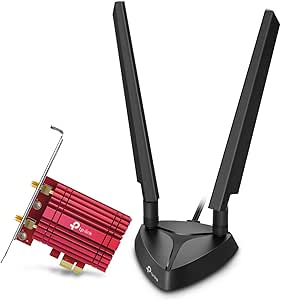 | Best for Desktop Builds | Wi-Fi standard: Wi-Fi 6E | Chipset: Intel AX210 | Band speeds: 2,402 Mbps (6 GHz), 2,402 Mbps (5 GHz), 574 Mbps (2.4 GHz) | VIEW ON AMAZON | See Our Full Breakdown |
| Panda Wireless PAU0F AXE3000 Tri-Band WiFi 6E USB 3.0 Adapter |  | Best for Linux Users | Wi-Fi standard: Wi-Fi 6E | Bands: 2.4 GHz, 5 GHz, 6 GHz | Interface: USB 3.0 | VIEW ON AMAZON | See Our Full Breakdown |
| Gallasys AXE5400 Tri-Band WiFi 6E USB Adapter for Desktop PC & Laptop |  | Best for Windows Plug-and-Play Setup | Wi-Fi standard: Wi-Fi 6E (AXE5400) | Bands: 2.4 GHz, 5 GHz, 6 GHz | Maximum speed: Up to 5,400 Mbps combined | VIEW ON AMAZON | See Our Full Breakdown |
| EDUP USB 3.0 WiFi 6E Adapter for PC, AX3000M Tri-Band Wireless Network Adapter (EP-AX1672) |  | Best for Cross-Platform Value | Wi-Fi standard: Wi-Fi 6E (802.11ax) | Chipset: MT7921AU | Band speeds: 600 Mbps (2.4 GHz), 1,200 Mbps (5 GHz), 1,200 Mbps (6 GHz) | VIEW ON AMAZON | See Our Full Breakdown |
| NEWFAST AX5400 WiFi 6E USB Adapter for Desktop PCs |  | Best for Quick Setup | Wi-Fi standard: Wi-Fi 6E (IEEE 802.11a/b/g/n/ac/ax) | Bands: 6 GHz, 5 GHz, and 2.4 GHz | Listed band speeds: 2402 Mbps (6 GHz), 2402 Mbps (5 GHz), 574 Mbps (2.4 GHz) | VIEW ON AMAZON | See Our Full Breakdown |
| BrosTrend AXE5400 Tri-Band WiFi 6E USB Adapter with Two High-Gain Antennas |  | Best for Adjustable Reception | Model: AXE5400 WiFi 6E USB Adapter | Bands: 6 GHz, 5 GHz, and 2.4 GHz | Listed band speeds: 2402 Mbps (6 GHz), 2402 Mbps (5 GHz), 574 Mbps (2.4 GHz) | VIEW ON AMAZON | See Our Full Breakdown |
| TP-Link Archer TXE70U AXE5400 Tri-Band Wi-Fi 6E USB Adapter |  | Best for USB Port Flexibility | Model: Archer TXE70U | Wireless standard: Wi-Fi 6E | Bands: 6 GHz, 5 GHz, and 2.4 GHz | VIEW ON AMAZON | See Our Full Breakdown |
| TP-Link Wi-Fi 6E Tri-Band AXE5400 PCIe Wi-Fi Card with Intel AX210 |  | Best for a Permanent Desktop Install | Chipset: Intel AX210 | Wi-Fi standard: Wi-Fi 6E | Bands: 2.4 GHz, 5 GHz, and 6 GHz | VIEW ON AMAZON | See Our Full Breakdown |
| UGREEN AXE5400 WiFi 6E USB Adapter for Desktop PC |  | Best for High-Gain Antenna Coverage | Model number: 75917 | Wi-Fi standard: Wi-Fi 6E | Bands: 6 GHz, 5 GHz, and 2.4 GHz | VIEW ON AMAZON | See Our Full Breakdown |
| Intel AX411 Wi-Fi 6E Tri-Band Adapter |  | Best for Compatible Intel Laptops | Model: AX411NGW | Wi-Fi: Wi-Fi 6E, tri-band: 2.4, 5, and 6 GHz | Maximum speed: Up to 2.4 Gbps | VIEW ON AMAZON | See Our Full Breakdown |
| TP-Link Archer TXE70UH AXE5400 Wi-Fi 6E USB Adapter |  | Best for Flexible Placement | Model: Archer TXE70UH | Wi-Fi standard: Wi-Fi 6E | Bands: 6 GHz, 5 GHz, and 2.4 GHz | VIEW ON AMAZON | See Our Full Breakdown |
| NETGEAR Nighthawk A8000 WiFi 6E USB 3.0 Adapter (AXE3000, Tri-Band) |  | Best for Advertised Speed | Model: A8000 | Wi-Fi standard: Wi-Fi 6E (AXE3000) | Bands: Tri-band, including 6 GHz | VIEW ON AMAZON | See Our Full Breakdown |
| TP-Link AXE3000 Tri-Band Wi-Fi 6E USB Adapter |  | Best for a Straightforward Desktop Upgrade | Wi-Fi standard: Wi-Fi 6E | Bands: 2.4 GHz, 5 GHz, and 6 GHz | Maximum speed: Up to 1.2 Gbps | VIEW ON AMAZON | See Our Full Breakdown |
| WAVLINK AX5400 WiFi 6E USB Adapter for Desktop PCs |  | Best for Antenna Placement and Soft AP | Model: WL-WN693X2F | Wi-Fi standard: Wi-Fi 6E, AX5400 | Band speeds: Up to 573 Mbps on 2.4 GHz; up to 2402 Mbps on 5 GHz and 6 GHz | VIEW ON AMAZON | See Our Full Breakdown |
| wifi 6e adapters tri band | Interface | Wi-Fi standard | Bands | Antennas |
|---|---|---|---|---|
| ALFA Network AWUS036AXML Wi-Fi | USB 3.0 | Wi-Fi 6E (802.11ax) | 2.4 GHz, 5 GHz, 6 GHz | Two detachable 5 dBi antennas |
| TP-Link WiFi 6E AXE5400 PCIe W | PCIe | Wi-Fi 6E | — | — |
| Panda Wireless PAU0F AXE3000 T | USB 3.0 | Wi-Fi 6E | 2.4 GHz, 5 GHz, 6 GHz | Dual adjustable antennas |
| Gallasys AXE5400 Tri-Band WiFi | USB 3.0 | Wi-Fi 6E (AXE5400) | 2.4 GHz, 5 GHz, 6 GHz | Two external omnidirectional 6 dBi antennas, rotatable 180° |
| EDUP USB 3.0 WiFi 6E Adapter f | USB 3.0 | Wi-Fi 6E (802.11ax) | — | Dual 5 dBi |
| NEWFAST AX5400 WiFi 6E USB Ada | USB 3.0 | Wi-Fi 6E (IEEE 802.11a/b/g/n/ac/ax) | 6 GHz, 5 GHz, and 2.4 GHz | Two high-gain antennas |
| BrosTrend AXE5400 Tri-Band WiF | USB Wi-Fi adapter | — | 6 GHz, 5 GHz, and 2.4 GHz | Two adjustable external antennas |
| TP-Link Archer TXE70U AXE5400 | — | — | 6 GHz, 5 GHz, and 2.4 GHz | — |
| TP-Link Wi-Fi 6E Tri-Band AXE5 | PCIe | Wi-Fi 6E | 2.4 GHz, 5 GHz, and 6 GHz | Two high-gain antennas |
| UGREEN AXE5400 WiFi 6E USB Ada | USB 3.0 | Wi-Fi 6E | 6 GHz, 5 GHz, and 2.4 GHz | Two 5 dBi high-gain external antennas |
| Intel AX411 Wi-Fi 6E Tri-Band | CNVio2, M.2 Key E | — | — | — |
| TP-Link Archer TXE70UH AXE5400 | USB 3.0 | Wi-Fi 6E | 6 GHz, 5 GHz, and 2.4 GHz | — |
| NETGEAR Nighthawk A8000 WiFi 6 | USB 3.0 | Wi-Fi 6E (AXE3000) | Tri-band, including 6 GHz | — |
| TP-Link AXE3000 Tri-Band Wi-Fi | USB 3.0 | Wi-Fi 6E | 2.4 GHz, 5 GHz, and 6 GHz | — |
| WAVLINK AX5400 WiFi 6E USB Ada | USB 3.0 | Wi-Fi 6E, AX5400 | — | 4 x 3 dBi high-gain antennas |
More Details on Our Top Picks
ALFA Network AWUS036AXML Wi-Fi 6E USB 3.0 Adapter
The AWUS036AXML pairs tri-band Wi-Fi 6E with two detachable 5 dBi antennas, giving desktop owners more freedom to adjust or replace the antennas than a compact, self-contained USB adapter allows. Its stated combined throughput reaches 3,000 Mbps, though that figure is shared across bands and depends on the router and setup. Compared with the EDUP EP-AX1672, it offers similar headline throughput and antenna gain, while EDUP supplies clearer Windows and Linux compatibility details and a longer listed warranty. The ALFA’s main draw is the detachable antenna design; its tradeoff is uncertainty about operating-system support, since the supplied description does not specify it. I’d choose it for a setup where antenna positioning matters, after confirming compatibility with the target computer.
Pros:- Supports 2.4 GHz, 5 GHz, and 6 GHz Wi-Fi 6E bands
- Two detachable 5 dBi antennas allow flexible positioning
- USB 3.0 interface
- Advertised combined throughput up to 3,000 Mbps
Cons:- Operating-system compatibility is not specified in the supplied product details
- Requires a compatible USB 3.0 connection
- The 3,000 Mbps figure is combined throughput, not a speed on one band
Best for: Desktop users who want detachable antennas for flexible placement and have confirmed adapter support for their operating system
Not ideal for: Buyers who need clearly documented Windows or Linux compatibility before purchase, or who cannot connect a USB 3.0 adapter
- Wi-Fi standard:Wi-Fi 6E (802.11ax)
- Bands:2.4 GHz, 5 GHz, 6 GHz
- Maximum throughput:Up to 3,000 Mbps combined
- Interface:USB 3.0
- Chipset:MediaTek MT7921AU
- Antennas:Two detachable 5 dBi antennas
- Model:AWUS036AXML
Our verdict“Choose the ALFA if detachable antennas are your priority and you can verify its operating-system compatibility first.”
TP-Link WiFi 6E AXE5400 PCIe WiFi Card with Intel AX210 and Magnetic Antenna Base
For a desktop with an open PCIe slot, this TP-Link AXE5400 card combines tri-band Wi-Fi 6E with Bluetooth 5.3, WPA3, and both standard and low-profile brackets. Its listed band rates—2,402 Mbps on 6 GHz and 5 GHz, plus 574 Mbps on 2.4 GHz—make the speed breakdown clearer than the combined figures given for the ALFA AWUS036AXML and Gallasys AXE5400 USB adapters. The magnetic antenna base also lets me place the antennas away from the back of the PC, which can help with positioning. There are setup conditions: 6 GHz requires Windows 11, and Bluetooth needs the included cable connected to a motherboard F_USB header. That makes it a stronger fit for a planned desktop build than for a quick laptop upgrade.
Pros:- Tri-band Wi-Fi 6E with listed speeds for each band
- Magnetic antenna base allows flexible antenna placement
- Adds Bluetooth 5.3 and WPA3 security
- Includes standard and low-profile brackets
Cons:- 6 GHz Wi-Fi requires Windows 11
- Bluetooth requires connecting the included cable to a F_USB header
- Requires an available PCIe slot
Best for: Windows 11 desktop builders with a spare PCIe slot who want Wi-Fi 6E and Bluetooth 5.3 in one card
Not ideal for: Laptop owners, Windows 10 users seeking 6 GHz access, or desktop builders without an available F_USB header for Bluetooth
- Wi-Fi standard:Wi-Fi 6E
- Chipset:Intel AX210
- Band speeds:2,402 Mbps (6 GHz), 2,402 Mbps (5 GHz), 574 Mbps (2.4 GHz)
- Interface:PCIe
- Bluetooth:5.3
- Security:WPA3
- 6 GHz requirement:Windows 11
- Brackets:Standard and low-profile included
Our verdict“Pick this card for a Windows 11 desktop build where PCIe Wi-Fi, flexible antennas, and Bluetooth are useful together.”
Panda Wireless PAU0F AXE3000 Tri-Band WiFi 6E USB 3.0 Adapter
The Panda Wireless PAU0F earns a distinct place for buyers who want a USB Wi-Fi 6E adapter with stated support for Windows 11 and Linux distributions. Its adjustable dual antennas can be aimed to suit a desk or nearby router, while support for WEP, WPA, WPA2, and WPA3 covers a broad range of network security settings. Compared with the EDUP EP-AX1672, Panda names Linux compatibility but does not give a minimum kernel version or a throughput figure in the supplied details; EDUP specifies kernel 5.19 or later and lists AX3000 speeds. The PAU0F’s sharpest limitation is Windows 10, which is not supported. It also flags virtual-machine guest use as a case requiring contact with the manufacturer, so I’d favor it for a direct Linux installation rather than a more complex setup.
Pros:- Supports 2.4 GHz, 5 GHz, and 6 GHz bands
- Lists support for Windows 11 and Linux distributions
- Dual adjustable antennas help with positioning
- Supports WEP, WPA, WPA2, and WPA3 security
Cons:- Windows 10 is not supported
- Supplied details do not state a maximum throughput or Linux kernel requirement
- Virtual-machine guest OS use requires contacting the manufacturer
Best for: Linux users installing Wi-Fi 6E directly on a compatible computer, especially those who want adjustable antennas
Not ideal for: Windows 10 users or people who need a stated throughput figure and clearly defined Linux kernel requirement
- Wi-Fi standard:Wi-Fi 6E
- Bands:2.4 GHz, 5 GHz, 6 GHz
- Interface:USB 3.0
- Antennas:Dual adjustable antennas
- Operating systems:Windows 11 and Linux distributions
- Wi-Fi security:WEP, WPA, WPA2, WPA3
- Warranty:1 year
Our verdict“Consider the PAU0F for a direct Linux or Windows 11 setup if Windows 10 support and a published speed rating are not requirements.”
Gallasys AXE5400 Tri-Band WiFi 6E USB Adapter for Desktop PC & Laptop
The Gallasys AXE5400 is aimed at Windows owners who want a straightforward route to tri-band connectivity: it lists Windows 10 and 11 compatibility, driver-free plug-and-play setup, and an included 0.8 m USB extension cable. Its two rotatable 6 dBi antennas offer more stated gain than the 5 dBi antennas on the ALFA AWUS036AXML and EDUP EP-AX1672, while the aluminum heatsink and ventilation are intended to manage heat during longer sessions. The 5,400 Mbps headline is a combined figure, so it should not be read as single-band speed. Its main tradeoffs are narrow OS support—no macOS or Linux—and a note that older Wi-Fi drivers may need removal to avoid conflicts. I’d shortlist it for a Windows PC where antenna placement and a simple initial setup matter.
Pros:- Tri-band Wi-Fi 6E support across 2.4 GHz, 5 GHz, and 6 GHz
- Two rotatable 6 dBi antennas
- Includes a 0.8 m USB extension cable
- Cooling design includes an aluminum heatsink and ventilation holes
Cons:- Compatible with Windows 10 and 11 only
- Older Wi-Fi adapter drivers may need removal to avoid installation conflicts
- The 5,400 Mbps rating is combined throughput, not a single-band speed
Best for: Windows 10 or 11 desktop and laptop owners who want external high-gain antennas and an included extension cable
Not ideal for: macOS or Linux users, or anyone expecting the 5,400 Mbps combined rating on a single band
- Wi-Fi standard:Wi-Fi 6E (AXE5400)
- Bands:2.4 GHz, 5 GHz, 6 GHz
- Maximum speed:Up to 5,400 Mbps combined
- Interface:USB 3.0
- Antennas:Two external omnidirectional 6 dBi antennas, rotatable 180°
- Compatibility:Windows 10 and Windows 11
- Cable:0.8 m USB extension cable included
- Security:WPA3
Our verdict“Choose Gallasys for a Windows PC if its included extension cable, high-gain antennas, and setup approach suit your space.”
EDUP USB 3.0 WiFi 6E Adapter for PC, AX3000M Tri-Band Wireless Network Adapter (EP-AX1672)
The EDUP EP-AX1672 stands out for buyers who need one USB adapter across Windows 10, Windows 11, and Linux, with a useful caveat: 6 GHz works only on Windows 11 and Linux, not Windows 10. Its stated band rates are 600 Mbps on 2.4 GHz and 1,200 Mbps each on 5 GHz and 6 GHz, making its AX3000 profile more specific than the ALFA AWUS036AXML’s combined 3,000 Mbps claim. Dual 5 dBi antennas support signal positioning, and the listed three-year warranty is longer than the one-year coverage specified for the Panda PAU0F. Setup is less immediate on Windows, where drivers must be installed; Linux is listed as plug-and-play with kernel 5.19 or later. This is a practical fit for mixed-OS households that can manage the Windows driver step.
Pros:- Supports Windows 10, Windows 11, and Linux with kernel 5.19 or later
- Lists speeds for all three bands
- Dual 5 dBi antennas
- Three-year warranty and plug-and-play support on Linux
Cons:- 6 GHz is unavailable on Windows 10
- Windows requires driver installation
- Linux compatibility is specified for kernel 5.19 or later
Best for: People moving the adapter between Windows 10, Windows 11, and compatible Linux systems who want band-specific speed details
Not ideal for: Windows 10 users who specifically need 6 GHz, or buyers who want Windows setup without a separate driver installation
- Wi-Fi standard:Wi-Fi 6E (802.11ax)
- Chipset:MT7921AU
- Band speeds:600 Mbps (2.4 GHz), 1,200 Mbps (5 GHz), 1,200 Mbps (6 GHz)
- Interface:USB 3.0
- Antennas:Dual 5 dBi
- Compatible operating systems:Windows 10, Windows 11, Linux kernel 5.19 or later
- Warranty:3 years
- Linux setup:Plug and play
Our verdict“Pick EDUP for a cross-platform USB adapter if its Windows driver step and Windows 10 band limitation fit your setup.”
NEWFAST AX5400 WiFi 6E USB Adapter for Desktop PCs
The NEWFAST stands out for buyers who want a straightforward route to tri-band Wi-Fi 6E: its driver is pre-installed, and its two high-gain antennas give it an advantage over compact adapters with less prominent antennas. Like the UGREEN AXE5400, it lists 2402 Mbps on both 6 GHz and 5 GHz, plus 574 Mbps on 2.4 GHz, along with MU-MIMO and OFDMA for handling network traffic. Those combined figures describe link capacity, not a guaranteed download speed. The tradeoff is that NEWFAST is limited to Windows 10 and 11, and 6 GHz requires a compatible router. Its one-year warranty is also shorter than the BrosTrend adapter’s two-year registered warranty. I’d choose it when driver convenience matters more than broad operating-system support or a longer warranty.
Pros:- Supports 6 GHz, 5 GHz, and 2.4 GHz bands
- Two high-gain antennas are designed to support reception and stability
- Pre-installed driver can simplify setup
- Supports WPA3, MU-MIMO, and OFDMA
Cons:- Compatibility is limited to Windows 10 and Windows 11
- A compatible 6 GHz router is required to use the 6 GHz band
- One-year warranty is shorter than BrosTrend’s registered two-year warranty
Best for: Windows 10 or 11 desktop owners who want a tri-band USB adapter with a pre-installed driver and external antennas
Not ideal for: People using other operating systems, or buyers who need 6 GHz without a compatible Wi-Fi 6E router
- Wi-Fi standard:Wi-Fi 6E (IEEE 802.11a/b/g/n/ac/ax)
- Bands:6 GHz, 5 GHz, and 2.4 GHz
- Listed band speeds:2402 Mbps (6 GHz), 2402 Mbps (5 GHz), 574 Mbps (2.4 GHz)
- Interface:USB 3.0
- Antennas:Two high-gain antennas
- Security:WPA3
- Compatibility:Windows 10 and Windows 11
- Warranty:1 year
Our verdict“Choose the NEWFAST for simple Windows setup and external antennas; skip it if you need wider OS support or a longer warranty.”
BrosTrend AXE5400 Tri-Band WiFi 6E USB Adapter with Two High-Gain Antennas
The BrosTrend’s defining detail is its pair of adjustable external antennas, which give buyers more control over placement than the NEWFAST’s listed dual high-gain antennas. Beamforming is intended to direct wireless signals toward connected devices, while WPA3 adds current network security. Its listed band rates match the NEWFAST and UGREEN AXE5400: 2402 Mbps each on 6 GHz and 5 GHz, and 574 Mbps on 2.4 GHz. The key limitation is the operating system: although the adapter works with Windows 10 and 11, 6 GHz requires Windows 11. That makes its tri-band claim less useful for a Windows 10 buyer. The pre-loaded driver helps with setup, and the two-year warranty after registration gives it a longer stated coverage period than NEWFAST’s one year.
Pros:- Supports 6 GHz, 5 GHz, and 2.4 GHz
- Two adjustable external antennas allow flexible positioning
- Beamforming is designed to improve signal direction
- Two-year warranty available with registration
Cons:- 6 GHz support requires Windows 11
- Limited to Windows 10 and Windows 11
- A compatible 6 GHz router is needed to use that band
Best for: Windows 11 desktop users who want adjustable external antennas and a longer registered warranty
Not ideal for: Windows 10 users specifically seeking 6 GHz access, or anyone using a non-Windows computer
- Model:AXE5400 WiFi 6E USB Adapter
- Bands:6 GHz, 5 GHz, and 2.4 GHz
- Listed band speeds:2402 Mbps (6 GHz), 2402 Mbps (5 GHz), 574 Mbps (2.4 GHz)
- Interface:USB Wi-Fi adapter
- Antennas:Two adjustable external antennas
- Features:Beamforming
- Security:WPA3
- 6 GHz requirement:Windows 11
- Warranty:2 years with registration
Our verdict“Pick the BrosTrend if you use Windows 11 and value antenna positioning; Windows 10 buyers should look at options without its 6 GHz restriction.”
TP-Link Archer TXE70U AXE5400 Tri-Band Wi-Fi 6E USB Adapter
The Archer TXE70U is the most flexible pick here for computers with different USB ports: it supports USB-A and USB-C, while the NEWFAST and UGREEN listings specify USB 3.0 without that connector choice. Its small 2.83-inch body is easier to fit around a desktop or laptop than a card that occupies a PCIe slot, though its compact format doesn’t include the two external antennas found on several other USB options. The listed rates—2402 Mbps on each of 6 GHz and 5 GHz, plus 574 Mbps on 2.4 GHz—put it in the same advertised class as BrosTrend. A built-in driver and WPA3 simplify the basics; MU-MIMO and OFDMA support traffic management. It remains a Windows-only adapter, and using 6 GHz still depends on a compatible router.
Pros:- USB-A and USB-C connectivity broadens port compatibility
- Compact dimensions suit crowded setups
- Tri-band support includes 6 GHz
- Built-in driver, WPA3, MU-MIMO, and OFDMA are included
Cons:- Compatible only with specified Windows 10 and Windows 11 versions
- No external antennas are listed
- A compatible Wi-Fi 6E router is required for 6 GHz
Best for: Windows 10 or 11 users who need a compact Wi-Fi 6E adapter that can connect through either USB-A or USB-C
Not ideal for: Buyers prioritizing external antennas or support for operating systems beyond Windows
- Model:Archer TXE70U
- Wireless standard:Wi-Fi 6E
- Bands:6 GHz, 5 GHz, and 2.4 GHz
- Listed band speeds:2402 Mbps (6 GHz), 2402 Mbps (5 GHz), 574 Mbps (2.4 GHz)
- USB interface:USB 3.0, USB-A and USB-C
- Compatibility:Windows 10 (32/64-bit) and Windows 11 (64-bit)
- Security:WPA3
- Dimensions:2.83 x 0.94 x 0.42 inches
Our verdict“Choose the TXE70U when USB-C support and compact size matter more than external antennas.”
TP-Link Wi-Fi 6E Tri-Band AXE5400 PCIe Wi-Fi Card with Intel AX210
For a desktop that can spare a PCIe slot, this TP-Link card offers a more integrated setup than the USB adapters in this group. Its Intel AX210 chipset supports Wi-Fi 6E, while two high-gain antennas and both standard and low-profile brackets make it adaptable to different desktop cases. It also adds Bluetooth 5.3, a feature the NEWFAST, BrosTrend, and UGREEN USB listings don’t specify. The installation asks more of the buyer: Bluetooth works only after connecting the included cable to a motherboard F_USB header, and Windows 11 is required for 6 GHz. The provided advertised maximum is up to 2.4 Gbps, so it should not be compared directly with the USB models’ combined AXE5400 figures as though they used the same measure. Choose this card for a fixed desktop build, not quick plug-in setup.
Pros:- Intel AX210 chipset supports three Wi-Fi bands
- Bluetooth 5.3 is included
- Two high-gain antennas are supplied
- Standard and low-profile brackets support different desktop cases
Cons:- Requires an available PCIe slot and internal installation
- 6 GHz requires Windows 11
- Bluetooth requires connecting the cable to a motherboard F_USB connector
Best for: Desktop builders with an available PCIe slot who want Wi-Fi 6E, Bluetooth 5.3, and case bracket options
Not ideal for: Laptop owners, users who want a simple USB install, or Windows 10 users seeking 6 GHz access
- Chipset:Intel AX210
- Wi-Fi standard:Wi-Fi 6E
- Bands:2.4 GHz, 5 GHz, and 6 GHz
- Advertised maximum speed:Up to 2.4 Gbps
- Interface:PCIe
- Bluetooth:Bluetooth 5.3
- Antennas:Two high-gain antennas
- 6 GHz operating system requirement:Windows 11
- Included brackets:Standard and low-profile
Our verdict“Choose this PCIe card for a permanent desktop installation with Bluetooth; choose a USB model for easier setup or portability.”
UGREEN AXE5400 WiFi 6E USB Adapter for Desktop PC
The UGREEN makes its case through dual 5 dBi external antennas paired with familiar AXE5400-class tri-band specs. That antenna detail is more explicit than the NEWFAST’s general high-gain description, while the TXE70U takes the opposite approach with a compact body and no listed external antennas. UGREEN lists 2400 Mbps on both 6 GHz and 5 GHz, plus 574 Mbps on 2.4 GHz; those are band rates, not a promise of real-world throughput. MU-MIMO and OFDMA are intended to manage multiple connected devices, and WPA3-SAE adds security. Setup uses USB 3.0 and included Windows drivers. Its main constraint is platform support: it is limited to Windows 10 and 11, and 6 GHz requires a Wi-Fi 6E router. I’d favor it when antenna reach matters more than USB-C flexibility or a compact footprint.
Pros:- Tri-band support covers 6 GHz, 5 GHz, and 2.4 GHz
- Dual 5 dBi external antennas are designed for broader coverage
- Supports WPA3-SAE, OFDMA, and MU-MIMO
- Included Windows drivers support setup
Cons:- Compatible only with Windows 10 and Windows 11
- A compatible Wi-Fi 6E router is required for 6 GHz
- USB 3.0 listing does not specify USB-C support
Best for: Windows desktop users who prefer specified 5 dBi external antennas and want tri-band Wi-Fi through USB 3.0
Not ideal for: People using macOS or Linux, or buyers who need USB-C support or a compact adapter
- Model number:75917
- Wi-Fi standard:Wi-Fi 6E
- Bands:6 GHz, 5 GHz, and 2.4 GHz
- Listed band speeds:2400 Mbps (6 GHz), 2400 Mbps (5 GHz), 574 Mbps (2.4 GHz)
- Interface:USB 3.0
- Antennas:Two 5 dBi high-gain external antennas
- Security:WPA3-SAE
- Compatibility:Windows 10 and Windows 11
Our verdict“Pick the UGREEN if external antenna coverage is your priority; choose the TXE70U if USB-C and a smaller form factor matter more.”
Intel AX411 Wi-Fi 6E Tri-Band Adapter
The AX411 is the only internal laptop upgrade in this group, so it suits an owner who wants tri-band Wi-Fi without a USB adapter taking up a port. Its support for 2.4, 5, and 6 GHz, plus Bluetooth 5.3, brings modern wireless features into a compatible laptop. Compared with the plug-in NETGEAR Nighthawk A8000, it avoids a separate antenna and cable, but the fit requirements are much stricter: the laptop needs an Intel 12th-generation-or-newer platform, CNVio2 support, and an M.2 Key E slot. It is not a desktop option, and an incompatible system may fail to recognize it. I’d choose it only after confirming the laptop’s interface and CPU support; for broader PC compatibility, a USB model is the more practical route.
Pros:- Supports all three Wi-Fi bands, including 6 GHz
- Bluetooth 5.3 is included
- Internal form avoids an external USB adapter and cable
- Supports MU-MIMO, OFDMA, and WPA3
Cons:- Requires a compatible Intel laptop, CNVio2 support, and an M.2 Key E slot
- Not suitable for desktop systems
- May go unrecognized or prevent booting in incompatible PCs
Best for: Owners of compatible Intel 12th-generation-or-newer laptops who want an internal Wi-Fi 6E and Bluetooth upgrade
Not ideal for: Desktop builders and laptop owners who cannot confirm CNVio2 and M.2 Key E compatibility
- Model:AX411NGW
- Wi-Fi:Wi-Fi 6E, tri-band: 2.4, 5, and 6 GHz
- Maximum speed:Up to 2.4 Gbps
- Bluetooth:5.3
- Interface:CNVio2, M.2 Key E
- Compatibility:Intel 12th-generation and newer laptops with CNVio2 support
- Operating systems:Windows 10/11 64-bit
- Warranty:30 days
Our verdict“Choose the AX411 for a confirmed-compatible Intel laptop where an internal tri-band upgrade is preferable to a USB adapter.”
TP-Link Archer TXE70UH AXE5400 Wi-Fi 6E USB Adapter
The Archer TXE70UH makes the most sense when the adapter needs to sit away from a desktop’s rear ports. Its 1.2-meter USB 3.0 cable gives more placement freedom than the WAVLINK AX5400’s one-meter cable, which can help position the adapter where reception is better. It supports all three bands and includes MU-MIMO, OFDMA, beamforming, and WPA3, giving it a solid feature set for a Windows setup. The tradeoff is that the 6 GHz band requires Windows 11; buyers on Windows 10 should not choose it expecting access to that band. Compared with TP-Link’s AXE3000 USB adapter, this model advertises higher combined capacity, but both share that operating-system limit for 6 GHz. I’d pick it for flexible desktop placement when Windows 11 is already part of the setup.
Pros:- Tri-band support includes 6 GHz
- A 1.2-meter cable allows flexible placement
- MU-MIMO, OFDMA, beamforming, and WPA3 are supported
- Advertises up to 2402 Mbps on both 6 GHz and 5 GHz
Cons:- 6 GHz connectivity requires Windows 11
- Access to 6 GHz also depends on having a compatible Wi-Fi 6E router
- Uses a USB port and cable rather than an internal card
Best for: Windows 11 desktop users who need a cable-mounted adapter they can position away from the PC
Not ideal for: Windows 10 users who specifically need 6 GHz access, or buyers seeking an internal PCIe card
- Model:Archer TXE70UH
- Wi-Fi standard:Wi-Fi 6E
- Bands:6 GHz, 5 GHz, and 2.4 GHz
- Maximum advertised speed:Up to 2.4 Gbps
- Band speeds:Up to 2402 Mbps on 6 GHz and 5 GHz; up to 574 Mbps on 2.4 GHz
- Interface:USB 3.0
- Cable length:1.2 meters
- Security:WPA3
- 6 GHz requirement:Windows 11
Our verdict“Choose the TXE70UH for a Windows 11 desktop where cable length and flexible adapter placement matter.”
NETGEAR Nighthawk A8000 WiFi 6E USB 3.0 Adapter (AXE3000, Tri-Band)
The A8000 leads this batch on advertised combined speed, with up to 3 Gbps and a flippable antenna that can be aimed for a better signal. Its compact cradle also makes placement less dependent on the PC’s USB port location. Compared with TP-Link’s Archer TXE70UH, it claims a higher maximum speed, while the TP-Link includes a longer cable and lists WPA3 and specific multi-user features. The A8000’s appeal is straightforward USB installation for Windows PCs, but the 6 GHz band requires a Wi-Fi 6E router or mesh system; the adapter alone cannot add that band to an older network. Windows-only compatibility narrows its audience, too. I’d favor it when advertised throughput and adjustable antenna placement matter more than a longer included cable or a stated list of advanced network features.
Pros:- Advertises tri-band speeds up to 3 Gbps
- Flippable antenna supports signal positioning
- Compact cradle allows flexible placement
- USB installation avoids replacing an internal network card
Cons:- 6 GHz access requires a Wi-Fi 6E router or mesh system
- Compatible with Windows PCs only
- Provided specs do not list a cable length or security standard
Best for: Windows laptop and desktop owners seeking a USB adapter with a high advertised combined speed and adjustable antenna
Not ideal for: Mac users or buyers without a Wi-Fi 6E router who expect to use the 6 GHz band
- Model:A8000
- Wi-Fi standard:Wi-Fi 6E (AXE3000)
- Bands:Tri-band, including 6 GHz
- Maximum speed:Up to 3 Gbps
- Interface:USB 3.0
- Antenna:Flippable
- Compatibility:Windows PCs
- Network requirement:Wi-Fi 6 or Wi-Fi 6E router or mesh system
Our verdict“Choose the A8000 for a Windows PC when its higher advertised speed and adjustable antenna outweigh the need for a Wi-Fi 6E network.”
TP-Link AXE3000 Tri-Band Wi-Fi 6E USB Adapter
This TP-Link is a sensible pick for a desktop user who wants the familiar benefits of a cabled USB adapter without chasing the higher advertised throughput of the Archer TXE70UH or NETGEAR A8000. It adds tri-band Wi-Fi 6E through USB 3.0, with beamforming antennas and a 1.2-meter cable to help move it away from the back of the PC. MU-MIMO, OFDMA, and WPA3 round out the listed features. Its stated maximum speed is up to 1.2 Gbps, lower than the other TP-Link in this batch, so buyers prioritizing the fastest advertised connection should compare those models first. Like the TXE70UH, it requires Windows 11 for 6 GHz. I’d choose this one for a basic desktop refresh where its placement options and feature set matter more than headline speed.
Pros:- Adds 2.4, 5, and 6 GHz connectivity over USB 3.0
- 1.2-meter cable offers placement flexibility
- Beamforming antennas and MU-MIMO and OFDMA support are listed
- Includes WPA3 security
Cons:- Advertised maximum speed is up to 1.2 Gbps, below the TXE70UH’s stated capacity
- 6 GHz requires Windows 11
- Needs a compatible Wi-Fi 6E router to connect on 6 GHz
Best for: Desktop users adding tri-band Wi-Fi 6E over USB who value cable placement and WPA3
Not ideal for: Buyers who prioritize the highest advertised speed or need 6 GHz on an operating system other than Windows 11
- Wi-Fi standard:Wi-Fi 6E
- Bands:2.4 GHz, 5 GHz, and 6 GHz
- Maximum speed:Up to 1.2 Gbps
- Band speeds:1202 Mbps on 6 GHz and 5 GHz; 574 Mbps on 2.4 GHz
- Interface:USB 3.0
- Cable length:1.2 meters
- Features:MU-MIMO, OFDMA, beamforming, WPA3
- 6 GHz requirement:Windows 11
Our verdict“Choose this TP-Link for a cable-positioned desktop upgrade when its listed features matter more than higher advertised speeds.”
WAVLINK AX5400 WiFi 6E USB Adapter for Desktop PCs
WAVLINK’s AX5400 stands out for its magnetic base, four external antennas, and Soft AP mode. The base and one-meter cable give desktop owners options for placing the antennas away from the tower, while Soft AP can share a PC’s wired internet connection. Its listed per-band speeds—up to 2402 Mbps on both 5 and 6 GHz and 573 Mbps on 2.4 GHz—match the broad tri-band profile of the TP-Link Archer TXE70UH. WAVLINK adds the sharing mode and built-in driver, but the 6 GHz requirement is specific: Windows 11 version 21H2 or later. The TXE70UH offers a slightly longer cable, while this model lists four antennas and Soft AP. I’d choose WAVLINK when those features fit the setup, with a compatible Wi-Fi 6E router and USB 3.0 port in place.
Pros:- Tri-band operation supports 2.4, 5, and 6 GHz
- Magnetic base and one-meter cable allow flexible antenna placement
- Four 3 dBi antennas are included
- Soft AP mode can share the PC’s wired connection
Cons:- 6 GHz requires Windows 11 version 21H2 or later
- Optimal performance calls for a USB 3.0 port and compatible Wi-Fi 6E router
- Built-in driver still requires installation
Best for: Windows desktop owners who want an external antenna base and the option to share a wired connection through Soft AP
Not ideal for: Users on older Windows versions seeking 6 GHz, or buyers without a Wi-Fi 6E router and USB 3.0 port
- Model:WL-WN693X2F
- Wi-Fi standard:Wi-Fi 6E, AX5400
- Band speeds:Up to 573 Mbps on 2.4 GHz; up to 2402 Mbps on 5 GHz and 6 GHz
- Interface:USB 3.0
- Cable length:1 meter
- Antennas:4 x 3 dBi high-gain antennas
- Features:MU-MIMO, OFDMA, WPA3, Soft AP mode, magnetic base
- Supported operating systems:Windows 10 and Windows 11
- 6 GHz requirement:Windows 11 version 21H2 or later
Our verdict“Choose WAVLINK when its magnetic antenna base and Soft AP mode are useful additions to a Windows desktop’s tri-band Wi-Fi setup.”

How We Picked
I compared the 15 listings by the details that change the buying decision: USB versus PCIe connection, stated AXE3000 or AXE5400 class, antenna arrangement, and whether the design gives a desktop owner room to position antennas away from the PC chassis. I also considered how much installation each type asks of the buyer and whether the listing names a chipset, as the TP-Link PCIe options do with Intel AX210. These details help separate a practical desktop upgrade from a portable or low-installation option.
The ranking logic favors fit and useful design details over a larger wireless-class number alone. A PCIe card with an antenna base ranks well for a desktop that can accommodate it, while USB models earn a place for simpler installation or distinct antenna configurations. I treat brand and model claims as listing information, not as proof of measured speed or reliability; actual results depend on the router, client device, drivers, distance, and interference.
| wifi 6e adapters tri band | Wi-Fi standard | Interface |
|---|---|---|
| ALFA Network AWUS036AXML Wi-Fi | Wi-Fi 6E (802.11ax) | USB 3.0 |
| TP-Link WiFi 6E AXE5400 PCIe W | Wi-Fi 6E | PCIe |
| Panda Wireless PAU0F AXE3000 T | Wi-Fi 6E | USB 3.0 |
| Gallasys AXE5400 Tri-Band WiFi | Wi-Fi 6E (AXE5400) | USB 3.0 |
| EDUP USB 3.0 WiFi 6E Adapter f | Wi-Fi 6E (802.11ax) | USB 3.0 |
| NEWFAST AX5400 WiFi 6E USB Ada | Wi-Fi 6E (IEEE 802.11a/b/g/n/ac/ax) | USB 3.0 |
| BrosTrend AXE5400 Tri-Band WiF | — | USB Wi-Fi adapter |
| TP-Link Archer TXE70U AXE5400 | — | — |
| TP-Link Wi-Fi 6E Tri-Band AXE5 | Wi-Fi 6E | PCIe |
| UGREEN AXE5400 WiFi 6E USB Ada | Wi-Fi 6E | USB 3.0 |
| Intel AX411 Wi-Fi 6E Tri-Band | — | CNVio2, M.2 Key E |
| TP-Link Archer TXE70UH AXE5400 | Wi-Fi 6E | USB 3.0 |
| NETGEAR Nighthawk A8000 WiFi 6 | Wi-Fi 6E (AXE3000) | USB 3.0 |
| TP-Link AXE3000 Tri-Band Wi-Fi | Wi-Fi 6E | USB 3.0 |
| WAVLINK AX5400 WiFi 6E USB Ada | Wi-Fi 6E, AX5400 | USB 3.0 |
Factors to Consider When Choosing Wifi 6e Adapters Tri Band
I’d make the choice in this order: confirm 6 GHz compatibility, decide how much installation your PC allows, then compare antenna placement and adapter class. Those checks can rule out a poor fit before a model’s headline specification distracts from the practical details.
Check the Whole 6 GHz Path
A tri-band adapter can support 2.4, 5, and 6 GHz, but the adapter alone cannot create a 6 GHz connection. Your router must broadcast a compatible 6 GHz network, and your operating system and driver must support the adapter’s 6 GHz features. Check the exact operating system requirements for the model before buying, especially for older Windows installations or less common platforms. Also verify that your region permits the relevant 6 GHz channels, since available spectrum differs by location. If your router lacks 6 GHz, the adapter can still use other supported bands, but you will not get the main Wi-Fi 6E distinction.
Choose USB or PCIe Around Your PC
USB adapters avoid opening a desktop and are usually the simpler route for laptops or shared computers. A PCIe card takes more installation effort and occupies an internal expansion slot, but its antenna base can be placed where reception is better than behind a metal case. Check whether you have an available PCIe slot and whether nearby components will obstruct the card or its connections. For laptops, confirm that the adapter’s size and cable arrangement will not block neighboring ports. Choose based on your setup and willingness to install hardware, rather than assuming one connection type is universally faster.
Treat AXE Class as a Comparison, Not a Speed Promise
AXE3000 and AXE5400 describe a product’s advertised aggregate wireless class, not the speed one computer will see on a single connection. That total combines capabilities across bands and depends on compatible routers and clients. A faster-class adapter may make sense when the rest of the network can use its capabilities, but a weak signal, congestion, or a slower internet plan can limit the practical difference. Check the router’s own specifications and the adapter’s supported channel widths and stream configuration where listed. If those details are missing, avoid choosing solely by the AXE number.
Plan Where the Antennas Will Sit
A desktop tucked under a desk or beside a wall may get a poor signal from antennas hidden behind the case. A separate antenna base or external antennas can give you more control over height and orientation, though they need room and can add cables or protrusions. Compact USB designs are easier to carry and store, but their placement may be constrained by the port they occupy. A short USB extension can help reposition some adapters, but check whether one is included and whether the manufacturer supports that setup. Think about the physical location of the PC and router before paying for antenna features that your space cannot use.
Check Drivers, Chipset, and Support
Chipset details can help identify what hardware a listing uses, but they do not replace checking the exact model’s support page. Look for current drivers, supported operating systems, and instructions for enabling 6 GHz. A product name that resembles another adapter may still use different hardware or require different software. This matters particularly when comparing USB models from less familiar brands or listings with sparse specifications. For a work computer that needs stable ongoing support, I’d give clear driver documentation more weight than a headline class number.
Decide Whether Wi-Fi Is the Right Upgrade
Wi-Fi 6E can reduce contention when a compatible 6 GHz network is available and the computer has a reasonably clear path to the router. The 6 GHz band generally has less range through walls than lower bands, so a distant room may not benefit as much as a nearby workstation. If the PC stays in one place and low latency or consistent throughput matters most, compare the adapter purchase with a wired Ethernet connection or an access point closer to the room. Buyers with a capable router and a nearby PC have a stronger case for 6 GHz. For a crowded home network, also check whether the router can dedicate channels and handle the number of connected devices.
Frequently Asked Questions
Will a tri-band Wi-Fi 6E adapter connect to a router that only supports Wi-Fi 6?
Usually, a Wi-Fi 6E adapter can connect over supported 2.4 GHz or 5 GHz bands on a Wi-Fi 6 router. It cannot use the 6 GHz band unless the router also supports Wi-Fi 6E or a later compatible standard. Check the adapter’s band support and router settings before purchasing. If you plan to upgrade the router later, the adapter may still serve as a step toward 6 GHz connectivity.
Does AXE5400 mean this adapter will be faster than an AXE3000 model?
Not necessarily for a single PC connection. The AXE figure is an aggregate class across bands, while actual throughput depends on the router, connection band, channel width, signal quality, and device configuration. An AXE5400 adapter may offer more advertised capacity, but it cannot overcome a router or internet connection that is the limiting factor. Compare chipset, antenna placement, and compatibility alongside the class label.
Should I choose a PCIe card or a USB adapter for a desktop PC?
Choose PCIe if you are comfortable installing an internal card and want an antenna setup that can sit away from the computer chassis. Choose USB if you want a simpler installation or expect to move the adapter between devices. A PCIe card needs an available slot and room for its antenna base; a USB adapter needs a convenient port and may benefit from flexible placement. Neither connection type guarantees better results in every room, so consider your layout and installation preferences.
Can I use 6 GHz Wi-Fi on an older Windows PC?
Possibly, but the adapter, Windows version, and driver all need to support 6 GHz. Verify the specific model’s operating system requirements and current driver availability before ordering. Hardware that works on 2.4 or 5 GHz may still fail to expose a 6 GHz connection if software support is missing. If the manufacturer’s compatibility details are unclear, that uncertainty is a reason to choose a better-documented option.
Is Wi-Fi 6E worthwhile if my PC is far from the router?
It may be less useful if walls and distance weaken the 6 GHz signal, since that band generally has shorter reach than 2.4 GHz. The adapter may fall back to 5 GHz or 2.4 GHz depending on the network and connection conditions. A movable antenna base, a closer access point, or wired Ethernet may better address a distant-room connection. Consider where the PC and router sit before choosing a 6 GHz adapter for range alone.
Conclusion
For most desktop owners who can install an internal card, I’d choose the TP-Link PCIe AXE5400 with Intel AX210 as the best overall fit because its separate antenna base addresses desktop placement and its chipset is named. For USB convenience, the Archer TXE70U is a strong starting point; buyers who want a more prominent external antenna setup can compare the BrosTrend or TP-Link TXE70UH. I’d treat the AXE3000 models, including the Panda Wireless PAU0F and NETGEAR Nighthawk A8000, as alternatives when their form or specific requirements suit the build better than a higher class label. Beginners should favor a USB option with clear driver support, while desktop tinkerers may prefer the named-chipset PCIe cards. There is no clear premium pick from the listed specifications alone: I’d reserve that label for a model whose support, antenna setup, and compatibility match your system and router.