Portable firewalls range from pocket-sized travel routers to fanless mini PCs that can run firewall software such as OPNsense or pfSense. My best overall pick is the GL.iNet GL-MT3600BE Beryl 7, which combines travel-friendly Wi-Fi 7 with firewall and VPN features in a single device. For more ports and room to build a wired security gateway, the N150 six-port mini PC stands out; the Netgate 4200 MAX is the more purpose-built premium option. The main tradeoff is convenience versus control: compact routers are easier to carry and set up, while mini PCs and dedicated gateways offer more flexibility but call for more configuration and space. Read on for the full comparison and a pick for different travel, home-lab, and small-office needs.

Get privacy and security gear delivered free with Prime
- Fast, free delivery on millions of items
- Prime Video, Amazon Music and more included
- Member-only deals all year
Key Takeaways
- The Beryl 7 is the clearest travel-first pick: it combines Wi-Fi 7 and router features, while the other GL.iNet travel option, the Mango, is a simpler compact choice with a more limited feature set.
- The N150 mini PC offers the strongest port flexibility among the listed mini PCs: six 2.5GbE ports give it more scope for separating network segments than the four-port N100 and older fanless systems.
- Dedicated software and hardware support set the Netgate 4200 MAX apart: it is a purpose-built pfSense+ gateway rather than a generic mini PC that requires the buyer to choose and manage an operating system.
- Several mini PCs share a four-port, fanless design: their differences come down to processor generation, memory, storage, and network interfaces, so buyers should check software compatibility and exact port specifications instead of choosing by form factor alone.
- The ASUS ExpertWiFi EBG15 fills a different niche: it is a wired VPN router, not a pocket Wi-Fi travel router, making it a better fit for compact fixed installations than for sharing hotel Wi-Fi wirelessly.
| N100 Fanless Firewall Mini PC, 4×2.5GbE LAN, 8GB RAM 128GB SSD |  | Best Overall | Processor: Intel N100, 4 cores, up to 3.4 GHz | Memory: 8GB RAM | Storage: 128GB SSD; M.2 expansion and TF card slot | VIEW ON AMAZON | See Our Full Breakdown |
| GL.iNet GL-MT3600BE Beryl 7 Dual-Band Wi-Fi 7 Travel Router |  | Best for Travel | Wireless: Dual-band Wi-Fi 7 | Stated wireless speeds: Up to 688 Mbps on 2.4GHz and 2882 Mbps on 5GHz | Ethernet: 1 × 2.5GbE WAN and 1 × 2.5GbE LAN | VIEW ON AMAZON | See Our Full Breakdown |
| N150 Mini PC Firewall (N100 Upgrade), 6 x 2.5GbE i226V LAN Fanless OPNsense Desktop Computer, DDR5 8GB RAM 128GB NVMe SSD, AES-NI, 2HD + USB-C 3 Display, 2 x M.2 NVMe Slot |  | Best for Multi-Segment Networks | Processor: Intel N150, 4 cores, up to 3.6 GHz, 6W TDP | Memory: 8GB DDR5 | Storage: 128GB NVMe SSD; 2 × M.2 NVMe slots and SATA 3.0 support | VIEW ON AMAZON | See Our Full Breakdown |
| Protectli Vault Pro VP2420 Fanless Firewall Mini PC, Intel Celeron J6412, 8GB RAM, 120GB SSD |  | Best for a Purpose-Built Wired Firewall | Processor: Intel Celeron J6412, quad-core, 2.0 GHz, up to 2.6 GHz | Memory: 8GB RAM | Storage: 120GB SSD and 8GB onboard eMMC | VIEW ON AMAZON | See Our Full Breakdown |
| Protectli Vault FW4B 4-Port Fanless Firewall Mini PC, Intel Celeron J3160, 8GB RAM, 120GB mSATA SSD |  | Best Compact Gigabit Pick | Processor: Intel Celeron J3160, quad-core, up to 2.24 GHz | Memory: 8GB DDR3L RAM | Storage: 120GB mSATA SSD | VIEW ON AMAZON | See Our Full Breakdown |
| Fanless Mini Firewall PC with Intel Celeron J4125, 4 Intel i225 2.5GbE Ports, 4GB RAM and 64GB mSATA SSD |  | Best for Upgrade-Friendly Builds | Processor: Intel Celeron J4125 quad-core, up to 2.7 GHz | Ethernet: 4 Intel i225 2.5GbE ports | Memory: 4GB DDR4; one SODIMM slot, supports up to 16GB | VIEW ON AMAZON | See Our Full Breakdown |
| Glovary J3710 Fanless Mini PC Firewall Appliance, 4-Port 2.5GbE, 8GB RAM, 128GB SSD |  | Best for Multi-OS Experimenting | Processor: Intel Pentium J3710, 4 cores / 4 threads, up to 2.64 GHz | Memory: 8GB DDR3L SO-DIMM | Storage: 128GB SSD | VIEW ON AMAZON | See Our Full Breakdown |
| Fanless Firewall Mini PC with Intel J4105, 4× 2.5GbE LAN, 8GB RAM, and 240GB mSATA SSD |  | Best Ready-to-Configure Value | Processor: Intel J4105, 4 cores / 4 threads, up to 2.5 GHz | Memory: 8GB DDR4; supports up to 16GB | Storage: 240GB mSATA SSD; supports up to 512GB; HDD not supported | VIEW ON AMAZON | See Our Full Breakdown |
| Netgate 4200 MAX pfSense+ Security Gateway |  | Best Dedicated pfSense Gateway | Processor: 4-core 2.1 GHz Intel Atom C1110 | Memory: 4GB LPDDR5 RAM | Ethernet: 4 unswitched, configurable 2.5 Gbps ports | VIEW ON AMAZON | See Our Full Breakdown |
| GL.iNet GL-MT300N-V2 Mango Portable Mini Travel Wi-Fi Router |  | Best Pocket-Size Travel Firewall | Model: GL-MT300N-V2 | Wireless: 802.11b/g/n, 2.4 GHz Wi-Fi 4 | Data transfer rate: 300 Mbps | VIEW ON AMAZON | See Our Full Breakdown |
| ASUS ExpertWiFi EBG15 Gigabit VPN Wired Router | 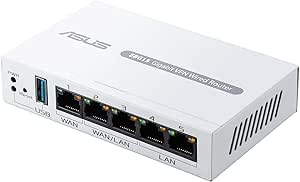 | Best for Small-Business WAN Flexibility | Router type: Wired VPN router | WAN ports: 1 Gigabit WAN and 2 Gigabit WAN/LAN ports | USB WAN: Supports mobile hotspot backup | VIEW ON AMAZON | See Our Full Breakdown |
| portable firewall | Processor | Memory | Ethernet | Storage |
|---|---|---|---|---|
| N100 Fanless Firewall Mini PC | Intel N100, 4 cores, up to 3.4 GHz | 8GB RAM | 4 × RTL8125BG 2.5GbE ports | 128GB SSD; M.2 expansion and TF card slot |
| GL.iNet GL-MT3600BE Beryl 7 Du | — | — | 1 × 2.5GbE WAN and 1 × 2.5GbE LAN | — |
| N150 Mini PC Firewall | Intel N150, 4 cores, up to 3.6 GHz, 6W TDP | 8GB DDR5 | 6 × Intel i226V 2.5GbE ports | 128GB NVMe SSD; 2 × M.2 NVMe slots and SATA 3.0 support |
| Protectli Vault Pro VP2420 Fan | Intel Celeron J6412, quad-core, 2.0 GHz, up to 2.6 GHz | 8GB RAM | 4 × Intel 2.5GbE ports | 120GB SSD and 8GB onboard eMMC |
| Protectli Vault FW4B 4-Port Fa | Intel Celeron J3160, quad-core, up to 2.24 GHz | 8GB DDR3L RAM | 4 × Intel Gigabit Ethernet ports | 120GB mSATA SSD |
| Fanless Mini Firewall PC with | Intel Celeron J4125 quad-core, up to 2.7 GHz | 4GB DDR4; one SODIMM slot, supports up to 16GB | 4 Intel i225 2.5GbE ports | 64GB mSATA SSD; supports up to 512GB |
| Glovary J3710 Fanless Mini PC | Intel Pentium J3710, 4 cores / 4 threads, up to 2.64 GHz | 8GB DDR3L SO-DIMM | — | 128GB SSD |
| Fanless Firewall Mini PC with | Intel J4105, 4 cores / 4 threads, up to 2.5 GHz | 8GB DDR4; supports up to 16GB | — | 240GB mSATA SSD; supports up to 512GB; HDD not supported |
| Netgate 4200 MAX pfSense+ Secu | 4-core 2.1 GHz Intel Atom C1110 | 4GB LPDDR5 RAM | 4 unswitched, configurable 2.5 Gbps ports | — |
| GL.iNet GL-MT300N-V2 Mango Por | — | — | 2 ports; 100 Mbps LAN port bandwidth | — |
| ASUS ExpertWiFi EBG15 Gigabit | — | — | — | — |
More Details on Our Top Picks
N100 Fanless Firewall Mini PC, 4×2.5GbE LAN, 8GB RAM 128GB SSD
I’d put this N100 mini PC near the top for buyers who want a dedicated, silent firewall with room to run other network services. Its four 2.5GbE ports give it more flexibility than the Protectli Vault FW4B, whose four interfaces are limited to Gigabit Ethernet, while the N100 processor and 8GB RAM suit firewall duties plus lighter homelab workloads. It supports several router-focused systems, including OPNsense and OpenWrt, but arrives with Windows 11 Pro rather than a firewall OS, so setup involves installing and configuring your preferred platform. The passive cooling avoids fan noise, though the compact enclosure has less cooling headroom than a system with active airflow. This is my balanced pick for a home lab; buyers needing six physical network ports should look at the Glovary N150 instead.
Pros:- Four 2.5GbE ports support faster wired links than the Protectli Vault FW4B’s Gigabit ports.
- Fanless operation suits quiet rooms and always-on network cabinets.
- N100 processor, 8GB RAM, and 128GB SSD provide a capable base for firewall and light homelab use.
- Supports OPNsense, OpenWrt, pfSense, and several virtualization platforms.
Cons:- Windows 11 Pro is listed as the installed OS, so firewall deployment requires installing and configuring another system.
- Four ports offer less segmentation flexibility than the six-port Glovary N150.
- Passive cooling can limit sustained workloads compared with a system using active cooling.
Best for: Home-lab owners who want a quiet four-port 2.5GbE firewall that can also host lightweight network services.
Not ideal for: Buyers who need six Ethernet interfaces, a preconfigured firewall OS, or hardware with clearly specified enterprise support.
- Processor:Intel N100, 4 cores, up to 3.4 GHz
- Memory:8GB RAM
- Storage:128GB SSD; M.2 expansion and TF card slot
- Ethernet:4 × RTL8125BG 2.5GbE ports
- Cooling:Fanless passive cooling
- Operating system:Windows 11 Pro listed; supports OPNsense, OpenWrt, pfSense, and Linux
- Video output:2 × HDMI 2.0, up to 4K at 60Hz
- Dimensions and weight:162 × 118.5 × 30 mm; 0.5 kg
Our verdict“Choose this for a quiet, versatile four-port 2.5GbE firewall, but pick the Glovary N150 if you need more interfaces.”
GL.iNet GL-MT3600BE Beryl 7 Dual-Band Wi-Fi 7 Travel Router
The Beryl 7 takes a different approach from the mini-PC firewall appliances here: it is a portable Wi-Fi router with built-in VPN tools, not a multi-port wired gateway. Its single WAN and single LAN are enough to secure a hotel-room setup, while dual-band Wi-Fi 7 lets several personal devices share that protected connection. OpenVPN and WireGuard client support can route connected traffic through a VPN, and the configurable button makes a selected feature easier to toggle. Compared with the GL.iNet Mango elsewhere in this roundup, this model offers dual 2.5GbE and much higher stated VPN throughput, but it is not the right replacement for the four- or six-port wired firewall boxes. Its OpenWrt-based firmware offers flexibility, yet setup and VPN-provider configuration still ask more of the user than a simple plug-in hotspot.
Pros:- Portable design combines Wi-Fi 7 with a VPN client and server.
- Dual 2.5GbE ports provide faster wired connections than the GL.iNet Mango’s travel-router setup.
- WireGuard and OpenVPN support can protect traffic for devices connected to the router.
- Configurable physical button can provide quick access to a chosen feature.
Cons:- Only one LAN port limits wired segmentation compared with the four-port mini-PC firewalls.
- VPN service use requires an active subscription with a provider.
- VPN and OpenWrt configuration may take more effort than a basic travel hotspot.
Best for: Frequent travelers who want to put laptops, phones, and other devices behind one portable VPN-enabled Wi-Fi router.
Not ideal for: Home-lab builders who need multiple wired firewall interfaces, or users seeking a dedicated desktop appliance for OPNsense or pfSense.
- Wireless:Dual-band Wi-Fi 7
- Stated wireless speeds:Up to 688 Mbps on 2.4GHz and 2882 Mbps on 5GHz
- Ethernet:1 × 2.5GbE WAN and 1 × 2.5GbE LAN
- VPN protocols:WireGuard and OpenVPN
- Stated VPN speed:Up to 1100 Mbps WireGuard; up to 1000 Mbps OpenVPN-DCO
- USB:1 × USB 3.0
- Firmware:OpenWrt 21.02, Kernel 5.4.281
- Security features:WPA3, DNS over HTTPS, and DNS over TLS
Our verdict“Pick the Beryl 7 for portable VPN-protected Wi-Fi while traveling, not as a substitute for a multi-port wired firewall appliance.”
N150 Mini PC Firewall (N100 Upgrade), 6 x 2.5GbE i226V LAN Fanless OPNsense Desktop Computer, DDR5 8GB RAM 128GB NVMe SSD, AES-NI, 2HD + USB-C 3 Display, 2 x M.2 NVMe Slot
For a network split across several zones, I’d favor the Glovary N150 because its six 2.5GbE ports give more room for separate WAN, LAN, guest, and device networks than the four-port N100 and Protectli options. The newer N150 processor, 8GB of DDR5 memory, and AES-NI support also make it a stronger fit for VPN and firewall workloads, though actual performance depends on the software and rules in use. Two M.2 slots plus SATA expansion add flexibility for a small virtualized setup, but that extra capacity is less useful if all you need is a basic home gateway. Its passive design is quiet, and an optional small fan can be connected; that is a practical fallback under heavier sustained load. Buyers who value a simpler, smaller port count may find the N100 model easier to justify.
Pros:- Six Intel i226V 2.5GbE ports allow more wired network zones than the four-port N100 appliance.
- N150 processor and AES-NI support suit firewall and VPN workloads.
- Two M.2 NVMe slots and SATA support provide more storage expansion options than the listed N100 model.
- Fanless aluminium enclosure runs quietly, with a connector included for an optional fan.
Cons:- No firewall operating system is specified as preinstalled, so installation and configuration are the buyer’s responsibility.
- Six-port hardware and storage expansion can be unnecessary complexity for a basic home network.
- Passive cooling may be less suitable for sustained heavy workloads without adding the optional fan.
Best for: Homelab operators and small offices that need six separate 2.5GbE connections for network segmentation.
Not ideal for: Buyers who want a simple, ready-to-run router, or who do not need more than four Ethernet ports and expanded storage options.
- Processor:Intel N150, 4 cores, up to 3.6 GHz, 6W TDP
- Memory:8GB DDR5
- Storage:128GB NVMe SSD; 2 × M.2 NVMe slots and SATA 3.0 support
- Ethernet:6 × Intel i226V 2.5GbE ports
- Firewall features:AES-NI support
- Cooling:Fanless aluminium body; optional 80 × 10 mm fan support
- Display outputs:2 × HDMI and 1 × USB-C; up to 4K at 60Hz
- Other ports:1 × USB 3.2, 4 × USB 2.0, TF card slot
Our verdict“Choose this Glovary if six 2.5GbE ports and storage expansion matter more than a simpler four-port firewall setup.”
Protectli Vault Pro VP2420 Fanless Firewall Mini PC, Intel Celeron J6412, 8GB RAM, 120GB SSD
The VP2420 is a focused choice for buyers who want four Intel 2.5GbE ports in a compact, fanless appliance and plan to install their own firewall software. It is more purpose-built than the Windows-equipped N100 mini PC: the VP2420 is OS-agnostic, includes AES-NI, and is listed as tested with pfSense and OPNsense. That makes it a sensible starting point for a dedicated gateway, although the J6412 processor is older and its listed burst speed is lower than the N100’s. It also has fewer network interfaces than the Glovary N150, so complex segmentation may call for a different box. There is no operating system preinstalled, which suits experienced users who want control but adds setup work for newcomers. DisplayPort and HDMI help with local installation and troubleshooting.
Pros:- Four Intel 2.5GbE ports suit a fast wired gateway.
- AES-NI support and stated testing with pfSense and OPNsense fit firewall use.
- Fanless cooling keeps the appliance silent.
- HDMI and DisplayPort offer convenient local setup and troubleshooting.
Cons:- No operating system is preinstalled, so the buyer must install and configure firewall software.
- The J6412 is an older, lower-clocked platform than the N100 in the HEIGAOLAPC mini PC.
- Four Ethernet ports provide less segmentation capacity than the Glovary N150’s six.
Best for: Buyers building a dedicated OPNsense or pfSense gateway who want four Intel 2.5GbE ports and do not need a preinstalled OS.
Not ideal for: Beginners expecting a ready-configured firewall, or users who need six Ethernet ports or a newer processor platform.
- Processor:Intel Celeron J6412, quad-core, 2.0 GHz, up to 2.6 GHz
- Memory:8GB RAM
- Storage:120GB SSD and 8GB onboard eMMC
- Ethernet:4 × Intel 2.5GbE ports
- Ports:2 × USB 3.0 Type-A, 1 × USB-C 3.2, HDMI, DisplayPort
- Cooling:Passive air cooling
- Operating system:None preinstalled; OS agnostic
- Dimensions:5.75 × 5 × 2 inches
Our verdict“Choose the VP2420 for a compact, OS-agnostic four-port 2.5GbE firewall, provided you are comfortable installing the software yourself.”
Protectli Vault FW4B 4-Port Fanless Firewall Mini PC, Intel Celeron J3160, 8GB RAM, 120GB mSATA SSD
The FW4B earns a distinct place for buyers whose priority is a small, quiet four-port Gigabit firewall, not multi-gig throughput. At 4.5 × 4.3 × 1.5 inches, it is the most compact dedicated wired appliance in this group, and its four Intel Ethernet ports give it a straightforward layout for a basic WAN-and-LAN setup. Compared with the newer Protectli VP2420, it gives up 2.5GbE and uses an older J3160 processor, so I would not choose it for a fast broadband connection or demanding VPN workloads. Its fanless design and AES-NI support still suit modest always-on firewall duties, and Protectli lists compatibility testing with pfSense and OPNsense. Like the other Protectli box, it ships without an operating system; users wanting an easier travel setup should look at the Beryl 7 instead.
Pros:- Compact 4.5 × 4.3 × 1.5-inch enclosure fits tight wiring spaces.
- Four Intel Gigabit Ethernet ports support a conventional wired firewall layout.
- Fanless convection cooling runs silently.
- AES-NI support and listed testing with pfSense and OPNsense suit firewall deployment.
Cons:- Gigabit ports are slower than the 2.5GbE interfaces on the VP2420 and N100 models.
- Older J3160 processor is a less suitable choice for demanding VPN or multi-gig workloads.
- No operating system is preinstalled; Coreboot BIOS is optional and must be installed by the user.
Best for: Owners of compact home or small-office networks with Gigabit internet who want a small, silent appliance for a self-installed firewall OS.
Not ideal for: Users with multi-gig internet, heavy VPN demands, or a preference for preinstalled firewall software.
- Processor:Intel Celeron J3160, quad-core, up to 2.24 GHz
- Memory:8GB DDR3L RAM
- Storage:120GB mSATA SSD
- Ethernet:4 × Intel Gigabit Ethernet ports
- Other ports:2 × USB 3.0, 2 × HDMI, RJ-45 COM
- Cooling:Fanless convection
- Operating system:None preinstalled; OS agnostic
- Dimensions:4.5 × 4.3 × 1.5 inches
Our verdict“Choose the FW4B for a compact, silent Gigabit firewall, but step up to the VP2420 if you need 2.5GbE.”
Fanless Mini Firewall PC with Intel Celeron J4125, 4 Intel i225 2.5GbE Ports, 4GB RAM and 64GB mSATA SSD
This compact unit suits buyers who want a quiet, four-port firewall appliance and plan to tune its memory or storage later. Its four Intel i225 2.5GbE ports give it the network flexibility to separate a WAN connection from several internal segments, while the J4125 quad-core processor is a more recent platform than the J3710 in the Glovary appliance. The tradeoff is its modest starting configuration: 4GB RAM and 64GB storage leave less headroom than the Glovary’s 8GB/128GB setup or the J4105 model’s 240GB SSD. Both memory and storage can be upgraded, which helps this pick adapt as needs grow. Passive cooling and a supplied mounting bracket suit unobtrusive installations, but buyers need to provide their own keyboard and mouse for local setup.
Pros:- Four Intel i225 2.5GbE ports support multi-segment network setups.
- Fanless cooling avoids fan noise in a home or office.
- Memory can be expanded to 16GB and storage to 512GB.
- Included bracket supports mounting behind a monitor or TV.
Cons:- The included 4GB RAM and 64GB SSD are modest compared with the Glovary J3710 and J4105 options.
- Keyboard and mouse are not included.
- Local display connections are limited to HDMI and VGA.
Best for: Home-lab owners who want four 2.5GbE ports in a quiet, mountable appliance and are comfortable upgrading RAM or storage themselves.
Not ideal for: Buyers who want generous memory and storage out of the box, or who need a complete local setup with keyboard and mouse included.
- Processor:Intel Celeron J4125 quad-core, up to 2.7 GHz
- Ethernet:4 Intel i225 2.5GbE ports
- Memory:4GB DDR4; one SODIMM slot, supports up to 16GB
- Storage:64GB mSATA SSD; supports up to 512GB
- Cooling:Fanless passive cooling
- Video outputs:HDMI and VGA
- Dimensions and weight:5.27 × 5 × 1.43 inches; 0.6 kg
- Operating system support:Firewall OS; tested with pfSense, Linux, and Ubuntu
Our verdict“Choose this if you value a quiet four-port platform you can upgrade, but prefer a different model if you want more RAM and storage immediately.”
Glovary J3710 Fanless Mini PC Firewall Appliance, 4-Port 2.5GbE, 8GB RAM, 128GB SSD
The Glovary is a flexible pick for a buyer who wants to run more than a dedicated firewall: its listed support for OPNsense, Linux, ESXi, and Proxmox opens the door to testing network services or virtualization on the same small appliance. Its 8GB RAM and 128GB SSD also make it more ready to configure than the J4125 model, which arrives with half the memory and storage. The compromise is the older Pentium J3710, a 4-core, 4-thread processor that may be less appealing for heavier workloads than the J4105 model. Four Intel i225V 2.5GbE ports and fanless operation fit a compact network setup, while HDMI and DisplayPort add display flexibility. The 8GB memory limit makes this a less adaptable choice than appliances with room to expand RAM.
Pros:- Four Intel i225V 2.5GbE ports support multiple network connections.
- 8GB RAM and a 128GB SSD provide a more usable starting setup than the J4125 appliance.
- Listed support for OPNsense, Linux, ESXi, and Proxmox suits multi-OS labs.
- HDMI and DisplayPort provide two display output options.
Cons:- The J3710 is an older processor platform.
- Memory is limited to 8GB.
- Its virtualization flexibility may not compensate for limited memory in larger lab setups.
Best for: Home-lab users who want one quiet, four-port box for firewall software and occasional experiments with Linux, ESXi, or Proxmox.
Not ideal for: Buyers planning memory-intensive virtual machines or seeking a newer processor platform with room to expand beyond 8GB RAM.
- Processor:Intel Pentium J3710, 4 cores / 4 threads, up to 2.64 GHz
- Memory:8GB DDR3L SO-DIMM
- Storage:128GB SSD
- Network:4 × Intel i225V 2.5GbE LAN
- Video outputs:HDMI and DisplayPort
- Additional ports:2 × USB 3.0, 3.5mm audio, console
- Expansion:mSATA, SATA 3.0, Mini-PCIe
- Cooling and power draw:Fanless; 6.5W TDP
Our verdict“Pick the Glovary for a quiet multi-OS lab appliance with usable included storage, but skip it if you need a newer CPU or more than 8GB RAM.”
Fanless Firewall Mini PC with Intel J4105, 4× 2.5GbE LAN, 8GB RAM, and 240GB mSATA SSD
Among these mini-PC appliances, this J4105 model offers the strongest out-of-box balance of memory and storage: 8GB DDR4 and a 240GB mSATA SSD leave more room for logs and configuration than the J4125 unit’s 4GB and 64GB, without requiring an immediate upgrade. Four Intel I226-V 2.5GbE ports and compatibility with pfSense and Ubuntu make it a straightforward fit for a wired home gateway. Its passive aluminum cooling and listed 10W consumption favor a quiet, low-power installation. Compared with the Glovary, it has more SSD capacity and a DDR4 memory configuration that can expand to 16GB, though the Glovary lists more operating-system options for virtualization. The J4105’s main limitations are no HDD support and inconsistent published dimensions and weight, so verify the physical fit before mounting.
Pros:- Four Intel I226-V 2.5GbE ports suit multi-gigabit wired firewall layouts.
- 8GB DDR4 and a 240GB SSD offer more out-of-box capacity than the J4125 appliance.
- Fanless cooling and listed 10W power consumption suit quiet, low-power use.
- Memory supports expansion up to 16GB and VESA mounting is included.
Cons:- HDDs are not supported.
- Published dimensions and weight are inconsistent.
- The listed OS testing includes pfSense and Ubuntu, but not the broader virtualization options listed for the Glovary.
Best for: Home-network builders who want a quiet four-port 2.5GbE appliance with useful included SSD capacity and no immediate upgrade project.
Not ideal for: Buyers who need conventional HDD support, rely on precise published dimensions for a tight installation, or want the Glovary’s listed ESXi and Proxmox compatibility.
- Processor:Intel J4105, 4 cores / 4 threads, up to 2.5 GHz
- Memory:8GB DDR4; supports up to 16GB
- Storage:240GB mSATA SSD; supports up to 512GB; HDD not supported
- Network:4 × Intel I226-V 2.5GbE LAN ports
- Ports:2 × USB 3.0, HDMI, VGA, DC
- Cooling and power:Fanless aluminum alloy case; 10W listed power consumption
- Operating system support:Tested with pfSense, Ubuntu, and other operating systems
- Mounting and warranty:VESA mount included; 12-month warranty
Our verdict“Choose this for a quiet, well-equipped wired firewall starter system, provided its SSD-only storage and uncertain published size fit your plans.”
Netgate 4200 MAX pfSense+ Security Gateway
The Netgate 4200 MAX is the dedicated-gateway choice for buyers who would rather start with pfSense+ preloaded than configure a general-purpose mini PC. Its four configurable 2.5 Gbps ports support arrangements such as dual WAN, and the stated routing and firewall throughput figures make it a more explicitly specified security appliance than the J4105 mini PC. It also lists IPsec, OpenVPN, and WireGuard, plus TAC Lite support, giving buyers a defined software and support path. That specialization costs flexibility: unlike the Glovary, it is not positioned for ESXi or Proxmox experiments, and it provides wired connectivity only. Passive cooling keeps it quiet, but buyers seeking travel Wi-Fi should choose the GL.iNet Mango instead. A one-year hardware warranty and required adult signature for delivery are practical factors to plan around.
Pros:- pfSense+ comes preloaded, reducing the initial software setup work.
- Four configurable 2.5 Gbps ports allow flexible wired layouts such as dual WAN.
- Lists IPsec, OpenVPN, and WireGuard VPN options.
- Passive cooling and included TAC Lite support suit a quiet, supported installation.
Cons:- Wired connectivity only; it does not provide travel Wi-Fi like the GL.iNet Mango.
- The one-year hardware warranty is limited in duration.
- Adult signature is required for delivery.
Best for: Small offices and technically confident home users who want a preloaded pfSense+ gateway with configurable multi-gigabit ports and VPN options.
Not ideal for: Travelers needing wireless access, or home-lab users who want a general-purpose platform for virtualization rather than a dedicated gateway.
- Processor:4-core 2.1 GHz Intel Atom C1110
- Memory:4GB LPDDR5 RAM
- Ethernet:4 unswitched, configurable 2.5 Gbps ports
- Routing throughput:9.28 Gbps for IMIX traffic
- Firewall throughput:8.61 Gbps
- VPN protocols:IPsec, OpenVPN, WireGuard
- Operating system and cooling:FreeBSD, pfSense Plus; passive cooling
- Warranty and support:1-year hardware warranty; TAC Lite support included
Our verdict“Choose the Netgate if you want a dedicated, preloaded pfSense+ gateway with VPN support, not a portable Wi-Fi router or multi-purpose lab PC.”
GL.iNet GL-MT300N-V2 Mango Portable Mini Travel Wi-Fi Router
The Mango is the lineup’s genuinely travel-friendly option: at 39 g, it can turn a hotel’s wired or shared wireless connection into a private Wi-Fi network without carrying a mini-PC firewall. OpenWrt and a preinstalled OpenVPN client add useful protection options, while app and web setup offer a simpler route than configuring the Netgate 4200 MAX or one of the fanless four-port appliances. That convenience comes with a clear performance and capability divide. The Mango has only 2.4 GHz Wi-Fi 4, a 300 Mbps listed transfer rate, and 100 Mbps Ethernet ports; it is not a substitute for the 2.5GbE wired throughput of the Netgate or mini PCs. Its 128MB RAM and 16MB flash also limit its scope. For lightweight travel networking, portability wins; for a fixed high-speed gateway, choose another product.
Pros:- At 39 g, it is far easier to carry than the fanless firewall mini PCs.
- Can convert public wired or wireless connections into private Wi-Fi.
- OpenWrt and a preinstalled OpenVPN client add software flexibility and VPN capability.
- Setup is available through a mobile app or web admin panel.
Cons:- 2.4 GHz-only Wi-Fi 4 is less capable than newer dual-band travel routers.
- 100 Mbps Ethernet ports are a major limit beside the 2.5GbE appliances.
- The 5V/2A power adapter is sold separately.
Best for: Frequent travelers who want a very light router to create private Wi-Fi from hotel or public wired and wireless networks, with an OpenVPN client available.
Not ideal for: Buyers who need multi-gigabit wired firewall throughput, modern dual-band Wi-Fi, or capacity for demanding network services.
- Model:GL-MT300N-V2
- Wireless:802.11b/g/n, 2.4 GHz Wi-Fi 4
- Data transfer rate:300 Mbps
- Ethernet:2 ports; 100 Mbps LAN port bandwidth
- Operating system:OpenWrt
- Memory and flash:128MB RAM; 16MB flash storage
- Power:5V input; USB-powered or 5V/2A adapter
- Weight and warranty:39 g (1.41 oz); 2-year warranty
Our verdict“Pick the Mango for lightweight travel privacy and simple hotel networking, but not for a high-speed home firewall or modern Wi-Fi needs.”
ASUS ExpertWiFi EBG15 Gigabit VPN Wired Router
The ASUS ExpertWiFi EBG15 suits small offices that want firewall and VPN features in a managed wired router, rather than a portable Wi-Fi gateway. Its three Gigabit WAN/WAN-LAN ports allow flexible internet connections, while USB mobile-hotspot backup can help keep a site online during a primary connection outage. VLAN support gives administrators a way to separate business traffic, and intrusion prevention, deep packet inspection, and DNS-over-TLS add security tools without requiring a mini PC build. Compared with the GL.iNet GL-MT3600BE Beryl 7, this model prioritizes wired WAN handling and business network controls over travel-friendly wireless access. The tradeoff is clear: no Wi-Fi access point functionality is stated, and hotspot backup depends on a connected phone. I’d choose it for a fixed small-business setup, not as a self-contained travel firewall.
Pros:- Three Gigabit WAN/WAN-LAN ports support flexible WAN configuration.
- USB mobile-hotspot backup can provide an alternate internet connection.
- VLAN support helps separate business devices and traffic.
- Includes intrusion prevention, deep packet inspection, firewall, VPN, and DNS-over-TLS features.
Cons:- No Wi-Fi access point functionality is stated, so a separate wireless access point may be needed.
- Mobile backup requires a connected phone hotspot.
- Gigabit ports offer less wired bandwidth headroom than the 2.5GbE ports on several firewall mini PCs in this roundup.
Best for: Small-business owners or office IT administrators who need VLAN segmentation, VPN and firewall controls, plus multiple wired WAN options and phone-based internet backup.
Not ideal for: Travelers or home users seeking an all-in-one portable firewall with built-in Wi-Fi, since this is a wired router and no wireless access point functionality is stated.
- Router type:Wired VPN router
- WAN ports:1 Gigabit WAN and 2 Gigabit WAN/LAN ports
- USB WAN:Supports mobile hotspot backup
- Data transfer rate:1000 Mbps
- LAN port bandwidth:1 Gbps
- Network standards:IEEE 802.1p, 802.1q, 802.3ab, 802.3i, 802.3u, 802.3x, IPv4, IPv6
- Security features:AiProtection Pro, intrusion prevention, deep packet inspection, firewall, VPN, DNS-over-TLS, SSH
- Management:ASUS ExpertWiFi app and web browser
Our verdict“Choose the EBG15 for a small office that values wired WAN flexibility and built-in security controls over a compact, Wi-Fi-equipped travel setup.”

How We Picked
I ranked these devices by how well their design matches portable firewall use: taking a security gateway on the road, fitting one into a compact setup, or moving a configurable firewall between networks. I weighed physical portability, available network ports and link speeds, the likely setup burden, and whether the product is a travel router, a general-purpose mini PC, or a dedicated security gateway. I also considered how much flexibility buyers get for segmenting networks or running firewall software, balanced against the extra knowledge and maintenance that flexibility can require.
The ranking favors products that make their intended role clear and deliver a useful balance of portability, capability, and manageable setup. The Beryl 7 leads for travelers seeking an integrated Wi-Fi router with security features; the six-port N150 leads among adaptable mini PCs. The Netgate 4200 MAX earns a premium role for buyers who want a dedicated pfSense+ platform, while older or less fully specified mini PCs rank lower because buyers should verify performance, interface details, and software support before building a security-critical setup. The Mango and ASUS are included as distinct alternatives, not treated as direct substitutes for multi-port firewall appliances.
Factors to Consider When Choosing Portable Firewalls
Choosing a portable firewall starts with deciding what you need to carry and what you expect it to protect. A travel router, an appliance you configure yourself, and a wired VPN router solve different problems, even when each can be described as a firewall. These broader checks can prevent a mismatch between your network, your skills, and the device you pack.
Decide Whether You Need Wi-Fi or a Wired Gateway
Start by mapping the connections your setup needs: an upstream internet link, protected devices, and possibly a separate guest or work network. A travel router such as the GL.iNet options can provide Wi-Fi as well as routing, which reduces the number of devices and cables you carry. A wired mini PC or gateway usually needs separate access points if you want wireless coverage. A common mistake is buying a multi-port appliance for hotel use and then discovering it cannot replace a Wi-Fi router. If you only need to protect a small set of wired devices, the extra wireless features may not be worth prioritizing.
Count Ports by Network Role, Not Just Quantity
Port count matters when you want distinct connections for internet, trusted devices, guests, servers, or management, but each port needs a clear job. A six-port device gives more room to separate networks than a four-port model, yet that advantage depends on the firewall software and your configuration. Check whether ports are the speed and type your existing modem, switch, or access point supports; a faster interface cannot make a slower upstream connection faster. Also check whether the device supports the routing or bridging setup you plan to use. Buying extra ports without a plan can add cost and configuration work without improving security.
Match Software Flexibility to Your Skill Level
A general-purpose mini PC can offer broad choice of firewall operating systems, but the buyer is responsible for selecting, installing, and maintaining a compatible setup. A dedicated appliance such as the Netgate gateway narrows that choice while providing a more defined software path. Travel routers can be easier to deploy because their router functions are integrated, though their interfaces may offer less flexibility than a configurable firewall platform. Before buying a generic PC, check the operating system’s support for its network chips and wireless needs. If troubleshooting network drivers or rules would disrupt work, a simpler managed setup may be the better fit.
Plan for Power, Space, and Heat on the Road
Portable means more than small dimensions: check the power supply, cable load, and whether the unit can sit safely near your modem or other equipment. A pocket travel router is easier to pack, while a fanless mini PC may need more room and a separate access point or switch. Fanless construction can avoid fan noise and moving parts, but it does not remove the need for airflow around the case. Confirm the power input and adapter requirements before relying on a device abroad or in a tightly packed network cabinet. A compact product that requires several extra accessories may be less convenient than its size suggests.
Check VPN Needs and Real Throughput Expectations
VPN support is useful when you want protected traffic on untrusted networks, but the hardware’s stated port speed does not tell you how quickly it can process encrypted traffic. Check the device and software documentation for VPN protocol support and throughput information relevant to your intended configuration. Multiple tunnels, filtering rules, and traffic inspection can place a heavier load on a compact processor than basic routing. Decide whether the firewall must handle every device or only a laptop and phone, since that changes the performance you need. Avoid choosing by a maximum interface speed alone when your main task is encrypted traffic.
Account for Updates and Recovery Before You Buy
A firewall needs ongoing software updates and a way to recover from a bad configuration, especially if it protects a home or work connection. Find out how the device receives firmware or operating-system updates and whether you can restore a known-good configuration. Generic mini PCs may give you more control, but they also leave more responsibility with you for updates, backups, and troubleshooting. Dedicated and integrated routers can reduce setup work, though their supported features and update paths may be more constrained. If you are setting up a firewall remotely, plan for local access or a reset path before changing network rules.
Frequently Asked Questions
Can a travel router protect devices on hotel Wi-Fi?
Yes, a travel router can sit between a hotel connection and your devices, applying its routing and firewall features to traffic that passes through it. The exact protection depends on the model’s settings, firmware, and any VPN configuration you enable. A travel router does not automatically make every connection private or secure, so check how it handles the hotel login page and whether your devices actually connect through it. For wireless use, an integrated travel router is usually easier to pack than a wired firewall appliance plus a separate access point. Keep a fallback plan, since some hotel networks restrict routers or require repeated sign-ins.
Should I buy a mini PC firewall or a dedicated pfSense gateway?
Choose a mini PC if you want to select your own firewall software, value hardware flexibility, or need several network ports for a custom layout. Choose a dedicated gateway if you prefer a defined pfSense+ platform and want less uncertainty about the intended software path. The mini PC route can involve checking network-chip support, installing software, and handling updates yourself. A dedicated appliance narrows those choices but may be less attractive if you want to experiment with other systems. Compare setup responsibility as carefully as port count and processor specifications.
Is a six-port firewall automatically better than a four-port model?
No. Extra ports help when you have a specific need to separate network roles or connect more wired equipment directly, but the benefit depends on configuration and the rest of your network. A four-port appliance may be sufficient if a managed switch handles device connections or if you only need a basic internet and local-network split. Check interface speed and compatibility too, since port quantity alone does not establish performance. Choose the layout that fits your actual connections rather than paying for unused ports or taking on unnecessary setup complexity.
Can I use one portable firewall for travel and as my home gateway?
Often, but convenience depends on the device and how different your home and travel networks are. A travel router is easier to move between locations, while a mini PC or dedicated gateway can offer more wired connections and configuration options at home. Switching environments may require changing upstream settings, Wi-Fi details, or firewall rules, so consider how quickly you can restore the right configuration. Keep separate saved configurations if the software supports them, and test the change before relying on it away from home. If you need a permanent home setup and frequent travel protection, two role-specific devices may be simpler.
What should I check before using a firewall for VPN traffic?
Check that the device and its software support the VPN protocol and features you plan to use, then look for throughput information under comparable settings. Encrypted traffic can run slower than ordinary routing, particularly when you add multiple tunnels, filtering, or inspection rules. Confirm whether the VPN should cover all connected devices or only selected clients, since policy routing and split tunneling can change setup needs. Test the configuration on your actual internet connection and check that traffic behaves as intended if the VPN drops. A fast network port alone does not guarantee fast VPN performance.
Conclusion
For most travelers who want one compact device for Wi-Fi and firewall features, I recommend the GL.iNet GL-MT3600BE Beryl 7 as best overall. The best value for a configurable wired setup is the four-port N100 fanless mini PC, provided you are comfortable choosing and maintaining firewall software; buyers needing more network separation should step up to the six-port N150. For a best premium, dedicated gateway, choose the Netgate 4200 MAX for its pfSense+ focus. Beginners who want a travel-oriented all-in-one should start with the Beryl 7 rather than a bare mini PC, while buyers seeking a very simple compact travel router can look at the Mango and accept its more limited capabilities. For a fixed wired VPN installation, the ASUS ExpertWiFi EBG15 is the more relevant fit; for a customizable home lab, compare the mini PCs by port needs, processor generation, and software support before deciding.