
Privacy on a laptop splits into two problems — who can read your screen and who can read your data — and the best privacy-focused laptop security setup covers both. Malwarebytes Premium Security + VPN is my best overall pick because it bundles malware defense with a no-log VPN in one subscription, handling the digital side in a single install. On the physical side, the F FORITO Magnetic Laptop Privacy Screen stands out for its removable magnetic mount and blue light filtering, while the StarTech.com gold filter suits buyers after a premium finish. The core tradeoff in this category is simple: software protects you from remote threats but does nothing against the person in the next seat, and a privacy screen does the reverse. Keep reading for the full ranked breakdown of all 13 options, who each one suits, and who should skip it.

Get privacy and security gear delivered free — and shop member deals
- Fast, free delivery on millions of items
- Access to Prime Big Deal Days deals on October 6–7
- Prime Video, Amazon Music and more included
Key Takeaways
- Privacy splits into two jobs. Ten of the 13 picks are physical privacy screens that stop visual snooping, while Malwarebytes is the only one covering malware and open Wi-Fi traffic — most buyers need one from each camp, not two from one.
- Magnetic mounting won the ranking tiebreakers. Screens that snap on and off without residue outranked adhesive films of similar optical quality, because most people occasionally share their display.
- Four-way filters are a specialist tool. The Peslv and F FORITO 360-degree models block viewing from above and below as well as the sides, but they dim the panel more and cost more than standard 60-degree filters.
- The 2-pack magnetic set is the value story. Two 15.6-inch screens for roughly one premium filter’s price makes it the obvious pick for multi-laptop households and anyone protecting a work and personal machine.
- Fit beats brand. Nearly every screen here targets 16:9 panels in 14 or 15.6 inches, so owners of 16:10 laptops — most MacBooks included — should verify aspect ratio before comparing anything else.






| privacy-focused laptop security software | Screen Size | Aspect Ratio | Material |
|---|---|---|---|
| 15.6 Inch Laptop Privacy Scree | 15.6 in (396.24 mm diagonal) | — | — |
| 15.6 Inch Laptop Privacy Scree | 15.6 in | 16:9 | — |
| F FORITO Magnetic Laptop Priva | 15.6 in | 16:9 | Scratch-resistant premium panel |
| Magnetic Laptop Privacy Screen | 14 in (355.6 mm diagonal) | 16:9 | Multi-layered film |
| Peslv 360° 4-Way Laptop Privac | 14 in | 16:9 | PET with nano-silica adsorption layer |
| 15.6 Inch Privacy Screen Filte | 15.6 inches | 16:9 | — |
| F FORITO 15.6 Inch Laptop Priv | 15.6 inches | 16:9 | Durable, scratch-resistant, ultra-thin |
| 2-Pack Magnetic 15.6 Inch Lapt | 15.6 inches | 16:9 | Reinforced protective layer |
| Malwarebytes Premium Security | — | — | — |
| Peslv 15.6 Inch Laptop Privacy | 15.6 inches | 16:9 | Imported optical materials from Japan |
| Peslv Magnetic Laptop Privacy | — | — | Imported materials from Japan and Germany |
| Magnetic Laptop Privacy Screen | — | 16:9 | — |
| StarTech.com 14-inch 16:9 Lapt | — | — | — |
More Details on Our Top Picks
15.6 Inch Laptop Privacy Screen Filter – Anti-Glare and Privacy Shield
This filter takes my top slot because it covers everything the average buyer needs without locking them into one mounting style. The choice of adhesive strips or slide-mount tabs means you can fit it permanently or pop it off for a presentation — flexibility the magnetic F FORITO 15.6-inch model matches only if your laptop bezel plays nicely with magnets. Blue light and UV filtering sit alongside the usual side-view blackout, so long work sessions feel easier on the eyes, and the bundled microfiber cloth keeps the panel clean. The tradeoffs: it’s not tuned for touchscreens, and like every filter here except the Peslv 360° 4-Way, it won’t hide your screen from someone standing directly behind you. Measure your panel against the 345 x 194 mm dimensions before ordering.
Pros:- Two install styles in one box: adhesive strips or slide-mount tabs
- Combines side-view privacy with UV and blue light filtering
- Broad brand compatibility from Lenovo and HP to Samsung
- Microfiber cloth included for upkeep
Cons:- Not optimized for touchscreen laptops
- Won’t block someone viewing from directly behind you
- Fit depends on matching the exact 345 x 194 mm dimensions
Best for: Office workers and students with standard 15.6-inch laptops who want privacy, glare control, and eye comfort in one filter with a choice of mounting styles
Not ideal for: Touchscreen laptop owners — the film isn’t tuned for touch input — and anyone who needs to block views from directly behind
- Screen Size:15.6 in (396.24 mm diagonal)
- Filter Width:13 9/16 in (345 mm)
- Filter Height:7 5/8 in (194 mm)
- Compatibility:Lenovo, HP, Dell, Acer, Asus, Samsung, and other brands
- Installation:Adhesive strips or slide-mount tabs
- Protection:Anti-glare, UV filtering, blue light filtering, side-view privacy
- Package Contents:Filter, adhesive strips, slide-mount tabs, microfiber cloth
Our verdict“The safest first choice for most 15.6-inch laptop owners who want privacy plus eye comfort without committing to a single mount style.”
15.6 Inch Laptop Privacy Screen with Anti-Glare and Blue Light Filter
If tired, dry eyes are your main complaint, this is the panel I’d point you to first. It puts hard numbers on eye protection — 95% blue light, 92% UV, and glare cut by over 90% — while the 15.6 Inch Laptop Privacy Screen Filter – Anti-Glare and Privacy Shield makes similar promises without quantifying them. The stated ±30° anti-peep angle tells you exactly when the screen goes dark for a seatmate, which is genuinely useful on a plane. Compared with the magnetic F FORITO, the mounting here is more conventional, so removal takes a little more effort when you want to share your screen. On the downside, fit depends entirely on matching the 13.6 x 7.6-inch glass area, and buyers with unusual bezel shapes report a fiddly install. It’s a specs-first pick for all-day screen workers, not a convenience pick.
Pros:- Quantified eye protection: 95% blue light and 92% UV reduction
- Glare cut by over 90%, helpful in bright offices and outdoors
- Defined ±30° privacy angle sets clear expectations
- Multiple installation options included
Cons:- Requires careful dimension verification before buying
- Mounting can be fiddly on non-standard or unusual monitor frames
Best for: All-day screen workers whose priority is measurable blue light and UV reduction alongside everyday side-view privacy
Not ideal for: Frequent screen-sharers — the conventional mount makes quick removal more of a chore than the magnetic options in this roundup
- Screen Size:15.6 in
- Aspect Ratio:16:9
- Width:13.6 in
- Height:7.6 in
- Blue Light Reduction:95%
- UV Reduction:92%
- Glare Reduction:Over 90%
- Privacy Angle:±30°
Our verdict“Buy this if measurable blue light and UV reduction matter as much to you as keeping seatmates out of your screen.”
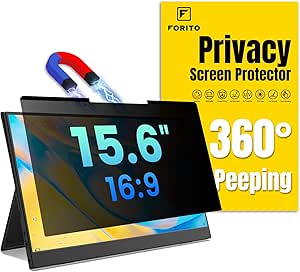
F FORITO Magnetic Laptop Privacy Screen 15.6 inch 16:9, Anti-Peeping, Anti-Glare, Blue Light Filter, Removable
The appeal here is speed: magnets let the panel snap on and lift off in seconds, which suits anyone who shares their screen in meetings several times a day. Next to the adhesive-mounted 15.6 Inch Laptop Privacy Screen Filter – Anti-Glare and Privacy Shield, you trade a flush, permanent fit for that freedom — and the scratch-resistant surface handles repeated removal better than film-style filters. The 360° privacy claim sounds broader than what the Peslv 360° 4-Way actually delivers, since true top-and-bottom blocking is where most filters, this one included, fall short; expect the side angles covered, not the person peering over your shoulder. Two real costs: the attached filter can stop some laptops closing fully, and magnetic grip varies with bezel design. I’d pick it for hot-deskers who value fast swaps over a seamless fit.
Pros:- Magnetic attachment snaps on and off in seconds
- Scratch-resistant surface survives repeated handling
- Anti-glare and blue light layers ease eye strain
- Wide-angle side privacy for open offices
Cons:- Can prevent the laptop lid from closing fully
- Doesn’t block views from directly behind
- Magnetic grip depends on your bezel design
Best for: Hot-deskers and hybrid workers who attach and remove their privacy filter several times a day
Not ideal for: Ultraportable users whose laptops have tight lid tolerances — the attached filter can stop the lid closing fully
- Screen Size:15.6 in
- Aspect Ratio:16:9
- Width:13 9/16 in (345 mm)
- Height:7 5/8 in (194 mm)
- Attachment:Magnetic, fully removable
- Privacy Coverage:360° anti-peeping design
- Material:Scratch-resistant premium panel
- Extras:Anti-glare and blue light filtering
Our verdict“The right pick for anyone who removes their filter daily and values magnetic speed over a flush permanent fit.”
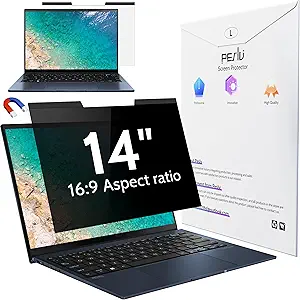
Magnetic Laptop Privacy Screen 14 Inch 16:9
For a 14-inch machine that lives in a bag, this bundle covers more than the screen. Alongside the magnetic filter you get a webcam cover, storage folder, and cleaning cloth — small extras that matter when the filter comes off at the office and needs somewhere safe to live. The multi-layered film blocks side views while keeping the head-on image clear, and UV and blue light filtering ease long café sessions. Compared with the Peslv 360° 4-Way for the same screen size, you give up top-and-bottom privacy in exchange for quicker magnetic removal and a richer accessory pack. It’s not optimized for touchscreens, and like most filters here, a bystander directly behind you still sees everything. Frequent flyers who want one purchase to cover the basics get the most from it.
Pros:- Quick magnetic attachment and removal
- Webcam cover, storage folder, and cleaning cloth included
- UV and blue light filtering for long sessions
- Clear head-on image with side-view blackout
Cons:- Side-view privacy only — overhead views stay visible
- Not optimized for touchscreens
- Requires an exact dimension match before purchase
Best for: Commuters and frequent flyers with 14-inch laptops who want a webcam cover and protective storage in the same box
Not ideal for: Anyone needing vertical privacy — the Peslv 360° 4-Way blocks overhead views that this one leaves exposed
- Screen Size:14 in (355.6 mm diagonal)
- Aspect Ratio:16:9
- Filter Width:12 3/16 in (310 mm)
- Filter Height:6 7/8 in (175 mm)
- Attachment:Magnetic, with magnetic stickers
- Material:Multi-layered film
- Compatibility:Most 14-inch Lenovo, HP, Dell, Acer, Asus, Samsung laptops
- Included Accessories:Webcam cover, storage folder, cleaning cloth
Our verdict“A smart buy for 14-inch laptop travelers who want privacy plus webcam and storage extras in a single package.”
Peslv 360° 4-Way Laptop Privacy Screen for 14 Inch Monitors
Most privacy filters only darken the left and right angles; this one adds 4-way protection that also blocks views from above and below, which matters on trains and planes where people look down at your screen. That’s the clearest edge over the Magnetic Laptop Privacy Screen 14 Inch, which covers side views only. The nano-silica adsorption layer installs bubble-free without adhesives or magnets, and the German AG anti-glare coating paired with 93% blue light blocking keeps the image usable in harsh lighting. A three-year durability rating suggests it survives daily handling. The catches: fit is limited to 14-inch, 16:9 panels at exactly 12 3/16 x 6 7/8 inches, so measuring is non-negotiable, and 4-way filtering dims the screen slightly even head-on. I’d choose it when secrecy outranks convenience.
Pros:- True 4-way privacy blocks left, right, top, and bottom viewing angles
- Bubble-free nano-silica install with no adhesives or magnets
- 93% blue light blocking with German AG anti-glare layer
- Rated for three years of daily use
Cons:- Fits only 14-inch 16:9 panels at the exact listed dimensions
- 4-way filtering slightly dims the image even head-on
Best for: Consultants, lawyers, and finance workers handling sensitive data in planes, trains, and shared workspaces
Not ideal for: Casual home users — the always-on 4-way dimming is more than you need where privacy isn’t a daily concern
- Screen Size:14 in
- Aspect Ratio:16:9
- Width:12 3/16 in (12.2 in)
- Height:6 7/8 in (6.9 in)
- Privacy Coverage:4-way: left, right, top, bottom
- Blue Light Blocking:93%
- Anti-Glare Layer:German imported AG coating
- Material:PET with nano-silica adsorption layer
- Rated Durability:3 years
Our verdict“Choose this when blocking every viewing angle — including from above — is worth a stricter fit requirement.”
15.6 Inch Privacy Screen Filter for 16:9 Monitors, Anti-Spy/Glare Protector Film
This filter is the one I’d point cost-conscious buyers toward. It covers the fundamentals — a 60-degree side-view block, 30% blue light reduction, and a choice between slide-on or mounted installation — without charging for extras like magnets or four-way shielding. Compared with the F FORITO 360° protector, it only blocks horizontally, so someone sitting above you on a plane can still see your screen. And its blue light filtering is noticeably weaker than the Peslv filter’s 92% reduction. For everyday coffee-shop work on a standard 16:9 laptop, though, that tradeoff is reasonable: you get scratch and dust protection plus basic privacy at the lowest commitment in this lineup. I’d skip it only if your screen is a touchscreen or a 16:10 panel, neither of which it supports.
Pros:- Blocks side views beyond 60 degrees for workable everyday privacy
- Slide-on or mounted installation suits both fixed and mobile setups
- Adds scratch and dust protection to the display surface
- Typically the cheapest entry point among 15.6-inch filters here
Cons:- Blocks only side angles — no vertical privacy like 360° filters offer
- 30% blue light reduction is modest next to rivals claiming 90%+
- Incompatible with touchscreens and 16:10 aspect ratio panels
Best for: Students and remote workers on a tight budget who mostly need side-angle privacy in cafes and shared offices
Not ideal for: Touchscreen laptop owners or anyone with a 16:10 display — this filter won’t fit or function correctly on either
- Screen Size:15.6 inches
- Aspect Ratio:16:9
- Width:13 9/16 in (344 mm)
- Height:7 5/8 in (194 mm)
- Viewing Angle Block:60 degrees
- Blue Light Block:30%
- Installation:Slide-on/off or mounted
- Touchscreen Compatible:No
Our verdict“The sensible pick if you want basic side-view privacy on a standard 15.6-inch laptop without paying for magnetic mounts or four-way shielding.”
F FORITO 15.6 Inch Laptop Privacy Screen Protector, 360° Anti-Peeping and Anti-Glare Shield
Where most filters in this roundup only darken the left and right angles, this F FORITO shield adds four-way 360° anti-peeping, so the screen also blurs for anyone looking down from above — the exact scenario on a plane or train. That alone separates it from the standard 15.6-inch budget filter, which leaves vertical sightlines open. It also layers in anti-glare and blue light filtering with an ultra-thin, scratch-resistant build rated for HP, Lenovo, Dell, Acer, ASUS, and Thinkpad 15.6-inch models. The compromises: installation takes more patience than a magnetic option like the 2-Pack Magnetic screen, and four-way filters typically dim the panel more than two-way ones, which matters if you already work at low brightness. For crowded commutes, I’d still take this over any side-only filter.
Pros:- 360° four-way filtering blocks viewers from sides and above
- Broad brand compatibility across major 15.6-inch laptop lines
- Ultra-thin, scratch-resistant build holds up to daily travel
- Combines anti-glare and blue light filtering for long sessions
Cons:- Installation is fussier than snap-on magnetic alternatives
- Four-way filtering dims the display more than standard filters
- Requires precise measurement before buying
Best for: Frequent flyers and commuters who handle sensitive documents with strangers seated above and beside them
Not ideal for: Users who want quick on/off removal between private and shared viewing — the fitted install isn’t designed for that
- Screen Size:15.6 inches
- Aspect Ratio:16:9
- Dimensions:13.6 x 7.6 in (345 x 194 mm)
- Privacy Coverage:360° four-way anti-peeping
- Material:Durable, scratch-resistant, ultra-thin
- Eye Protection:Anti-glare and anti-blue light
- Compatible Brands:HP, Lenovo, Dell, Acer, ASUS, Thinkpad
Our verdict“Choose this if your privacy risk comes from every direction — it’s the strongest shield here for planes, trains, and packed open offices.”
2-Pack Magnetic 15.6 Inch Laptop Privacy Screen, Anti-Blue/Glare Protector, Anti-Spy Filter, 16:9 Aspect Ratio
Getting two magnetic filters in one pack changes the math for anyone outfitting two laptops — or wanting a spare when the first gets scuffed in a bag. Per unit, it undercuts buying two single filters like the Peslv or the standard budget option. The magnetic attachment is the other real advantage: it snaps on for a client meeting and lifts off when you’re watching a film with a partner, something the fitted F FORITO 360° can’t match. It also claims a 98% blue light block, the strongest figure in this group. What you give up is precision: magnets assume a standard bezel, so bezel-less or unusual frames may not seal properly, and the magnetic grip can leave a small gap that slightly softens the privacy effect versus adhesive mounts.
Pros:- Two filters per pack lowers the per-laptop cost
- Magnetic design snaps on and off in seconds without residue
- 98% blue light blocking leads this roundup
- Maintains full HD clarity head-on while blocking side views
Cons:- Magnetic fit is unreliable on bezel-less or irregular frames
- Slight gap from the mount can weaken the seal versus fixed filters
- Only available for 15.6-inch 16:9 screens
Best for: Households or professionals running two 15.6-inch laptops who want removable privacy they can share or swap
Not ideal for: Owners of bezel-less or non-standard screens — the magnetic mount needs a conventional frame to seat properly
- Screen Size:15.6 inches
- Aspect Ratio:16:9
- Pack Size:2 filters
- Attachment:Reusable magnetic mount
- Blue Light Block:98%
- Protection:Anti-spy, anti-glare, blue light
- Material:Reinforced protective layer
Our verdict“The smartest buy for two-laptop setups or anyone who wants privacy on demand rather than a permanently fitted filter.”
Malwarebytes Premium Security + VPN Software | 1 Year, 2 Devices | Windows, Mac, Android, iOS, Chrome
Every other product in this roundup guards your screen from wandering eyes; this is the one I’d pair with them to cover what a film never can — your network traffic and malware exposure. Malwarebytes Premium bundles real-time threat detection with a no-log VPN across 500+ servers in 40+ countries, plus ad and tracker blocking, so public Wi-Fi stops being the weak link once the privacy filter handles shoulder surfers. Unlike a one-time hardware purchase such as the 2-Pack Magnetic screen, this is a subscription covering 2 devices for a year, and activation is digital only. It also runs across Windows, Mac, Android, iOS, and Chromebook, which means your phone gets the same cover as your laptop. The recurring cost is the honest drawback; the protection scope is the payoff.
Pros:- No-log VPN with 500+ servers in 40+ countries secures public Wi-Fi
- Real-time malware detection across five platforms
- Ad and tracker blocking reduces profiling while browsing
- Covers laptops and phones under one license
Cons:- Subscription model means recurring yearly cost
- Only 2 devices per license — limiting for families
- Digital activation only, no physical product
Best for: Remote workers on public Wi-Fi who need VPN and malware protection that a physical privacy screen can’t provide
Not ideal for: Buyers wanting a one-time purchase — the yearly subscription and 2-device cap will frustrate multi-device households
- Platforms:Windows, Mac, iOS, Android, Chromebook
- License Duration:1 year
- Device Limit:2 devices
- VPN:No-log, 500+ servers in 40+ countries
- Threat Protection:Real-time detection
- Browsing Tools:Ad blocking and anti-tracker
- Delivery:Online code activation
Our verdict“The essential software half of laptop privacy — pair it with any screen filter here if you actually work on untrusted networks.”
Peslv 15.6 Inch Laptop Privacy Screen Compatible with Lenovo, HP, Dell, Acer, Asus, ThinkPad, XPS – Anti-Glare Blue Light Filter Protector
If your workday runs eight-plus hours, this Peslv filter is where I’d look. Its 92% blue light and 98% UV reduction, built on imported Japanese optical materials, goes well beyond the 30% figure on the budget 15.6-inch filter — that gap matters when eye strain, not spying, is your daily complaint. Privacy still holds up via micro-blind optical technology with a 30-degree side cutoff, and two mounting options cover both raised and flush frames across Lenovo, HP, Dell, Acer, ASUS, ThinkPad, and XPS models. Versus the F FORITO 360°, you lose vertical privacy; versus the 2-Pack Magnetic option, you lose quick removal. The anti-glare coating also leans glossy rather than matte, which some users find less effective under harsh overhead lighting.
Pros:- 92% blue light and 98% UV reduction for long-session comfort
- Micro-blind optical layer blocks views beyond 30 degrees
- Two mounting options fit raised or flush monitor frames
- Japanese optical materials keep the front view sharp
Cons:- No vertical privacy — only side angles are blocked
- Anti-glare finish isn’t fully matte, which some users prefer
- Careful measurement needed before purchase
Best for: Office workers and developers logging long hours who want serious blue light and UV filtering alongside side-view privacy
Not ideal for: Anyone needing overhead-angle privacy — its two-way filter leaves vertical sightlines open, unlike 360° options
- Screen Size:15.6 inches
- Aspect Ratio:16:9
- Dimensions:13.6 x 7.6 in
- Privacy Angle:Beyond 30 degrees blocked
- Blue Light Reduction:92%
- UV Reduction:98%
- Anti-Glare Effect:Over 90%
- Material:Imported optical materials from Japan
- Installation:Raised or flush frame mounting options
Our verdict“The right filter when eye fatigue is your main problem and side-angle privacy is enough for your workspace.”
Peslv Magnetic Laptop Privacy Screen 14 inch for 16:9 Monitors
Among the 14-inch filters in this lineup, this option stands out for one number: 95% blue light reduction, paired with 92% UV filtering. That’s a wide margin over the StarTech.com 14-inch privacy screen, which cuts blue light by up to 51%, so I’d point anyone who stares at a screen all day toward this model first. The magnetic attachment snaps on and off in seconds, which suits commuters who only want privacy in public. The tradeoffs are real, though. Like every filter here except the Peslv 360° 4-Way model, it only blocks side angles — someone directly behind you still sees everything. It also fits a very specific 12.2 x 6.9-inch panel, so buyers who skip measuring risk a return. Compared with adhesive-mounted rivals, the removable design is the cleaner long-term choice.
Pros:- 95% blue light and 92% UV reduction, the strongest eye-protection figures in this lineup
- Magnetic mounting allows instant attachment and removal without adhesive residue
- Japanese and German sourced materials suggest better durability than budget film filters
- Effective side-angle blackout for working in shared spaces
Cons:- Offers no protection against viewers positioned directly behind the user
- Fits only one exact panel size, so measuring the screen before ordering is mandatory
- 16:9-only compatibility excludes newer 16:10 laptops
Best for: Office workers and students with 14-inch 16:9 laptops who want strong blue light filtering alongside everyday side-angle privacy
Not ideal for: Anyone needing 360-degree privacy — front and vertical viewing stay fully visible, so the Peslv 360° 4-Way model suits them better
- Compatible Device:14-inch laptops with 16:9 aspect ratio
- Display Size:14 inches
- Width:12 3/16″ (310 mm)
- Height:6 7/8″ (175 mm)
- Diagonal:14 inches
- Blue Light Reduction:95%
- UV Light Reduction:92%
- Material:Imported materials from Japan and Germany
- Attachment:Magnetic, removable
Our verdict“The right pick for 14-inch laptop owners who rank eye strain relief as highly as privacy and want a filter they can pop off at home.”
Magnetic Laptop Privacy Screen 15.6 Inch 16:9
Most privacy filters in this roundup target 14-inch machines, so this model earns its place by covering the 15.6-inch segment — still the most common laptop size sold. Its broad compatibility list (Lenovo, HP, Dell, Acer, Asus, Samsung) gives it wider reach than the size-locked Peslv 14-inch magnetic screen, and the magnetic snap-on design makes it a sensible travel companion for open workspaces and flights. I’d still urge caution on fit: at 13 9/16 x 7 5/8 inches it suits standard 16:9 panels, but slim-bezel models can sit awkwardly, so checking dimensions matters more here than with brand-specific options like the Peslv 15.6-inch filter. The other caveat is touch — touchscreen users should look elsewhere, since this filter isn’t optimized for it. For conventional 15.6-inch laptops, though, it covers the basics well at a low commitment.
Pros:- Magnetic snaps allow fast attachment and removal when moving between private and public spaces
- Broad brand compatibility across Lenovo, HP, Dell, Acer, Asus, and Samsung 15.6-inch models
- Maintains a clear straight-on view while blacking out side angles
- Adds UV and blue light filtering for longer work sessions
Cons:- Not optimized for touchscreens, a dealbreaker for 2-in-1 and touch-enabled laptops
- Generic sizing means fit is less predictable than model-specific rivals
- No protection from anyone viewing directly behind the user
Best for: Travelers and hot-deskers with standard 15.6-inch 16:9 laptops from major brands who want quick on/off privacy in public
Not ideal for: Touchscreen laptop owners and anyone with a slim-bezel or 16:10 display, where fit and touch response become problems
- Filter Width:13 9/16″ (345 mm)
- Filter Height:7 5/8″ (194 mm)
- Diagonal Size:15.6″ (396.24 mm)
- Aspect Ratio:16:9
- Compatibility:Lenovo, HP, Dell, Acer, Asus, Samsung, and other laptops
- Attachment:Magnetic snap-on
- Touchscreen Support:Not optimized for touchscreens
Our verdict“A practical, travel-friendly privacy filter for owners of conventional 15.6-inch laptops who don’t rely on touch input.”
StarTech.com 14-inch 16:9 Laptop Privacy Screen with Reversible Gold Filter
This is the most deliberate piece of engineering in the lineup. StarTech’s Microlouver technology defines a precise 60-degree viewing window, and the reversible design flips between a glossy gold side for stronger privacy and a matte side for glare reduction — no other filter here gives buyers that choice after purchase. Compared with the Peslv 14-inch magnetic screen, the tradeoff is clear: StarTech’s 51% blue light reduction is far weaker than Peslv’s 95%, and the adhesive-strip mounting lacks the grab-and-go convenience of magnets. Worse, the mounting tabs cost extra, which stings at this price. I’d frame it this way: buyers who prioritize a sharp, defined privacy cone and a premium gold finish get something genuinely distinct here, while those chasing eye-comfort specs or easy removal are better served by the magnetic alternatives.
Pros:- Microlouver technology delivers a clearly defined 60-degree privacy angle
- Reversible design offers both a glossy gold privacy side and a matte anti-glare side
- Reduces blue light by up to 51% to lessen eye strain
- Sits clear of webcams and sensors, avoiding interference
Cons:- Additional mounting tabs are sold separately, raising the real cost
- Adhesive-strip installation is less convenient than the magnetic mounting on rival filters
- 51% blue light reduction trails the 95% figure of the Peslv 14-inch screen
Best for: Professionals handling sensitive data who want a defined 60-degree privacy window and the flexibility of reversible gold and matte finishes
Not ideal for: Budget buyers and frequent removers — the adhesive mounting and separately sold tabs make it pricier and less flexible than magnetic options
- Compatibility:14-inch laptops with 16:9 displays
- Dimensions:12.2 x 6.8 inches
- Privacy Technology:Microlouver
- Viewing Angle:60 degrees
- Blue Light Reduction:Up to 51%
- Transmittance:60%
- Design:Reversible — glossy gold / matte
- Mounting:Adhesive strips included; mounting tabs sold separately
Our verdict“The premium choice for security-minded professionals who value a reversible gold filter and a precisely defined viewing angle over convenience specs.”
How We Picked
I judged every option in this roundup against one question: how well does it actually keep your information private, and at what cost in money and daily friction. For the privacy screens, that meant weighing viewing-angle design (standard two-way filters versus 360-degree four-way filters), the attachment system, panel fit, and eye-comfort extras like anti-glare coatings and blue light filtering. For the lone software pick, I looked at malware detection track record, the bundled VPN’s logging policy, and how many devices a single license covers. Price mattered throughout, but I measured it as cost per protected screen or device, not sticker price.
The ranking reflects versatility first: products that solve the privacy problem for the widest range of buyers, with the fewest compromises, landed at the top. A removable magnetic screen outranks a permanent adhesive film of equal optical quality, because most people sometimes want to share their display at full brightness. Niche designs like four-way filters and gold-finish screens sit lower only because they ask more money for a benefit a smaller group of buyers actually needs — not because they do their job poorly.
Factors to Consider When Choosing Privacy-focused Laptop Security Software
The reviews above cover what each option does. This guide covers the decisions the reviews can’t make for you: which privacy problem you’re actually solving, how much coverage your routine demands, and the sizing and setup mistakes that send most filters back for a refund.
Decide Which Privacy Problem You Are Actually Solving
Every product in this category answers one of two different questions. Security software like Malwarebytes answers ‘who can reach my data through the network,’ while a privacy screen answers ‘who can see my display from the next seat over.’ Buying one and expecting the other’s job is the most common mistake in this category, and no product at any price does both. If you work from home alone on a secured network, software is where your money goes first. If you commute, hot-desk, or study in libraries, the screen matters more day to day. Most remote workers land in both camps, and the good news is that a solid screen plus a one-year software license costs less than many extended warranties. Decide your threat model before you compare prices, or you’ll overbuy in the wrong column.
Two-Way vs Four-Way Filters: Pay for Coverage You Will Use
Standard filters are two-way: they black out the view from roughly 30 degrees to each side while staying clear head-on. Four-way (360-degree) filters add vertical blocking, so the passenger in the airline seat behind you or the colleague standing at your shoulder also sees nothing. That extra coverage isn’t free. Four-way filters dim the panel more, narrow the head-on sweet spot, and cost more, and casual users often find the tradeoff isn’t worth it for a coffee shop where nobody sits directly beside them. Buy four-way if you regularly handle sensitive material on planes, trains, or open-plan floors where people pass behind you. Buy two-way if your exposure is mostly seatmates. The honest rule: pay for the coverage your calendar actually creates, not the coverage that sounds safest.
Attachment Style Decides Whether You Will Actually Use It
A privacy screen only protects you when it’s on the laptop, so the mount decides how much protection you really get. Magnetic screens snap on and off in seconds, which makes them the right call if you share your screen in meetings, watch films with a partner, or do color-sensitive work that occasionally needs the full panel. Adhesive and slide-tab mounts sit flusher, weigh less, and can’t be knocked loose in a bag, but removing them is a chore and re-sticking weakens over time. Commuters and presenters should default to magnetic; set-it-and-forget-it users who never share their display save a little money with adhesive. One caution with magnetic mounts: they add a slight bezel gap, so check that your laptop lid still closes fully, especially on thinner ultrabooks.
Sizing Is Where Most Buyers Go Wrong
Filter sizes are sold by the viewable diagonal, and 15.6-inch and 14-inch dominate this roundup for a reason: they’re the most common laptop panels. What trips buyers up is assuming the label is enough. Two laptops can both be ‘15.6-inch’ while their viewable widths differ by several millimeters, and a filter that overhangs the glass can’t be trimmed cleanly. Measure the lit display area only, width and height, excluding the bezel, and match those numbers against the listing rather than trusting the inch rating alone. Aspect ratio matters just as much — nearly every filter here is built for 16:9 panels, so owners of 16:10 machines (most MacBooks and many newer Dell and Lenovo models) should verify ratio before anything else. Brand compatibility lists mentioning HP, Lenovo, Dell, Acer, and ASUS are helpful starting points, not guarantees. When you’re between two sizes, the slightly smaller filter is the safer buy.
What to Demand From Privacy Software Beyond the Label
With software, the sticker features matter less than the policies behind them. A bundled VPN is only private if the provider has a clear no-log policy, so read that page before you trust it with your traffic. Check device limits and platform coverage against your actual household — a two-device license evaporates fast once you count a phone and a partner’s laptop. Look at renewal pricing, not just the first-year rate, because security suites are known for introductory discounts that climb at year two. Free antivirus tools deserve a special warning in a privacy roundup: some monetize the very browsing data you installed them to protect. And treat the VPN inside a security suite as a public-Wi-Fi shield rather than a full replacement for a dedicated service — it covers café and airport risk well, but heavy streaming or torrenting needs usually outgrow it.
Frequently Asked Questions
Do I need a privacy screen if I already have security software installed?
Yes, if you ever work around other people, because the two products solve different problems. Security software blocks remote threats — malware, trackers, snooping on open Wi-Fi — but it does nothing about the person one seat over reading your screen on a train. A privacy filter handles that visual exposure, yet offers zero defense against a malicious download. Think of them as covering two separate attack surfaces on the same laptop. Buyers who only ever work in a private room can skip the screen; everyone else should carry both layers.
Are magnetic privacy screens as secure as adhesive ones?
For daily use, yes — modern magnetic mounts hold firmly through normal typing, carrying, and lid opening. Where they differ is failure mode: a hard knock inside a bag can shift a magnetic panel, while an adhesive mount stays put until you deliberately peel it off. The magnetic advantage is that you’ll actually remove it when privacy doesn’t matter, which keeps full brightness and color available for movies and photo work. Adhesive suits owners who want a permanent install and never share their display. If your laptop sees both meetings and solo work, magnetic is the more practical choice; if it never leaves your desk, adhesive is cheaper and cleaner.
Will a privacy screen make my display too dark to use?
Every filter dims the panel somewhat, typically cutting perceived brightness by a fifth to a third, and four-way filters sit at the darker end of that range. In practice, most owners compensate by raising screen brightness a notch or two, which costs some battery life but restores comfortable viewing. The anti-glare and blue light coatings on many of these screens partially offset the dimming by making the remaining light easier on your eyes. The buyers who struggle are those with already-dim panels or who work in bright sunlight, where every bit of brightness counts. If that describes you, prioritize a two-way filter from a brand that publishes a light-transmission figure, and buy from a seller with a workable return policy.
Is the VPN bundled with security software good enough, or do I need a separate VPN service?
For the most common use case — protecting your traffic on hotel, airport, and café Wi-Fi — a bundled VPN like the one in Malwarebytes Premium is genuinely sufficient, and it removes the hassle of a second subscription. The limits show up for power users: bundled VPNs tend to offer fewer server locations, no specialized streaming or P2P servers, and basic apps. If your privacy goal is shielding everyday browsing from snoops and your internet provider, the bundle covers it. If you want to pick exit countries, stream geo-restricted libraries, or run a VPN on your router, a dedicated service earns its extra cost. Start with the bundle, and upgrade only when you hit a specific wall.
How do I measure my laptop so the privacy screen actually fits?
Measure the viewable area — the part that lights up — not the glass edge to edge. Run a tape diagonally corner to corner for the inch rating, then record width and height separately, since filters are cut to exact dimensions. Confirm the aspect ratio next: width divided by height near 1.78 means 16:9, which nearly every filter in this roundup targets; near 1.6 means 16:10, which most of them don’t fit. Compare your width and height against the listing’s measurements rather than the inch label, because panel sizes vary between laptop models. If your numbers land between two sizes, choose the smaller one — a slight gap at the edges still protects your privacy, while an overhang won’t sit flat.
Conclusion
If your priority is digital privacy — malware, trackers, and open Wi-Fi — Malwarebytes Premium Security + VPN is the best overall pick and the only product here that handles it, making it the natural starting point for most buyers. Pair it with the F FORITO Magnetic 15.6-inch privacy screen if you also work around other people; its removable mount and blue light filtering make it the most flexible physical option in the lineup. Value shoppers should grab the 2-pack magnetic 15.6-inch set, which covers two laptops for roughly the price of one premium filter. Premium buyers who want a sharper look and a brand with a long accessories track record will prefer the StarTech.com gold filter. Beginners who want zero setup fuss should start with a simple magnetic 14-inch screen — snap on, snap off, nothing to configure — while frequent flyers and open-office workers should spend up for a four-way 360-degree filter like the Peslv or F FORITO 360 models. Skip the category only if your laptop never leaves a private room and you already trust your security stack; everyone else should pick one from each column and be done with it.
Fall Picks
fall essentials
As an affiliate, we earn on qualifying purchases.