
VPN routers with built-in security can encrypt traffic for every device on your network, but the right choice depends on whether you need Wi-Fi, travel portability, or a wired gateway for a larger setup. I’d name the GL.iNet Flint 2 best overall for its balance of home Wi-Fi and VPN-focused controls; the GL.iNet Brume 2 stands out as a compact wired security gateway, while the TP-Link Omada ER8411 suits demanding multi-WAN networks. The main tradeoff is between simple, all-in-one Wi-Fi and more flexible wired systems that may take more setup and require separate access points. VPN speed, protocol support, security updates, and the number of devices you need to protect also matter. Read on for the full breakdown of all 15 options and how I’d match them to different buyers.

Get privacy and security gear delivered free with Prime
- Fast, free delivery on millions of items
- Prime Video, Amazon Music and more included
- Member-only deals all year
Key Takeaways
The Flint 2 is the strongest all-around fit for buyers who want home Wi-Fi and VPN controls in one device; wired gateways such as the Brume 2 need a separate Wi-Fi access point.
Wired VPN gateways prioritize network control over convenience. The TP-Link ER8411 and Omada ER7412-M2 offer a more infrastructure-focused path, but they are not direct substitutes for an all-in-one wireless router.
Travel routers solve a different problem than home routers. The GL-SFT1200 Opal, Beryl AX, and Slate 7 are designed for portable use, where compactness and easy connection to unfamiliar networks matter more than whole-home coverage.
More WAN ports and faster Ethernet do not automatically mean faster VPN service. The VPN protocol, router processing capacity, internet plan, and provider limits all affect encrypted throughput.
Built-in VPN support is not the same as complete security. Buyers still need to check update support, firewall controls, DNS handling, and whether they can maintain a secure configuration over time.
| GL.iNet GL-SFT1200 Opal AC1200 Dual-Band Travel Router | 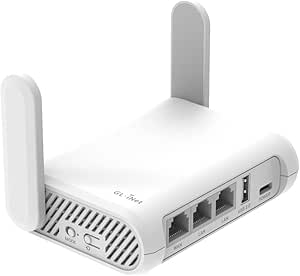 | Best Compact Travel VPN Router | Wi-Fi: Wi-Fi 5, dual-band | Wireless speed: Up to 300 Mbps on 2.4 GHz and 867 Mbps on 5 GHz | Ethernet ports: 2 Gigabit LAN, 1 Gigabit WAN | VIEW LATEST PRICE | See Our Full Breakdown |
| GL.iNet Flint 3 Tri-Band Wi-Fi 7 Router with 5 x 2.5G Ports |  | Best Premium Wi-Fi 7 VPN Router | Wi-Fi standard: Wi-Fi 7 (802.11be) | Bands: Tri-band, including 6 GHz | Advertised wireless speed: Up to 9 Gbps | VIEW LATEST PRICE | See Our Full Breakdown |
| GL.iNet Flint 2 Wi-Fi 6 Gaming Router (GL-MT6000) |  | Best Overall Home VPN Router | Model: GL-MT6000 | Wi-Fi standard: Wi-Fi 6 (802.11ax) | Wireless speed: Up to 6 Gbps | VIEW LATEST PRICE | See Our Full Breakdown |
| TP-Link ER605 Wired Gigabit VPN Router |  | Best for Multi-WAN Wired Networks | Network type: Wired | Ethernet ports: 1 Gigabit WAN, 2 Gigabit WAN/LAN, 2 Gigabit LAN | VPN connections: Up to 20 IPsec, 16 OpenVPN, 16 L2TP, and 16 PPTP | VIEW LATEST PRICE | See Our Full Breakdown |
| GL.iNet Brume 2 Wired VPN Security Gateway with 2.5G WAN |  | Best Dedicated VPN Gateway | Model: GL-MT2500A (Brume 2) | Connectivity: Wired Ethernet; no Wi-Fi | Ports: 2.5 Gbps WAN, 1 Gbps LAN, USB 3.0 | VIEW LATEST PRICE | See Our Full Breakdown |
| ASUS RT-AX1800S Dual-Band Wi-Fi 6 Router |  | Best for a Straightforward Home VPN | Wi-Fi standard: Wi-Fi 6 (802.11ax) | Frequency bands: Dual-band | Maximum data transfer rate: 1800 Mbps | VIEW LATEST PRICE | See Our Full Breakdown |
| TP-Link ER7206 Multi-WAN Gigabit VPN Router |  | Best for Small-Business VPN Management | Network type: Wired | WAN ports: 1 Gigabit SFP WAN, 1 Gigabit WAN, and 2 Gigabit WAN/LAN | Maximum WAN ports: 4 | VIEW LATEST PRICE | See Our Full Breakdown |
| GL.iNet Fortify (GL-MT6000) AX6000 Wi-Fi 6 Router with ExpressVPN |  | Best Wi-Fi Router for VPN Coverage | Wi-Fi class: AX6000 dual-band Wi-Fi 6 | Wi-Fi speeds: Up to 1,148 Mbps at 2.4 GHz and 4,804 Mbps at 5 GHz | VPN speeds: WireGuard up to 900 Mbps; OpenVPN DCO up to 880 Mbps | VIEW LATEST PRICE | See Our Full Breakdown |
| TP-Link Omada ER7412-M2 Multi-Gigabit VPN Router |  | Best for Multi-WAN Business Security | Router type: Wired multi-gigabit VPN router | WAN/LAN ports: 2 × 2.5G RJ45; 10 × Gigabit, including 2 × SFP and 8 × RJ45 | WAN load balancing: Up to 11 WAN ports | VIEW LATEST PRICE | See Our Full Breakdown |
| GL.iNet GL-MT5000 Brume 3 Wired VPN Security Gateway |  | Best Compact High-Throughput VPN Gateway | Connectivity: Wired Ethernet; no Wi-Fi | Ethernet ports: 3 × 2.5GbE | VPN protocols: WireGuard and OpenVPN-DCO | VIEW LATEST PRICE | See Our Full Breakdown |
| Cisco RV340 Dual WAN VPN Router with 4 Gigabit Ethernet Ports |  | Best for Business VPN Access | Model: RV340-K9-NA | Ethernet ports: 4 Gigabit | WAN: Dual WAN with load balancing and failover | VIEW LATEST PRICE | See Our Full Breakdown |
| Omada Fusion 2.5G Multi-WAN Wired VPN Router |  | Best for On-Site Network Management | Router type: Wired VPN router | Ports: 5 × 2.5 Gbps | WAN support: Up to 4 WAN connections | VIEW LATEST PRICE | See Our Full Breakdown |
| GL.iNet GL-BE3600 Slate 7 Wi-Fi 7 Travel Router with Touchscreen and Dual 2.5G Ethernet |  | Best Compact Wi-Fi 7 VPN Pick | Wi-Fi generation: Wi-Fi 7 | Frequency bands: Dual-band, 2.4 GHz and 5 GHz | Wireless speed: 688 Mbps (2.4 GHz) + 2882 Mbps (5 GHz) | VIEW LATEST PRICE | See Our Full Breakdown |
| GL.iNet Beryl AX Wi-Fi 6 Travel Router (GL-MT3000) | 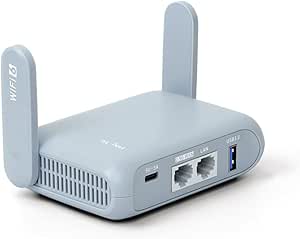 | Best for Simple Travel VPN Setup | Wi-Fi generation: Wi-Fi 6 | Frequency bands: Dual-band, 2.4 GHz and 5 GHz | Wireless speed: 574 Mbps (2.4 GHz) + 2402 Mbps (5 GHz) | VIEW LATEST PRICE | See Our Full Breakdown |
| TP-Link Omada ER8411 10G Multi-WAN VPN Router |  | Best for High-Capacity Business Networks | Network type: Wired | Ports: 1 × 10G SFP+ WAN/LAN, 1 × 10G SFP+ WAN, 1 × Gigabit SFP WAN/LAN, 8 × Gigabit RJ45 WAN/LAN, 2 × USB 3.0 | Maximum WAN connections: Up to 10 | VIEW LATEST PRICE | See Our Full Breakdown |
| VPN routers with built-in security | Ethernet ports |
|---|---|
| GL.iNet GL-SFT1200 Opal AC1200 | 2 Gigabit LAN, 1 Gigabit WAN |
| GL.iNet Flint 3 Tri-Band Wi-Fi | 5 × 2.5G |
| GL.iNet Flint 2 Wi-Fi 6 Gaming | 2 × 2.5G, 4 × 1G |
| TP-Link ER605 Wired Gigabit VP | 1 Gigabit WAN, 2 Gigabit WAN/LAN, 2 Gigabit LAN |
| GL.iNet Brume 2 Wired VPN Secu | — |
| ASUS RT-AX1800S Dual-Band Wi-F | 1 Gigabit WAN and 4 Gigabit LAN |
| TP-Link ER7206 Multi-WAN Gigab | — |
| GL.iNet Fortify | — |
| TP-Link Omada ER7412-M2 Multi- | — |
| GL.iNet GL-MT5000 Brume 3 Wire | 3 × 2.5GbE |
| Cisco RV340 Dual WAN VPN Route | 4 Gigabit |
| Omada Fusion 2.5G Multi-WAN Wi | — |
| GL.iNet GL-BE3600 Slate 7 Wi-F | 2 × 2.5G (1 WAN, 1 LAN) |
| GL.iNet Beryl AX Wi-Fi 6 Trave | — |
| TP-Link Omada ER8411 10G Multi | — |
More Details on Our Top Picks
GL.iNet GL-SFT1200 Opal AC1200 Dual-Band Travel Router
The Opal is the portable pick for buyers who want VPN protection on hotel or public Wi-Fi without carrying a full-size router. Its pre-installed WireGuard and OpenVPN support lets it route connected devices through a VPN, while Access Point and repeater modes give it more flexibility than a simple hotspot adapter. Three gigabit ports are useful for connecting wired devices, and the configurable physical switch can provide a quick VPN control once set up. Compared with the GL.iNet Flint 2, it is far less capable as a home hub: Wi-Fi 5, 128 MB of RAM, and its compact design suit travel rather than a busy household. Its antennas fold away for packing but may need extending for better coverage. The switch needs configuration, and some timed public hotspots require reconnecting.
Pros:- Lightweight 145 g body with retractable antennas is easy to pack.
- Pre-installed WireGuard and OpenVPN support VPN client use.
- Three gigabit Ethernet ports allow wired connections.
- Access Point and public Wi-Fi repeater modes add travel flexibility.
Cons:- The physical VPN switch must be configured in the admin panel before it works as intended.
- Public hotspots with time limits may require reconnecting after a session expires.
- Wi-Fi 5 and 128 MB of RAM make it less suitable for demanding home networks.
Best for: Frequent travelers who want a lightweight router to share a VPN-protected hotel or public Wi-Fi connection with multiple devices.
Not ideal for: Households with many demanding devices or buyers seeking high-speed Wi-Fi 6 or Wi-Fi 7 coverage; the Opal is a travel-focused Wi-Fi 5 router.
- Wi-Fi:Wi-Fi 5, dual-band
- Wireless speed:Up to 300 Mbps on 2.4 GHz and 867 Mbps on 5 GHz
- Ethernet ports:2 Gigabit LAN, 1 Gigabit WAN
- VPN protocols:OpenVPN and WireGuard
- Operating system:OpenWrt
- Security:WPA2-PSK, WPA3, OpenVPN, WireGuard
- Weight:145 g
- Memory:128 MB RAM
Our verdict“Choose the Opal if portability and straightforward VPN sharing matter more than the home-network capacity of the Flint 2.”
GL.iNet Flint 3 Tri-Band Wi-Fi 7 Router with 5 x 2.5G Ports
The Flint 3 is the premium choice here for a household that wants current-generation wireless capacity alongside router-level VPN options. Its tri-band Wi-Fi 7 with 6 GHz and Multi-Link Operation can help compatible devices share a busy network more effectively, while five 2.5G ports give wired equipment room beyond the gigabit connections on the Flint 2. The advertised WireGuard and OpenVPN throughput of up to 680 Mbps makes it a better fit for faster VPN connections than the travel-focused Opal, though actual results depend on the network and VPN service. Built-in support for AdGuard Home and Bark parental controls adds useful security and household-management tools. The tradeoff is setup attention: the manufacturer recommends a firmware update at first use, and buyers who do not have Wi-Fi 7 or multi-gig devices may not benefit much from its extra capacity.
Pros:- Tri-band Wi-Fi 7 includes 6 GHz support and Multi-Link Operation.
- Five 2.5G Ethernet ports support multi-gig wired connections.
- Advertised VPN throughput reaches up to 680 Mbps for WireGuard and OpenVPN.
- AdGuard Home and Bark parental controls add network-level management features.
Cons:- Initial setup includes a recommended firmware update.
- Advertised wireless and VPN speeds depend on connected devices, network conditions, and VPN service.
- Wi-Fi 7 and five 2.5G ports offer limited benefit to buyers with older or mostly wireless equipment.
Best for: Households with Wi-Fi 7 devices, multi-gig wired equipment, and several users who want VPN support plus filtering and parental-control options.
Not ideal for: Small or lightly connected homes using mostly Wi-Fi 5 or Wi-Fi 6 devices; the Flint 3’s newer wireless features and 2.5G ports may go unused.
- Wi-Fi standard:Wi-Fi 7 (802.11be)
- Bands:Tri-band, including 6 GHz
- Advertised wireless speed:Up to 9 Gbps
- Advertised VPN speed:Up to 680 Mbps for WireGuard and OpenVPN
- Ethernet ports:5 × 2.5G
- Coverage:Up to 2,000 square feet
- Memory and storage:1 GB DDR4 RAM; 8 GB eMMC
- Security features:WPA2-PSK, WPA3, WPA2-Enterprise, WPA-Enterprise, AdGuard Home, Bark parental controls
Our verdict“Pick the Flint 3 for a VPN-capable home network built around Wi-Fi 7 and multi-gig connections, rather than for a basic household setup.”
GL.iNet Flint 2 Wi-Fi 6 Gaming Router (GL-MT6000)
The Flint 2 earns the broadest home-use role by pairing Wi-Fi 6 with strong listed VPN throughput and practical network controls. Its advertised WireGuard performance of up to 900 Mbps and OpenVPN performance of up to 880 Mbps give it a higher stated VPN ceiling than the Flint 3, though real speeds will vary with the VPN server and connection. Two 2.5G ports and four gigabit ports also make it easier to connect a mix of faster and standard wired devices. OpenWrt, AdGuard Home, QoS, and guest mode give security-conscious owners room to manage traffic and separate visitors. Unlike the Flint 3, it lacks Wi-Fi 7 and tri-band 6 GHz support, so it is not the forward-looking choice for newer wireless clients. Firmware updating is recommended during setup.
Pros:- Listed WireGuard and OpenVPN speeds reach up to 900 Mbps and 880 Mbps respectively.
- Two 2.5G ports and four gigabit ports support mixed wired equipment.
- Pre-installed OpenWrt supports flexible network configuration.
- AdGuard Home, QoS, guest mode, and access point mode support network management.
Cons:- Wi-Fi 6 lacks the Flint 3’s Wi-Fi 7 and 6 GHz capabilities.
- A firmware update is recommended during initial setup.
- Actual VPN speeds vary with the connection, server location, and service provider.
Best for: Homes that want a capable Wi-Fi 6 router with high listed VPN throughput, wired multi-gig options, and configurable network controls.
Not ideal for: Buyers who want Wi-Fi 7, 6 GHz connectivity, or a plug-and-play experience that avoids firmware setup.
- Model:GL-MT6000
- Wi-Fi standard:Wi-Fi 6 (802.11ax)
- Wireless speed:Up to 6 Gbps
- VPN speeds:WireGuard up to 900 Mbps; OpenVPN up to 880 Mbps
- Ethernet ports:2 × 2.5G, 4 × 1G
- Memory and storage:1 GB DDR4 RAM; 8 GB eMMC
- Operating system:Linux with pre-installed OpenWrt
- Network features:AdGuard Home support, QoS, guest mode, access point mode, Multi-WAN
Our verdict“Choose the Flint 2 for a balanced Wi-Fi 6 home network with a strong stated VPN ceiling, and choose the Flint 3 if Wi-Fi 7 matters more.”
TP-Link ER605 Wired Gigabit VPN Router
The TP-Link ER605 suits buyers who prioritize wired routing, multiple internet connections, and firewall controls over built-in Wi-Fi. Its five gigabit ports can be assigned across WAN and LAN roles, while load balancing and USB modem backup provide options for networks that need another path when a connection fails. It supports several VPN connection types and includes SPI firewall, DoS defense, and IP/MAC/URL filtering. That makes it a different proposition from the GL.iNet Brume 2: the ER605 emphasizes multi-WAN management and Omada SDN integration, while the Brume 2 focuses on a dedicated VPN gateway with WireGuard and OpenVPN. The ER605 needs a separate access point for wireless devices, and USB backup depends on a compatible modem. It is better suited to offices or structured wired networks than casual home users.
Pros:- Five gigabit ports can support multiple WAN and LAN connections.
- Load balancing and USB support for a compatible 4G/3G modem offer WAN flexibility.
- Supports IPsec, OpenVPN, L2TP, and PPTP connections.
- SPI firewall, DoS defense, and IP/MAC/URL filtering provide built-in network controls.
Cons:- No built-in Wi-Fi; wireless coverage requires a separate access point.
- USB WAN backup requires a compatible 4G/3G modem.
- Its focus on wired multi-WAN management may be more involved than a home wireless router.
Best for: Small offices and wired home networks that need multi-WAN routing, firewall controls, Omada integration, or a compatible cellular WAN backup.
Not ideal for: Buyers who need Wi-Fi from the router itself or want a simple wireless VPN router without separate access-point hardware.
- Network type:Wired
- Ethernet ports:1 Gigabit WAN, 2 Gigabit WAN/LAN, 2 Gigabit LAN
- VPN connections:Up to 20 IPsec, 16 OpenVPN, 16 L2TP, and 16 PPTP
- Security features:SPI firewall, DoS defense, IP/MAC/URL filtering
- WAN features:Load balancing; USB WAN backup with a compatible 4G/3G modem
- Data transfer rate:1 Gbps
- Omada support:Omada SDN integration
- Dimensions:6.22 × 3.98 × 0.98 in
Our verdict“Choose the ER605 for wired multi-WAN and firewall management; choose the Brume 2 if a dedicated WireGuard-focused VPN gateway is the priority.”
GL.iNet Brume 2 Wired VPN Security Gateway with 2.5G WAN
The Brume 2 is a focused wired gateway for buyers who want VPN routing without paying for wireless hardware they will not use. It comes with WireGuard and OpenVPN pre-installed, supports more than 30 VPN service providers, and can run a VPN client and server at the same time—a useful setup for routing outbound traffic while keeping remote access available. Its 2.5G WAN port can connect to a faster upstream network, although the gigabit LAN port is the limit for a wired client on that side. Compared with the TP-Link ER605, the Brume 2 is less centered on multi-WAN management and more on VPN functionality. Its listed WireGuard speed reaches 355 Mbps, while OpenVPN tops out at 150 Mbps. It has no Wi-Fi, so wireless access requires a separate router or access point.
Pros:- Pre-installed WireGuard and OpenVPN support simplifies setup with supported VPN services.
- Can run a VPN server and client simultaneously.
- 2.5G WAN, gigabit LAN, USB 3.0, and 8 GB eMMC provide useful wired gateway hardware.
- Supports Cloudflare encryption and IPv6 security.
Cons:- No Wi-Fi; a separate access point or wireless router is needed.
- Listed OpenVPN throughput is limited to 150 Mbps.
- The gigabit LAN port limits wired client connections to gigabit speeds.
Best for: Security-minded users who already have Wi-Fi hardware and want a dedicated gateway for VPN client routing, remote VPN access, or both.
Not ideal for: Buyers seeking an all-in-one wireless router, high OpenVPN throughput, or extensive multi-WAN management.
- Model:GL-MT2500A (Brume 2)
- Connectivity:Wired Ethernet; no Wi-Fi
- Ports:2.5 Gbps WAN, 1 Gbps LAN, USB 3.0
- VPN protocols:OpenVPN and WireGuard
- Listed VPN speeds:OpenVPN up to 150 Mbps; WireGuard up to 355 Mbps
- VPN operation:Supports simultaneous VPN server and client
- Storage:8 GB eMMC
- Operating system:Linux
Our verdict“Choose the Brume 2 when dedicated VPN routing and simultaneous server/client use matter more than built-in Wi-Fi or broad multi-WAN controls.”
ASUS RT-AX1800S Dual-Band Wi-Fi 6 Router
The RT-AX1800S is a practical choice for households that want Wi-Fi and basic security features in one familiar router. Its Instant Guard VPN access and AiProtection Classic add security functions without requiring a separate wired gateway, while Wi-Fi 6 features such as OFDMA and MU-MIMO help manage several connected devices. Compared with the GL.iNet Fortify, it is a simpler, more modestly equipped option: it lacks the Fortify’s stated high VPN throughput, multi-gigabit ports, and OpenWrt controls. That keeps the ASUS better suited to everyday home networking than demanding VPN-heavy use. Its tradeoffs are a dual-band design and coverage that depends on the home layout; buyers seeking more advanced VPN routing or faster wired links should look elsewhere.
Pros:- AiProtection Classic and Instant Guard VPN access combine security features with an everyday Wi-Fi router.
- Wi-Fi 6 MU-MIMO and OFDMA help serve multiple connected devices efficiently.
- Four Gigabit LAN ports support wired devices such as computers and consoles.
- AiMesh compatibility allows expansion with compatible ASUS networking equipment.
Cons:- Dual-band Wi-Fi offers less flexibility than a tri-band router for busy networks.
- No stated high-throughput VPN performance figures for buyers who need to plan around VPN speeds.
- Real-world Wi-Fi speed and coverage vary with the network and building materials.
Best for: Home users who want Wi-Fi 6, basic network protection, and VPN access without building a separate wired security setup.
Not ideal for: VPN power users, multi-gigabit households, or buyers who need tri-band Wi-Fi and extensive policy-routing controls.
- Wi-Fi standard:Wi-Fi 6 (802.11ax)
- Frequency bands:Dual-band
- Maximum data transfer rate:1800 Mbps
- Ethernet ports:1 Gigabit WAN and 4 Gigabit LAN
- Antennas:4 external antennas
- Security:AiProtection Classic; WPA-Enterprise; WPA2-Enterprise; WPS
- VPN feature:ASUS Instant Guard VPN
- Memory:256 MB RAM
Our verdict“Choose the ASUS for a straightforward home router with built-in security features, but pick the Fortify if VPN throughput and advanced routing matter more.”
TP-Link ER7206 Multi-WAN Gigabit VPN Router
The ER7206 earns its place for wired networks that need several ways to connect to the internet and centralized oversight. Its four configurable WAN ports allow flexible bandwidth management, while Omada SDN can bring compatible network devices into one management system. It supports multiple VPN types and connection counts, making it a more business-oriented choice than the home-focused ASUS RT-AX1800S, which includes Wi-Fi but does not offer this kind of multi-WAN setup. The ER7206’s firewall policies, DoS defense, and filtering add useful layers of network control. The tradeoff is clear: this is a wired router with one LAN port listed, not an all-in-one Wi-Fi solution. Omada also makes the most sense when the rest of the network can use compatible devices and controllers.
Pros:- Four configurable WAN ports support flexible internet connections and bandwidth management.
- Omada SDN offers centralized cloud, app, controller, or standalone management options.
- Supports multiple VPN protocols and numerous simultaneous VPN connections.
- Firewall policies, DoS defense, and IP/MAC/URL filtering provide network security controls.
Cons:- Wired-only design means a separate access point is needed for Wi-Fi.
- Only one Gigabit LAN port is listed, limiting direct wired device connections.
- Using Omada SDN with other equipment requires compatible devices and controllers.
Best for: Small offices or technically capable households that need multiple WAN connections, VPN options, and centralized management of compatible network equipment.
Not ideal for: Buyers who want built-in Wi-Fi, several local LAN ports, or a simple standalone home router setup.
- Network type:Wired
- WAN ports:1 Gigabit SFP WAN, 1 Gigabit WAN, and 2 Gigabit WAN/LAN
- Maximum WAN ports:4
- LAN ports:1 Gigabit LAN
- VPN support:Up to 100 IPsec, 50 OpenVPN, 50 L2TP, and 50 PPTP connections
- Security features:Firewall policies, DoS defense, and IP/MAC/URL filtering
- Management:Omada SDN controller, cloud access, app, or standalone mode
- RAM:512 MB
Our verdict“Choose the ER7206 for a managed wired network with multiple WAN options; skip it if you need Wi-Fi or a straightforward home setup.”
GL.iNet Fortify (GL-MT6000) AX6000 Wi-Fi 6 Router with ExpressVPN
The Fortify GL-MT6000 is the strongest fit here for buyers who want VPN protection to reach devices throughout a Wi-Fi network, including equipment that cannot run a VPN app. Its ExpressVPN integration is paired with OpenWrt tools for policy routing, parental controls, and multi-WAN, giving it more flexibility than the simpler ASUS RT-AX1800S. The Fortify also has two 2.5 GbE ports and stated WireGuard speeds up to 900 Mbps, so it is better equipped for faster wired connections and VPN-heavy use. That capability comes with a more involved feature set, and the included ExpressVPN plan lasts 12 months rather than establishing ongoing service. Stated wireless coverage, device capacity, and VPN speeds are maximum figures; actual results depend on the home, ISP, protocol, and VPN server.
Pros:- ExpressVPN integration can cover network devices that do not support VPN apps themselves.
- Stated WireGuard speeds reach up to 900 Mbps, with OpenVPN DCO up to 880 Mbps.
- Two 2.5 GbE ports and four Gigabit LAN ports support fast wired connections.
- OpenWrt includes policy routing, parental controls, VPN client/server, and multi-WAN features.
Cons:- VPN speeds vary with the protocol, server, ISP, and network conditions.
- Coverage and connected-device figures are stated maximums, not guaranteed results in every home.
- The included ExpressVPN plan is limited to 12 months.
Best for: Households that want an integrated ExpressVPN setup for multiple devices, including smart-home equipment, plus advanced routing controls.
Not ideal for: Buyers who want a simple router with no VPN service commitment, or who do not need OpenWrt controls and multi-gigabit ports.
- Wi-Fi class:AX6000 dual-band Wi-Fi 6
- Wi-Fi speeds:Up to 1,148 Mbps at 2.4 GHz and 4,804 Mbps at 5 GHz
- VPN speeds:WireGuard up to 900 Mbps; OpenVPN DCO up to 880 Mbps
- WAN/LAN ports:1 × 2.5 GbE WAN; 1 × 2.5 GbE WAN/LAN
- LAN ports:4 × 1 GbE
- Processor and memory:Quad-core 2.0 GHz; 1 GB DDR4 RAM
- Operating system:OpenWrt v21.02 (Kernel 5.4)
- VPN integration:ExpressVPN integration with a 12-month advanced plan included
Our verdict“Choose the Fortify if you want integrated VPN protection across Wi-Fi devices and value advanced routing more than a simple setup.”
TP-Link Omada ER7412-M2 Multi-Gigabit VPN Router
The ER7412-M2 is aimed at wired offices that need more port capacity and security controls than the ER7206 provides. It combines two 2.5G ports with ten Gigabit WAN/LAN ports and supports load balancing across as many as 11 WAN connections. Its range of VPN protocols, DPI, and IPS/IDS make it a more security-layered option than the ER7206, while Omada SDN supports centralized configuration. The design is also more adaptable to larger wired deployments, though it does not provide Wi-Fi; wireless access requires separate equipment. This flexibility comes with a steeper setup burden than the home-oriented GL.iNet Fortify, which bundles Wi-Fi and ExpressVPN integration. I would choose the TP-Link for managed office infrastructure, not for someone seeking a plug-in home router with minimal configuration.
Pros:- Two 2.5G ports and ten Gigabit WAN/LAN ports provide extensive wired connectivity.
- Load balancing supports up to 11 WAN connections.
- VPN protocol support includes SSL, IPSec, GRE, WireGuard, PPTP, L2TP, and OpenVPN.
- DoS/DDoS protection, filtering, DPI, and IPS/IDS offer layered security controls.
Cons:- Wired-only design requires separate access points for wireless coverage.
- Advanced security and Omada configuration can be demanding for home users.
- Gigabit LAN bandwidth limits the listed LAN ports to 1,000 Mbps.
Best for: Businesses or network administrators managing multiple internet links, wired devices, and centralized security policies.
Not ideal for: Home users who need built-in Wi-Fi or want VPN and security features without business-oriented configuration.
- Router type:Wired multi-gigabit VPN router
- WAN/LAN ports:2 × 2.5G RJ45; 10 × Gigabit, including 2 × SFP and 8 × RJ45
- WAN load balancing:Up to 11 WAN ports
- VPN protocols:SSL, IPSec, GRE, WireGuard, PPTP, L2TP, and OpenVPN
- Security features:DoS/DDoS protection, IP/MAC/URL filtering, DPI, and IPS/IDS
- Processor:Quad-core
- Management:Omada SDN and app control
- USB:1 × USB 3.0
Our verdict“Choose the ER7412-M2 for a managed business network that needs extensive ports and multi-WAN security, not for an all-in-one Wi-Fi router.”
GL.iNet GL-MT5000 Brume 3 Wired VPN Security Gateway
The Brume 3 GL-MT5000 focuses on VPN performance and flexible wired connections rather than wireless convenience. Hardware-accelerated WireGuard and OpenVPN-DCO are rated for throughput up to 1,100 Mbps, and three configurable 2.5GbE ports support multi-WAN or failover. Its VPN traffic obfuscation and OpenWrt foundation add options for users who want more control than the simpler TP-Link ER7206 offers. But the Brume 3 is a gateway, not a Wi-Fi router: it needs a separate access point for wireless devices. That makes it a better fit for an existing network or a tailored setup than for buyers replacing a single home router. USB-C supports expansion, though buyers should plan around that one USB connection for storage or cellular dongles.
Pros:- Hardware-accelerated WireGuard and OpenVPN-DCO throughput is rated up to 1,100 Mbps.
- Three configurable 2.5GbE ports support multi-WAN and failover setups.
- VPN obfuscation can disguise VPN traffic as regular HTTPS traffic.
- OpenWrt and USB-C expansion support plugins, external storage, or cellular dongles.
Cons:- No built-in Wi-Fi; wireless coverage requires a separate access point.
- OpenWrt and configurable WAN/LAN roles may require networking experience.
- USB expansion depends on a single Type-C port.
Best for: Technically confident users who want a compact wired gateway with fast VPN capability, multi-WAN options, and OpenWrt flexibility.
Not ideal for: Buyers replacing a home Wi-Fi router or those who need built-in wireless and a simple all-in-one installation.
- Connectivity:Wired Ethernet; no Wi-Fi
- Ethernet ports:3 × 2.5GbE
- VPN protocols:WireGuard and OpenVPN-DCO
- Maximum VPN throughput:Up to 1,100 Mbps
- Memory:1 GB DDR4 RAM
- Internal storage:8 GB eMMC
- USB:USB 3.0 Type-C
- Operating system:OpenWrt
Our verdict“Choose the Brume 3 for a compact, configurable wired VPN gateway; choose the Fortify instead if you want VPN protection and Wi-Fi in one unit.”
Cisco RV340 Dual WAN VPN Router with 4 Gigabit Ethernet Ports
The RV340 is a sensible fit for a small office that needs reliable wired VPN access and a backup internet connection, rather than a modern all-in-one Wi-Fi system. Its dual WAN can balance traffic or fail over if one connection drops, while AnyConnect, IPsec, and L2TP over IPsec offer several ways to connect remote staff. VLANs also let an administrator separate guest access from business devices. Compared with the Omada Fusion 2.5G, the Cisco offers familiar remote-access options but has Gigabit rather than 2.5G ports and lacks the listed IPS/IDS protection. Its wireless specification is single-band 802.11ac, so I would treat it mainly as a wired security gateway. The one-year support term is a limitation for buyers who want ongoing help.
Pros:- Dual WAN supports load balancing and failover.
- AnyConnect and multiple IPsec VPN options suit remote-access needs.
- VLAN support can separate guest traffic from business devices.
- Four Gigabit Ethernet ports provide wired connections for local devices.
Cons:- Wireless capability is listed as single-band 802.11ac.
- Four Gigabit ports lack the 2.5G capacity offered by the Omada Fusion 2.5G.
- Technical support is listed for one year.
Best for: Small offices with wired workstations, remote staff using Cisco AnyConnect, and two internet connections to keep available.
Not ideal for: Homes or offices seeking fast built-in dual-band Wi-Fi, 2.5G networking, or technical support beyond the included first year.
- Model:RV340-K9-NA
- Ethernet ports:4 Gigabit
- WAN:Dual WAN with load balancing and failover
- VPN protocols:IPsec, L2TP over IPsec, Cisco IPsec
- Remote access:Cisco AnyConnect Secure Mobility Client
- Wireless:802.11ac, single-band listed
- Data transfer rate:900 Mbps
- Protection:Limited lifetime; one year of technical support
Our verdict“Choose the RV340 for a small wired office that values AnyConnect and dual-WAN continuity more than multigigabit ports or modern Wi-Fi.”
Omada Fusion 2.5G Multi-WAN Wired VPN Router
For a wired network that needs fast ports, several internet feeds, and security controls in one appliance, the Fusion 2.5G brings an unusually practical mix. Five 2.5G ports give compatible wired devices more headroom than the Gigabit ports on the Cisco RV340, while support for up to four WAN connections provides room for load balancing and automatic failover. The built-in Omada controller avoids a separate controller purchase, and its touchscreen puts basic status and troubleshooting information at the device. Advanced firewall and IPS/IDS features add protection beyond simple VPN termination. The tradeoff is clear: this is wired-only, unlike the travel-focused GL.iNet Slate 7, and its small screen is a status aid rather than a substitute for full management software. I would shortlist it for a small business with an existing Wi-Fi access point.
Pros:- Five 2.5G ports support faster wired links than Gigabit-only routers such as the Cisco RV340.
- Up to four WAN connections offer load balancing and automatic failover.
- Built-in Omada controller supports management without a separate controller.
- Advanced firewall and IPS/IDS add security controls beyond VPN support.
Cons:- No Wi-Fi is specified, so wireless access requires separate equipment.
- The 2.51-inch touchscreen is small for detailed administration.
- Its wired focus makes it less adaptable for travel or standalone home use than the GL.iNet Slate 7.
Best for: Small-business administrators who need multigigabit wired connections, multiple WAN lines, and local network status without a separate Omada controller.
Not ideal for: Households or small offices that need the router itself to broadcast Wi-Fi or want a large display for hands-on administration.
- Router type:Wired VPN router
- Ports:5 × 2.5 Gbps
- WAN support:Up to 4 WAN connections
- WAN features:Load balancing and automatic failover
- Controller:Omada controller built in
- Security:Advanced firewall; IPS/IDS
- Processor:Quad-core CPU
- Display:2.51-inch touchscreen
- Warranty:5 years
Our verdict“Pick the Fusion 2.5G when a managed business network needs multigigabit ports and multi-WAN resilience but already has Wi-Fi covered.”
GL.iNet GL-BE3600 Slate 7 Wi-Fi 7 Travel Router with Touchscreen and Dual 2.5G Ethernet
The Slate 7 is the most flexible portable pick here for buyers who want a personal Wi-Fi network with VPN controls, rather than a fixed office gateway. It combines Wi-Fi 7, OpenVPN, WireGuard, WPA3, and encrypted DNS options in a travel router, with a touchscreen for network modes and VPN controls. OpenWrt 23.05 also gives technically confident owners room to customize beyond the built-in interface. Compared with the Beryl AX, the Slate 7 offers a newer Wi-Fi generation, more RAM, and higher listed WireGuard throughput, making it the stronger option for heavier portable use. The compromise is that VPN speed depends on protocol: the listed OpenVPN ceiling is 100 Mbps, and even WireGuard is capped at 540 Mbps. It also needs a separate VPN service subscription for provider-based protection.
Pros:- Wi-Fi 7 and two 2.5G Ethernet ports offer modern wireless and wired connectivity in a travel router.
- OpenVPN and WireGuard support client and server use.
- WPA3, DNS over HTTPS, and DNS over TLS add security layers beyond VPN support.
- OpenWrt 23.05 supports customization and plugin installation.
Cons:- Listed VPN speeds top out at 100 Mbps for OpenVPN and 540 Mbps for WireGuard.
- A VPN provider subscription is needed for service-based VPN protection.
- The feature button requires configuration before it can be used.
Best for: Frequent travelers and remote workers who want customizable Wi-Fi 7, VPN client and server options, and a portable router with wired multigigabit connections.
Not ideal for: Users who need high OpenVPN throughput, a permanent multi-WAN office gateway, or VPN service included with the router.
- Wi-Fi generation:Wi-Fi 7
- Frequency bands:Dual-band, 2.4 GHz and 5 GHz
- Wireless speed:688 Mbps (2.4 GHz) + 2882 Mbps (5 GHz)
- Ethernet ports:2 × 2.5G (1 WAN, 1 LAN)
- Operating system:OpenWrt 23.05, Kernel 5.4.213
- VPN protocols:OpenVPN and WireGuard
- Maximum VPN speed:100 Mbps (OpenVPN); 540 Mbps (WireGuard)
- Security protocols:WPA3, DNS over HTTPS, DNS over TLS
- Memory:2 GB RAM; 512 MB storage
Our verdict“Choose the Slate 7 if you want a customizable Wi-Fi 7 travel router with stronger listed WireGuard performance than the Beryl AX, and can accept its VPN speed limits.”
GL.iNet Beryl AX Wi-Fi 6 Travel Router (GL-MT3000)
The Beryl AX is a compact way to carry a more controlled network between hotels, temporary workspaces, and home. Its OpenVPN and WireGuard client and server support pairs with WPA3 and encrypted DNS, while the configurable physical switch can make a chosen security action easier to reach once it is set up. Compared with the newer Slate 7, the Beryl AX uses Wi-Fi 6 and has lower listed WireGuard throughput, but it remains a capable travel option with a 2.5G WAN port, gigabit LAN, and USB 3.0. The smaller 64 MB of RAM and OpenWrt 21.02 make it less compelling for users who want the Slate 7’s newer platform or more customization headroom. VPN speeds are also limited to 150 Mbps for OpenVPN and 300 Mbps for WireGuard.
Pros:- Compact design is suited to travel and temporary networks.
- OpenVPN and WireGuard support both client and server operation.
- 2.5G WAN, gigabit LAN, and USB 3.0 provide useful connection options.
- WPA3 and DNS over HTTPS and TLS add security protections.
Cons:- Listed VPN speeds are limited to 150 Mbps for OpenVPN and 300 Mbps for WireGuard.
- The physical toggle must be configured in the admin panel before use.
- Wi-Fi 6 and 64 MB RAM make it less future-facing than the Slate 7.
Best for: Travelers who want a compact Wi-Fi 6 router with VPN client and server support, WPA3, and a configurable physical control.
Not ideal for: Users who need Wi-Fi 7, higher listed WireGuard throughput, or a physical switch that works without initial configuration.
- Wi-Fi generation:Wi-Fi 6
- Frequency bands:Dual-band, 2.4 GHz and 5 GHz
- Wireless speed:574 Mbps (2.4 GHz) + 2402 Mbps (5 GHz)
- Ports:2.5G WAN, 1 Gbps LAN, USB 3.0
- VPN support:OpenVPN and WireGuard client and server
- Maximum VPN speed:150 Mbps (OpenVPN); 300 Mbps (WireGuard)
- Firmware:OpenWrt 21.02
- Security protocols:WPA2-PSK, WPA3
- RAM:64 MB
Our verdict“The Beryl AX suits travelers who want a compact, security-focused Wi-Fi 6 router and do not need the Slate 7’s newer Wi-Fi or higher WireGuard ceiling.”
TP-Link Omada ER8411 10G Multi-WAN VPN Router
The ER8411 is the business-scale choice in this group: it pairs 10G SFP+ connectivity with a broad set of VPN protocols and security controls for networks with demanding wired infrastructure. Support for up to 10 WAN connections and Omada SDN management makes it a better fit for centralized offices than the Cisco RV340, which has two WAN connections and four Gigabit ports. Firewall policies, DoS defense, IP/MAC/URL filtering, and IP-MAC binding give administrators several ways to control traffic beyond the VPN tunnel itself. That capacity comes with a practical caveat: the router is wired only, so Wi-Fi needs separate access points. Cloud management plan details also require confirmation with TP-Link. For a small home or simple branch office, the Fusion 2.5G is a more proportionate alternative.
Pros:- 10G SFP+ ports and Gigabit ports support flexible high-capacity WAN and LAN layouts.
- Up to 10 WAN connections support load balancing across multiple internet links.
- Omada SDN offers hardware, software, cloud, app, and standalone management options.
- Firewall policies, DoS defense, traffic filtering, and several VPN protocols provide broad security controls.
Cons:- No built-in Wi-Fi is specified; wireless access requires separate equipment.
- Cloud controller plan details require confirmation with TP-Link.
- Its extensive capacity and management features may be excessive for small networks compared with the Fusion 2.5G.
Best for: IT teams managing high-capacity wired networks that need multiple WAN links, centralized Omada management, and several VPN and firewall controls.
Not ideal for: Home users or small offices seeking built-in Wi-Fi, simple setup, or a compact router with fewer enterprise-oriented management needs.
- Network type:Wired
- Ports:1 × 10G SFP+ WAN/LAN, 1 × 10G SFP+ WAN, 1 × Gigabit SFP WAN/LAN, 8 × Gigabit RJ45 WAN/LAN, 2 × USB 3.0
- Maximum WAN connections:Up to 10
- VPN protocols:SSL, IPsec, OpenVPN, PPTP, L2TP
- Security features:Firewall policies, DoS defense, IP/MAC/URL filtering, IP-MAC binding, ALG activation
- Management:Omada hardware, software, or cloud controller; standalone mode; app
- Maximum concurrent sessions:2,300,000
- Maximum clients:1,000+
- USB LTE backup:Supported on one USB port
Our verdict“Choose the ER8411 for a large wired network that can use its 10G links, multi-WAN capacity, and Omada controls, not for a simple Wi-Fi setup.”
How We Picked
I compared these 15 routers by how well their security and VPN capabilities fit the job implied by the hardware: home Wi-Fi, travel, or wired network management. I weighed VPN protocol and configuration flexibility, the practical value of the WAN and LAN interfaces, Wi-Fi capability where included, and how approachable setup appears to be. I also considered whether a product offers a clear role without requiring buyers to add equipment they may not expect.
The ranking favors versatile choices that combine useful VPN controls with a coherent setup for their intended audience. The Flint 2 ranks ahead of wired gateways for most home buyers because it combines Wi-Fi and VPN functions, while specialized products rank higher for buyers with distinct needs such as multi-WAN management, multi-gig routing, or travel use. I do not treat port count or a high Wi-Fi generation as proof of VPN speed, and I recommend checking firmware support, protocol compatibility, and current security features before buying.
Factors to Consider When Choosing VPN Routers With Built-in Security
Before choosing a model, decide what part of your network the router will protect and how much configuration you want to manage. A VPN-capable device can be a single household router, a travel companion, or a wired gateway behind existing Wi-Fi equipment; those roles are not interchangeable. These checks can help you avoid paying for capacity you will not use—or buying a device that leaves a gap in your setup.
Decide Whether You Need Wi-Fi or a Wired Gateway
A wired VPN gateway protects traffic routed through it but does not provide wireless coverage by itself. That can be an advantage if you already own access points or want to separate routing from Wi-Fi, but it adds equipment and configuration steps. An all-in-one model is usually simpler for a home with one router location and no existing network gear. A common mistake is buying a gateway based on its VPN label, then discovering that phones and laptops still need a separate wireless network. Map your current modem, router, and access points before choosing, and check whether the new device will replace or sit alongside them.
Match VPN Throughput to Your Actual Use
Advertised internet or Wi-Fi capacity does not tell you how quickly a router can process encrypted VPN traffic. VPN speed depends on the router’s processing capability, the protocol in use, the VPN provider’s servers, and the distance to those servers. If you stream, work, or download through a VPN on several devices at once, prioritize measured VPN throughput for the protocols you plan to use rather than the largest Wi-Fi number. Buyers who need privacy only for selected devices may benefit from routing rules instead of sending all household traffic through one tunnel. Check whether the router can run the protocol your provider supports and whether it can keep normal traffic working if the tunnel drops.
Treat Security as an Ongoing Maintenance Job
A router’s security depends on more than a VPN client or a firewall checkbox. Firmware updates, supported encryption protocols, secure administration, and the vendor’s update practices all affect how well it can protect a network over time. Before purchase, check how updates are delivered and whether the controls you need are available without complicated workarounds. Change default credentials, disable remote administration if you do not need it, and avoid exposing management interfaces to the public internet. A model with many advanced settings can offer more control, but only if you can keep its configuration current.
Check the Whole Network, Not Just the Router
A router-level VPN can cover devices that cannot run VPN apps, but it may also change how local devices communicate. Printers, casting devices, game consoles, and smart-home hubs can behave differently when they are routed through a remote VPN server or separated onto another network. Look for support for guest networks, device-specific routing, or other ways to keep local traffic local while protecting selected devices. Do not assume that every connected device will automatically use the VPN: confirm routing behavior and what happens when the tunnel disconnects. This planning matters most in households that mix privacy-sensitive work devices with devices that rely on local discovery.
Choose Ports and WAN Features for a Real Need
Multi-WAN, multi-gig, and 10G ports are useful when your internet service, local storage, or network design can make use of them. They do not improve VPN privacy on their own, and they cannot raise the speed supplied by a slower internet connection. Multi-WAN can support failover or distribute connections, but it may involve more setup and does not mean one VPN session will combine bandwidth from multiple services. Count the ports your current equipment needs, then consider whether you have a realistic near-term use for faster links. For a basic home connection, ease of setup and reliable VPN behavior may matter more than unused port capacity.
Factor in Setup, Support, and Travel Needs
Router setup can range from a guided consumer interface to network-management tools intended for people comfortable with VLANs, policies, and multiple access points. If you want a quick household setup, favor clear VPN configuration, understandable status indicators, and a straightforward recovery path when a tunnel fails. A travel router should be judged by portability, power options, and how easily it can share a connection from a hotel or public network—not by home-wide coverage. Buyers who choose an advanced gateway should plan time for configuration and ongoing maintenance rather than expecting an appliance-style experience. Check whether your VPN provider offers setup instructions for the specific router platform before committing.
Frequently Asked Questions
Will a VPN router protect every device in my home automatically?
It can protect devices whose traffic is routed through the VPN, but the result depends on the router’s configuration. Some models support routing the whole network through one VPN connection, while others let you choose devices or traffic types. Devices using a separate access point, guest network, or direct connection may follow different rules. Check whether the router has a VPN kill switch or equivalent behavior if the tunnel disconnects. Confirm the routing setup with a few devices before relying on it for every household connection.
Can I use a wired VPN gateway with my current Wi-Fi router?
Often, yes: a wired gateway can sit between your modem and existing wireless equipment, or it can work alongside an access point. The right arrangement depends on whether your current router can operate in access-point mode and how you want to handle DHCP, firewall rules, and Wi-Fi. Leaving two devices in router mode can create double NAT, which may complicate gaming, remote access, or some work applications. Check both devices’ operating modes and plan which one will manage routing before connecting them. If you want one-box simplicity, an all-in-one Wi-Fi router is usually easier.
Should I route all household traffic through the VPN?
Not always. Sending everything through one VPN location can make privacy management simple, but it may interfere with local services, location-sensitive apps, or devices that need direct connections. Selective routing can keep work laptops or specific devices protected while leaving streaming boxes, printers, or local services on the normal connection. The tradeoff is that selective rules take more setup and are easier to misconfigure. Choose a router that makes its routing policy visible, then test the devices and services your household relies on.
Do multi-gig or 10G ports make a router faster when using a VPN?
They can remove a wired network bottleneck when your internet service or local devices support those speeds, but they do not guarantee fast encrypted traffic. VPN performance also depends on the router’s processing capability, protocol, server, and provider. A router with high-speed ports may still deliver less VPN throughput than your connection’s full capacity. Before paying for faster interfaces, check the VPN performance figures for the protocol you plan to use and compare them with your actual internet plan. Port speed is most useful when the rest of your network can take advantage of it.
What should I check before replacing my router with a VPN model?
Confirm that the router supports your VPN provider’s protocol and configuration method, and check how firmware updates and recovery work. Make sure its WAN connection matches your modem or internet service, and verify that it has enough LAN ports or that your existing switch will work. If you use mesh Wi-Fi, access points, a work VPN, or remote-access services, check for compatibility before changing the network layout. Save your current settings and note which devices depend on fixed addresses or port forwarding. These checks can prevent a security upgrade from disrupting everyday network access.
Conclusion
For most households wanting one device for Wi-Fi and VPN controls, I’d choose the GL.iNet Flint 2 as the best overall. The TP-Link ER605 is the value-oriented wired pick for buyers who already have Wi-Fi equipment and want a VPN gateway without moving to a more elaborate multi-gig setup. For a premium, capacity-focused network, the TP-Link Omada ER8411 is the strongest fit among these options, while buyers who prefer a simpler home-router format should favor the Flint 2 over a standalone gateway. Beginners should look at an all-in-one model with a clear setup path rather than starting with a multi-WAN business gateway. For travel, choose the GL.iNet Beryl AX or Slate 7; for a compact wired security role, consider the Brume 2. The right choice is the one that matches your network layout and maintenance comfort, not simply the router with the most ports.