USB cameras range from basic 720p call cameras to 4K models and wide-angle modules, so the right choice depends on your room, setup, and how much detail you need. I’d put the Logitech C920x first for dependable Full HD video, straightforward use, and a balanced feature set. The Anker PowerConf C200 stands out for buyers who want more resolution, while the EMEET S600 pairs 4K capture with autofocus for a sharper, more flexible setup. The tradeoffs are image detail versus cost and bandwidth, plus convenience features such as privacy covers and microphones versus a dedicated mic or lighting. Read on for how these 15 options compare and which one fits your setup.

Get privacy and security gear delivered free with Prime
- Fast, free delivery on millions of items
- Prime Video, Amazon Music and more included
- Member-only deals all year
Complete the kit

Key Takeaways
- The Logitech C920x is the most balanced pick: Full HD video and familiar webcam design make it a practical starting point for calls and general use.
- Higher resolution is not the only upgrade: The EMEET S600 adds 4K and PDAF autofocus, while the Anker PowerConf C200 offers 2K for buyers who want extra detail without jumping to 4K.
- Privacy covers and built-in microphones are common conveniences: Several 1080p models include them, so compare framing, audio needs, and mounting before treating those features as deciding factors.
- Wide-angle cameras solve a different problem: The Innomaker’s 130° lens and the EMEET C960’s 90° field of view suit broader scenes, but can show more of the room than a typical desk call requires.
- Specialty and entry-level models involve distinct compromises: The Ctetma Wi-Fi USB charger camera targets a different use from ordinary webcams, while the Logitech C270 trades Full HD detail for 720p simplicity.
| Shcngqio TWC29 1080P HD Webcam with Noise-Canceling Microphone and Privacy Cover |  | Best for Simple Setup | Resolution: 1080p Full HD | Frame rate: 30 fps | Lens: Wide-angle | VIEW ON AMAZON | See Our Full Breakdown |
| Acer A610 1080p Full HD Webcam with Dual Microphones and Privacy Cover |  | Best for Flexible Positioning | Resolution: 1080p Full HD | Field of view: 83° | Rotation: 360° | VIEW ON AMAZON | See Our Full Breakdown |
| Logitech C920x HD Pro Webcam, Full HD 1080p at 30 fps, Black |  | Best for Autofocus and Background Effects | Resolution: Full HD 1080p | Frame rate: 30 fps | Focus: Autofocus | VIEW ON AMAZON | See Our Full Breakdown |
| EMEET S600 4K Webcam with Sony Sensor and PDAF Autofocus |  | Best Premium Resolution and Motion | Maximum resolution: 4K at 30 fps | 1080p frame rate: 60 fps | Sensor: Sony 1/2.55-inch | VIEW ON AMAZON | See Our Full Breakdown |
| EMEET C960 1080P Webcam with Microphone, 2 Mics, 90° FOV |  | Best for Wide Group Calls | Resolution: 1920 × 1080 (1080p) | Field of view: 90° | Microphones: 2 omnidirectional | VIEW ON AMAZON | See Our Full Breakdown |
| NIVEOLI 1080p Webcam with Microphone and Privacy Cover |  | Best for Light-Changing Rooms | Resolution: 1080p Full HD | Frame rate: 30 fps | Sensor: CMOS | VIEW ON AMAZON | See Our Full Breakdown |
| NexiGo N60 1080p Webcam with Microphone and Privacy Cover |  | Best for Straightforward Desk Calls | Resolution: Up to 1920 × 1080 | Frame rate: 30 fps | Image sensor: 2 MP CMOS | VIEW ON AMAZON | See Our Full Breakdown |
| Ctetma 1080p Wi-Fi USB Charger Camera |  | Best for App-Based Indoor Monitoring | Video resolution: 1080p | Connectivity: Wi-Fi | Power source: Battery powered as listed | VIEW ON AMAZON | See Our Full Breakdown |
| Logitech C270 720p HD Webcam |  | Best for Basic Video Calls | Video resolution: 720p HD | Frame rate: 30 fps | Field of view: 55° diagonal | VIEW ON AMAZON | See Our Full Breakdown |
| Innomaker 1080P USB2.0 UVC Camera with 130° Wide Angle Lens |  | Best for Raspberry Pi and Custom Builds | Model: U20CAM-1080P | Resolution: 1080p | Frame rate: 30 fps | VIEW ON AMAZON | See Our Full Breakdown |
| Logitech Brio 101 Full HD 1080p Webcam |  | Best for Straightforward Video Calls | Resolution: 1080p Full HD | Connection: USB-A | Microphone: Built-in | VIEW ON AMAZON | See Our Full Breakdown |
| Anker PowerConf C200 2K Webcam |  | Best for Adjustable Framing | Resolution: 2K | Sensor type: CMOS | Connectivity: USB | VIEW ON AMAZON | See Our Full Breakdown |
| 1080p 30fps USB Webcam with Tripod |  | Best for Flexible Desk Placement | Resolution: 1080p | Frame rate: 30 fps | Sensor: CMOS, 1/3 inch | VIEW ON AMAZON | See Our Full Breakdown |
| TRAUSI 1080P FHD Webcam with Noise-Canceling Mic, Auto Light Correction, Privacy Cover, and Wide Angle Lens | 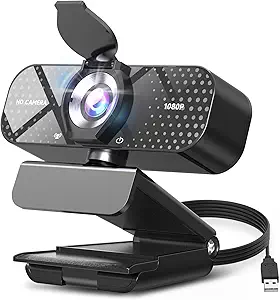 | Best for Simple Cross-Platform Setup | Resolution: 1080P Full HD | Frame rate: 30 fps | Lens: Wide angle | VIEW ON AMAZON | See Our Full Breakdown |
| AOC 4K Webcam for PC with Noise-Canceling Mic |  | Best for 4K Detail | Resolution: 4K Ultra HD | Field of view: 80° | Rotation: 180° tilt, 360° swivel | VIEW ON AMAZON | See Our Full Breakdown |
| usb camera | Resolution | Compatibility | Connectivity | Frame rate |
|---|---|---|---|---|
| Shcngqio TWC29 1080P HD Webcam | 1080p Full HD | Laptop, desktop, PC, and Mac | USB 2.0, 3.0, 3.1, and OTG | 30 fps |
| Acer A610 1080p Full HD Webcam | 1080p Full HD | Windows 7/8/10/11 and Mac OS | Plug and play; Type-A to Type-C adapter included | — |
| Logitech C920x HD Pro Webcam | Full HD 1080p | Windows 11; Nintendo Switch 2 GameChat mode | — | 30 fps |
| EMEET S600 4K Webcam with Sony | — | — | USB 2.0/3.0 | — |
| EMEET C960 1080P Webcam with M | 1920 × 1080 (1080p) | Windows 10/11, macOS 10.14+, Android TV 7.0+ | USB Type-A and USB Type-C | — |
| NIVEOLI 1080p Webcam with Micr | 1080p Full HD | Windows, Mac, Linux, Android | USB 2.0 | 30 fps |
| NexiGo N60 1080p Webcam with M | Up to 1920 × 1080 | Mac OS X, Windows, Android, Linux, Chrome OS, Ubuntu; not Xbox or PlayStation | — | 30 fps |
| Ctetma 1080p Wi-Fi USB Charger | — | — | Wi-Fi | — |
| Logitech C270 720p HD Webcam | — | Skype, Zoom, Nintendo Switch 2 GameChat | — | 30 fps |
| Innomaker 1080P USB2.0 UVC Cam | 1080p | — | — | 30 fps |
| Logitech Brio 101 Full HD 1080 | 1080p Full HD | Windows, Mac, Nintendo Switch 2 (GameChat), Zoom, Teams, Google Meet | — | — |
| Anker PowerConf C200 2K Webcam | 2K | Windows 7 or later; macOS 10.11 or later | USB | — |
| 1080p 30fps USB Webcam with Tr | 1080p | Windows, macOS, Chrome OS, Linux 2.6 or later | — | 30 fps |
| TRAUSI 1080P FHD Webcam with N | 1080P Full HD | Windows, Mac, Linux | USB 2.0/3.0/3.1, OTG | 30 fps |
| AOC 4K Webcam for PC with Nois | 4K Ultra HD | Zoom, Teams, Skype, Windows, Mac | USB-C; USB-A adapter included | — |
More Details on Our Top Picks
Shcngqio TWC29 1080P HD Webcam with Noise-Canceling Microphone and Privacy Cover
The Shcngqio TWC29 is a straightforward pick for video calls when you want a USB camera that works without a driver setup. Its 1080p video, automatic light correction, and noise-canceling microphone cover the basics for meetings, while the sliding cover gives you a physical way to block the lens between calls. Compared with the Acer A610, it offers a wider stated USB compatibility range, including OTG, but the Acer adds 360-degree rotation and an included Type-C adapter. The TWC29 is limited to 30 fps, so it is better suited to calls and classes than fast-moving footage. Its plastic construction may also feel less substantial than pricier alternatives. Choose it for uncomplicated calls; skip it if you need smoother motion or more flexible positioning.
Pros:- 1080p video with automatic light correction
- Noise-canceling microphone is built in
- Sliding physical privacy cover
- Plug-and-play USB compatibility, including OTG
Cons:- 30 fps is less suited to fast-motion video
- Plastic construction may feel less durable than metal alternatives
Best for: Remote workers and students who want a basic 1080p webcam with a privacy cover and minimal setup.
Not ideal for: Streamers filming fast movement or buyers who want a sturdier-feeling camera and adjustable positioning.
- Resolution:1080p Full HD
- Frame rate:30 fps
- Lens:Wide-angle
- Microphone:Built-in noise-canceling
- Privacy feature:Sliding cover
- Connectivity:USB 2.0, 3.0, 3.1, and OTG
- Cable length:5 ft
- Compatibility:Laptop, desktop, PC, and Mac
Our verdict“Pick the TWC29 for uncomplicated everyday calls; choose the Acer A610 if rotation and a Type-C adapter matter more.”
Acer A610 1080p Full HD Webcam with Dual Microphones and Privacy Cover
The Acer A610 suits buyers who want a conventional USB webcam that can be aimed around a desk without moving the monitor. Its 360-degree rotation makes repositioning easier than with the fixed setup described for the EMEET C960, and the included Type-A to Type-C adapter helps it connect across newer and older ports. Video is 1080p with automatic low-light correction, while dual noise-reduction microphones handle voice pickup without separate audio gear. There are practical limits: its 83-degree field of view is narrower than the C960’s 90 degrees, and it has no built-in speakers. The microphone may also need to be selected as the computer’s default input. This is a sensible fit for calls where flexible aiming and broad computer compatibility matter more than extra-wide framing.
Pros:- 1080p video with automatic low-light correction
- Dual noise-reduction microphones
- 360-degree rotation for flexible aiming
- Type-A to Type-C adapter included
Cons:- No built-in speakers
- 83-degree field of view is narrower than the EMEET C960’s 90 degrees
- Microphone may need to be selected as the default input
Best for: Office workers and teachers who reposition a webcam between solo calls and small-group meetings.
Not ideal for: Buyers who need built-in speakers or the widest possible view for several people around a table.
- Resolution:1080p Full HD
- Field of view:83°
- Rotation:360°
- Microphones:Dual noise-reduction
- Privacy feature:Built-in privacy cover
- Connectivity:Plug and play; Type-A to Type-C adapter included
- Compatibility:Windows 7/8/10/11 and Mac OS
- Speakers:Not included
Our verdict“Choose the A610 if you want flexible camera positioning and a Type-C adapter included with a basic 1080p USB webcam.”
Logitech C920x HD Pro Webcam, Full HD 1080p at 30 fps, Black
The Logitech C920x HD Pro focuses on keeping a speaker sharp as they move, with autofocus and automatic lighting adjustment supporting its 1080p, 30 fps video. That makes it a different proposition from the fixed-focus EMEET C960, which is aimed at a steady camera position and wider group framing. Dual stereo microphones provide onboard audio, and the included three-month XSplit VCam license adds background blur, removal, or replacement without a green screen. The main compromise is easy to miss: there is no privacy shutter, unlike the C960 and several other picks here. Its 30 fps ceiling also favors meetings and standard streaming over smoother high-motion video. I’d rank it for buyers who value focus and software effects more than a built-in lens cover.
Pros:- Autofocus helps keep moving speakers sharp
- Automatic lighting adjustment
- Dual stereo microphones
- XSplit VCam license supports background effects without a green screen
Cons:- No privacy shutter
- Maximum frame rate is 30 fps
Best for: Remote presenters and streamers who want autofocus and software background effects in a familiar 1080p USB webcam.
Not ideal for: Privacy-conscious buyers who want a physical shutter, or users seeking 60 fps video.
- Resolution:Full HD 1080p
- Frame rate:30 fps
- Focus:Autofocus
- Lighting:Automatic lighting adjustment
- Audio:Dual stereo microphones
- Software:3-month XSplit VCam license
- Privacy shutter:None
- Compatibility:Windows 11; Nintendo Switch 2 GameChat mode
Our verdict“Choose the C920x for autofocus and background effects; pick the EMEET C960 if a physical privacy cover and wider fixed-focus view matter more.”
EMEET S600 4K Webcam with Sony Sensor and PDAF Autofocus
The EMEET S600 stands apart from the 1080p models in this roundup by offering both 4K at 30 fps and 1080p at 60 fps. The higher-resolution mode suits detailed presentations, while the faster 1080p option can make motion look smoother than on the Logitech C920x, which tops out at 30 fps. A Sony 1/2.55-inch sensor, PDAF autofocus, and automatic light adjustment round out the imaging package. The field of view changes with resolution: at 1080p it adjusts from 40 to 73 degrees, but at 4K it is fixed at 73 degrees. Noise and image settings may require EMEETLINK software, adding a setup step beyond plug and play. This is the most capable option here for buyers who will use those image modes, though it asks for more software involvement than simpler cameras.
Pros:- 4K at 30 fps and 1080p at 60 fps
- Sony 1/2.55-inch sensor with PDAF autofocus
- Built-in privacy cover and adjustable positioning
- Noise-filtering microphones
Cons:- Field of view is fixed at 73° in 4K mode
- Noise cancellation and image customization require EMEETLINK software
Best for: Presenters and streamers who need 4K detail or smoother 1080p motion from a USB webcam.
Not ideal for: Buyers who prefer a fixed, no-software setup or need a wider field of view while recording in 4K.
- Maximum resolution:4K at 30 fps
- 1080p frame rate:60 fps
- Sensor:Sony 1/2.55-inch
- Autofocus:PDAF
- Field of view:40°–73° at 1080p; fixed at 73° at 4K
- Microphones:Noise-filtering
- Privacy cover:Built-in
- Connectivity:USB 2.0/3.0
Our verdict“Choose the S600 if you will use its 4K or 60 fps modes; the Logitech C920x is simpler if 1080p at 30 fps is enough.”
EMEET C960 1080P Webcam with Microphone, 2 Mics, 90° FOV
The EMEET C960 is built for a wider view of a shared desk: its 90-degree field of view can include more people than the Acer A610’s 83-degree view. Dual omnidirectional microphones support group calls, and the privacy cover gives it a practical advantage over the autofocus-equipped Logitech C920x, which lacks a shutter. USB Type-A and Type-C adapters broaden its connection options, while automatic light correction helps with changing room conditions. The tradeoff is fixed focus: unlike the C920x, it cannot refocus as the subject moves nearer or farther away. It also lacks built-in speakers and does not support Windows Hello. I’d choose it for a stationary laptop or desktop setup shared by several people, but a solo presenter who moves around may prefer an autofocus model.
Pros:- 90-degree field of view accommodates more people
- Dual omnidirectional microphones
- USB Type-A and Type-C connectivity
- Privacy cover and automatic light correction
Cons:- Fixed focus is less adaptable to changing subject distance
- No built-in speakers
- Does not support Windows Hello
Best for: Small teams and families who need a wide USB webcam view for calls from a shared desk.
Not ideal for: Presenters who move close to and far from the camera, or buyers who need built-in speakers or Windows Hello.
- Resolution:1920 × 1080 (1080p)
- Field of view:90°
- Microphones:2 omnidirectional
- Connectivity:USB Type-A and USB Type-C
- Focus type:Fixed focus
- Sensor type:CMOS
- Weight:0.16 kg
- Compatibility:Windows 10/11, macOS 10.14+, Android TV 7.0+
Our verdict“Pick the C960 for wide group framing and flexible USB connections; choose the Logitech C920x for autofocus on a moving solo presenter.”
NIVEOLI 1080p Webcam with Microphone and Privacy Cover
The NIVEOLI earns this spot for buyers who want Full HD USB video with basic help when room lighting shifts. HDR and automatic light correction can make calls easier to follow in uneven light, while the dual noise-reducing microphones handle voice pickup without a separate mic. Compared with the Logitech C270, it offers 1080p instead of 720p and adds a privacy shutter, making it the stronger fit for sharper everyday meetings. Its fixed focus keeps setup simple, but it gives less flexibility than an autofocus camera when subjects move closer or farther away. The 360-degree head helps with positioning, though this remains a straightforward USB 2.0 webcam rather than a camera for demanding streaming setups.
Pros:- 1080p video at 30 fps
- HDR and automatic light correction help with variable room lighting
- Dual noise-reducing microphones are built in
- Privacy shutter and 360-degree rotation support flexible everyday use
Cons:- Fixed focus is less adaptable to changing subject distances
- USB 2.0 connection lacks the flexibility of cameras with broader connection options
Best for: Remote workers who want Full HD calls, a built-in privacy shutter, and automatic light adjustment in a home office
Not ideal for: Streamers who frequently change their distance from the camera and need autofocus or more control over framing
- Resolution:1080p Full HD
- Frame rate:30 fps
- Sensor:CMOS
- Connectivity:USB 2.0
- Focus:Fixed focus
- Microphones:Dual noise-reducing digital microphones
- Special features:HDR, automatic light correction, privacy shutter
- Rotation:360°
- Compatibility:Windows, Mac, Linux, Android
Our verdict“Choose the NIVEOLI for Full HD calls with light correction and a privacy shutter; skip it if autofocus matters more than simple setup.”
NexiGo N60 1080p Webcam with Microphone and Privacy Cover
The NexiGo N60 keeps the essentials clear: 1080p at 30 fps, a glass lens, a built-in noise-canceling microphone, and a cover for the lens. Its stated working distance spans typical desk calls through wider room setups, giving it a more explicit framing range than the NIVEOLI, though both use fixed-focus simplicity rather than autofocus. USB 2.0 and 3.0 support and driver-free setup make it an easy match for common computers. The tradeoff is that this is a conventional desktop webcam, not a console camera: it is listed as incompatible with Xbox and PlayStation. Audio delays may also call for a firmware update, so buyers expecting a completely hands-off setup should factor that in.
Pros:- 1080p video at up to 30 fps
- 3.6 mm glass lens with a stated 19.6-inch to 13-foot optimized distance
- Privacy cover blocks the lens when not in use
- USB 2.0 or 3.0 plug-and-play connection
Cons:- Not compatible with Xbox, PS4, or PS5
- Audio delays may require a firmware update
- Fixed 30 fps does not offer a higher frame-rate mode
Best for: Desk-based video callers who want a covered 1080p webcam that can connect to a range of computers without driver setup
Not ideal for: Console players using Xbox or PlayStation, or buyers who need guaranteed synchronized audio without troubleshooting
- Resolution:Up to 1920 × 1080
- Frame rate:30 fps
- Image sensor:2 MP CMOS
- Lens:3.6 mm glass
- Optimized distance:19.6 inches to 13 feet
- Connection:USB 2.0/3.0
- Microphone:Built-in noise-canceling
- Privacy:Included lens cover
- Compatibility:Mac OS X, Windows, Android, Linux, Chrome OS, Ubuntu; not Xbox or PlayStation
Our verdict“Pick the N60 for uncomplicated computer calls with a physical lens cover, provided console use and possible audio updates are not part of your setup.”
Ctetma 1080p Wi-Fi USB Charger Camera
The Ctetma serves a different purpose from desk webcams such as the Logitech C270: it is an indoor Wi-Fi camera built around app viewing, motion alerts, and microSD loop recording. That makes it more suited to checking a room remotely than joining a video call, and the listing does not specify a microphone, frame rate, or computer webcam compatibility. Its 1080p stream and motion notifications cover the basic monitoring use case, while app playback lets owners review or download clips. The card is not included, so recording depends on buying compatible microSD storage separately. Its battery-powered listing also sits awkwardly beside the USB charger design in the product name; buyers should verify the intended power arrangement before relying on it for continuous coverage.
Pros:- 1080p live video through iOS and Android apps
- Motion detection alerts support remote monitoring
- Automatic loop recording with app playback and downloads
- Compact indoor form factor
Cons:- MicroSD card is not included
- Battery-powered specification conflicts with the USB charger framing, leaving power expectations unclear
- Listing does not provide webcam-oriented details such as microphone, frame rate, or computer compatibility
Best for: People who want app-based indoor room monitoring with motion alerts and local loop recording to a microSD card
Not ideal for: Video-call users who need a standard USB webcam, known microphone performance, or clearly specified continuous power
- Video resolution:1080p
- Connectivity:Wi-Fi
- Power source:Battery powered as listed
- Storage:MicroSD card, not included
- Use:Indoor
- Dimensions:3.7 × 1.3 × 2.7 inches
- Color:Black
- Enclosure material:Metal, plastic
- App support:iOS and Android
Our verdict“Choose the Ctetma for app-based indoor monitoring and motion-triggered recording, not as a conventional USB meeting webcam.”
Logitech C270 720p HD Webcam
The Logitech C270 is the simplest call-focused pick here: it trades Full HD detail for 720p video at 30 fps, automatic light correction, and a built-in noise-reducing microphone. Its 55-degree field of view keeps the frame relatively focused on one person, which can be preferable to the Innomaker 130° camera when a wide view would show too much of a room. The adjustable clip also suits laptops, monitors, or shelves without needing a custom mount. The compromise is clear: the NIVEOLI and NexiGo N60 both deliver 1080p, so the C270 is less suited to buyers who prioritize image detail. Its fixed frame rate and narrower resolution make it a practical meeting camera rather than a flexible streaming tool.
Pros:- Plug-and-play 720p video at 30 fps
- RightLight 2 automatic light correction
- Built-in noise-reducing microphone
- Adjustable clip supports laptops, monitors, and shelves
Cons:- 720p resolution is lower than the 1080p NIVEOLI and NexiGo N60
- Fixed 30 fps offers no higher frame-rate mode
- 55-degree field of view is less suitable for fitting several people into frame
Best for: Laptop and desktop users who want a simple, focused camera for routine one-person calls
Not ideal for: Buyers who need Full HD detail, broader group framing, or a higher frame-rate option
- Video resolution:720p HD
- Frame rate:30 fps
- Field of view:55° diagonal
- Microphone:Built-in noise-reducing
- Light correction:RightLight 2
- Mount:Adjustable universal clip
- Color:Black
- Compatibility:Skype, Zoom, Nintendo Switch 2 GameChat
Our verdict“Choose the C270 for uncomplicated one-person calls if 720p is enough; pick a 1080p model when sharper video matters.”
Innomaker 1080P USB2.0 UVC Camera with 130° Wide Angle Lens
Innomaker is the specialist choice in this group: native UVC support, YUY2 and MJPEG formats, and an M12 lens thread make it easier to integrate into Raspberry Pi, Jetson Nano, and other custom setups. Its 130-degree diagonal view captures much more of a scene than the Logitech C270’s 55-degree frame, useful for group spaces or robotics where the camera must see a broad area. That wide view can also include unwanted background, so it is less naturally suited to a tight head-and-shoulders call. The compact board and optical customization come with practical limits: it has fixed focus, no image stabilization, and no stated privacy cover or microphone. Buyers seeking a finished desktop webcam should look to the NexiGo N60 instead.
Pros:- Native UVC plug-and-play support across listed operating systems
- 130° diagonal field of view captures broad scenes
- M12 lens thread allows optical customization
- Compact design supports single-board computer projects
Cons:- Fixed focus limits use with changing subject distances
- No image stabilization
- No microphone or privacy cover is specified
Best for: Makers and developers building Raspberry Pi, Jetson Nano, or PC projects that need a compact UVC camera and adjustable optics
Not ideal for: Callers who want an all-in-one webcam with microphone, privacy cover, stabilization, and a narrow view
- Model:U20CAM-1080P
- Resolution:1080p
- Frame rate:30 fps
- Field of view:130° diagonal, 103° horizontal
- Interface:USB 2.0
- Supported formats:YUY2, MJPEG
- Focus:Fixed focus
- Weight:0.06 kg
- Operating systems:Windows, Linux, Android, Mac OS
Our verdict“Pick the Innomaker for custom USB camera projects that benefit from a wide view and M12 optics, not for a ready-to-use meeting setup.”
Logitech Brio 101 Full HD 1080p Webcam
The Logitech Brio 101 suits buyers who want a familiar, uncomplicated USB camera for meetings. Its RightLight adjustment helps lift shadows in uneven room lighting, while the built-in microphone and plug-and-play USB-A connection keep setup simple. Compared with the Anker PowerConf C200, it trades 2K detail, autofocus, and adjustable framing for a simpler Full HD setup. The integrated privacy shutter is an easy way to cover the lens between calls, and compatibility spans common meeting platforms and operating systems. Its USB-A cable may call for an adapter with USB-C-only laptops, and 1080p will not satisfy buyers seeking the extra detail of a 4K camera. The recycled-plastic construction is a useful material choice, though the listed 34% minimum does not change its basic call-focused feature set.
Pros:- RightLight technology helps reduce shadows in challenging room lighting
- Integrated physical privacy shutter
- Plug-and-play USB-A connection works with common meeting platforms
- Made with at least 34% post-consumer recycled plastic
Cons:- USB-A cable may require an adapter for USB-C-only laptops
- 1080p resolution offers less detail than the Anker PowerConf C200 or AOC 4K Webcam
Best for: Remote workers who want a simple 1080p USB-A webcam with a physical shutter for everyday meetings
Not ideal for: USB-C-only laptop owners who do not want an adapter, or creators who need 2K or 4K detail
- Resolution:1080p Full HD
- Connection:USB-A
- Microphone:Built-in
- Privacy feature:Integrated slide cover
- Lighting:RightLight technology
- Material:Minimum 34% post-consumer recycled plastic
- Compatibility:Windows, Mac, Nintendo Switch 2 (GameChat), Zoom, Teams, Google Meet
- Software:Logi Options+ App
Our verdict“Choose the Brio 101 for uncomplicated Full HD calls and a built-in shutter; skip it if you need higher resolution or USB-C connectivity.”
Anker PowerConf C200 2K Webcam
The Anker PowerConf C200 gives laptop-based callers more control over how much of the room appears on camera. Its three 65°, 78°, and 95° viewing angles let a solo caller keep the frame tight or include more people, while autofocus and 2K capture add flexibility beyond the fixed Full HD view of the Logitech Brio 101. Dual microphones with AI noise cancellation are aimed at clearer speech, and the sliding lens cover provides a physical privacy measure. The tradeoff is a feature set oriented around laptops: listed compatibility is limited to Windows 7 or later and macOS 10.11 or later, and the source does not describe a tripod or broader mounting options. Buyers who need a bundled stand or Linux compatibility may find the 1080p webcam with tripod a better fit.
Pros:- 2K resolution captures more detail than standard 1080p models
- Three selectable viewing angles support different room and group sizes
- Autofocus adjusts as the subject moves
- Dual microphones with AI noise cancellation and a sliding privacy cover
Cons:- Compatibility is listed for Windows and macOS, with no Linux support specified
- Product data lists laptop compatibility and does not include a tripod
Best for: Laptop users who want 2K video, tighter or wider framing choices, and noise-reducing dual microphones
Not ideal for: Linux users or buyers who need a webcam with an included tripod and explicitly broad device compatibility
- Resolution:2K
- Sensor type:CMOS
- Connectivity:USB
- Microphones:Dual microphones with AI noise cancellation
- Viewing angles:65°, 78°, or 95°
- Focus:Autofocus
- Weight:7.04 ounces
- Compatibility:Windows 7 or later; macOS 10.11 or later
- Privacy feature:Integrated sliding lens cover
Our verdict“Pick the C200 if adjustable framing and 2K detail matter more than a bundled stand or broad platform coverage.”
1080p 30fps USB Webcam with Tripod
The 1080p 30fps USB Webcam with Tripod is the most placement-ready option in this group: its included telescopic aluminum tripod can put the camera where a laptop bezel cannot. That makes it more adaptable for recording or streaming than the clamp-on-style Logitech Brio 101, while its 90-degree view can fit more of a desk scene than the narrower AOC 4K Webcam. Autofocus, low-light correction, and dual noise-canceling microphones cover the basics for calls, and a privacy shutter handles lens coverage. The compromises are a standard 1080p/30fps ceiling and a five-foot cable, which can constrain placement on a larger setup. It is also not water resistant, so it belongs in ordinary indoor use rather than exposed environments.
Pros:- Included adjustable aluminum tripod enables flexible camera positioning
- Autofocus and low-light correction support changing subjects and room conditions
- Dual noise-canceling microphones with pickup range up to 10 feet
- 90-degree view, privacy shutter, and 360-degree rotation
Cons:- 1080p at 30 fps is less suited to high-motion recording than higher-frame-rate cameras
- Five-foot cable can limit placement distance
- Not water resistant
Best for: Home streamers and presenters who want a webcam they can position independently of a laptop screen
Not ideal for: Buyers who prioritize 4K capture, high frame rates for fast motion, or long cable reach
- Resolution:1080p
- Frame rate:30 fps
- Sensor:CMOS, 1/3 inch
- Viewing angle:90 degrees
- Focus:Autofocus
- Microphones:Dual noise-canceling; pickup range up to 10 feet
- Cable length:5 feet
- Tripod:Included; aluminum, telescopic, 1/4-inch screw
- Compatibility:Windows, macOS, Chrome OS, Linux 2.6 or later
Our verdict“Choose this webcam if the included tripod and flexible positioning matter more than resolution beyond 1080p.”
TRAUSI 1080P FHD Webcam with Noise-Canceling Mic, Auto Light Correction, Privacy Cover, and Wide Angle Lens
The TRAUSI 1080P FHD Webcam is a straightforward pick for buyers who want a wide view and plug-and-play setup across Windows, Mac, and Linux. Its automatic light correction and built-in noise-canceling microphone address two common call problems without requiring a listed driver installation. Compared with the Anker PowerConf C200, it gives up 2K resolution, autofocus, and selectable viewing angles; in return, its broad compatibility makes it a simpler candidate for mixed-device households. A sliding cover provides physical lens privacy. The product data lists a 30 fps frame rate and USB connectivity, but does not specify the field-of-view angle or a tripod, so buyers who need precise framing or independent placement should look at the 90-degree webcam with tripod. Plastic construction may also feel less substantial than some alternatives.
Pros:- Plug-and-play setup requires no additional drivers
- Listed compatibility includes Windows, Mac, and Linux
- Automatic light correction adapts to varied lighting
- Built-in noise-canceling microphone and sliding privacy cover
Cons:- Fixed 30 fps frame rate is less suited to high-motion video
- Product data does not specify the wide-angle lens’s field of view
- Plastic construction may feel less substantial than metal-bodied options
Best for: People using Windows, Mac, or Linux who want a simple wide-angle Full HD camera for calls
Not ideal for: Creators who need 2K or 4K, autofocus, a specified field-of-view angle, or an included tripod
- Resolution:1080P Full HD
- Frame rate:30 fps
- Lens:Wide angle
- Microphone:Built-in noise-canceling
- Privacy feature:Sliding cover
- Connectivity:USB 2.0/3.0/3.1, OTG
- Cable length:5 ft
- Compatibility:Windows, Mac, Linux
- Installation:Plug and play; no drivers required
Our verdict“Choose the TRAUSI for a simple Full HD setup across common desktop platforms, provided you do not need advanced framing or higher resolution.”
AOC 4K Webcam for PC with Noise-Canceling Mic
The AOC 4K Webcam is the resolution-focused choice here, capturing 4K video for calls or recordings where fine detail matters more than a broad group frame. Its 80° field of view keeps the scene relatively contained compared with the 90-degree USB webcam with tripod, which can help a solo caller avoid showing as much of the room. Automatic light correction, a noise-reducing microphone, and a physical lens cover round out the essentials. The included USB-C to USB-A adapter makes it easier to connect across newer and older ports than the USB-A-only Brio 101. In exchange for 4K, buyers get no listed software customization, and the 80-degree view may not fit larger groups. Rotation and tilt help aim the camera but do not widen its field of view.
Pros:- 4K Ultra HD resolution offers more detail than the roundup’s 1080p cameras
- USB-C connection includes a USB-A adapter
- 180-degree tilt and 360-degree swivel support flexible aiming
- Physical lens cover and automatic light correction
Cons:- 80-degree field of view may be too narrow for larger groups
- No software customization options are specified
Best for: Solo professionals and creators who want 4K detail with flexible camera aiming and USB-C connectivity
Not ideal for: Large-group meeting hosts who need a wider view, or users seeking software controls for camera customization
- Resolution:4K Ultra HD
- Field of view:80°
- Rotation:180° tilt, 360° swivel
- Connectivity:USB-C; USB-A adapter included
- Microphone:Built-in noise-reducing
- Privacy feature:Physical sliding lens cover
- Lighting:Automatic light correction
- Compatibility:Zoom, Teams, Skype, Windows, Mac
Our verdict“Choose the AOC if 4K detail and adaptable aiming are priorities, and your typical frame does not need to fit a large group.”

How We Picked
I ranked these USB cameras by how well their listed features match common uses: video calls, streaming, group framing, compact or embedded setups, and basic monitoring. Resolution mattered, but I also weighed autofocus, field of view, microphones, privacy controls, mounting, and whether the product’s design fits ordinary computer use. A higher resolution can add detail, but it does not automatically produce better calls if lighting, focus, connection, or framing is a poor match.
The Logitech C920x leads because its Full HD format offers a practical balance for general use. The 2K and 4K models rank as more specialized upgrades, while straightforward 1080p webcams compete on convenience and included features. I placed the 720p C270 lower for buyers who need sharper video, and treated the Wi-Fi USB charger camera and wide-angle USB module as specialty options rather than direct substitutes for desk webcams. Product distinctions here follow the supplied specifications and stated features.
Factors to Consider When Choosing Usb Cameras
Before choosing a USB camera, I’d start with the problem it needs to solve: a face-centered video call, a wider room view, sharper image detail, or a fixed specialty setup. These broader tradeoffs can matter more than the resolution printed on the box.
Match Resolution to Your Call Setup
For ordinary calls, Full HD is a practical baseline, while 2K or 4K can preserve more detail when the camera, lighting, display, and connection can support it. A high-resolution sensor does not guarantee that a meeting app will transmit at that resolution; apps and network conditions may reduce the outgoing image. Buyers sometimes pay for extra pixels when poor light or a low-quality connection is the real source of a soft image. Check the camera’s frame-rate options as well as its maximum resolution, since the two can affect motion smoothness. If you mainly use a small video window, a well-framed 1080p camera may serve you better than a 4K model. Choose a higher-resolution option when you have a clear use for cropping, close detail, or a larger display.
Choose a Field of View That Fits the Room
A narrower view keeps attention on one person and hides more of a busy room. A wide-angle lens can include several people or a demonstration area, but it may also capture clutter and make a single face appear smaller. Think about where the camera will sit and how far you sit from it before choosing a field of view. A wide view can be useful in a small room when moving the camera is difficult, though placement still matters. Commonly, buyers focus on the number of degrees without asking whether their meeting software can crop or adjust the framing. If the camera will serve both solo calls and group sessions, look for framing controls or a position that lets you change the composition.
Treat Autofocus and Lighting as a Pair
Autofocus helps when you move toward the camera, hold up an object, or share a space with another speaker. For a fixed desk position, focus that stays steady can matter more than fast refocusing. Lighting has its own limits: automatic correction can help with changing brightness, but it cannot replace a lamp or fix strong backlighting. A window behind you may leave your face dark even when the camera advertises light correction. If you often show objects close to the lens, prioritize autofocus behavior; if you sit still, spend more attention on lighting and stable framing. A small change to room lighting can improve the result more than moving from Full HD to a higher resolution.
Decide Whether the Built-In Microphone Is Enough
Built-in microphones reduce desk clutter and can work for routine calls, especially when the camera sits near you. Their sound still depends on distance, room echo, keyboard noise, and nearby conversations. Noise-canceling language in a listing does not tell you how your voice will sound in your particular room. If clear audio is central to your work, compare the webcam microphone with a headset or separate microphone you already own. Avoid paying for multiple built-in audio features if you plan to mute the camera mic and use another device. Check how your computer selects audio inputs so the camera does not quietly become the active microphone when you connect it.
Check Mounting, Privacy, and Compatibility
A webcam that fits your monitor, tripod, or embedded project is more useful than one with a longer feature list but an awkward mount. Confirm that the clip or tripod attachment suits your setup and that the cable can reach the computer without pulling the camera out of position. A physical privacy cover is a simple way to block the lens between calls, but it does not control microphone access or software permissions. For USB cameras used in project builds, check connector type, operating-system support, and whether the device follows UVC standards before buying. That compatibility step matters especially for a camera module, which may not behave like a plug-and-play conference webcam. Buyers should also check whether the listed camera connection matches their computer’s available ports.
Pay for a Specialty Feature Only When You Need It
Some cameras are made for a particular setup rather than general video calls. A 130° module can suit a fixed installation that needs a broad view, while a Wi-Fi USB charger camera serves a different purpose from a monitor-mounted webcam. These products may bring setup, compatibility, or framing compromises that do not matter to their intended buyer but can frustrate someone seeking a standard call camera. Before choosing a specialty device, write down the exact connection, placement, and software behavior you need. A premium sensor is a sensible upgrade when you can use its added detail or autofocus, not simply because its maximum resolution is larger. For a basic desk setup, a familiar Full HD webcam may be the simpler fit.
Frequently Asked Questions
Is a 4K USB camera worth choosing over a 1080p webcam?
It can be, if you need extra detail for cropping, demonstrations, or a larger on-screen image and your computer and apps can handle the stream. Many video-call services compress or cap video, which can narrow the visible difference. A 1080p model may be the more sensible fit for routine meetings, especially if your room lighting is limited. Compare autofocus and field of view alongside resolution, since those features affect how useful the image is. Choose 4K for a specific detail need rather than as a guarantee of better calls.
Will a USB webcam work with my video-call app and computer?
Most conventional webcams are designed to connect as USB video devices, but support can vary by operating system, port, and app. Check the product’s stated compatibility and whether it uses UVC if you need broad support or plan to use it in a project. A USB connector alone does not promise that every camera feature will be available in every app. After connecting, confirm that the app has selected the intended camera and microphone. Specialty modules may need more setup than a standard monitor webcam.
Should I choose a wide-angle USB camera for meetings?
Choose a wide view when you need to include multiple people, a work area, or a demonstration surface. For a solo desk call, it may reveal more of the room and leave your face smaller in the frame. Measure your camera distance and think about the background before deciding. Some apps offer digital cropping, though that can reduce visible detail. If your meetings alternate between group and solo use, flexible positioning or adjustable framing can be more useful than the widest lens available.
Can a webcam’s built-in microphone replace a headset?
It may be adequate for casual calls when the camera sits close and the room is quiet. A headset or separate microphone can give more consistent voice pickup when you share a room or have echo and keyboard noise. Microphone claims do not account for your desk distance or room acoustics. Check which audio device your meeting app uses after connecting the camera. If audio quality matters for work, treat the webcam mic as a convenience unless you have a reason to rely on it.
What should I check before buying a USB camera for a fixed or embedded setup?
Confirm the connector, cable length, mounting method, operating-system support, and whether your software recognizes the camera. For modules such as the Innomaker, verify any UVC or driver requirements and check that the wide viewing angle suits the space. A specialty camera may not offer the same stand, privacy cover, or conferencing controls as a desk webcam. For a device presented as a Wi-Fi USB charger camera, read how it connects and what software or network setup it requires. Matching those details to the intended installation can prevent a camera that connects physically but does not work with your setup.
Conclusion
For most desk calls, I’d choose the Logitech C920x as best overall for its straightforward Full HD balance. The Logitech C270 is the basic value pick for buyers who prioritize simple 720p video, while the Logitech Brio 101 is a reasonable beginner option among the Full HD models. For a premium step up, compare the EMEET S600 for 4K autofocus with the Anker PowerConf C200 for 2K; the better fit depends on how much resolution you can use. Choose the Innomaker for a fixed wide-angle project, or the EMEET C960 when a broad desk or group view matters. The Ctetma belongs on the shortlist only for buyers seeking its specific Wi-Fi USB charger camera design, not a conventional call webcam.