
TL;DR

Get privacy and security gear delivered free — and shop member deals
- Fast, free delivery on millions of items
- Access to Prime Big Deal Days deals on October 6–7
- Prime Video, Amazon Music and more included
A laptop privacy screen protector uses a thin filter, often with tiny vertical louvers, to make your display harder to see from the sides. It can reduce casual viewing on a train or in a shared office, but it does not stop someone behind you, record the screen, or access your files. Match the filter to your display dimensions and check brightness, touch, and viewing-angle trade-offs before buying.
Your spreadsheet can be readable to you and look like a dark slate to the person beside you on the train. That is the simple promise of laptop privacy screen protectors: they narrow the angles from which others can see your display.
This guide explains how the filters work, where they help, and where they fall short. You’ll also get a practical checklist for choosing a screen that fits your laptop without making everyday work uncomfortable.
A privacy filter narrows side viewing angles, often with tiny louvers, but does not block every viewpoint.
Treat it as a physical screen-viewing deterrent; use normal device security for digital threats.
Compare visible screen width, height, aspect ratio, bezel, and cutouts—not only diagonal size.
Check brightness, color, touchscreen behavior, and mounting style against the work you do.
A removable filter can suit commuters who sometimes need to share a screen or judge color accurately.
How a privacy screen makes side glances harder
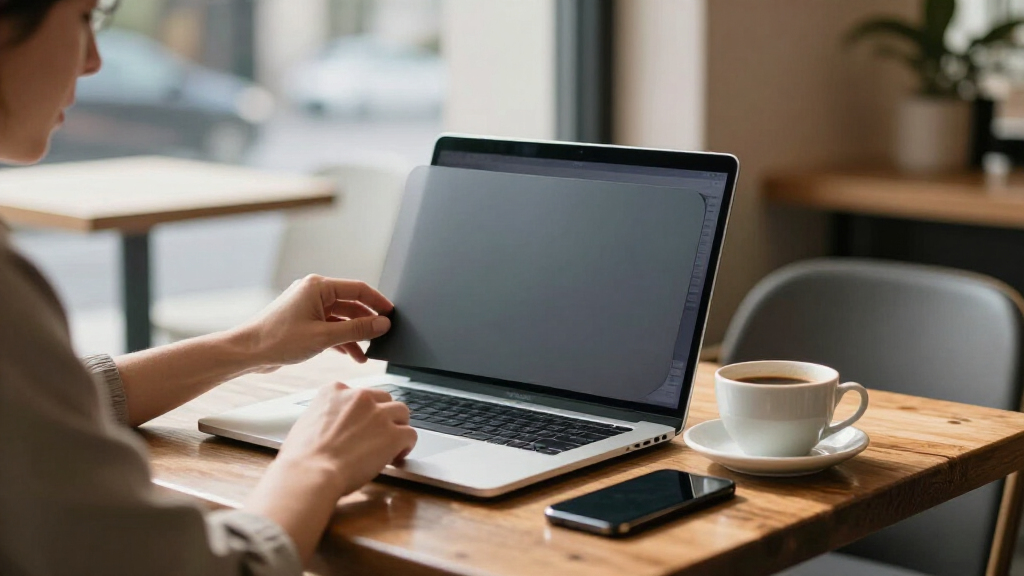
A laptop privacy screen is a thin filter placed over the display that limits visibility from the sides while keeping the image clearer when you face it. Most use micro-louver technology: tiny vertical slats act like miniature blinds, directing light toward the person in front and blocking much of it at off-center angles. On a packed train, the person in the next seat may see a dim patch where your budget spreadsheet should be.
The angle restriction is the key trade-off: the more strongly a filter blocks side views, the less forgiving it can be when you shift in your chair or someone needs to look at the screen with you. That makes the advertised viewing angle relevant to how you work, not just how much privacy a product claims. The effect also depends on screen brightness and light around you. A bright reflection or a seat directly behind you can still reveal the screen. Think of it as a curtain that covers some windows, not a locked door.
Filters attach in different ways. Magnetic and clip-on models are usually easier to remove when you want to show a colleague a design, which is useful if privacy needs change during the day. Adhesive versions can sit close to the display, but repositioning them may be harder. Some business laptops offer built-in electronic privacy, though the feature and its behavior vary by model; check whether it dims the display at the angles you care about and whether you can switch it off when sharing.
A privacy filter is a deterrent against casual side viewing, not a guarantee of confidentiality.
What a filter can protect—and what it cannot
Laptop privacy screen protectors can make it harder for nearby people to read information from certain side angles, but they do not protect your device from digital access or every physical viewpoint. On a plane, a filter may shield a booking reference from the passenger beside you. Someone standing directly behind your shoulder may still see the display. This distinction matters because a filter helps with one exposure path—someone looking at the screen—while leaving others untouched.
The filter also cannot stop screen recording, malware, or someone who can sign in to your laptop. Those risks call for separate steps such as account security, encryption, and software updates. In practice, privacy in public comes from matching the measure to the risk: a filter may make casual reading harder, while limiting what is open on screen and locking the laptop when you leave address other situations it cannot. Angle the screen away from foot traffic, keep sensitive windows out of view when you step away, and lock the laptop before leaving your seat.
Filters can bring practical extras, too. Depending on the product, a surface may reduce glare or help guard against scratches. But claims such as blue-light blocking, anti-glare, or antibacterial treatment are product-specific; they do not automatically come with privacy performance. Each extra can affect the display differently, so consider whether it solves a real problem in your routine rather than assuming more features mean stronger privacy.
Compare the trade-offs before you buy
Laptop privacy screen protectors trade some viewing comfort for more privacy from selected side angles. The size of that trade depends on the filter design and your work: a commuter reviewing invoices has different needs from a designer checking subtle color shifts. Compare the likely effect on your daily use before choosing a stronger privacy level.
| Choice or feature | What you gain | What to check |
|---|---|---|
| Narrower viewing angle | More resistance to side glances | Your own comfort and whether coworkers need to view the screen |
| Magnetic or clip-on mount | Easier removal for sharing or color-sensitive work | Fit around thin bezels and secure attachment |
| Adhesive mount | A close fit against the display | Whether you can reposition it without hassle |
| Touch-compatible filter | Potential to keep touchscreen use | Compatibility and responsiveness on your exact display |
| Matte or glossy finish | A surface that may suit your lighting preference | Possible changes in glare, sharpness, and color |
These choices affect each other in daily use. A narrow viewing angle may help on a crowded commute but make a quick screen review with a colleague awkward. A removable mount can resolve that by letting you take the filter off when sharing, though frequent handling can be inconvenient. Touch compatibility also matters most when you actually rely on touch; a filter that dulls responsiveness can turn simple taps into repeated attempts.
Many filters make the display look darker, especially models that restrict side viewing more strongly. Raising brightness can help, but it may use more battery and still cannot restore color or clarity lost through the filter. If you edit photos at a café, you may prefer a removable filter you can take off before judging a pale sky or a warm skin tone. For text-heavy work, modest dimming may be an easier compromise.
Use this six-step checklist to find the right fit
To choose a laptop privacy screen protector, confirm the visible display’s dimensions and features before comparing privacy levels and mounting styles. A matching diagonal measurement alone does not guarantee that the filter will cover the screen correctly. For example, two laptops with the same advertised screen size can have different aspect ratios, bezel shapes, or camera cutouts. A mismatch can leave part of the display exposed or cover a camera, so checking the outline is part of both privacy and usability.
- Measure the visible screen. Check its width and height as well as diagonal size; compare the actual display area, not just the laptop’s marketing name.
- Match the shape and aspect ratio. Confirm that the filter’s outline suits the screen, including rounded corners and thin bezels.
- Choose how it attaches. Pick magnetic or clip-on if you expect to remove it often; consider adhesive if a close, steady fit matters more.
- Check the viewing angle. A narrower angle can block more side views, but may make nearby collaboration harder.
- Check display compatibility. Look for support for touchscreens, high-resolution displays, and camera or sensor cutouts.
- Read the optical details. Look for information on brightness loss, finish, color effects, and touch performance, then check the return policy.
Use the checklist to rule out poor fits first, then weigh optical trade-offs against how often and where you use the laptop. Imagine a commuter who takes video calls at a café and reviews color proofs at the office. A removable filter with confirmed camera clearance may suit both parts of the week better than a permanently attached model chosen only for its privacy rating: it can be removed for color review, while still being available in public spaces.
Decide whether a privacy filter fits your routine
Laptop privacy screen protectors are most useful when you often handle sensitive information where strangers or coworkers can see your display. If you work with customer records in a shared workspace or review travel documents at an airport gate, blocking some side angles can add a useful layer. The benefit depends on how exposed the screen is: a seat beside a stranger creates a different risk from a private office. If you mainly work alone at home, the filter may feel like extra darkness without much day-to-day benefit.
Pay attention to what your work needs from the screen. A finance worker reading text may accept a dimmer display, while a photographer checking accurate color may want to remove the filter during editing. The practical question is whether the added privacy is worth the effect on the tasks you do most. A laptop privacy habit can also be as simple as turning your chair away from a walkway and lowering the lid when someone approaches.
Product trends include laptop-specific sizing, removable magnetic mounts, touchscreen options, and built-in privacy features on some business models. Availability and behavior vary, so check current manufacturer specifications for your exact device. “Privacy filter” is a general category; the fit and optical behavior belong to the specific product, and those details determine whether its protection is useful in your routine.
Frequently Asked Questions
Does a laptop privacy screen protect me from hackers?
No. A privacy screen affects who can see the display from certain angles; it does not control access to your files or network. Use account security, encryption, and software updates to protect the device.
Can someone still see my screen with a privacy filter?
Yes. The result depends on the viewing angle, distance, lighting, and filter design. Someone directly behind you may still see the screen, so position your laptop with care.
Will a privacy screen make my laptop display darker?
Often, yes. The amount varies by product, and some people raise brightness to compensate, which can affect battery life. Check product details if you work outdoors or need accurate color.
Can I use a privacy filter on a touchscreen?
Some filters are made for touchscreens, but responsiveness varies by model. Check compatibility for your exact display and review the return policy before buying.
How do I know if a privacy screen will fit my laptop?
Compare the visible display’s width, height, aspect ratio, and shape, then check bezel and camera cutouts. The diagonal screen size or laptop model name alone may not confirm a precise fit.
Conclusion
Choose a filter for the laptop you own and the places where you use it. Check the fit, accept the brightness and viewing-angle trade-offs, and keep positioning your screen thoughtfully.
A good filter can turn a stranger’s clear view into a dark window—but you still decide where to point that window.
Fall Picks
fall essentials
As an affiliate, we earn on qualifying purchases.